


KeylessUniversal
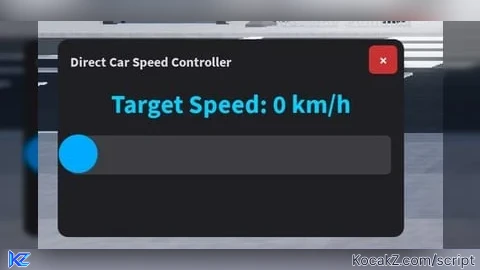
local Players = game:GetService("Players")
local UserInputService = game:GetService("UserInputService")
local RunService = game:GetService("RunService")

local player = Players.LocalPlayer
local playerGui = player:WaitForChild("PlayerGui")

if playerGui:FindFirstChild("SpeedControllerGui") then
	playerGui.SpeedControllerGui:Destroy()
end

---------------------------------------------------------
-- 1. GUI construction
---------------------------------------------------------
local screenGui = Instance.new("ScreenGui")
screenGui.Name = "SpeedControllerGui"
screenGui.ResetOnSpawn = false
screenGui.Parent = playerGui

local mainFrame = Instance.new("Frame")
mainFrame.Name = "MainFrame"
mainFrame.Size = UDim2.new(0.25, 0, 0.25, 0)
mainFrame.Position = UDim2.new(0.02, 0, 0.35, 0)
mainFrame.BackgroundColor3 = Color3.fromRGB(30, 30, 35)
mainFrame.BorderSizePixel = 0
mainFrame.Active = true
mainFrame.Draggable = true
mainFrame.Parent = screenGui

local uiCorner = Instance.new("UICorner")
uiCorner.CornerRadius = UDim.new(0, 8)
uiCorner.Parent = mainFrame

local titleLabel = Instance.new("TextLabel")
titleLabel.Size = UDim2.new(0.75, 0, 0, 25)
titleLabel.Position = UDim2.new(0, 10, 0, 5)
titleLabel.BackgroundTransparency = 1
titleLabel.Text = "Direct Car Speed Controller"
titleLabel.TextColor3 = Color3.fromRGB(220, 220, 220)
titleLabel.TextSize = 13
titleLabel.Font = Enum.Font.SourceSansBold
titleLabel.TextXAlignment = Enum.TextXAlignment.Left
titleLabel.Parent = mainFrame

local closeButton = Instance.new("TextButton")
closeButton.Size = UDim2.new(0, 22, 0, 22)
closeButton.Position = UDim2.new(1, -27, 0, 5)
closeButton.BackgroundColor3 = Color3.fromRGB(200, 50, 50)
closeButton.Text = "×"
closeButton.TextColor3 = Color3.fromRGB(255, 255, 255)
closeButton.TextSize = 14
closeButton.Font = Enum.Font.SourceSansBold
closeButton.Parent = mainFrame

local closeCorner = Instance.new("UICorner")
closeCorner.CornerRadius = UDim.new(0, 4)
closeCorner.Parent = closeButton

closeButton.MouseButton1Click:Connect(function()
	mainFrame.Visible = false
end)

local speedLabel = Instance.new("TextLabel")
speedLabel.Size = UDim2.new(1, -20, 0, 30)
speedLabel.Position = UDim2.new(0, 10, 0, 35)
speedLabel.BackgroundTransparency = 1
speedLabel.Text = "Target Speed: 0 km/h"
speedLabel.TextColor3 = Color3.fromRGB(0, 210, 255)
speedLabel.TextSize = 25
speedLabel.Font = Enum.Font.SourceSansBold
speedLabel.Parent = mainFrame

local sliderTrack = Instance.new("Frame")
sliderTrack.Size = UDim2.new(1, -20, 0, 30)
sliderTrack.Position = UDim2.new(0, 10, 0, 75)
sliderTrack.BackgroundColor3 = Color3.fromRGB(60, 60, 65)
sliderTrack.BorderSizePixel = 0
sliderTrack.Parent = mainFrame

local trackCorner = Instance.new("UICorner")
trackCorner.CornerRadius = UDim.new(0, 4)
trackCorner.Parent = sliderTrack

local sliderKnob = Instance.new("TextButton")
sliderKnob.Size = UDim2.new(0, 30, 0, 30)
sliderKnob.Position = UDim2.new(0, -9, 0.5, -16)
sliderKnob.BackgroundColor3 = Color3.fromRGB(0, 170, 255)
sliderKnob.Text = ""
sliderKnob.Parent = sliderTrack

local knobCorner = Instance.new("UICorner")
knobCorner.CornerRadius = UDim.new(1, 0)
knobCorner.Parent = sliderKnob

---------------------------------------------------------
-- 2. Slider operation process
---------------------------------------------------------
local MIN_SPEED = 0
local MAX_SPEED = 300 -- MAX 300 km/h (Adjust this value to change the top speed)
local currentKMH = 0
local dragging = false

local function updateSlider(input)
	local trackAbsPos = sliderTrack.AbsolutePosition.X
	local trackAbsSize = sliderTrack.AbsoluteSize.X

	local mouseX = input.Position.X
	local relativeX = math.clamp(mouseX - trackAbsPos, 0, trackAbsSize)
	local alpha = relativeX / trackAbsSize

	sliderKnob.Position = UDim2.new(alpha, -9, 0.5, -16)
	currentKMH = math.floor(MIN_SPEED + (MAX_SPEED - MIN_SPEED) * alpha)
	speedLabel.Text = string.format("Target Speed: %d km/h", currentKMH)
end

sliderKnob.InputBegan:Connect(function(input)
	if input.UserInputType == Enum.UserInputType.MouseButton1 or input.UserInputType == Enum.UserInputType.Touch then
		dragging = true
	end
end)

UserInputService.InputEnded:Connect(function(input)
	if input.UserInputType == Enum.UserInputType.MouseButton1 or input.UserInputType == Enum.UserInputType.Touch then
		dragging = false
	end
end)

UserInputService.InputChanged:Connect(function(input)
	if dragging and (input.UserInputType == Enum.UserInputType.MouseMovement or input.UserInputType == Enum.UserInputType.Touch) then
		updateSlider(input)
	end
end)

---------------------------------------------------------
-- 3. Speed Control
---------------------------------------------------------
RunService.Heartbeat:Connect(function()
	local character = player.Character
	if not character then return end

	local humanoid = character:FindFirstChildOfClass("Humanoid")
	if not humanoid then return end

	local seat = humanoid.SeatPart
	if seat and seat:IsA("VehicleSeat") then
		-- 1 km/h ≒ 1.008 studs/s
		local targetStudsPerSec = currentKMH / 1.008

		seat.MaxSpeed = targetStudsPerSec
		seat.Torque = math.max(seat.Torque, 50000)

		if seat.Throttle > -1 and currentKMH > 0 then
			local rootPart = seat.AssemblyRootPart or seat
			local currentVel = rootPart.AssemblyLinearVelocity
			local forwardVector = seat.CFrame.LookVector

			local targetVelocity = forwardVector * targetStudsPerSec
			rootPart.AssemblyLinearVelocity = Vector3.new(
				targetVelocity.X,
				currentVel.Y,
				targetVelocity.Z
			)
		end
	end
end)No comments yet for this script.


