

KeylessUniversal
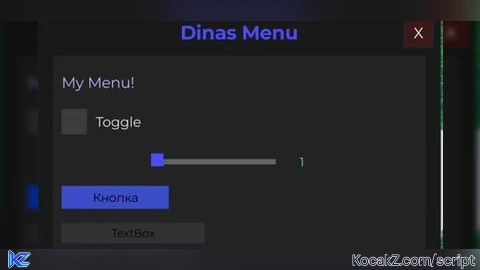
local VALID_KEY = "12345" -- Ключ для проверки

local player = game.Players.LocalPlayer
local TweenService = game:GetService("TweenService")
local UserInputService = game:GetService("UserInputService")

-- Главное GUI
local screenGui = Instance.new("ScreenGui")
screenGui.Name = "DinasMenu"
screenGui.Parent = player:WaitForChild("PlayerGui")

-- Ключ-меню
local keyFrame = Instance.new("Frame", screenGui)
keyFrame.Size = UDim2.new(0, 300, 0, 120)
keyFrame.Position = UDim2.new(0.5, -150, 0.5, -60)
keyFrame.AnchorPoint = Vector2.new(0.5,0.5)
keyFrame.BackgroundColor3 = Color3.fromRGB(30,30,30)

local keyLabel = Instance.new("TextLabel", keyFrame)
keyLabel.Size = UDim2.new(1,0,0.3,0)
keyLabel.Position = UDim2.new(0,0,0,0)
keyLabel.Text = "Enter Key:"
keyLabel.BackgroundTransparency = 1
keyLabel.TextColor3 = Color3.fromRGB(255,255,255)
keyLabel.Font = Enum.Font.Gotham
keyLabel.TextSize = 20

local keyBox = Instance.new("TextBox", keyFrame)
keyBox.Size = UDim2.new(0.8,0,0.3,0)
keyBox.Position = UDim2.new(0.1,0,0.35,0)
keyBox.BackgroundColor3 = Color3.fromRGB(40,40,40)
keyBox.TextColor3 = Color3.fromRGB(255,255,255)
keyBox.Font = Enum.Font.Gotham
keyBox.TextSize = 18
keyBox.PlaceholderText = "Your Key:"

local enterButton = Instance.new("TextButton", keyFrame)
enterButton.Size = UDim2.new(0.6,0,0.2,0)
enterButton.Position = UDim2.new(0.2,0,0.7,0)
enterButton.BackgroundColor3 = Color3.fromRGB(50,50,120)
enterButton.Text = "Login"
enterButton.Font = Enum.Font.Gotham
enterButton.TextColor3 = Color3.fromRGB(255,255,255)
enterButton.TextSize = 18

-- Главное меню (скрыто по умолчанию)
local menuFrame = Instance.new("Frame", screenGui)
menuFrame.Size = UDim2.new(0,450,0,350)
menuFrame.Position = UDim2.new(0.5, -225, 0.52, -155)
menuFrame.AnchorPoint = Vector2.new(0,0)
menuFrame.BackgroundColor3 = Color3.fromRGB(25,25,25)
menuFrame.Active = true
menuFrame.Draggable = true
menuFrame.Visible = false

local menuTitle = Instance.new("TextLabel", menuFrame)
menuTitle.Size = UDim2.new(1, -40, 0, 36)
menuTitle.Position = UDim2.new(0, 20, 0, 6)
menuTitle.Text = "Dinas Menu"
menuTitle.BackgroundTransparency = 1
menuTitle.TextColor3 = Color3.fromRGB(75,75,255)
menuTitle.Font = Enum.Font.GothamBold
menuTitle.TextSize = 26

local closeButton = Instance.new("TextButton", menuFrame)
closeButton.Size = UDim2.new(0,32,0,32)
closeButton.Position = UDim2.new(1,-40,0,8)
closeButton.Text = "X"
closeButton.BackgroundColor3 = Color3.fromRGB(60,25,25)
closeButton.TextColor3 = Color3.fromRGB(255,255,255)
closeButton.Font = Enum.Font.Gotham
closeButton.TextSize = 20

closeButton.MouseButton1Click:Connect(function()
    menuFrame.Visible = false
end)

-- Тестовая вкладка и элемент
local playerTab = Instance.new("Frame", menuFrame)
playerTab.Size = UDim2.new(1, -32, 1, -60)
playerTab.Position = UDim2.new(0, 16, 0, 50)
playerTab.BackgroundColor3 = Color3.fromRGB(35,35,35)
playerTab.BorderSizePixel = 0

local exampleLabel = Instance.new("TextLabel", playerTab)
exampleLabel.Size = UDim2.new(0,400,0,36)
exampleLabel.Position = UDim2.new(0, 10, 0, 12)
exampleLabel.Text = "My Menu!"
exampleLabel.BackgroundTransparency = 1
exampleLabel.TextColor3 = Color3.fromRGB(180,180,255)
exampleLabel.Font = Enum.Font.Gotham
exampleLabel.TextSize = 20
exampleLabel.TextXAlignment = Enum.TextXAlignment.Left

-- Toggle (переключатель)
local toggleState = false

local toggleBtn = Instance.new("TextButton", playerTab)
toggleBtn.Size = UDim2.new(0,28,0,28)
toggleBtn.Position = UDim2.new(0, 10, 0, 60)
toggleBtn.BackgroundColor3 = Color3.fromRGB(60,60,60)
toggleBtn.Text = ""
toggleBtn.AutoButtonColor = false

local toggleLabel = Instance.new("TextLabel", playerTab)
toggleLabel.Size = UDim2.new(0,120,0,28)
toggleLabel.Position = UDim2.new(0, 48, 0, 60)
toggleLabel.Text = "Toggle"
toggleLabel.Font = Enum.Font.Gotham
toggleLabel.TextSize = 18
toggleLabel.TextColor3 = Color3.fromRGB(230,230,230)
toggleLabel.BackgroundTransparency = 1
toggleLabel.TextXAlignment = Enum.TextXAlignment.Left

toggleBtn.MouseButton1Click:Connect(function()
    toggleState = not toggleState
    toggleBtn.BackgroundColor3 = toggleState and Color3.fromRGB(80,255,80) or Color3.fromRGB(60,60,60)
    print("Toggle:", toggleState)
end)

local sliderMin = 1
local sliderMax = 100
local sliderValue = sliderMin

local sliderBar = Instance.new("Frame", playerTab)
sliderBar.Size = UDim2.new(0,140,0,6)
sliderBar.Position = UDim2.new(0,110,0,116)
sliderBar.BackgroundColor3 = Color3.fromRGB(100,100,100)

local sliderKnob = Instance.new("Frame", playerTab)
sliderKnob.Size = UDim2.new(0,14,0,14)
sliderKnob.Position = UDim2.new(0,110,0,110)
sliderKnob.BackgroundColor3 = Color3.fromRGB(75,75,255)
sliderKnob.BorderSizePixel = 0

local sliderValueLabel = Instance.new("TextLabel", playerTab)
sliderValueLabel.Size = UDim2.new(0,38,0,18)
sliderValueLabel.Position = UDim2.new(0,260,0,110)
sliderValueLabel.Text = tostring(sliderValue)
sliderValueLabel.Font = Enum.Font.Gotham
sliderValueLabel.TextSize = 16
sliderValueLabel.TextColor3 = Color3.fromRGB(80,255,80)
sliderValueLabel.BackgroundTransparency = 1

-- Универсальная обработка drag (мышь + тач)
local UserInputService = game:GetService("UserInputService")
local dragging = false

local function updateSlider(input)
    local bar = sliderBar
    local px = nil
    if input.Position then
        px = input.Position.X
    elseif input.UserInputType == Enum.UserInputType.Touch then
        px = input.Position.X
    end
    if px then
        local rel = math.clamp(px - bar.AbsolutePosition.X, 0, bar.AbsoluteSize.X)
        sliderKnob.Position = UDim2.new(0, bar.Position.X.Offset + rel - 7, 0, 110)
        sliderValue = math.floor(sliderMin + (rel/bar.AbsoluteSize.X)*(sliderMax-sliderMin))
        sliderValueLabel.Text = tostring(sliderValue)
        -- СЮДА можно вставлять свою реакцию на изменение
    end
end

sliderKnob.InputBegan:Connect(function(input)
    if input.UserInputType == Enum.UserInputType.MouseButton1 or input.UserInputType == Enum.UserInputType.Touch then
        dragging = true
    end
end)
sliderBar.InputBegan:Connect(function(input)
    if input.UserInputType == Enum.UserInputType.MouseButton1 or input.UserInputType == Enum.UserInputType.Touch then
        dragging = true
        updateSlider(input)
    end
end)
UserInputService.InputChanged:Connect(function(input)
    if dragging and (input.UserInputType == Enum.UserInputType.MouseMovement or input.UserInputType == Enum.UserInputType.Touch) then
        updateSlider(input)
    end
end)
UserInputService.InputEnded:Connect(function(input)
    if input.UserInputType == Enum.UserInputType.MouseButton1 or input.UserInputType == Enum.UserInputType.Touch then
        dragging = false
    end
end)

-- Button
local execBtn = Instance.new("TextButton", playerTab)
execBtn.Size = UDim2.new(0,120,0,26)
execBtn.Position = UDim2.new(0, 10, 0, 146)
execBtn.BackgroundColor3 = Color3.fromRGB(60,75,200)
execBtn.Text = "Кнопка"
execBtn.TextColor3 = Color3.fromRGB(1,1,1)
execBtn.Font = Enum.Font.Gotham
execBtn.TextSize = 16
execBtn.MouseButton1Click:Connect(function()
    print("Кнопка нажата!")
end)

-- DropDown
local dropDown = Instance.new("TextButton", playerTab)
dropDown.Size = UDim2.new(0,100,0,24)
dropDown.Position = UDim2.new(0,10,0,230)
dropDown.BackgroundColor3 = Color3.fromRGB(80,60,120)
dropDown.Text = "Mode ▼"
dropDown.TextColor3 = Color3.fromRGB(220,220,255)
dropDown.Font = Enum.Font.Gotham
dropDown.TextSize = 15

local dropList = Instance.new("Frame", playerTab)
dropList.Size = UDim2.new(0,100,0,0)
dropList.Position = UDim2.new(0,10,0,254)
dropList.BackgroundColor3 = Color3.fromRGB(70,70,90)
dropList.ClipsDescendants = true
dropList.Visible = false

local dropOptions = {"Basic", "Fast", "Turbo"}
for i, modeName in ipairs(dropOptions) do
    local optBtn = Instance.new("TextButton")
    optBtn.Size = UDim2.new(1,0,0,20)
    optBtn.Position = UDim2.new(0,0,0,(i-1)*20)
    optBtn.Text = modeName
    optBtn.BackgroundTransparency = 1
    optBtn.TextColor3 = Color3.new(1,1,1)
    optBtn.Font = Enum.Font.Gotham
    optBtn.TextSize = 13
    optBtn.Parent = dropList
    optBtn.MouseButton1Click:Connect(function()
        dropDown.Text = modeName.." ▼"
        dropList.Visible = false
        dropList.Size = UDim2.new(0,100,0,0)
        print("Выбран режим:", modeName)
    end)
end
dropDown.MouseButton1Click:Connect(function()
    dropList.Visible = not dropList.Visible
    if dropList.Visible then
        dropList.Size = UDim2.new(0,100,0,#dropOptions*20)
    else
        dropList.Size = UDim2.new(0,100,0,0)
    end
end)
dropList.Parent = playerTab

local userInput = Instance.new("TextBox", playerTab)
userInput.Size = UDim2.new(0,160,0,22)
userInput.Position = UDim2.new(0, 10, 0, 188)
userInput.BackgroundColor3 = Color3.fromRGB(50,50,50)
userInput.Font = Enum.Font.Gotham
userInput.TextSize = 15
userInput.TextColor3 = Color3.fromRGB(1,1,1)
userInput.PlaceholderText = "Text"
userInput.FocusLost:Connect(function(enter)
    if enter then
    print("TextBox:", userInput.Text)
    end
end)

-- Скрытие и показ по RightShift
UserInputService.InputBegan:Connect(function(input, processed)
    if not processed and input.KeyCode == Enum.KeyCode.RightShift then
        menuFrame.Visible = not menuFrame.Visible
    end
end)

-- После правильного ключа прячем keyFrame и показываем меню
enterButton.MouseButton1Click:Connect(function()
    if keyBox.Text == VALID_KEY then
        keyFrame.Visible = false
        menuFrame.Visible = true
    else
        keyBox.TextColor3 = Color3.fromRGB(255,0,0)
        wait(0.7)
        keyBox.TextColor3 = Color3.fromRGB(255,255,255)
        keyBox.Text = ""
    end
end)![[KEYLESS] Moondiety Script | 17+ supported Games](https://scriptblox.com/images/sb/0-1753093706828.png)


cool
10/10 nice
horrible chatgpt ui
obvious chatgpt slop
Generate from ai Генерировать с помощью ИИ :1