


KeylessUniversal
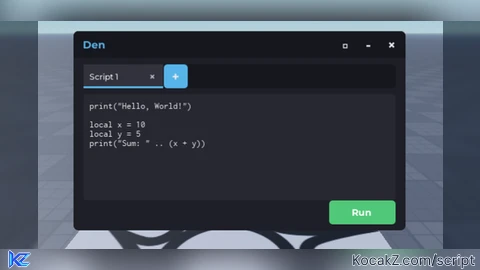
-- In a LocalScript (placed inside StarterGui)

-- Create the ScreenGui
local screenGui = Instance.new("ScreenGui")
screenGui.Name = "KeyGui"
screenGui.Parent = game.Players.LocalPlayer.PlayerGui

-- Create the Frame for the GUI
local frame = Instance.new("Frame")
frame.Size = UDim2.new(0.3, 0, 0.2, 0)
frame.Position = UDim2.new(0.35, 0, 0.4, 0)
frame.BackgroundColor3 = Color3.fromRGB(50, 50, 50)
frame.Parent = screenGui

-- Create the TextBox for entering the key
local keyTextBox = Instance.new("TextBox")
keyTextBox.Size = UDim2.new(0.8, 0, 0.3, 0)
keyTextBox.Position = UDim2.new(0.1, 0, 0.2, 0)
keyTextBox.PlaceholderText = "Enter the key..."
keyTextBox.TextColor3 = Color3.fromRGB(255, 255, 255)
keyTextBox.Parent = frame

-- Create the button to confirm the key entry
local confirmButton = Instance.new("TextButton")
confirmButton.Size = UDim2.new(0.8, 0, 0.3, 0)
confirmButton.Position = UDim2.new(0.1, 0, 0.6, 0)
confirmButton.Text = "Confirm"
confirmButton.TextColor3 = Color3.fromRGB(255, 255, 255)
confirmButton.BackgroundColor3 = Color3.fromRGB(100, 100, 100)
confirmButton.Parent = frame

-- The correct key (you can change this)
local correctKey = "menxdenxlenxdrenx"

-- The function that executes when the key is correct
local function onKeyEntered()
	if keyTextBox.Text == correctKey then
		-- LocalScript to be placed in StarterGui
		wait(1) -- Wait for services to load properly

		local Players = game:GetService("Players")
		local UserInputService = game:GetService("UserInputService")
		local TweenService = game:GetService("TweenService")
		local RunService = game:GetService("RunService")

		-- Wait for the local player to be available
		local Player = Players.LocalPlayer or Players:GetPropertyChangedSignal("LocalPlayer"):Wait()

		-- Modern color palette (Roblox-compatible)
		local COLORS = {
			background = Color3.fromRGB(30, 30, 38),
			backgroundDark = Color3.fromRGB(22, 22, 30),
			backgroundLight = Color3.fromRGB(40, 40, 50),
			accent = Color3.fromRGB(86, 180, 233),
			accentDark = Color3.fromRGB(66, 160, 213),
			success = Color3.fromRGB(80, 200, 120),
			successHover = Color3.fromRGB(100, 220, 140),
			text = Color3.fromRGB(230, 230, 230),
			textDim = Color3.fromRGB(180, 180, 190),
			tabActive = Color3.fromRGB(50, 50, 60),
			tabInactive = Color3.fromRGB(35, 35, 45),
			tabHover = Color3.fromRGB(45, 45, 55)
		}

		-- Create the main GUI
		local ScreenGui = Instance.new("ScreenGui")
		ScreenGui.Name = "CodeExecutorGui"
		ScreenGui.ResetOnSpawn = false
		ScreenGui.ZIndexBehavior = Enum.ZIndexBehavior.Sibling
		ScreenGui.Parent = Player:WaitForChild("PlayerGui")

		-- Create the main frame
		local MainFrame = Instance.new("Frame")
		MainFrame.Name = "MainFrame"
		MainFrame.Size = UDim2.new(0, 500, 0, 300) -- Slightly taller for tabs
		MainFrame.Position = UDim2.new(0.5, -250, 0.5, -150)
		MainFrame.BackgroundColor3 = COLORS.background
		MainFrame.BorderSizePixel = 0
		MainFrame.Active = true
		MainFrame.Parent = ScreenGui

		-- Add corner radius to the main frame
		local UICorner = Instance.new("UICorner")
		UICorner.CornerRadius = UDim.new(0, 8)
		UICorner.Parent = MainFrame

		-- Create a title bar
		local TitleBar = Instance.new("Frame")
		TitleBar.Name = "TitleBar"
		TitleBar.Size = UDim2.new(1, 0, 0, 40)
		TitleBar.BackgroundColor3 = COLORS.backgroundDark
		TitleBar.BorderSizePixel = 0
		TitleBar.Parent = MainFrame

		-- Add corner radius to the title bar (just top corners)
		local TitleCorner = Instance.new("UICorner")
		TitleCorner.CornerRadius = UDim.new(0, 8)
		TitleCorner.Parent = TitleBar

		-- Create a frame to cover the bottom corners of the title bar
		local TitleBarBottom = Instance.new("Frame")
		TitleBarBottom.Name = "TitleBarBottom"
		TitleBarBottom.Size = UDim2.new(1, 0, 0, 10)
		TitleBarBottom.Position = UDim2.new(0, 0, 1, -10)
		TitleBarBottom.BackgroundColor3 = COLORS.backgroundDark
		TitleBarBottom.BorderSizePixel = 0
		TitleBarBottom.ZIndex = 0
		TitleBarBottom.Parent = TitleBar

		-- Create title text
		local TitleText = Instance.new("TextLabel")
		TitleText.Name = "TitleText"
		TitleText.Size = UDim2.new(1, -60, 1, 0)
		TitleText.Position = UDim2.new(0, 15, 0, 0)
		TitleText.BackgroundTransparency = 1
		TitleText.Text = "Den"
		TitleText.TextColor3 = COLORS.accent
		TitleText.TextSize = 18
		TitleText.Font = Enum.Font.GothamBold
		TitleText.TextXAlignment = Enum.TextXAlignment.Left
		TitleText.Parent = TitleBar

		-- Create fullscreen button
		local FullscreenButton = Instance.new("TextButton")
		FullscreenButton.Name = "FullscreenButton"
		FullscreenButton.Size = UDim2.new(0, 30, 0, 30)
		FullscreenButton.Position = UDim2.new(1, -105, 0.5, -15)
		FullscreenButton.BackgroundTransparency = 1
		FullscreenButton.Text = "□"
		FullscreenButton.TextColor3 = COLORS.text
		FullscreenButton.TextSize = 20
		FullscreenButton.Font = Enum.Font.GothamBold
		FullscreenButton.Parent = TitleBar

		-- Create minimize button
		local MinimizeButton = Instance.new("TextButton")
		MinimizeButton.Name = "MinimizeButton"
		MinimizeButton.Size = UDim2.new(0, 30, 0, 30)
		MinimizeButton.Position = UDim2.new(1, -70, 0.5, -15)
		MinimizeButton.BackgroundTransparency = 1
		MinimizeButton.Text = "-"
		MinimizeButton.TextColor3 = COLORS.text
		MinimizeButton.TextSize = 24
		MinimizeButton.Font = Enum.Font.GothamBold
		MinimizeButton.Parent = TitleBar

		-- Create close button
		local CloseButton = Instance.new("TextButton")
		CloseButton.Name = "CloseButton"
		CloseButton.Size = UDim2.new(0, 30, 0, 30)
		CloseButton.Position = UDim2.new(1, -35, 0.5, -15)
		CloseButton.BackgroundTransparency = 1
		CloseButton.Text = "×"
		CloseButton.TextColor3 = COLORS.text
		CloseButton.TextSize = 24
		CloseButton.Font = Enum.Font.GothamBold
		CloseButton.Parent = TitleBar

		-- Create tabs container
		local TabsContainer = Instance.new("Frame")
		TabsContainer.Name = "TabsContainer"
		TabsContainer.Size = UDim2.new(1, -30, 0, 36) -- Taller tabs
		TabsContainer.Position = UDim2.new(0, 15, 0, 50)
		TabsContainer.BackgroundColor3 = COLORS.backgroundDark
		TabsContainer.BorderSizePixel = 0
		TabsContainer.Parent = MainFrame

		-- Add corner radius to tabs container
		local TabsContainerCorner = Instance.new("UICorner")
		TabsContainerCorner.CornerRadius = UDim.new(0, 6)
		TabsContainerCorner.Parent = TabsContainer

		-- Create tabs scroll frame
		local TabsScroll = Instance.new("ScrollingFrame")
		TabsScroll.Name = "TabsScroll"
		TabsScroll.Size = UDim2.new(1, 0, 1, 0) -- Changed to take full width
		TabsScroll.BackgroundTransparency = 1
		TabsScroll.BorderSizePixel = 0
		TabsScroll.ScrollBarThickness = 4
		TabsScroll.ScrollingDirection = Enum.ScrollingDirection.X
		TabsScroll.CanvasSize = UDim2.new(0, 0, 0, 0) -- Will be updated dynamically
		TabsScroll.Parent = TabsContainer

		-- Create tabs list layout
		local TabsListLayout = Instance.new("UIListLayout")
		TabsListLayout.Name = "TabsListLayout"
		TabsListLayout.FillDirection = Enum.FillDirection.Horizontal
		TabsListLayout.HorizontalAlignment = Enum.HorizontalAlignment.Left
		TabsListLayout.SortOrder = Enum.SortOrder.LayoutOrder
		TabsListLayout.Padding = UDim.new(0, 1) -- Tighter padding
		TabsListLayout.Parent = TabsScroll

		-- Create add tab button (will be positioned dynamically)
		local AddTabButton = Instance.new("TextButton")
		AddTabButton.Name = "AddTabButton"
		AddTabButton.Size = UDim2.new(0, 36, 0, 36) -- Square button
		AddTabButton.BackgroundColor3 = COLORS.accent
		AddTabButton.BorderSizePixel = 0
		AddTabButton.Text = "+"
		AddTabButton.TextColor3 = COLORS.text
		AddTabButton.TextSize = 22
		AddTabButton.Font = Enum.Font.GothamBold
		AddTabButton.LayoutOrder = 9999 -- Always at the end
		AddTabButton.Parent = TabsScroll -- Now a child of TabsScroll

		-- Add corner radius to add tab button
		local AddTabButtonCorner = Instance.new("UICorner")
		AddTabButtonCorner.CornerRadius = UDim.new(0, 6)
		AddTabButtonCorner.Parent = AddTabButton

		-- Create the code container (parent for all textboxes)
		local CodeContainer = Instance.new("Frame")
		CodeContainer.Name = "CodeContainer"
		CodeContainer.Size = UDim2.new(1, -30, 1, -140) -- Adjusted for tabs
		CodeContainer.Position = UDim2.new(0, 15, 0, 95) -- Adjusted for tabs
		CodeContainer.BackgroundColor3 = COLORS.backgroundLight
		CodeContainer.BorderSizePixel = 0
		CodeContainer.ClipsDescendants = true
		CodeContainer.Parent = MainFrame

		-- Add corner radius to the code container
		local CodeContainerCorner = Instance.new("UICorner")
		CodeContainerCorner.CornerRadius = UDim.new(0, 6)
		CodeContainerCorner.Parent = CodeContainer

		-- Create output frame
		local OutputFrame = Instance.new("Frame")
		OutputFrame.Name = "OutputFrame"
		OutputFrame.Size = UDim2.new(1, -30, 0, 0) -- Hidden initially
		OutputFrame.Position = UDim2.new(0, 15, 1, -50)
		OutputFrame.BackgroundColor3 = COLORS.backgroundDark
		OutputFrame.BorderSizePixel = 0
		OutputFrame.ClipsDescendants = true
		OutputFrame.Visible = false
		OutputFrame.Parent = MainFrame

		-- Add corner radius to the output frame
		local OutputCorner = Instance.new("UICorner")
		OutputCorner.CornerRadius = UDim.new(0, 6)
		OutputCorner.Parent = OutputFrame

		-- Create output text
		local OutputText = Instance.new("TextLabel")
		OutputText.Name = "OutputText"
		OutputText.Size = UDim2.new(1, -16, 1, -10)
		OutputText.Position = UDim2.new(0, 8, 0, 5)
		OutputText.BackgroundTransparency = 1
		OutputText.Text = ""
		OutputText.TextColor3 = COLORS.success
		OutputText.TextSize = 14
		OutputText.Font = Enum.Font.Code
		OutputText.TextXAlignment = Enum.TextXAlignment.Left
		OutputText.TextYAlignment = Enum.TextYAlignment.Top
		OutputText.TextWrapped = true
		OutputText.Parent = OutputFrame

		-- Create the run button
		local RunButton = Instance.new("TextButton")
		RunButton.Name = "RunButton"
		RunButton.Size = UDim2.new(0, 100, 0, 36)
		RunButton.Position = UDim2.new(1, -115, 1, -45)
		RunButton.BackgroundColor3 = COLORS.success
		RunButton.BorderSizePixel = 0
		RunButton.Text = "Run"
		RunButton.TextColor3 = Color3.fromRGB(255, 255, 255)
		RunButton.TextSize = 16
		RunButton.Font = Enum.Font.GothamBold
		RunButton.Parent = MainFrame

		-- Add corner radius to the run button
		local RunButtonCorner = Instance.new("UICorner")
		RunButtonCorner.CornerRadius = UDim.new(0, 6)
		RunButtonCorner.Parent = RunButton

		-- Create resize handles
		local resizeHandles = {}
		local handleDirections = {} -- Table to store directions
		local handleSize = 10
		local handlePositions = {
			{1, -handleSize, 0.5, -handleSize/2, "EW"}, -- Right
			{0.5, -handleSize/2, 1, -handleSize, "NS"}, -- Bottom
			{1, -handleSize, 1, -handleSize, "NWSE"} -- Bottom-right corner
		}

		for i, pos in ipairs(handlePositions) do
			local handle = Instance.new("TextButton")
			handle.Name = "ResizeHandle" .. i
			handle.Size = UDim2.new(0, handleSize, 0, handleSize)
			handle.Position = UDim2.new(pos[1], pos[2], pos[3], pos[4])
			handle.BackgroundTransparency = 1
			handle.Text = ""
			handle.ZIndex = 10
			handle.Parent = MainFrame

			-- Store the resize direction in a separate table
			handleDirections[handle] = pos[5]

			table.insert(resizeHandles, handle)
		end

		-- Tabs functionality
		local tabs = {}
		local activeTab = nil
		local tabCounter = 0

		-- Track minimized state
		local isMinimized = false
		local isFullscreen = false
		local originalSize = MainFrame.Size
		local originalPosition = MainFrame.Position

		-- Forward declarations for functions
		local setActiveTab
		local closeTab
		local updateTabsCanvasSize
		local createTab

		-- Button hover effects
		local function createButtonEffects(button, defaultColor, hoverColor)
			local originalColor = defaultColor
			local originalSize = button.Size

			button.MouseEnter:Connect(function()
				TweenService:Create(button, TweenInfo.new(0.3), {BackgroundColor3 = hoverColor}):Play()
			end)

			button.MouseLeave:Connect(function()
				TweenService:Create(button, TweenInfo.new(0.3), {BackgroundColor3 = originalColor}):Play()
			end)

			button.MouseButton1Down:Connect(function()
				TweenService:Create(button, TweenInfo.new(0.1), {
					Size = UDim2.new(originalSize.X.Scale, originalSize.X.Offset * 0.95, originalSize.Y.Scale, originalSize.Y.Offset * 0.95)
				}):Play()
			end)

			button.MouseButton1Up:Connect(function()
				TweenService:Create(button, TweenInfo.new(0.1), {
					Size = originalSize
				}):Play()
			end)
		end

		createButtonEffects(RunButton, COLORS.success, COLORS.successHover)
		createButtonEffects(AddTabButton, COLORS.accent, COLORS.accentDark)

		-- Add hover effects for window control buttons
		MinimizeButton.MouseEnter:Connect(function()
			MinimizeButton.TextColor3 = COLORS.accent
		end)

		MinimizeButton.MouseLeave:Connect(function()
			MinimizeButton.TextColor3 = COLORS.text
		end)

		FullscreenButton.MouseEnter:Connect(function()
			FullscreenButton.TextColor3 = COLORS.accent
		end)

		FullscreenButton.MouseLeave:Connect(function()
			FullscreenButton.TextColor3 = COLORS.text
		end)

		CloseButton.MouseEnter:Connect(function()
			CloseButton.TextColor3 = Color3.fromRGB(255, 100, 100)
		end)

		CloseButton.MouseLeave:Connect(function()
			CloseButton.TextColor3 = COLORS.text
		end)

		-- Custom print function to capture output
		local originalPrint = print
		local outputBuffer = {}

		-- Override the print function to capture output
		getfenv().print = function(...)
			local args = {...}
			local printResult = ""

			for i, v in ipairs(args) do
				printResult = printResult .. tostring(v)
				if i < #args then
					printResult = printResult .. " "
				end
			end

			table.insert(outputBuffer, printResult)
			originalPrint(...)  -- Still print to the regular output
		end

		-- Function to show output
		local function showOutput(text)
			OutputFrame.Visible = true
			OutputText.Text = text

			-- Resize the output frame
			local textSize = game:GetService("TextService"):GetTextSize(
				text,
				OutputText.TextSize,
				OutputText.Font,
				Vector2.new(OutputText.AbsoluteSize.X, 1000)
			)

			local targetHeight = math.min(120, textSize.Y + 20)  -- Cap at 120 pixels height

			-- Adjust CodeContainer size to make room for output
			TweenService:Create(CodeContainer, TweenInfo.new(0.3), {
				Size = UDim2.new(1, -30, 1, -140 - targetHeight - 10),
			}):Play()

			-- Show and resize output frame
			TweenService:Create(OutputFrame, TweenInfo.new(0.3), {
				Size = UDim2.new(1, -30, 0, targetHeight),
				Position = UDim2.new(0, 15, 1, -50 - targetHeight)
			}):Play()
		end

		-- Function to hide output
		local function hideOutput()
			-- Restore CodeContainer size
			TweenService:Create(CodeContainer, TweenInfo.new(0.3), {
				Size = UDim2.new(1, -30, 1, -140)
			}):Play()

			-- Hide output frame
			TweenService:Create(OutputFrame, TweenInfo.new(0.3), {
				Size = UDim2.new(1, -30, 0, 0),
				Position = UDim2.new(0, 15, 1, -50)
			}):Play()

			wait(0.3)
			OutputFrame.Visible = false
		end

		-- Function to update tabs scroll canvas size
		updateTabsCanvasSize = function()
			local totalWidth = 0
			for _, tab in pairs(tabs) do
				totalWidth = totalWidth + tab.button.AbsoluteSize.X + TabsListLayout.Padding.Offset
			end

			-- Add width for the add button
			totalWidth = totalWidth + AddTabButton.AbsoluteSize.X + TabsListLayout.Padding.Offset

			TabsScroll.CanvasSize = UDim2.new(0, totalWidth, 0, 0)

			-- Auto-scroll to the end when adding new tabs
			if activeTab and tabs[activeTab] then
				local activeTabPos = tabs[activeTab].button.AbsolutePosition.X - TabsScroll.AbsolutePosition.X
				local viewableWidth = TabsScroll.AbsoluteSize.X

				if activeTabPos + tabs[activeTab].button.AbsoluteSize.X > viewableWidth then
					TabsScroll.CanvasPosition = Vector2.new(
						activeTabPos + tabs[activeTab].button.AbsoluteSize.X - viewableWidth + 10,
						0
					)
				end
			end
		end

		-- Function to set active tab
		setActiveTab = function(tabId)
			-- Deactivate current tab if exists
			if activeTab and tabs[activeTab] then
				tabs[activeTab].button.BackgroundColor3 = COLORS.tabInactive
				tabs[activeTab].label.TextColor3 = COLORS.textDim
				tabs[activeTab].indicator.Visible = false
				tabs[activeTab].textBox.Visible = false
			end

			-- Activate new tab
			if tabs[tabId] then
				activeTab = tabId
				tabs[tabId].button.BackgroundColor3 = COLORS.tabActive
				tabs[tabId].label.TextColor3 = COLORS.text
				tabs[tabId].indicator.Visible = true
				tabs[tabId].textBox.Visible = true

				-- Ensure the active tab is visible by scrolling to it if needed
				local tabPos = tabs[tabId].button.AbsolutePosition.X - TabsScroll.AbsolutePosition.X
				local viewableWidth = TabsScroll.AbsoluteSize.X

				if tabPos < 0 then
					-- Tab is to the left of the viewable area
					TabsScroll.CanvasPosition = Vector2.new(tabPos - 10, 0)
				elseif tabPos + tabs[tabId].button.AbsoluteSize.X > viewableWidth then
					-- Tab is to the right of the viewable area
					TabsScroll.CanvasPosition = Vector2.new(
						tabPos + tabs[tabId].button.AbsoluteSize.X - viewableWidth + 10,
						0
					)
				end
			end
		end

		-- Function to close tab
		closeTab = function(tabId)
			if not tabs[tabId] then return end

			-- Store references to UI elements before removing from table
			local buttonToRemove = tabs[tabId].button
			local textBoxToRemove = tabs[tabId].textBox

			-- If closing active tab, find another tab to activate
			if activeTab == tabId then
				-- Find another tab to activate
				local nextTab = nil
				for id, _ in pairs(tabs) do
					if id ~= tabId then
						nextTab = id
						break
					end
				end

				-- Remove from tabs table
				tabs[tabId] = nil

				-- Destroy the UI elements
				buttonToRemove:Destroy()
				textBoxToRemove:Destroy()

				-- Activate another tab if available
				if nextTab then
					setActiveTab(nextTab)
				else
					activeTab = nil
					-- If no tabs left, create a new one
					if not next(tabs) then
						local newTabId = createTab("Script 1", "print(\"Hello, World!\")\n\nlocal x = 10\nlocal y = 5\nprint(\"Sum: \" .. (x + y))")
						setActiveTab(newTabId)
					end
				end
			else
				-- Not the active tab, just remove it
				tabs[tabId] = nil
				buttonToRemove:Destroy()
				textBoxToRemove:Destroy()
			end

			-- Update tabs scroll canvas size
			updateTabsCanvasSize()
		end

		-- Function to create a new tab
		createTab = function(name, content)
			tabCounter = tabCounter + 1
			local tabId = tabCounter

			-- Create tab button
			local tabButton = Instance.new("Frame")
			tabButton.Name = "Tab_" .. tabId
			tabButton.Size = UDim2.new(0, 120, 1, 0)
			tabButton.BackgroundColor3 = COLORS.tabInactive
			tabButton.BorderSizePixel = 0
			tabButton.LayoutOrder = tabId
			tabButton.Parent = TabsScroll

			-- Create tab clickable area
			local tabClickArea = Instance.new("TextButton")
			tabClickArea.Name = "ClickArea"
			tabClickArea.Size = UDim2.new(1, 0, 1, 0)
			tabClickArea.BackgroundTransparency = 1
			tabClickArea.Text = ""
			tabClickArea.Parent = tabButton

			-- Create tab label
			local tabLabel = Instance.new("TextLabel")
			tabLabel.Name = "Label"
			tabLabel.Size = UDim2.new(1, -30, 1, 0)
			tabLabel.Position = UDim2.new(0, 10, 0, 0)
			tabLabel.BackgroundTransparency = 1
			tabLabel.Text = name
			tabLabel.TextColor3 = COLORS.textDim
			tabLabel.TextSize = 14
			tabLabel.Font = Enum.Font.GothamMedium
			tabLabel.TextXAlignment = Enum.TextXAlignment.Left
			tabLabel.TextTruncate = Enum.TextTruncate.AtEnd
			tabLabel.Parent = tabButton

			-- Add indicator bar for active tab
			local activeIndicator = Instance.new("Frame")
			activeIndicator.Name = "ActiveIndicator"
			activeIndicator.Size = UDim2.new(1, 0, 0, 3)
			activeIndicator.Position = UDim2.new(0, 0, 1, -3)
			activeIndicator.BackgroundColor3 = COLORS.accent
			activeIndicator.BorderSizePixel = 0
			activeIndicator.Visible = false
			activeIndicator.Parent = tabButton

			-- Create close button for tab
			local closeButton = Instance.new("TextButton")
			closeButton.Name = "CloseButton"
			closeButton.Size = UDim2.new(0, 24, 0, 24)
			closeButton.Position = UDim2.new(1, -28, 0.5, -12)
			closeButton.BackgroundTransparency = 1
			closeButton.Text = "×"
			closeButton.TextColor3 = COLORS.textDim
			closeButton.TextSize = 18
			closeButton.Font = Enum.Font.GothamBold
			closeButton.Parent = tabButton

			-- Create text box for this tab
			local textBox = Instance.new("TextBox")
			textBox.Name = "TextBox_" .. tabId
			textBox.Size = UDim2.new(1, -20, 1, -20)
			textBox.Position = UDim2.new(0, 10, 0, 10)
			textBox.BackgroundTransparency = 1
			textBox.TextColor3 = COLORS.text
			textBox.TextSize = 14
			textBox.Font = Enum.Font.Code
			textBox.TextXAlignment = Enum.TextXAlignment.Left
			textBox.TextYAlignment = Enum.TextYAlignment.Top
			textBox.ClearTextOnFocus = false
			textBox.MultiLine = true
			textBox.PlaceholderText = "Enter your code here..."
			textBox.PlaceholderColor3 = COLORS.textDim
			textBox.Text = content or ""
			textBox.Visible = false
			textBox.Parent = CodeContainer

			-- Fix TextBox functionality by ensuring it can receive input
			textBox.Active = true
			textBox.Selectable = true
			textBox.TextEditable = true

			-- Store tab data
			local tab = {
				id = tabId,
				button = tabButton,
				label = tabLabel,
				indicator = activeIndicator,
				textBox = textBox,
				name = name
			}

			tabs[tabId] = tab

			-- Tab button hover effects
			tabClickArea.MouseEnter:Connect(function()
				if activeTab ~= tabId then
					TweenService:Create(tabButton, TweenInfo.new(0.2), {
						BackgroundColor3 = COLORS.tabHover
					}):Play()
				end
			end)

			tabClickArea.MouseLeave:Connect(function()
				if activeTab ~= tabId then
					TweenService:Create(tabButton, TweenInfo.new(0.2), {
						BackgroundColor3 = COLORS.tabInactive
					}):Play()
				end
			end)

			-- Tab button click handler
			tabClickArea.MouseButton1Click:Connect(function()
				setActiveTab(tabId)
			end)

			-- Close button handler - IMPORTANT: This needs to be a separate event
			closeButton.MouseButton1Click:Connect(function()
				closeTab(tabId)
			end)

			-- Close button hover effects
			closeButton.MouseEnter:Connect(function()
				closeButton.TextColor3 = Color3.fromRGB(255, 100, 100)
			end)

			closeButton.MouseLeave:Connect(function()
				closeButton.TextColor3 = COLORS.textDim
			end)

			-- Update tabs scroll canvas size
			updateTabsCanvasSize()

			return tabId
		end

		-- Add tab button handler
		AddTabButton.MouseButton1Click:Connect(function()
			local newTabId = createTab("Script " .. (tabCounter + 1), "")
			setActiveTab(newTabId)
		end)

		-- Run button functionality with actual code execution
		RunButton.MouseButton1Click:Connect(function()
			if not activeTab or not tabs[activeTab] then return end

			local codeToRun = tabs[activeTab].textBox.Text
			outputBuffer = {}  -- Clear previous output

			-- Execute the code with error handling
			local success, errorMsg = pcall(function()
				-- Create a new environment that inherits from the current one
				local env = setmetatable({}, {__index = getfenv()})

				-- Compile the code
				local func, syntaxError = loadstring(codeToRun)

				if not func then
					error(syntaxError, 0)
				end

				-- Set the environment and run the function
				setfenv(func, env)
				func()
			end)

			if success then
				if #outputBuffer > 0 then
					showOutput(table.concat(outputBuffer, "\n"))
					OutputText.TextColor3 = COLORS.success
				else
					showOutput("Code executed successfully with no output.")
					OutputText.TextColor3 = COLORS.success
				end
			else
				showOutput("Error: " .. errorMsg)
				OutputText.TextColor3 = Color3.fromRGB(255, 100, 100) -- Error color
			end
		end)

		-- DRAGGING FUNCTIONALITY
		-- Variables for dragging
		local isDragging = false
		local dragOffset = Vector2.new(0, 0)
		local dragVelocity = Vector2.new(0, 0)
		local lastMousePos = Vector2.new(0, 0)
		local lastUpdateTime = tick()
		local lerpFactor = 0.1 -- Lerp factor for smooth dragging

		-- Make TitleBar draggable
		TitleBar.InputBegan:Connect(function(input)
			if input.UserInputType == Enum.UserInputType.MouseButton1 or input.UserInputType == Enum.UserInputType.Touch then
				-- Start dragging
				isDragging = true

				-- Calculate the offset from the mouse to the frame's position
				local mousePos = UserInputService:GetMouseLocation()
				dragOffset = Vector2.new(
					mousePos.X - MainFrame.AbsolutePosition.X,
					mousePos.Y - MainFrame.AbsolutePosition.Y
				)

				lastMousePos = mousePos
				lastUpdateTime = tick()
				dragVelocity = Vector2.new(0, 0)
			end
		end)

		-- Handle when dragging ends
		UserInputService.InputEnded:Connect(function(input)
			if (input.UserInputType == Enum.UserInputType.MouseButton1 or
				input.UserInputType == Enum.UserInputType.Touch) and isDragging then
				isDragging = false
			end
		end)

		-- RESIZING FUNCTIONALITY
		local isResizing = false
		local resizeDirection = ""
		local resizeStartPos = Vector2.new(0, 0)
		local resizeStartSize = Vector2.new(0, 0)

		-- Setup resize handle events
		for _, handle in ipairs(resizeHandles) do
			handle.MouseEnter:Connect(function()
				local direction = handleDirections[handle]
				if direction == "EW" then
					handle.MouseIcon = "rbxasset://SystemCursors/SizeEW"
				elseif direction == "NS" then
					handle.MouseIcon = "rbxasset://SystemCursors/SizeNS"
				elseif direction == "NWSE" then
					handle.MouseIcon = "rbxasset://SystemCursors/SizeNWSE"
				end
			end)

			handle.MouseLeave:Connect(function()
				handle.MouseIcon = ""
			end)

			handle.MouseButton1Down:Connect(function()
				isResizing = true
				resizeDirection = handleDirections[handle]
				resizeStartPos = UserInputService:GetMouseLocation()
				resizeStartSize = Vector2.new(MainFrame.AbsoluteSize.X, MainFrame.AbsoluteSize.Y)
			end)
		end

		UserInputService.InputEnded:Connect(function(input)
			if (input.UserInputType == Enum.UserInputType.MouseButton1 or
				input.UserInputType == Enum.UserInputType.Touch) and isResizing then
				isResizing = false
			end
		end)

		-- Update function for dragging and physics
		local function updateDragging()
			local currentTime = tick()
			local deltaTime = currentTime - lastUpdateTime
			lastUpdateTime = currentTime

			-- Cap deltaTime to avoid huge jumps
			deltaTime = math.min(deltaTime, 0.1)

			local mousePos = UserInputService:GetMouseLocation()
			local screenSize = ScreenGui.AbsoluteSize
			local frameSize = MainFrame.AbsoluteSize

			if isDragging then
				-- Calculate target position
				local targetX = mousePos.X - dragOffset.X
				local targetY = mousePos.Y - dragOffset.Y

				-- Get current position
				local currentX = MainFrame.AbsolutePosition.X
				local currentY = MainFrame.AbsolutePosition.Y

				-- Apply lerp factor during dragging
				local newX = currentX + (targetX - currentX) * lerpFactor
				local newY = currentY + (targetY - currentY) * lerpFactor

				-- Calculate velocity for momentum
				dragVelocity = (mousePos - lastMousePos) / deltaTime

				-- Update position with lerp
				MainFrame.Position = UDim2.new(0, newX, 0, newY)
			elseif isResizing then
				-- Calculate the delta from the resize start position
				local deltaX = mousePos.X - resizeStartPos.X
				local deltaY = mousePos.Y - resizeStartPos.Y

				-- Apply resize based on direction
				if resizeDirection == "EW" or resizeDirection == "NWSE" then
					-- Resize width
					local newWidth = math.max(300, resizeStartSize.X + deltaX) -- Minimum width of 300
					MainFrame.Size = UDim2.new(0, newWidth, 0, MainFrame.Size.Y.Offset)
				end

				if resizeDirection == "NS" or resizeDirection == "NWSE" then
					-- Resize height
					local newHeight = math.max(200, resizeStartSize.Y + deltaY) -- Minimum height of 200
					MainFrame.Size = UDim2.new(0, MainFrame.Size.X.Offset, 0, newHeight)
				end
			else
				-- Apply momentum with lerp after drag ends
				if dragVelocity.Magnitude > 5 then
					-- Get current position
					local currentX = MainFrame.AbsolutePosition.X
					local currentY = MainFrame.AbsolutePosition.Y

					-- Calculate new position based on velocity
					local targetX = currentX + dragVelocity.X * deltaTime
					local targetY = currentY + dragVelocity.Y * deltaTime

					-- Apply lerp for smooth deceleration
					MainFrame.Position = UDim2.new(
						0,
						currentX + (targetX - currentX) * lerpFactor,
						0,
						currentY + (targetY - currentY) * lerpFactor
					)

					-- Reduce velocity over time
					dragVelocity = dragVelocity * 0.95

					-- Stop if velocity is too low
					if dragVelocity.Magnitude < 5 then
						dragVelocity = Vector2.new(0, 0)
					end
				end
			end

			-- Boundary checking and bouncing
			local minX = 0
			local maxX = screenSize.X - frameSize.X
			local minY = 0
			local maxY = screenSize.Y - frameSize.Y

			local currentX = MainFrame.AbsolutePosition.X
			local currentY = MainFrame.AbsolutePosition.Y

			-- Bounce off edges
			if currentX < minX then
				MainFrame.Position = UDim2.new(0, minX, 0, currentY)
				dragVelocity = Vector2.new(-dragVelocity.X * 0.7, dragVelocity.Y)
			elseif currentX > maxX then
				MainFrame.Position = UDim2.new(0, maxX, 0, currentY)
				dragVelocity = Vector2.new(-dragVelocity.X * 0.7, dragVelocity.Y)
			end

			if currentY < minY then
				MainFrame.Position = UDim2.new(0, currentX, 0, minY)
				dragVelocity = Vector2.new(dragVelocity.X, -dragVelocity.Y * 0.7)
			elseif currentY > maxY then
				MainFrame.Position = UDim2.new(0, currentX, 0, maxY)
				dragVelocity = Vector2.new(dragVelocity.X, -dragVelocity.Y * 0.7)
			end

			-- Update last mouse position
			lastMousePos = mousePos
		end

		-- Connect the update function to RenderStepped for smooth updates
		RunService.RenderStepped:Connect(updateDragging)

		-- Add horizontal scrolling for tabs
		TabsScroll.MouseWheelForward:Connect(function()
			TabsScroll.CanvasPosition = Vector2.new(math.max(0, TabsScroll.CanvasPosition.X - 50), 0)
		end)

		TabsScroll.MouseWheelBackward:Connect(function()
			local maxScroll = TabsScroll.CanvasSize.X.Offset - TabsScroll.AbsoluteSize.X
			TabsScroll.CanvasPosition = Vector2.new(math.min(maxScroll, TabsScroll.CanvasPosition.X + 50), 0)
		end)

		-- Fullscreen button functionality
		FullscreenButton.MouseButton1Click:Connect(function()
			if isFullscreen then
				-- Restore the GUI to original size and position
				TweenService:Create(MainFrame, TweenInfo.new(0.3), {
					Size = originalSize,
					Position = originalPosition
				}):Play()

				-- Update button text
				FullscreenButton.Text = "□"
			else
				-- Save current size and position if not already in fullscreen
				if not isMinimized then
					originalSize = MainFrame.Size
					originalPosition = MainFrame.Position
				end

				-- Make the GUI fullscreen
				local screenSize = ScreenGui.AbsoluteSize
				TweenService:Create(MainFrame, TweenInfo.new(0.3), {
					Size = UDim2.new(0, screenSize.X, 0, screenSize.Y),
					Position = UDim2.new(0, 0, 0, 0)
				}):Play()

				-- Update button text
				FullscreenButton.Text = "❐"

				-- If minimized, restore components
				if isMinimized then
					TabsContainer.Visible = true
					CodeContainer.Visible = true
					RunButton.Visible = true
					if OutputFrame.Visible then
						OutputFrame.Visible = true
					end
					isMinimized = false
					MinimizeButton.Text = "-"
				end
			end

			isFullscreen = not isFullscreen
		end)

		-- Minimize button functionality
		MinimizeButton.MouseButton1Click:Connect(function()
			if isMinimized then
				-- Restore the GUI
				if not isFullscreen then
					TweenService:Create(MainFrame, TweenInfo.new(0.3), {
						Size = originalSize
					}):Play()
				else
					-- If fullscreen, restore to fullscreen size
					local screenSize = ScreenGui.AbsoluteSize
					TweenService:Create(MainFrame, TweenInfo.new(0.3), {
						Size = UDim2.new(0, screenSize.X, 0, screenSize.Y)
					}):Play()
				end

				-- Show all components
				TabsContainer.Visible = true
				CodeContainer.Visible = true
				RunButton.Visible = true
				if OutputFrame.Visible then
					OutputFrame.Visible = true
				end

				-- Update button text
				MinimizeButton.Text = "-"
			else
				-- Save current size if not already minimized and not in fullscreen
				if not isFullscreen then
					originalSize = MainFrame.Size
				end

				-- Minimize the GUI (just show title bar)
				TweenService:Create(MainFrame, TweenInfo.new(0.3), {
					Size = UDim2.new(0, MainFrame.Size.X.Offset, 0, TitleBar.Size.Y.Offset)
				}):Play()

				-- Hide all components except title bar
				TabsContainer.Visible = false
				CodeContainer.Visible = false
				RunButton.Visible = false
				OutputFrame.Visible = false

				-- Update button text
				MinimizeButton.Text = "+"
			end

			isMinimized = not isMinimized
		end)

		-- Close button functionality with fade animation
		CloseButton.MouseButton1Click:Connect(function()
			-- Create a fade animation for all elements
			local allElements = {MainFrame}

			-- Collect all descendants to fade them too
			for _, descendant in pairs(MainFrame:GetDescendants()) do
				if descendant:IsA("GuiObject") then
					table.insert(allElements, descendant)
				end
			end

			-- Fade out all elements
			for _, element in ipairs(allElements) do
				local tweenProps = {}

				-- All GuiObjects have BackgroundTransparency
				tweenProps.BackgroundTransparency = 1

				-- Only apply TextTransparency to objects with text
				if element:IsA("TextLabel") or element:IsA("TextButton") or element:IsA("TextBox") then
					tweenProps.TextTransparency = 1
				end

				-- Only apply ImageTransparency to image objects
				if element:IsA("ImageLabel") or element:IsA("ImageButton") then
					tweenProps.ImageTransparency = 1
				end

				-- Create and play the tween with the appropriate properties
				TweenService:Create(element, TweenInfo.new(0.5), tweenProps):Play()
			end

			-- Destroy the GUI after animation
			wait(0.5)
			ScreenGui:Destroy()
		end)

		-- Initialize with a default tab
		local initialTabId = createTab("Script 1", "print(\"Hello, World!\")\n\nlocal x = 10\nlocal y = 5\nprint(\"Sum: \" .. (x + y))")
		setActiveTab(initialTabId)


		-- Hide the GUI after successful entry
		screenGui:Destroy()
	else
		-- If the key is incorrect
		print("Incorrect key!")
	end
end

-- Button click listener
confirmButton.MouseButton1Click:Connect(onKeyEntered)No comments yet for this script.
![[KEYLESS] Moondiety Script | 17+ supported Games](https://scriptblox.com/images/sb/0-1753093706828.png)

