

KeylessUniversal
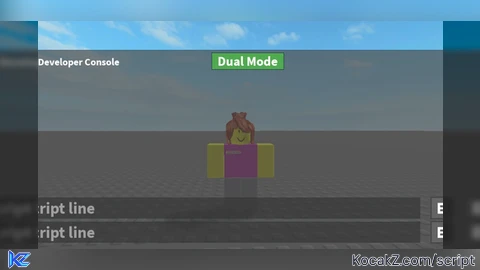
local gui = Instance.new("ScreenGui")
gui.Parent = game:GetService("CoreGui")

local frame = Instance.new("Frame")
frame.Size = UDim2.new(0.8, 0, 0.8, 0) -- 80% Screen Size
frame.Position = UDim2.new(0.1, 0, 0.1, 0)
frame.BackgroundColor3 = Color3.fromRGB(80, 80, 80) -- Gray Color
frame.BackgroundTransparency = 0.3 -- Semi-Transparent
frame.Active = true
frame.Draggable = true
frame.Parent = gui

-- Title Label
local title = Instance.new("TextLabel")
title.Size = UDim2.new(0, 200, 0, 30) -- Small size
title.Position = UDim2.new(0, 10, 0, 5) -- Top-left corner
title.BackgroundTransparency = 1
title.Text = "Defeat Developer Console"
title.TextColor3 = Color3.fromRGB(255, 255, 255)
title.TextScaled = true
title.Font = Enum.Font.SourceSansBold
title.TextXAlignment = Enum.TextXAlignment.Left
title.Parent = frame

-- Close Button (Image)
local closeButton = Instance.new("ImageButton")
closeButton.Size = UDim2.new(0, 30, 0, 30) -- Small button
closeButton.Position = UDim2.new(1, -40, 0, 5) -- Top-right corner
closeButton.BackgroundTransparency = 1
closeButton.Image = "rbxassetid://94294655127530" -- Replace with your custom image ID
closeButton.Parent = frame

closeButton.MouseButton1Click:Connect(function()
    gui:Destroy() -- Close GUI when clicked
end)

-- Toggle Button
local toggleButton = Instance.new("TextButton")
toggleButton.Size = UDim2.new(0.15, 0, 0.08, 0)
toggleButton.Position = UDim2.new(0.5, -50, 0, 5) -- Centered at the top
toggleButton.BackgroundColor3 = Color3.fromRGB(120, 120, 120) -- Gray
toggleButton.Text = "Dual Mode"
toggleButton.TextScaled = true
toggleButton.TextColor3 = Color3.fromRGB(255, 255, 255)
toggleButton.Font = Enum.Font.SourceSansBold
toggleButton.Parent = frame

-- Function to create textboxes
local function createTextbox(yPosition)
    local textbox = Instance.new("TextBox")
    textbox.Size = UDim2.new(0.85, 0, 0.1, 0)
    textbox.Position = UDim2.new(0.025, 0, yPosition, 0)
    textbox.BackgroundColor3 = Color3.fromRGB(50, 50, 50) -- Darker Gray
    textbox.BackgroundTransparency = 0.4 -- More Transparent
    textbox.TextColor3 = Color3.fromRGB(255, 255, 255)
    textbox.Text = "> script line"
    textbox.TextScaled = true
    textbox.ClearTextOnFocus = false
    textbox.Font = Enum.Font.SourceSansBold
    textbox.TextXAlignment = Enum.TextXAlignment.Left
    textbox.TextTransparency = 0.5 -- Semi-transparent placeholder
    textbox.Parent = frame

    textbox.Focused:Connect(function()
        if textbox.Text == "> script line" then
            textbox.Text = ""
            textbox.TextTransparency = 0 -- Make text visible when typing
        end
    end)

    textbox.FocusLost:Connect(function()
        if textbox.Text == "" then
            textbox.Text = "> script line"
            textbox.TextTransparency = 0.5 -- Restore transparency
        end
    end)

    return textbox
end

-- Function to create execute buttons
local function createExecuteButton(yPosition, textbox)
    local executeButton = Instance.new("TextButton")
    executeButton.Size = UDim2.new(0.1, 0, 0.1, 0)
    executeButton.Position = UDim2.new(0.9, 0, yPosition, 0)
    executeButton.BackgroundColor3 = Color3.fromRGB(100, 100, 100) -- Gray Button
    executeButton.BorderSizePixel = 2
    executeButton.BorderColor3 = Color3.fromRGB(70, 70, 70) -- Slightly Darker Border
    executeButton.Text = "Enter"
    executeButton.TextScaled = true
    executeButton.TextColor3 = Color3.fromRGB(255, 255, 255)
    executeButton.Font = Enum.Font.SourceSansBold
    executeButton.Parent = frame

    executeButton.MouseButton1Click:Connect(function()
        local scriptToRun = textbox.Text
        if scriptToRun ~= "" and scriptToRun ~= "> script line" then
            loadstring(scriptToRun)()
        end
    end)

    return executeButton
end

-- Textbox 1 & Execute Button 1
local textbox1 = createTextbox(0.85)
local executeButton1 = createExecuteButton(0.85, textbox1)

-- Textbox 2 & Execute Button 2 (Hidden by Default)
local textbox2 = createTextbox(0.73)
textbox2.Visible = false

local executeButton2 = createExecuteButton(0.73, textbox2)
executeButton2.Visible = false

-- Toggle Button Logic
local dualMode = false

toggleButton.MouseButton1Click:Connect(function()
    dualMode = not dualMode
    if dualMode then
        textbox2.Visible = true
        executeButton2.Visible = true
        toggleButton.BackgroundColor3 = Color3.fromRGB(80, 170, 80) -- Green when active
    else
        textbox2.Visible = false
        executeButton2.Visible = false
        toggleButton.BackgroundColor3 = Color3.fromRGB(120, 120, 120) -- Gray when inactive
    end
end)![[KEYLESS] Moondiety Script | 17+ supported Games](https://scriptblox.com/images/sb/0-1753093706828.png)


Enjoy
Im confused how does this work?
Put your script and click enter to execute it like loadstring and others
nice stop coding with chatgpt and stop pasting from discord vaults @nikolasawen
@nikilasawen i hope you learn scripting
@32ks wth is discord vaults
@bedshrine I hope you spell my name correctly
Sorry the loadstring is broken so I make the script not loadstring sorry
@nikolasawen learn coding but here since i feel bad for you universal FE script (game.Work*e.FilteringEnabled = false;)
i will try