

Key RequiredUniversal
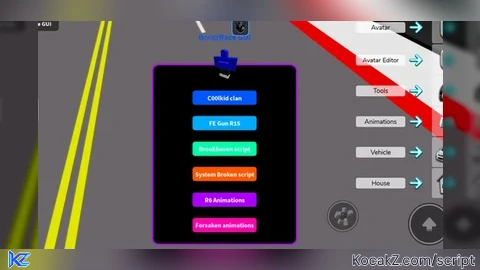
local Players = game:GetService("Players")
local TweenService = game:GetService("TweenService")
local RunService = game:GetService("RunService")
local player = Players.LocalPlayer
local thumbType = Enum.ThumbnailType.AvatarThumbnail
local thumbSize = Enum.ThumbnailSize.Size420x420
local content, isReady = Players:GetUserThumbnailAsync(player.UserId, thumbType, thumbSize)

-- Create ScreenGui
local screenGui = Instance.new("ScreenGui")
screenGui.Name = "CustomGUI"
screenGui.ResetOnSpawn = false
screenGui.Parent = player:WaitForChild("PlayerGui")

-- Create Frame
local frame = Instance.new("Frame")
frame.Size = UDim2.new(0, 400, 0, 50) -- start small; auto-expand
frame.Position = UDim2.new(0.3, 0, 0.3, 0)
frame.BackgroundColor3 = Color3.fromRGB(0, 0, 0)
frame.BorderSizePixel = 0
frame.Active = true
frame.Draggable = true
frame.Visible = true
frame.ZIndex = 1
frame.Parent = screenGui

-- UIStroke & UICorner
local uiStroke = Instance.new("UIStroke")
uiStroke.Color = Color3.fromRGB(180, 0, 255)
uiStroke.Thickness = 4
uiStroke.Parent = frame

local uiCorner = Instance.new("UICorner")
uiCorner.CornerRadius = UDim.new(0, 15)
uiCorner.Parent = frame

-- Avatar Image
local avatarImage = Instance.new("ImageLabel")
avatarImage.Size = UDim2.new(0, 120, 0, 120)
avatarImage.BackgroundTransparency = 1
avatarImage.Image = content
avatarImage.ZIndex = 2
avatarImage.Parent = screenGui

local avatarCorner = Instance.new("UICorner")
avatarCorner.CornerRadius = UDim.new(0.2, 0)
avatarCorner.Parent = avatarImage

-- Title
local title = Instance.new("TextLabel")
title.Size = UDim2.new(0, 250, 0, 40)
title.BackgroundTransparency = 1
title.Text = "DcruzRace GUI"
title.TextColor3 = Color3.fromRGB(0, 85, 255)
title.Font = Enum.Font.SourceSansBold
title.TextSize = 28
title.TextXAlignment = Enum.TextXAlignment.Center
title.TextYAlignment = Enum.TextYAlignment.Center
title.ZIndex = 3
title.Parent = screenGui

-- Toggle Button
local toggleButton = Instance.new("TextButton")
toggleButton.Size = UDim2.new(0, 120, 0, 40)
toggleButton.Position = UDim2.new(0, 10, 0, 10)
toggleButton.BackgroundColor3 = Color3.fromRGB(50, 50, 50)
toggleButton.TextColor3 = Color3.fromRGB(255, 255, 255)
toggleButton.Font = Enum.Font.SourceSansBold
toggleButton.TextSize = 20
toggleButton.Text = "Toggle GUI"
toggleButton.ZIndex = 4
toggleButton.Parent = screenGui
toggleButton.Active = true
toggleButton.Draggable = true

local buttonCorner = Instance.new("UICorner")
buttonCorner.CornerRadius = UDim.new(0, 10)
buttonCorner.Parent = toggleButton

-- Button storage
local buttons = {}
local buttonHeight = 40
local padding = 20 -- spacing between buttons

-- Function to create category header
local function createCategory(name)
	local header = Instance.new("TextLabel")
	header.Size = UDim2.new(0, 360, 0, 30)
	header.BackgroundTransparency = 1
	header.Text = name
	header.TextColor3 = Color3.fromRGB(255, 255, 255)
	header.Font = Enum.Font.SourceSansBold
	header.TextSize = 22
	header.TextXAlignment = Enum.TextXAlignment.Left
	header.ZIndex = 3
	header.Parent = frame
	table.insert(buttons, header)
	return header
end

-- Function to create button
local function createButton(name, color, scriptURL)
	local btn = Instance.new("TextButton")
	btn.Size = UDim2.new(0, 180, 0, buttonHeight)
	btn.BackgroundColor3 = color
	btn.TextColor3 = Color3.fromRGB(255, 255, 255)
	btn.Font = Enum.Font.SourceSansBold
	btn.TextSize = 22
	btn.Text = name
	btn.ZIndex = 3
	btn.Parent = frame

	local corner = Instance.new("UICorner")
	corner.CornerRadius = UDim.new(0, 8)
	corner.Parent = btn

	-- Glow hover animation
	local tweenInfo = TweenInfo.new(0.3, Enum.EasingStyle.Quad, Enum.EasingDirection.Out)
	local glowTween = TweenService:Create(btn, tweenInfo, {BackgroundColor3 = color:Lerp(Color3.fromRGB(255, 255, 255), 0.25)})
	local normalTween = TweenService:Create(btn, tweenInfo, {BackgroundColor3 = color})

	btn.MouseEnter:Connect(function() glowTween:Play() end)
	btn.MouseLeave:Connect(function() normalTween:Play() end)
	btn.MouseButton1Click:Connect(function() loadstring(game:HttpGet(scriptURL, true))() end)

	table.insert(buttons, btn)
	return btn
end

-- Adding categories and buttons
-- Trolling category
createCategory("Trolling")
createButton("C00lkid clan", Color3.fromRGB(0, 85, 255), "https://raw.githubusercontent.com/cfsmi2/c00lguiv1/refs/heads/main/Main.lua")
createButton("Brookhaven script", Color3.fromRGB(0, 255, 170), "https://raw.githubusercontent.com/OpenSourceEngine/Script/refs/heads/main/Brookhaven.lua")
createButton("System Broken script", Color3.fromRGB(255, 85, 0), "https://rawscripts.net/raw/Universal-Script-System-broken-script-32501")
createButton("Infinite yield", Color3.fromRGB(0, 170, 0), "https://raw.githubusercontent.com/EdgeIY/infiniteyield/master/source")
createButton("Click fling", Color3.fromRGB(255, 140, 0), "https://rawscripts.net/raw/Universal-Script-better-click-fling-universal-52247")
createButton("Fling GUI", Color3.fromRGB(255, 0, 0), "https://raw.githubusercontent.com/K1LAS1K/Ultimate-Fling-GUI/main/flingscript.lua")

-- Animations category
createCategory("Animations")
createButton("FE Gun R15", Color3.fromRGB(0, 170, 255), "https://rawscripts.net/raw/Universal-Script-FE-Gun-28741")
createButton("R6 Animations", Color3.fromRGB(170, 0, 255), "https://rawscripts.net/raw/Universal-Script-R6-Anim-Hub-30261")
createButton("Forsaken animations", Color3.fromRGB(255, 0, 170), "https://raw.githubusercontent.com/CyberNinja103/brodwa/refs/heads/main/ForsakationHub")

-- Animation category
createCategory("Animation")
createButton("R6 Anim Hub", Color3.fromRGB(0, 85, 255), "https://rawscripts.net/raw/Universal-Script-R6-animation-GUI-FE-46615")
createButton("Killer R6 anim FE", Color3.fromRGB(220, 20, 60), "https://pastefy.app/riYch0rX/raw")

-- Fun category
createCategory("Fun")
createButton("Doors hardcore mode", Color3.fromRGB(255, 0, 0), "https://raw.githubusercontent.com/DripCapybara/Doors-Mode-Remakes/refs/heads/main/HardcoreFixed.lua")

-- Advantages category
createCategory("Advantages")
createButton("Forsaken script", Color3.fromRGB(255, 85, 255), "https://rawscripts.net/raw/NOLI-Forsaken-Op-script-Auto-Farm-and-more-49047")
createButton("Server hopper", Color3.fromRGB(0, 200, 200), "https://raw.githubusercontent.com/lumpiasallad/Roblox_ServerHop/refs/heads/main/ServerHopScript.lua") -- NEW BUTTON

-- Function to update button positions and auto-expand frame
local function updateButtonPositions()
	local totalHeight = padding
	for _, obj in ipairs(buttons) do
		obj.Position = UDim2.new(0.5, -180, 0, totalHeight)
		totalHeight = totalHeight + ((obj:IsA("TextButton") and buttonHeight) or 30) + padding
	end
	frame.Size = UDim2.new(frame.Size.X.Scale, frame.Size.X.Offset, 0, totalHeight)
end

-- Update avatar & title relative to frame
local function updateAttachedObjects()
	local framePos = frame.Position
	local frameSize = frame.Size
	avatarImage.Position = UDim2.new(framePos.X.Scale, framePos.X.Offset + (frameSize.X.Offset/2 - 60),
									 framePos.Y.Scale, framePos.Y.Offset - 60)
	title.Position = UDim2.new(framePos.X.Scale, framePos.X.Offset + (frameSize.X.Offset/2 - 125),
							   framePos.Y.Scale, framePos.Y.Offset - 100)
	updateButtonPositions()
end

-- Initial update & continuous update
updateAttachedObjects()
RunService.RenderStepped:Connect(updateAttachedObjects)

-- Toggle GUI visibility
local enabled = true
toggleButton.MouseButton1Click:Connect(function()
	enabled = not enabled
	frame.Visible = enabled
	avatarImage.Visible = enabled
	title.Visible = enabled
end)


You can hate on it I'd actually prefer you hating on it then pretending not to hate on it because ur opinion matters :)
W script
@shingtodavid ty for ur feed back I'm glad you enjoy the script have a nice week
Script has updated they're is now categories drag the GUI to see all the scripts and added two more scripts R6 anim hub and Jeff the Killer R6 anim
even though this is ai respect bro
@Supan Thank you for commenting I made the designs myself but AI helped me make it work I Helped code it with AI fixing mistakes thank you for commenting it have a nice day
If the avatar changes from a Blue guy to something else that's me using hat scripts sorry about that hopefully you don't mind
Can we beat FE Gun???
yo wzg
@k00pkiddTheSp00kyGuy Wsg
AND YOU SAY HIS SCRIPTS ARE AI *ING LOSER LOL
i wont dislike this but you cant be out here sayin someone else has ai scripts when you do the same.
@iplaywarzone5 all I have learned from ur two comments is that you like bullying Beginner coders and swearing at them he Admits some of his scripts is AI or helped by AI most Scripts don't admit they used AI I searched up ur chat to find out what you were talking about and found out he called a Voice Chat Button AI I will Admit he probably wasn't thinking straight a Voice Chat Button is almost useless because they're is already a button to activate voice chat please do not comment ever again *ody wants you here