

KeylessUniversal
-- Create the main screen GUI
local screenGui = Instance.new("ScreenGui")
screenGui.Name = "SpeedButtonGui"
screenGui.Parent = game:GetService("Players").LocalPlayer:WaitForChild("PlayerGui")

-- Create the button inside the ScreenGui
local textButton = Instance.new("TextButton")
textButton.Name = "SpeedButton"
textButton.Size = UDim2.new(0.2, 0, 0.1, 0) -- 20% width, 10% height
textButton.Position = UDim2.new(0.1, 0, 0.1, 0) -- Centered on the screen
textButton.Text = "Speed changer"
textButton.Font = Enum.Font.SourceSansBold
textButton.FontSize = Enum.FontSize.Size24
textButton.TextColor3 = Color3.new(1, 1, 1) -- White text
textButton.BackgroundColor3 = Color3.new(0.7, 0.3, 0.9) -- Blue background
textButton.Parent = screenGui

-- Create the button's function
textButton.MouseButton1Click:Connect(function()
	local character = game:GetService("Players").LocalPlayer.Character
	if character then
		local humanoid = character:FindFirstChild("Humanoid")
		if humanoid then
			humanoid.WalkSpeed = 100
			print("Speed set to 100!")
		end
	end
end)
-- Create the main screen GUI
local screenGui = Instance.new("ScreenGui")
screenGui.Name = "JumpButtonGui"
screenGui.Parent = game:GetService("Players").LocalPlayer:WaitForChild("PlayerGui")

-- Create the button inside the ScreenGui
local textButton = Instance.new("TextButton")
textButton.Name = "JumpButton"
textButton.Size = UDim2.new(0.2, 0, 0.1, 0) -- 20% width, 10% height
textButton.Position = UDim2.new(0.1, 0, 0.01, 0) -- Centered on the screen
textButton.Text = "Jump height"
textButton.Font = Enum.Font.SourceSansBold
textButton.FontSize = Enum.FontSize.Size24
textButton.TextColor3 = Color3.new(1, 1, 1) -- White text
textButton.BackgroundColor3 = Color3.new(0.7, 0.3, 0.9) -- Blue background
textButton.Parent = screenGui

-- Create the button's function
textButton.MouseButton1Click:Connect(function()
	local character = game:GetService("Players").LocalPlayer.Character
	if character then
		local humanoid = character:FindFirstChild("Humanoid")
		if humanoid then
			humanoid.JumpPower = 100
			print("Speed set to 100!")
		end
	end
end)-- Simple KRNL-style GUI
-- Made by cybax0426

-- Create the main screen GUI
local screenGui = Instance.new("ScreenGui")
screenGui.Name = "SpeedButtonGui"
screenGui.Parent = game:GetService("Players").LocalPlayer:WaitForChild("PlayerGui")

-- Create the button inside the ScreenGui
local textButton = Instance.new("TextButton")
textButton.Name = "SpeedButton"
textButton.Size = UDim2.new(0.2, 0, 0.1, 0) -- 20% width, 10% height
textButton.Position = UDim2.new(0.1, 0, 0.1, 0) -- Centered on the screen
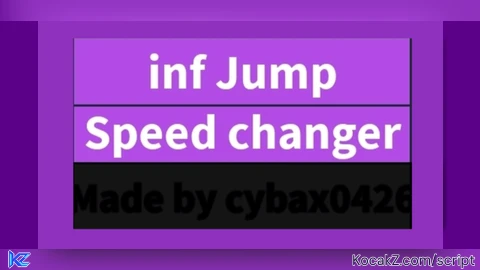
textButton.Text = "Speed changer"
textButton.Font = Enum.Font.SourceSansBold
textButton.FontSize = Enum.FontSize.Size24
textButton.TextColor3 = Color3.new(1, 1, 1) -- White text
textButton.BackgroundColor3 = Color3.new(0.7, 0.3, 0.9) -- Blue background
textButton.Parent = screenGui

-- Create the button's function
textButton.MouseButton1Click:Connect(function()
	local character = game:GetService("Players").LocalPlayer.Character
	if character then
		local humanoid = character:FindFirstChild("Humanoid")
		if humanoid then
			humanoid.WalkSpeed = 100
			print("Speed set to 100!")
		end
	end
end)
-- Create the main screen GUI
local screenGui = Instance.new("ScreenGui")
screenGui.Name = "JumpButtonGui"
screenGui.Parent = game:GetService("Players").LocalPlayer:WaitForChild("PlayerGui")

-- Create the button inside the ScreenGui
local textButton = Instance.new("TextButton")
textButton.Name = "JumpButton"
textButton.Size = UDim2.new(0.2, 0, 0.1, 0) -- 20% width, 10% height
textButton.Position = UDim2.new(0.1, 0, 0.01, 0) -- Centered on the screen
textButton.Text = "inf Jump"
textButton.Font = Enum.Font.SourceSansBold
textButton.FontSize = Enum.FontSize.Size24
textButton.TextColor3 = Color3.new(1, 1, 1) -- White text
textButton.BackgroundColor3 = Color3.new(0.7, 0.3, 0.9) -- Blue background
textButton.Parent = screenGui

-- Create the button's function
textButton.MouseButton1Click:Connect(function()
	local character = game:GetService("Players").LocalPlayer.Character
	if character then
		local humanoid = character:FindFirstChild("Humanoid")
		if humanoid then
			-- https://scriptblox.com/script/Universal-Script-Infinite-Jump-alternative-1236

	local thing = Instance.new("Part")
        thing.Name = "This is a part of the game"
        thing.Anchored = true
        thing.Parent = game.Workspace
        thing.Size = Vector3.new(5, 0.1, 5)
		thing.Transparency = 1
	game:GetService("RunService").Stepped:connect(
            function()
			local pos = game.Players.LocalPlayer.Character.HumanoidRootPart.CFrame
        thing.CFrame = CFrame.new(pos.X, pos.Y-3.3,pos.Z)--beetween -3.1 and idk but prob -3.6
		end)
			print("Speed set to 100!")
		end
	end
end)-- Simple KRNL-style GUI
-- Made by cybax0426

-- Create the GUI
local ScreenGui = Instance.new("ScreenGui")
local TextBox = Instance.new("TextBox")

-- Set parent (so it appears on your screen)
ScreenGui.Parent = game.CoreGui
TextBox.Parent = ScreenGui

-- TextBox appearance
TextBox.BackgroundColor3 = Color3.fromRGB(20, 20, 20)
TextBox.BorderColor3 = Color3.fromRGB(0.7, 0.3, 0.9)
TextBox.Position = UDim2.new(0.1, 0, 0.2, 0)
TextBox.Size = UDim2.new(0.2, 0, 0.1, 0)
TextBox.Font = Enum.Font.SourceSansBold
TextBox.Text = "Made by cybax0426"
TextBox.TextColor3 = Color3.fromRGB(0.7, 0.3, 0.9)
TextBox.TextSize = 20
TextBox.ClearTextOnFocus = false

-- Optional: Add a slight glow effect
local UIStroke = Instance.new("UIStroke")
UIStroke.Parent = TextBox
UIStroke.Color = Color3.fromRGB(9, 3, 9)
UIStroke.Thickness = .5No comments yet for this script.


