
![Sir Meme Hub | [16 GAMES] [$14.99 LIFETIME] | FARM/AIM/ESP](https://scriptblox.com/images/script/-1-1791044877945.webp)
Key Required VerifiedUniversal
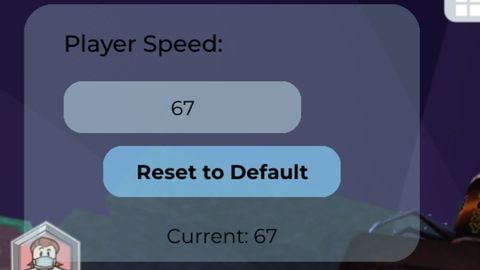
local Player = game:GetService("Players").LocalPlayer
local Character = Player.Character or Player.CharacterAdded:Wait()
local Humanoid = Character:WaitForChild("Humanoid")
local TweenService = game:GetService("TweenService")

-- Create GUI with rounded corners
local ScreenGui = Instance.new("ScreenGui")
local Frame = Instance.new("Frame")
local UICorner = Instance.new("UICorner")
local SpeedLabel = Instance.new("TextLabel")
local SpeedTextBox = Instance.new("TextBox")
local TextBoxCorner = Instance.new("UICorner")
local ResetButton = Instance.new("TextButton")
local ResetButtonCorner = Instance.new("UICorner")
local CurrentSpeedLabel = Instance.new("TextLabel")

-- ScreenGui setup
ScreenGui.Name = "SpeedControlGUI"
ScreenGui.Parent = Player.PlayerGui
ScreenGui.ResetOnSpawn = false

-- Main Frame with rounded corners and transparency
Frame.Name = "MainFrame"
Frame.Parent = ScreenGui
Frame.Size = UDim2.new(0, 200, 0, 130)
Frame.Position = UDim2.new(0, 10, 0, 10)
Frame.BackgroundColor3 = Color3.fromRGB(173, 216, 230) -- Light blue
Frame.BackgroundTransparency = 0.7 -- 30% opacity
Frame.BorderSizePixel = 0
Frame.Active = true
Frame.Draggable = true

UICorner.CornerRadius = UDim.new(0, 15)
UICorner.Parent = Frame

-- Speed Label
SpeedLabel.Name = "SpeedLabel"
SpeedLabel.Parent = Frame
SpeedLabel.Size = UDim2.new(0.8, 0, 0.2, 0)
SpeedLabel.Position = UDim2.new(0.1, 0, 0.05, 0)
SpeedLabel.BackgroundTransparency = 1
SpeedLabel.Text = "Player Speed:"
SpeedLabel.TextColor3 = Color3.fromRGB(0, 0, 0)
SpeedLabel.TextXAlignment = Enum.TextXAlignment.Left
SpeedLabel.Font = Enum.Font.GothamMedium
SpeedLabel.TextSize = 14

-- Speed TextBox with rounded corners
SpeedTextBox.Name = "SpeedTextBox"
SpeedTextBox.Parent = Frame
SpeedTextBox.Size = UDim2.new(0.6, 0, 0.2, 0)
SpeedTextBox.Position = UDim2.new(0.1, 0, 0.3, 0)
SpeedTextBox.BackgroundColor3 = Color3.fromRGB(200, 228, 240) -- Lighter blue
SpeedTextBox.BackgroundTransparency = 0.5
SpeedTextBox.TextColor3 = Color3.fromRGB(0, 0, 0)
SpeedTextBox.Text = tostring(Humanoid.WalkSpeed)
SpeedTextBox.PlaceholderText = "Enter speed"
SpeedTextBox.PlaceholderColor3 = Color3.fromRGB(100, 100, 100)
SpeedTextBox.ClearTextOnFocus = false
SpeedTextBox.Font = Enum.Font.Gotham
SpeedTextBox.TextSize = 12

TextBoxCorner.CornerRadius = UDim.new(0, 10)
TextBoxCorner.Parent = SpeedTextBox

-- Reset Button with rounded corners
ResetButton.Name = "ResetButton"
ResetButton.Parent = Frame
ResetButton.Size = UDim2.new(0.6, 0, 0.2, 0)
ResetButton.Position = UDim2.new(0.2, 0, 0.55, 0)
ResetButton.BackgroundColor3 = Color3.fromRGB(135, 206, 250) -- Light sky blue
ResetButton.BackgroundTransparency = 0.3
ResetButton.Text = "Reset to Default"
ResetButton.TextColor3 = Color3.fromRGB(0, 0, 0)
ResetButton.Font = Enum.Font.GothamBold
ResetButton.TextSize = 12
ResetButton.AutoButtonColor = false

ResetButtonCorner.CornerRadius = UDim.new(0, 10)
ResetButtonCorner.Parent = ResetButton

-- Current Speed Label
CurrentSpeedLabel.Name = "CurrentSpeedLabel"
CurrentSpeedLabel.Parent = Frame
CurrentSpeedLabel.Size = UDim2.new(0.8, 0, 0.2, 0)
CurrentSpeedLabel.Position = UDim2.new(0.1, 0, 0.8, 0)
CurrentSpeedLabel.BackgroundTransparency = 1
CurrentSpeedLabel.Text = "Current: " .. tostring(Humanoid.WalkSpeed)
CurrentSpeedLabel.TextColor3 = Color3.fromRGB(0, 0, 0)
CurrentSpeedLabel.Font = Enum.Font.Gotham
CurrentSpeedLabel.TextSize = 12

-- Animation functions
local function animateButtonHover(button)
    local hoverTween = TweenService:Create(
        button,
        TweenInfo.new(0.2, Enum.EasingStyle.Quad, Enum.EasingDirection.Out),
        {BackgroundTransparency = 0.1, TextColor3 = Color3.fromRGB(255, 255, 255)}
    )

    local leaveTween = TweenService:Create(
        button,
        TweenInfo.new(0.3, Enum.EasingStyle.Quad, Enum.EasingDirection.Out),
        {BackgroundTransparency = 0.3, TextColor3 = Color3.fromRGB(0, 0, 0)}
    )

    button.MouseEnter:Connect(function()
        hoverTween:Play()
    end)

    button.MouseLeave:Connect(function()
        leaveTween:Play()
    end)
end

local function animateTextBoxFocus(textBox)
    local focusTween = TweenService:Create(
        textBox,
        TweenInfo.new(0.2, Enum.EasingStyle.Quad, Enum.EasingDirection.Out),
        {BackgroundTransparency = 0.2, Size = UDim2.new(0.65, 0, 0.22, 0)}
    )

    local unfocusTween = TweenService:Create(
        textBox,
        TweenInfo.new(0.3, Enum.EasingStyle.Quad, Enum.EasingDirection.Out),
        {BackgroundTransparency = 0.5, Size = UDim2.new(0.6, 0, 0.2, 0)}
    )

    textBox.Focused:Connect(function()
        focusTween:Play()
    end)

    textBox.FocusLost:Connect(function()
        unfocusTween:Play()
    end)
end

-- Functions
local function updateCurrentSpeed()
    CurrentSpeedLabel.Text = "Current: " .. tostring(math.floor(Humanoid.WalkSpeed))
end

local function applySpeed()
    local newSpeed = tonumber(SpeedTextBox.Text)
    if newSpeed and newSpeed > 0 then
        Humanoid.WalkSpeed = newSpeed
        updateCurrentSpeed()
        SpeedTextBox.Text = tostring(newSpeed)
    else
        SpeedTextBox.Text = tostring(Humanoid.WalkSpeed)
    end
end

local function resetSpeed()
    Humanoid.WalkSpeed = 16
    SpeedTextBox.Text = "16"
    updateCurrentSpeed()
end

-- Setup animations
animateButtonHover(ResetButton)
animateTextBoxFocus(SpeedTextBox)

-- Event handlers
ResetButton.MouseButton1Click:Connect(resetSpeed)

SpeedTextBox.FocusLost:Connect(function(enterPressed)
    if enterPressed then
        applySpeed()
    end
end)

-- Update display when speed changes
Humanoid:GetPropertyChangedSignal("WalkSpeed"):Connect(updateCurrentSpeed)

-- Initialization
updateCurrentSpeed()

W And Open Source❤️ Keep it Up
@Brbrbbrbrbr Bro, thank you!
Yo thanks