

KeylessUniversal
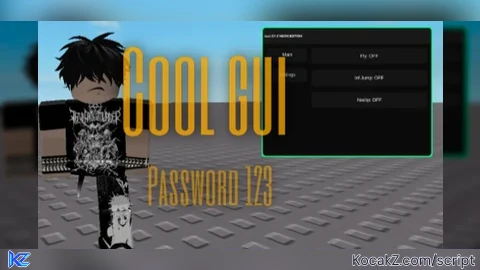
local UserInputService = game:GetService("UserInputService")
local RunService = game:GetService("RunService")
local player = game.Players.LocalPlayer

-- [[ CONFIGURATION ]] --
local SECRET_KEY = "123"
local flySpeed = 50
local flying, infJump, noclip = false, false, false
local MAIN_COLOR = Color3.fromRGB(0, 255, 150) -- Neon Green
local bv, bg

-- [[ UI INITIALIZATION ]] --
local screenGui = Instance.new("ScreenGui")
screenGui.Name = "FullNeon_GY"
screenGui.ResetOnSpawn = false
screenGui.Parent = player:WaitForChild("PlayerGui")

-- Helper: Create Glow Outline for any element
local function applyGlow(parent, thickness)
	local outline = Instance.new("Frame")
	outline.Name = "Glow"
	outline.Size = UDim2.new(1, thickness or 4, 1, thickness or 4)
	outline.Position = UDim2.new(0, -(thickness/2 or 2), 0, -(thickness/2 or 2))
	outline.BackgroundColor3 = MAIN_COLOR
	outline.BorderSizePixel = 0
	outline.ZIndex = parent.ZIndex - 1
	outline.Parent = parent
	Instance.new("UICorner", outline).CornerRadius = UDim.new(0, 8)
	return outline
end

-- [[ STAGE 1: KEY SYSTEM ]] --
local keyFrame = Instance.new("Frame")
keyFrame.Size = UDim2.new(0, 300, 0, 180)
keyFrame.Position = UDim2.new(0.5, -150, 0.5, -90)
keyFrame.BackgroundColor3 = Color3.fromRGB(15, 15, 15)
keyFrame.Parent = screenGui
Instance.new("UICorner", keyFrame)
applyGlow(keyFrame, 6)

local keyInput = Instance.new("TextBox", keyFrame)
keyInput.PlaceholderText = "Enter Password"
keyInput.Size = UDim2.new(0.8, 0, 0, 40)
keyInput.Position = UDim2.new(0.1, 0, 0.3, 0)
keyInput.BackgroundColor3 = Color3.fromRGB(25, 25, 25)
keyInput.TextColor3 = Color3.new(1, 1, 1)
keyInput.Font = Enum.Font.Gotham
Instance.new("UICorner", keyInput)

local loginBtn = Instance.new("TextButton", keyFrame)
loginBtn.Text = "VERIFY"
loginBtn.Size = UDim2.new(0.8, 0, 0, 40)
loginBtn.Position = UDim2.new(0.1, 0, 0.65, 0)
loginBtn.BackgroundColor3 = MAIN_COLOR
loginBtn.TextColor3 = Color3.new(0, 0, 0)
loginBtn.Font = Enum.Font.GothamBold
Instance.new("UICorner", loginBtn)

-- [[ STAGE 2: MAIN MENU ]] --
local mainFrame = Instance.new("Frame")
mainFrame.Size = UDim2.new(0, 420, 0, 320)
mainFrame.Position = UDim2.new(0.5, -210, 0.5, -160)
mainFrame.BackgroundColor3 = Color3.fromRGB(10, 10, 10)
mainFrame.Visible = false
mainFrame.Active = true
mainFrame.Draggable = true
mainFrame.Parent = screenGui
Instance.new("UICorner", mainFrame)
applyGlow(mainFrame, 6)

local topBar = Instance.new("Frame", mainFrame)
topBar.Size = UDim2.new(1, 0, 0, 40)
topBar.BackgroundColor3 = Color3.fromRGB(25, 25, 25)
Instance.new("UICorner", topBar)

local title = Instance.new("TextLabel", topBar)
title.Text = "  test GY // NEON EDITION"
title.Size = UDim2.new(1, 0, 1, 0)
title.TextColor3 = Color3.new(1, 1, 1)
title.BackgroundTransparency = 1
title.Font = Enum.Font.GothamBold
title.TextXAlignment = Enum.TextXAlignment.Left

-- Sidebar & Pages
local sidebar = Instance.new("Frame", mainFrame)
sidebar.Size = UDim2.new(0, 100, 1, -60)
sidebar.Position = UDim2.new(0, 10, 0, 50)
sidebar.BackgroundTransparency = 1
Instance.new("UIListLayout", sidebar).Padding = UDim.new(0, 15) -- More padding for outlines

local pageContainer = Instance.new("Frame", mainFrame)
pageContainer.Size = UDim2.new(1, -130, 1, -60)
pageContainer.Position = UDim2.new(0, 120, 0, 50)
pageContainer.BackgroundTransparency = 1

local pages = {}
local function createPage(name)
	local p = Instance.new("Frame", pageContainer)
	p.Size = UDim2.new(1, 0, 1, 0)
	p.BackgroundTransparency = 1
	p.Visible = false
	Instance.new("UIListLayout", p).Padding = UDim.new(0, 15)

	local tabBtn = Instance.new("TextButton", sidebar)
	tabBtn.Size = UDim2.new(1, 0, 0, 35)
	tabBtn.Text = name
	tabBtn.BackgroundColor3 = Color3.fromRGB(20, 20, 20)
	tabBtn.TextColor3 = Color3.new(1, 1, 1)
	Instance.new("UICorner", tabBtn)
	applyGlow(tabBtn, 3) -- TABS OUTLINE

	tabBtn.MouseButton1Click:Connect(function()
		for _, pg in pairs(pages) do pg.Visible = false end
		p.Visible = true
	end)
	pages[name] = p
	return p
end

local mainPage = createPage("Main")
local settingsPage = createPage("Settings")
mainPage.Visible = true

-- Helper for Logic Buttons
local function makeActionBtn(txt, parent)
	local b = Instance.new("TextButton", parent)
	b.Size = UDim2.new(1, 0, 0, 40)
	b.BackgroundColor3 = Color3.fromRGB(20, 20, 20)
	b.Text = txt
	b.TextColor3 = Color3.new(1, 1, 1)
	Instance.new("UICorner", b)
	applyGlow(b, 3) -- BUTTONS OUTLINE
	return b
end

local flyBtn = makeActionBtn("Fly: OFF", mainPage)
local jumpBtn = makeActionBtn("Inf Jump: OFF", mainPage)
local noclipBtn = makeActionBtn("Noclip: OFF", mainPage)

-- [[ SETTINGS: SPEED SLIDER ]] --
local sFrame = Instance.new("Frame", settingsPage)
sFrame.Size = UDim2.new(1, 0, 0, 50)
sFrame.BackgroundTransparency = 1

local sLabel = Instance.new("TextLabel", sFrame)
sLabel.Size = UDim2.new(1, 0, 0, 20)
sLabel.Text = "Fly Speed: 50"
sLabel.TextColor3 = Color3.new(1,1,1)
sLabel.BackgroundTransparency = 1

local sBar = Instance.new("Frame", sFrame)
sBar.Size = UDim2.new(1, 0, 0, 10)
sBar.Position = UDim2.new(0, 0, 0.6, 0)
sBar.BackgroundColor3 = Color3.fromRGB(30, 30, 30)
applyGlow(sBar, 2)

local sDot = Instance.new("TextButton", sBar)
sDot.Size = UDim2.new(0, 16, 0, 16)
sDot.Position = UDim2.new(0.25, -8, 0.5, -8)
sDot.BackgroundColor3 = MAIN_COLOR
sDot.Text = ""
Instance.new("UICorner", sDot)

-- [[ ALL LOGIC ]] --

loginBtn.MouseButton1Click:Connect(function()
	if keyInput.Text == SECRET_KEY then
		keyFrame:Destroy()
		mainFrame.Visible = true
	end
end)

flyBtn.MouseButton1Click:Connect(function()
	flying = not flying
	flyBtn.Text = "Fly: " .. (flying and "ON" or "OFF")
	local hrp = player.Character and player.Character:FindFirstChild("HumanoidRootPart")
	if flying and hrp then
		bv = Instance.new("BodyVelocity", hrp)
		bv.MaxForce = Vector3.new(1e6, 1e6, 1e6)
		bg = Instance.new("BodyGyro", hrp)
		bg.MaxTorque = Vector3.new(1e6, 1e6, 1e6)
		task.spawn(function()
			while flying do
				local cam = workspace.CurrentCamera.CFrame
				local move = Vector3.new(0,0,0)
				if UserInputService:IsKeyDown(Enum.KeyCode.W) then move += cam.LookVector end
				if UserInputService:IsKeyDown(Enum.KeyCode.S) then move -= cam.LookVector end
				if UserInputService:IsKeyDown(Enum.KeyCode.A) then move -= cam.RightVector end
				if UserInputService:IsKeyDown(Enum.KeyCode.D) then move += cam.RightVector end
				bv.Velocity = move * flySpeed
				bg.CFrame = cam
				RunService.RenderStepped:Wait()
			end
			if bv then bv:Destroy() end
			if bg then bg:Destroy() end
		end)
	end
end)

noclipBtn.MouseButton1Click:Connect(function() noclip = not noclip noclipBtn.Text = "Noclip: " .. (noclip and "ON" or "OFF") end)
RunService.Stepped:Connect(function() if noclip and player.Character then for _, v in pairs(player.Character:GetDescendants()) do if v:IsA("BasePart") then v.CanCollide = false end end end end)

jumpBtn.MouseButton1Click:Connect(function() infJump = not infJump jumpBtn.Text = "Inf Jump: " .. (infJump and "ON" or "OFF") end)
UserInputService.JumpRequest:Connect(function() if infJump then player.Character.Humanoid:ChangeState("Jumping") end end)

local dragging = false
sDot.MouseButton1Down:Connect(function() dragging = true end)
UserInputService.InputEnded:Connect(function(i) if i.UserInputType == Enum.UserInputType.MouseButton1 then dragging = false end end)
RunService.RenderStepped:Connect(function()
	if dragging then
		local percent = math.clamp((UserInputService:GetMouseLocation().X - sBar.AbsolutePosition.X) / sBar.AbsoluteSize.X, 0, 1)
		sDot.Position = UDim2.new(percent, -8, 0.5, -8)
		flySpeed = math.floor(percent * 300)
		sLabel.Text = "Fly Speed: " .. flySpeed
	end
end)No comments yet for this script.


