


KeylessUniversal
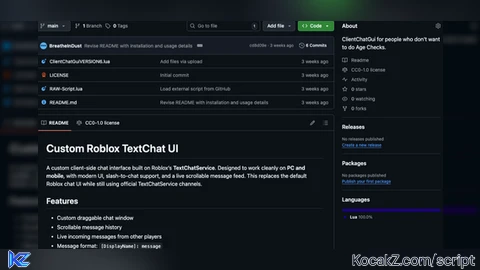
local Players = game:GetService("Players")
local TextChatService = game:GetService("TextChatService")
local UserInputService = game:GetService("UserInputService")

local player = Players.LocalPlayer

if TextChatService.ChatVersion ~= Enum.ChatVersion.TextChatService then
	warn("TextChatService is not enabled in this experience.")
	return
end

local generalChannel
repeat
	generalChannel = TextChatService:FindFirstChild("TextChannels")
		and TextChatService.TextChannels:FindFirstChild("RBXGeneral")
	task.wait()
until generalChannel

local gui = Instance.new("ScreenGui")
gui.Name = "ClientChatGui"
gui.ResetOnSpawn = false
gui.Parent = player:WaitForChild("PlayerGui")

local frame = Instance.new("Frame")
frame.Size = UDim2.fromScale(0.45, 0.3)
frame.Position = UDim2.fromScale(0.275, 0.65)
frame.BackgroundColor3 = Color3.fromRGB(25, 25, 25)
frame.BorderSizePixel = 0
frame.Parent = gui
frame.Active = true
frame.Draggable = true

local corner = Instance.new("UICorner")
corner.CornerRadius = UDim.new(0, 12)
corner.Parent = frame

local messages = Instance.new("ScrollingFrame")
messages.Size = UDim2.fromScale(0.92, 0.6)
messages.Position = UDim2.fromScale(0.04, 0.05)
messages.CanvasSize = UDim2.new(0, 0, 0, 0)
messages.ScrollBarImageTransparency = 0.3
messages.BackgroundColor3 = Color3.fromRGB(18, 18, 18)
messages.BorderSizePixel = 0
messages.AutomaticCanvasSize = Enum.AutomaticSize.None
messages.Parent = frame

local messagesCorner = Instance.new("UICorner")
messagesCorner.CornerRadius = UDim.new(0, 8)
messagesCorner.Parent = messages

local layout = Instance.new("UIListLayout")
layout.Padding = UDim.new(0, 6)
layout.Parent = messages

layout:GetPropertyChangedSignal("AbsoluteContentSize"):Connect(function()
	messages.CanvasSize = UDim2.fromOffset(0, layout.AbsoluteContentSize.Y + 10)
	messages.CanvasPosition = Vector2.new(0, math.max(0, messages.CanvasSize.Y.Offset - messages.AbsoluteWindowSize.Y))
end)

local box = Instance.new("TextBox")
box.Size = UDim2.fromScale(0.72, 0.22)
box.Position = UDim2.fromScale(0.04, 0.72)
box.PlaceholderText = "Type a message…"
box.Text = ""
box.TextColor3 = Color3.new(1, 1, 1)
box.BackgroundColor3 = Color3.fromRGB(40, 40, 40)
box.ClearTextOnFocus = false
box.TextWrapped = true
box.TextXAlignment = Enum.TextXAlignment.Left
box.TextYAlignment = Enum.TextYAlignment.Center
box.Font = Enum.Font.Gotham
box.TextSize = 16
box.Parent = frame

local boxCorner = Instance.new("UICorner")
boxCorner.CornerRadius = UDim.new(0, 8)
boxCorner.Parent = box

local sendButton = Instance.new("TextButton")
sendButton.Size = UDim2.fromScale(0.18, 0.22)
sendButton.Position = UDim2.fromScale(0.78, 0.72)
sendButton.Text = "Send"
sendButton.Font = Enum.Font.GothamSemibold
sendButton.TextSize = 16
sendButton.TextColor3 = Color3.new(1, 1, 1)
sendButton.BackgroundColor3 = Color3.fromRGB(0, 170, 255)
sendButton.Parent = frame

local sendCorner = Instance.new("UICorner")
sendCorner.CornerRadius = UDim.new(0, 8)
sendCorner.Parent = sendButton

local function sendMessage()
	local message = box.Text
	if message == "" then return end
	box.Text = ""
	pcall(function()
		generalChannel:SendAsync(message)
	end)
end

box.FocusLost:Connect(function(enterPressed)
	if enterPressed then
		sendMessage()
	end
end)

sendButton.Activated:Connect(sendMessage)

UserInputService.InputBegan:Connect(function(input, gameProcessed)
	if gameProcessed then return end
	if input.UserInputType == Enum.UserInputType.Keyboard
		and input.KeyCode == Enum.KeyCode.Slash then
		box:CaptureFocus()
	end
end)

local function addMessage(displayName, text)
	local label = Instance.new("TextLabel")
	label.Size = UDim2.new(1, -10, 0, 0)
	label.BackgroundTransparency = 1
	label.TextWrapped = true
	label.AutomaticSize = Enum.AutomaticSize.Y
	label.TextXAlignment = Enum.TextXAlignment.Left
	label.TextYAlignment = Enum.TextYAlignment.Top
	label.Font = Enum.Font.Gotham
	label.TextSize = 14
	label.TextColor3 = Color3.new(1, 1, 1)
	label.Text = "[" .. displayName .. "]: " .. text
	label.Parent = messages
end

TextChatService.OnIncomingMessage = function(message)
	if message.TextSource then
		local sourcePlayer = Players:GetPlayerByUserId(message.TextSource.UserId)
		if sourcePlayer then
			addMessage(sourcePlayer.DisplayName, message.Text)
		end
	end
end


x
least vibecoded script on scriptblox: