


Key RequiredUniversal
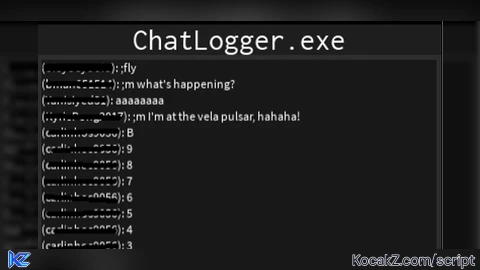
-- ChatLogger.exe - Logs all chat messages in a GUI
local Players = game:GetService("Players")
local StarterGui = game:GetService("StarterGui")
local TextService = game:GetService("TextService")

local player = Players.LocalPlayer

-- Global variables for GUI state
local showTimestamps = false
local showDisplayName = false
local messageHistory = {} -- Store original message data
local maxHistory = 500 -- maximum number of stored messages
local currentSearch = "" -- current search filter (lowercase)

-- Create the ChatLogger GUI
local function createChatLoggerGUI()
	-- Create the main ScreenGui
	local screenGui = Instance.new("ScreenGui")
	screenGui.Name = "ChatLogger"
	screenGui.ResetOnSpawn = false
	screenGui.Parent = player:WaitForChild("PlayerGui")

	-- Create the main frame
	local mainFrame = Instance.new("Frame")
	mainFrame.Name = "MainFrame"
	mainFrame.Size = UDim2.new(0, 400, 0, 300)
	mainFrame.Position = UDim2.new(0, 10, 0, 10)
	mainFrame.BackgroundColor3 = Color3.fromRGB(45, 45, 45)
	mainFrame.BorderSizePixel = 0
	mainFrame.Active = true
	mainFrame.Draggable = true
	mainFrame.Parent = screenGui

	-- Rounded corners and padding for main frame
	local mainCorner = Instance.new("UICorner")
	mainCorner.CornerRadius = UDim.new(0, 8)
	mainCorner.Parent = mainFrame

	local mainPadding = Instance.new("UIPadding")
	mainPadding.PaddingTop = UDim.new(0, 6)
	mainPadding.PaddingLeft = UDim.new(0, 6)
	mainPadding.PaddingRight = UDim.new(0, 6)
	mainPadding.PaddingBottom = UDim.new(0, 6)
	mainPadding.Parent = mainFrame

	-- Create the title bar
	local titleBar = Instance.new("Frame")
	titleBar.Name = "TitleBar"
	titleBar.Size = UDim2.new(1, 0, 0, 30)
	titleBar.Position = UDim2.new(0, 0, 0, 0)
	titleBar.BackgroundColor3 = Color3.fromRGB(30, 30, 30)
	titleBar.BorderSizePixel = 0
	titleBar.Parent = mainFrame

	-- Title bar styling
	local titleCorner = Instance.new("UICorner")
	titleCorner.CornerRadius = UDim.new(0, 8)
	titleCorner.Parent = titleBar

	local titleGradient = Instance.new("UIGradient")
	titleGradient.Color = ColorSequence.new({
		ColorSequenceKeypoint.new(0, Color3.fromRGB(40, 40, 40)),
		ColorSequenceKeypoint.new(1, Color3.fromRGB(28, 28, 28)),
	})
	titleGradient.Parent = titleBar

	local titleStroke = Instance.new("UIStroke")
	titleStroke.Color = Color3.fromRGB(0, 0, 0)
	titleStroke.Transparency = 0.7
	titleStroke.Parent = titleBar

	-- Helper: consistent button styling + hover
	local function styleButton(btn, baseColor, hoverColor)
		local corner = Instance.new("UICorner")
		corner.CornerRadius = UDim.new(0, 6)
		corner.Parent = btn
		btn.BackgroundColor3 = baseColor
		btn.MouseEnter:Connect(function()
			btn.BackgroundColor3 = hoverColor
		end)
		btn.MouseLeave:Connect(function()
			btn.BackgroundColor3 = baseColor
		end)
	end

	-- Create the title label
	local titleLabel = Instance.new("TextLabel")
	titleLabel.Name = "TitleLabel"
	titleLabel.Size = UDim2.new(1, -280, 1, 0)
	titleLabel.Position = UDim2.new(0, 0, 0, 0)
	titleLabel.BackgroundTransparency = 1
	titleLabel.Text = "ChatLogger.exe"
	titleLabel.TextColor3 = Color3.fromRGB(255, 255, 255)
	titleLabel.TextScaled = false
	titleLabel.TextSize = 18
	titleLabel.Font = Enum.Font.Code
	titleLabel.TextXAlignment = Enum.TextXAlignment.Left
	titleLabel.TextWrapped = false
	titleLabel.Parent = titleBar

	-- Create Close button
	local closeButton = Instance.new("TextButton")
	closeButton.Name = "CloseButton"
	closeButton.Size = UDim2.new(0, 36, 0, 24)
	closeButton.Position = UDim2.new(1, -40, 0, 3)
	closeButton.BackgroundColor3 = Color3.fromRGB(200, 50, 50)
	closeButton.BorderSizePixel = 0
	closeButton.Text = "X"
	closeButton.TextColor3 = Color3.fromRGB(255, 255, 255)
	closeButton.TextScaled = false
	closeButton.TextSize = 16
	closeButton.Font = Enum.Font.SourceSansBold
	closeButton.Parent = titleBar
	styleButton(closeButton, Color3.fromRGB(200,50,50), Color3.fromRGB(230,80,80))

	-- Create Refresh button
	local refreshButton = Instance.new("TextButton")
	refreshButton.Name = "RefreshButton"
	refreshButton.Size = UDim2.new(0, 42, 0, 24)
	refreshButton.Position = UDim2.new(1, -86, 0, 3)
	refreshButton.BackgroundColor3 = Color3.fromRGB(50, 150, 200)
	refreshButton.BorderSizePixel = 0
	refreshButton.Text = "R"
	refreshButton.TextColor3 = Color3.fromRGB(255, 255, 255)
	refreshButton.TextScaled = false
	refreshButton.TextSize = 16
	refreshButton.Font = Enum.Font.SourceSansBold
	refreshButton.Parent = titleBar
	styleButton(refreshButton, Color3.fromRGB(50,150,200), Color3.fromRGB(80,180,220))

	-- Create Timestamp toggle button
	local timestampButton = Instance.new("TextButton")
	timestampButton.Name = "TimestampButton"
	timestampButton.Size = UDim2.new(0, 40, 0, 24)
	timestampButton.Position = UDim2.new(1, -128, 0, 3)
	timestampButton.BackgroundColor3 = Color3.fromRGB(100, 100, 100)
	timestampButton.BorderSizePixel = 0
	timestampButton.Text = "TS"
	timestampButton.TextColor3 = Color3.fromRGB(255, 255, 255)
	timestampButton.TextScaled = false
	timestampButton.TextSize = 14
	timestampButton.Font = Enum.Font.SourceSansBold
	timestampButton.Parent = titleBar
	styleButton(timestampButton, Color3.fromRGB(100,100,100), Color3.fromRGB(140,140,140))

	-- Create Display Name toggle button
	local displayNameButton = Instance.new("TextButton")
	displayNameButton.Name = "DisplayNameButton"
	displayNameButton.Size = UDim2.new(0, 40, 0, 24)
	displayNameButton.Position = UDim2.new(1, -172, 0, 3)
	displayNameButton.BackgroundColor3 = Color3.fromRGB(150, 100, 50)
	displayNameButton.BorderSizePixel = 0
	displayNameButton.Text = "DN"
	displayNameButton.TextColor3 = Color3.fromRGB(255, 255, 255)
	displayNameButton.TextScaled = false
	displayNameButton.TextSize = 14
	displayNameButton.Font = Enum.Font.SourceSansBold
	displayNameButton.Parent = titleBar
	styleButton(displayNameButton, Color3.fromRGB(150,100,50), Color3.fromRGB(180,130,60))

	-- Create the search box below the title bar
	local searchBox = Instance.new("TextBox")
	searchBox.Name = "SearchBox"
	searchBox.Size = UDim2.new(1, -20, 0, 24)
	searchBox.Position = UDim2.new(0, 10, 0, 35)
	searchBox.PlaceholderText = "Search chat..."
	searchBox.BackgroundColor3 = Color3.fromRGB(50, 50, 50)
	searchBox.TextColor3 = Color3.fromRGB(255, 255, 255)
	searchBox.ClearTextOnFocus = false
	searchBox.Parent = mainFrame

	-- Create the scrolling frame for chat messages (moved down to fit search)
	local scrollingFrame = Instance.new("ScrollingFrame")
	scrollingFrame.Name = "ChatScrollingFrame"
	scrollingFrame.Size = UDim2.new(1, -10, 1, -80)
	scrollingFrame.Position = UDim2.new(0, 5, 0, 65)
	scrollingFrame.BackgroundColor3 = Color3.fromRGB(25, 25, 25)
	scrollingFrame.BorderSizePixel = 0
	scrollingFrame.ScrollBarThickness = 12
	scrollingFrame.ScrollBarImageColor3 = Color3.fromRGB(100, 100, 100)
	scrollingFrame.CanvasSize = UDim2.new(0, 0, 0, 0)
	scrollingFrame.AutomaticCanvasSize = Enum.AutomaticSize.Y
	scrollingFrame.Parent = mainFrame

	-- Scrolling frame padding and rounded corners
	local scrollPadding = Instance.new("UIPadding")
	scrollPadding.PaddingTop = UDim.new(0, 6)
	scrollPadding.PaddingLeft = UDim.new(0, 6)
	scrollPadding.PaddingRight = UDim.new(0, 6)
	scrollPadding.PaddingBottom = UDim.new(0, 6)
	scrollPadding.Parent = scrollingFrame

	local scrollCorner = Instance.new("UICorner")
	scrollCorner.CornerRadius = UDim.new(0, 6)
	scrollCorner.Parent = scrollingFrame

	-- Create the layout for chat messages
	local listLayout = Instance.new("UIListLayout")
	listLayout.SortOrder = Enum.SortOrder.LayoutOrder
	listLayout.Padding = UDim.new(0, 2)
	listLayout.Parent = scrollingFrame

	-- Create Clear button
	local clearButton = Instance.new("TextButton")
	clearButton.Name = "ClearButton"
	clearButton.Size = UDim2.new(0, 40, 0, 25)
	clearButton.Position = UDim2.new(1, -215, 0, 2.5)
	clearButton.BackgroundColor3 = Color3.fromRGB(180, 80, 80)
	clearButton.BorderSizePixel = 0
	clearButton.Text = "CLR"
	clearButton.TextColor3 = Color3.fromRGB(255, 255, 255)
	clearButton.TextScaled = true
	clearButton.Font = Enum.Font.SourceSansBold
	clearButton.Parent = titleBar

	-- Create Export button
	local exportButton = Instance.new("TextButton")
	exportButton.Name = "ExportButton"
	exportButton.Size = UDim2.new(0, 40, 0, 25)
	exportButton.Position = UDim2.new(1, -260, 0, 2.5)
	exportButton.BackgroundColor3 = Color3.fromRGB(100, 150, 100)
	exportButton.BorderSizePixel = 0
	exportButton.Text = "EXP"
	exportButton.TextColor3 = Color3.fromRGB(255, 255, 255)
	exportButton.TextScaled = true
	exportButton.Font = Enum.Font.SourceSansBold
	exportButton.Parent = titleBar

	return screenGui, scrollingFrame, listLayout, closeButton, refreshButton, timestampButton, displayNameButton, clearButton, exportButton, searchBox
end


-- Initialize the GUI
local screenGui, scrollingFrame, listLayout, closeButton, refreshButton, timestampButton, displayNameButton, clearButton, exportButton, searchBox = createChatLoggerGUI()

-- Get current timestamp in [HH:MM:SS] format
local function getTimestamp()
	local time = os.date("*t")
	return string.format("[%02d:%02d:%02d]", time.hour, time.min, time.sec)
end

-- Add a chat message to the log
local function addChatMessage(scrollingFrame, listLayout, playerName, message, skipHistory)
	-- Store original message data (unless skipping for refresh)
	if not skipHistory then
		table.insert(messageHistory, {
			playerName = playerName,
			message = message,
			timestamp = os.time()
		})

		-- enforce history limit
		if #messageHistory > maxHistory then
			table.remove(messageHistory, 1)
		end
	end

	-- Get the player object to check display name
	local playerObj = Players:FindFirstChild(playerName)
	local displayName = playerObj and playerObj.DisplayName or playerName

	-- Create the message text with optional timestamp and display name
	local messageText
	if showTimestamps then
		if showDisplayName then
			messageText = getTimestamp() .. " (" .. displayName .. "): " .. message
		else
			messageText = getTimestamp() .. " (" .. playerName .. "): " .. message
		end
	else
		if showDisplayName then
			messageText = "(" .. displayName .. "): " .. message
		else
			messageText = "(" .. playerName .. "): " .. message
		end
	end

	-- Create a label for the chat message
	local messageLabel = Instance.new("TextLabel")
	messageLabel.Name = "ChatMessage"
	messageLabel.Size = UDim2.new(1, -10, 0, 20)
	messageLabel.BackgroundTransparency = 1
	messageLabel.Text = messageText
	messageLabel.TextColor3 = Color3.fromRGB(255, 255, 255)
	messageLabel.TextScaled = false
	messageLabel.TextSize = 14
	messageLabel.Font = Enum.Font.SourceSans
	messageLabel.TextXAlignment = Enum.TextXAlignment.Left
	messageLabel.TextYAlignment = Enum.TextYAlignment.Top
	messageLabel.TextWrapped = true
	messageLabel.Parent = scrollingFrame

	-- Calculate text size and adjust label height
	local textSize = TextService:GetTextSize(messageLabel.Text, messageLabel.TextSize, messageLabel.Font, Vector2.new(scrollingFrame.AbsoluteSize.X - 20, math.huge))
	messageLabel.Size = UDim2.new(1, -10, 0, textSize.Y)

	-- Auto-scroll to bottom with multiple methods for reliability
	game:GetService("RunService").Heartbeat:Wait()
	task.wait()

	-- Method 1: Use CanvasPosition
	if scrollingFrame and scrollingFrame.CanvasSize then
		scrollingFrame.CanvasPosition = Vector2.new(0, scrollingFrame.CanvasSize.Y.Offset)
	end

	-- Method 2: Use CanvasSize offset for more reliable scrolling
	task.wait()
	if scrollingFrame then
		local maxY = 0
		for _, child in scrollingFrame:GetChildren() do
			if child:IsA("TextLabel") then
				maxY = maxY + child.AbsoluteSize.Y + 2 -- 2 for padding
			end
		end
		scrollingFrame.CanvasPosition = Vector2.new(0, maxY)
	end
end

-- Clear all chat messages
local function clearChatMessages(scrollingFrame)
	for _, child in scrollingFrame:GetChildren() do
		if child:IsA("TextLabel") then
			child:Destroy()
		end
	end
end

-- Refresh all existing messages with new timestamp and display name format
local function refreshMessages(scrollingFrame, listLayout)
	clearChatMessages(scrollingFrame)
	local filter = currentSearch:lower()
	for _, msgData in ipairs(messageHistory) do
		local playerObj = Players:FindFirstChild(msgData.playerName)
		local displayName = playerObj and playerObj.DisplayName or msgData.playerName
		local combined = (msgData.playerName .. " " .. displayName .. " " .. msgData.message):lower()
		if filter == "" or combined:find(filter, 1, true) then
			addChatMessage(scrollingFrame, listLayout, msgData.playerName, msgData.message, true)
		end
	end

end

-- Button event handlers
closeButton.MouseButton1Click:Connect(function()
	screenGui:Destroy()
end)

refreshButton.MouseButton1Click:Connect(function()
	-- Re-render history with current settings (acts as a refresh)
	refreshMessages(scrollingFrame, listLayout)
end)

-- Clear button: clears UI and history
if clearButton then
	clearButton.MouseButton1Click:Connect(function()
		clearChatMessages(scrollingFrame)
		messageHistory = {}
		addChatMessage(scrollingFrame, listLayout, "System", "Chat cleared - logging new messages...")
	end)
end

-- Export button: open modal with full log and attempt to copy
if exportButton then
	exportButton.MouseButton1Click:Connect(function()
		-- Build export text
		local lines = {}
		for _, msgData in ipairs(messageHistory) do
			local timeStr = os.date("%Y-%m-%d %H:%M:%S", msgData.timestamp)
			table.insert(lines, string.format("[%s] %s: %s", timeStr, msgData.playerName, msgData.message))
		end
		local exportText = table.concat(lines, "\n")

		-- Try to set clipboard (may fail in normal Roblox environment)
		local ok, err = pcall(function()
			if setclipboard then
				setclipboard(exportText)
			elseif setclipboard == nil and typeof and type(setclipboard) == "function" then
				setclipboard(exportText)
			else
				error("no clipboard available")
			end
		end)

		if ok then
			addChatMessage(scrollingFrame, listLayout, "System", "Export copied to clipboard (if supported).")
		else
			-- Fallback: show export in a modal TextBox for manual copy
			local modal = Instance.new("Frame")
			modal.Name = "ExportModal"
			modal.Size = UDim2.new(0, 500, 0, 300)
			modal.Position = UDim2.new(0.5, -250, 0.5, -150)
			modal.BackgroundColor3 = Color3.fromRGB(40, 40, 40)
			modal.BorderSizePixel = 0
			modal.Parent = screenGui

			local box = Instance.new("TextBox")
			box.Name = "ExportBox"
			box.Size = UDim2.new(1, -20, 1, -60)
			box.Position = UDim2.new(0, 10, 0, 10)
			box.Text = exportText
			box.TextWrapped = true
			box.TextXAlignment = Enum.TextXAlignment.Left
			box.TextYAlignment = Enum.TextYAlignment.Top
			box.MultiLine = true
			box.ClearTextOnFocus = false
			box.TextEditable = true
			box.Parent = modal

			local closeB = Instance.new("TextButton")
			closeB.Name = "CloseExport"
			closeB.Size = UDim2.new(0, 80, 0, 30)
			closeB.Position = UDim2.new(1, -90, 1, -40)
			closeB.Text = "Close"
			closeB.Parent = modal
			closeB.MouseButton1Click:Connect(function()
				modal:Destroy()
			end)

			addChatMessage(scrollingFrame, listLayout, "System", "Export modal opened — select and copy manually.")
		end
	end)
end

timestampButton.MouseButton1Click:Connect(function()
	showTimestamps = not showTimestamps
	if showTimestamps then
		timestampButton.BackgroundColor3 = Color3.fromRGB(50, 200, 50)
		refreshMessages(scrollingFrame, listLayout)
	else
		timestampButton.BackgroundColor3 = Color3.fromRGB(100, 100, 100)
		refreshMessages(scrollingFrame, listLayout)
	end
end)

displayNameButton.MouseButton1Click:Connect(function()
	showDisplayName = not showDisplayName
	if showDisplayName then
		displayNameButton.BackgroundColor3 = Color3.fromRGB(200, 150, 50)
		refreshMessages(scrollingFrame, listLayout)
	else
		displayNameButton.BackgroundColor3 = Color3.fromRGB(150, 100, 50)
		refreshMessages(scrollingFrame, listLayout)
	end
end)

-- Add a startup message
addChatMessage(scrollingFrame, listLayout, "System", "ChatLogger initialized - logging chat messages...")

-- Connect to chat messages for all players
local function connectPlayerChat(playerToConnect)
	playerToConnect.Chatted:Connect(function(message)
		addChatMessage(scrollingFrame, listLayout, playerToConnect.Name, message)
	end)
end

-- Connect to local player's chat
connectPlayerChat(player)

-- Connect to existing players
for _, otherPlayer in Players:GetPlayers() do
	if otherPlayer ~= player then
		connectPlayerChat(otherPlayer)
	end
end

-- Connect to players who join later
Players.PlayerAdded:Connect(function(newPlayer)
	connectPlayerChat(newPlayer)
end)

-- Search box handler
if searchBox then
	searchBox:GetPropertyChangedSignal("Text"):Connect(function()
		currentSearch = searchBox.Text or ""
		refreshMessages(scrollingFrame, listLayout)
	end)
end


hi
@tlrenny25 hi
cool script
fully ai generated, good job