


KeylessUniversal
--[[
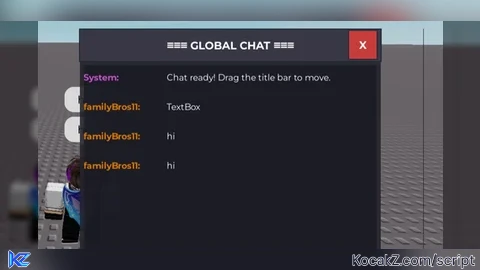
    FULL CHAT GUI SCRIPT - Delta Executor
    - Works on mobile
    - Drag enabled
    - ???
    - Can see yourself messages
--]]

local player = game.Players.LocalPlayer

-- Clear old GUI
local old = player.PlayerGui:FindFirstChild("FullChatGUI")
if old then old:Destroy() end

-- Create GUI
local gui = Instance.new("ScreenGui")
gui.Name = "FullChatGUI"
gui.Parent = player.PlayerGui
gui.ResetOnSpawn = false

-- Main Frame
local frame = Instance.new("Frame")
frame.Size = UDim2.new(0, 380, 0, 450)
frame.Position = UDim2.new(0.5, -190, 0.5, -225)
frame.BackgroundColor3 = Color3.fromRGB(35, 35, 45)
frame.BackgroundTransparency = 0.1
frame.BorderSizePixel = 0
frame.Parent = gui

-- DRAG FUNCTIONALITY
local dragging = false
local dragStart
local frameStart

frame.InputBegan:Connect(function(input)
    if input.UserInputType == Enum.UserInputType.Touch or input.UserInputType == Enum.UserInputType.MouseButton1 then
        dragging = true
        dragStart = input.Position
        frameStart = frame.Position
    end
end)

frame.InputEnded:Connect(function(input)
    dragging = false
end)

game:GetService("UserInputService").InputChanged:Connect(function(input)
    if dragging and (input.UserInputType == Enum.UserInputType.Touch or input.UserInputType == Enum.UserInputType.MouseMovement) then
        local delta = input.Position - dragStart
        frame.Position = UDim2.new(frameStart.X.Scale, frameStart.X.Offset + delta.X, frameStart.Y.Scale, frameStart.Y.Offset + delta.Y)
    end
end)

-- Title Bar
local title = Instance.new("TextLabel")
title.Size = UDim2.new(1, 0, 0, 40)
title.BackgroundColor3 = Color3.fromRGB(55, 55, 70)
title.Text = "≡≡≡ BUBBLE CHAT ≡≡≡"
title.TextColor3 = Color3.fromRGB(255, 255, 255)
title.Font = Enum.Font.GothamBold
title.TextSize = 16
title.Parent = frame

-- Close Button
local close = Instance.new("TextButton")
close.Size = UDim2.new(0, 35, 0, 35)
close.Position = UDim2.new(1, -40, 0, 2)
close.BackgroundColor3 = Color3.fromRGB(200, 60, 60)
close.Text = "X"
close.TextColor3 = Color3.fromRGB(255, 255, 255)
close.Font = Enum.Font.GothamBold
close.TextSize = 16
close.Parent = title
close.MouseButton1Click:Connect(function() gui:Destroy() end)

-- Chat Display (ScrollingFrame)
local chatDisplay = Instance.new("ScrollingFrame")
chatDisplay.Size = UDim2.new(1, -10, 1, -110)
chatDisplay.Position = UDim2.new(0, 5, 0, 45)
chatDisplay.BackgroundColor3 = Color3.fromRGB(25, 25, 35)
chatDisplay.BackgroundTransparency = 0.2
chatDisplay.BorderSizePixel = 0
chatDisplay.CanvasSize = UDim2.new(0, 0, 0, 0)
chatDisplay.ScrollBarThickness = 6
chatDisplay.Parent = frame

local messageLayout = Instance.new("UIListLayout")
messageLayout.Parent = chatDisplay
messageLayout.Padding = UDim.new(0, 5)

-- Input Area
local inputArea = Instance.new("Frame")
inputArea.Size = UDim2.new(1, -10, 0, 55)
inputArea.Position = UDim2.new(0, 5, 1, -60)
inputArea.BackgroundTransparency = 1
inputArea.Parent = frame

-- Text Box
local textBox = Instance.new("TextBox")
textBox.Size = UDim2.new(0.7, -5, 1, 0)
textBox.Position = UDim2.new(0, 0, 0, 0)
textBox.BackgroundColor3 = Color3.fromRGB(60, 60, 75)
textBox.TextColor3 = Color3.fromRGB(255, 255, 255)
textBox.PlaceholderText = "Type your message..."
textBox.PlaceholderColor3 = Color3.fromRGB(150, 150, 170)
textBox.Font = Enum.Font.Gotham
textBox.TextSize = 14
textBox.ClearTextOnFocus = false
textBox.Parent = inputArea

-- Send Button
local sendButton = Instance.new("TextButton")
sendButton.Size = UDim2.new(0, 70, 1, 0)
sendButton.Position = UDim2.new(0.73, 0, 0, 0)
sendButton.BackgroundColor3 = Color3.fromRGB(0, 120, 215)
sendButton.Text = "SEND"
sendButton.TextColor3 = Color3.fromRGB(255, 255, 255)
sendButton.Font = Enum.Font.GothamBold
sendButton.TextSize = 15
sendButton.Parent = inputArea

local buttonCorner = Instance.new("UICorner")
buttonCorner.CornerRadius = UDim.new(0, 6)
buttonCorner.Parent = sendButton

-- Username colors
local userColors = {}
local colorList = {
    Color3.fromRGB(0, 120, 215),
    Color3.fromRGB(0, 160, 80),
    Color3.fromRGB(200, 80, 200),
    Color3.fromRGB(220, 120, 0),
    Color3.fromRGB(180, 60, 60),
    Color3.fromRGB(0, 180, 180),
}

local function getUserColor(name)
    if not userColors[name] then
        userColors[name] = colorList[math.random(#colorList)]
    end
    return userColors[name]
end

-- Add message to display
local function addMessage(sender, message)
    local msgFrame = Instance.new("Frame")
    msgFrame.Size = UDim2.new(1, 0, 0, 32)
    msgFrame.BackgroundTransparency = 1
    msgFrame.Parent = chatDisplay

    local nameLabel = Instance.new("TextLabel")
    nameLabel.Size = UDim2.new(0, 95, 1, 0)
    nameLabel.BackgroundTransparency = 1
    nameLabel.Text = sender .. ":"
    nameLabel.TextColor3 = getUserColor(sender)
    nameLabel.Font = Enum.Font.GothamBold
    nameLabel.TextSize = 13
    nameLabel.TextXAlignment = Enum.TextXAlignment.Left
    nameLabel.Parent = msgFrame

    local msgLabel = Instance.new("TextLabel")
    msgLabel.Size = UDim2.new(1, -105, 1, 0)
    msgLabel.Position = UDim2.new(0, 105, 0, 0)
    msgLabel.BackgroundTransparency = 1
    msgLabel.TextColor3 = Color3.fromRGB(255, 255, 255)
    msgLabel.Font = Enum.Font.Gotham
    msgLabel.TextSize = 13
    msgLabel.TextXAlignment = Enum.TextXAlignment.Left
    msgLabel.Text = message
    msgLabel.TextWrapped = true
    msgLabel.Parent = msgFrame

    task.wait(0.05)
    chatDisplay.CanvasPosition = Vector2.new(0, chatDisplay.CanvasSize.Y.Offset)
end

-- Send to Roblox chat (everyone sees)
local function sendToRoblox(message)
    pcall(function()
        local remote = game:GetService("ReplicatedStorage"):FindFirstChild("DefaultChatSystemChatEvents")
        if remote and remote:FindFirstChild("SayMessageRequest") then
            remote.SayMessageRequest:FireServer(message, "All")
        end
    end)
end

-- Create bubble above player
local function createBubble(message)
    local character = player.Character
    if not character then
        character = player.CharacterAdded:Wait()
    end
    local head = character:FindFirstChild("Head")
    if not head then return end

    pcall(function()
        game:GetService("Chat"):Chat(head, message)
    end)
end

-- Send message
local function sendMessage()
    local message = textBox.Text
    if message == "" then return end

    addMessage(player.Name, message)
    sendToRoblox(message)
    createBubble(message)
    textBox.Text = ""
end

-- Listen for other players
local function listenForMessages()
    pcall(function()
        local remote = game:GetService("ReplicatedStorage"):FindFirstChild("DefaultChatSystemChatEvents")
        if remote and remote:FindFirstChild("OnMessageDone") then
            remote.OnMessageDone.OnClientEvent:Connect(function(data)
                if data.FromSpeaker and data.FromSpeaker ~= player.Name then
                    addMessage(data.FromSpeaker, data.Message)
                end
            end)
        end
    end)
end

-- Start listening
listenForMessages()

-- Button click
sendButton.MouseButton1Click:Connect(sendMessage)

-- Enter key
textBox.FocusLost:Connect(function(enter)
    if enter then sendMessage() end
end)

-- Welcome message
addMessage("System", "Chat ready! Drag the title bar to move.", false)

print("✅ Full Chat GUI loaded!")![[KEYLESS] Moondiety Script | 17+ supported Games](https://scriptblox.com/images/sb/0-1753093706828.png)


can everyone see it?
@Yogurt121234 No only your self
@bobiruwufsss oh ok
@Yogurt121234 Just look my word "Yourself"