


KeylessUniversal
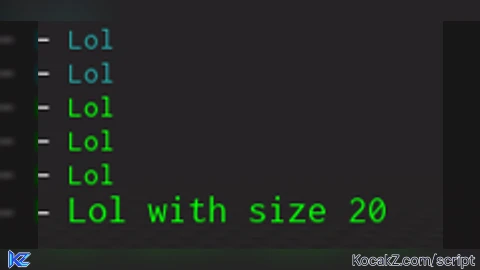
local RunService = game:GetService("RunService")
local CoreGui    = game:GetService("CoreGui")

local Output     = {}
Output.__index   = Output

function Output:ChangeColor(): RBXScriptConnection
    local conn = RunService.Heartbeat:Connect(function()
        local DevConsoleMaster = CoreGui:FindFirstChild("DevConsoleMaster")
        if not DevConsoleMaster then return end

        for _, text in DevConsoleMaster:GetDescendants() do
            if text:IsA("TextLabel") then
                text.RichText = true
            end
        end
    end)

    return conn
end

function Output:print(color: string, text: string, size: number | nil)
    local _text = '<font color="rgb(' .. color .. ')"'
    if size then
        _text = _text .. ' size="' .. tostring(size) .. '"'
    end

    _text = _text .. '>' ..text .. '</font>'
    print(_text)
end

local connection = Output:ChangeColor()
Output:print("0,255,0", "Lol")
Output:print("0,255,0", "Lol with size 20", 20)


nice
101% unc confirmed