

Key RequiredUniversal
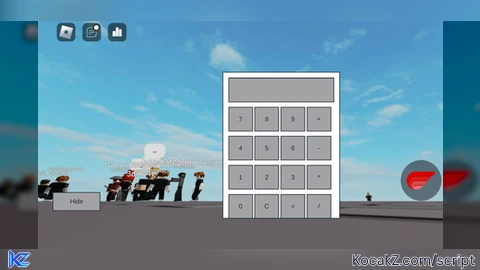
-- GUI Layout
local screenGui = Instance.new("ScreenGui")
screenGui.Parent = game.Players.LocalPlayer:WaitForChild("PlayerGui")

local frame = Instance.new("Frame")
frame.Size = UDim2.new(0, 200, 0, 250)
frame.Position = UDim2.new(0.5, -100, 0.5, -125)
frame.BackgroundColor3 = Color3.new(1, 1, 1)
frame.Parent = screenGui

local textBox = Instance.new("TextBox")
textBox.Size = UDim2.new(0, 180, 0, 40)
textBox.Position = UDim2.new(0, 10, 0, 10)
textBox.Text = ""
textBox.Parent = frame

local buttonNames = {"7", "8", "9", "+", "4", "5", "6", "-", "1", "2", "3", "*", "0", "C", "=", "/"}

for i, name in ipairs(buttonNames) do
    local button = Instance.new("TextButton")
    button.Size = UDim2.new(0, 40, 0, 40)
    button.Text = name
    button.Parent = frame

    local x = ((i - 1) % 4) * 45 + 10
    local y = math.floor((i - 1) / 4) * 50 + 60
    button.Position = UDim2.new(0, x, 0, y)
end

local hideButton = Instance.new("TextButton")
hideButton.Size = UDim2.new(0, 80, 0, 30)
hideButton.Position = UDim2.new(0, 10, 0, 260)
hideButton.Text = "Hide"
hideButton.Parent = screenGui

local showButton = Instance.new("TextButton")
showButton.Size = UDim2.new(0, 80, 0, 30)
showButton.Position = UDim2.new(0, 100, 0, 260)
showButton.Text = "Show"
showButton.Visible = false
showButton.Parent = screenGui

-- Calculator Logic
local function evaluateExpression(expression)
    local func = loadstring("return " .. expression)
    if func then
        local success, result = pcall(func)
        if success then
            return result
        else
            return "Error"
        end
    else
        return "Error"
    end
end

local input = ""
local function onButtonClick(button)
    local buttonText = button.Text
    if buttonText == "=" then
        textBox.Text = tostring(evaluateExpression(input))
        input = textBox.Text
    elseif buttonText == "C" then
        input = ""
        textBox.Text = input
    else
        input = input .. buttonText
        textBox.Text = input
    end
end

for _, button in ipairs(frame:GetChildren()) do
    if button:IsA("TextButton") then
        button.MouseButton1Click:Connect(function()
            onButtonClick(button)
        end)
    end
end

-- Movable Frame
local dragging
local dragInput
local dragStart
local startPos

local function update(input)
    local delta = input.Position - dragStart
    frame.Position = UDim2.new(startPos.X.Scale, startPos.X.Offset + delta.X, startPos.Y.Scale, startPos.Y.Offset + delta.Y)
end

frame.InputBegan:Connect(function(input)
    if input.UserInputType == Enum.UserInputType.MouseButton1 or input.UserInputType == Enum.UserInputType.Touch then
        dragging = true
        dragStart = input.Position
        startPos = frame.Position

        input.Changed:Connect(function()
            if input.UserInputState == Enum.UserInputState.End then
                dragging = false
            end
        end)
    end
end)

frame.InputChanged:Connect(function(input)
    if input.UserInputType == Enum.UserInputType.MouseMovement or input.UserInputType == Enum.UserInputType.Touch then
        dragInput = input
    end
end)

game:GetService("UserInputService").InputChanged:Connect(function(input)
    if dragging and input == dragInput then
        update(input)
    end
end)

-- Hide and Show Button Functionality
hideButton.MouseButton1Click:Connect(function()
    frame.Visible = false
    hideButton.Visible = false
    showButton.Visible = true
end)

showButton.MouseButton1Click:Connect(function()
    frame.Visible = true
    hideButton.Visible = true
    showButton.Visible = false
end)![Sir Meme Hub | [17 GAMES] [$14.99 LIFETIME] | FARM/AIM/ESP](https://cdn.kocakz.me/images/e504c71fa02f6af2fd2c60f10f68873bd0f27b9de310639fc51d740f46e3c289.webp)

why the hell do i need this
Most useful script ever
great, i like it