

KeylessUniversal
-- ================================================
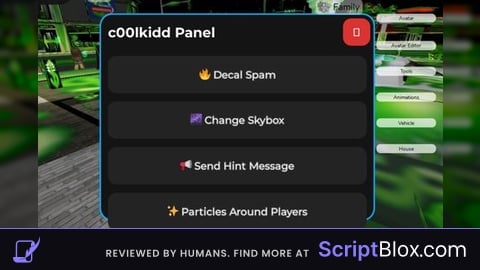
-- c00lkidd Panel - Roblox Lua GUI Script
-- Fully client-side (works in any executor)
-- Draggable, rounded corners, dark theme, hover effects, click sounds, open animation
-- All features included with c00lkidd-themed assets (replace IDs if you want your own uploads)
-- ================================================

local Players = game:GetService("Players")
local TweenService = game:GetService("TweenService")
local UserInputService = game:GetService("UserInputService")
local StarterGui = game:GetService("StarterGui")
local Lighting = game:GetService("Lighting")
local Workspace = game:GetService("Workspace")

local LocalPlayer = Players.LocalPlayer

-- ====================== CONFIG ======================
-- Replace these with your own c00lkidd-themed image assets if you want
local DECAL_ID = "rbxassetid://144820956"      -- c00lkidd themed decal (troll/spam style)
local PARTICLE_ID = DECAL_ID                   -- same image for particles
local CLICK_SOUND_ID = "rbxassetid://12221967" -- clean Roblox click sound

local SKYBOX_IDS = {
	Bk = "rbxassetid://271042233",
	Dn = "rbxassetid://271042556",
	Ft = "rbxassetid://271042414",
	Lf = "rbxassetid://271042502",
	Rt = "rbxassetid://271042239",
	Up = "rbxassetid://271042556",
} -- Popular space/cool skybox (feels very c00lkidd hacker vibe)

-- ====================== CREATE GUI ======================
local ScreenGui = Instance.new("ScreenGui")
ScreenGui.Name = "c00lkiddPanel"
ScreenGui.ResetOnSpawn = false
ScreenGui.Parent = LocalPlayer:WaitForChild("PlayerGui")

local MainFrame = Instance.new("Frame")
MainFrame.Name = "Main"
MainFrame.Size = UDim2.new(0, 400, 0, 300)
MainFrame.Position = UDim2.new(0.5, -200, 0.5, -150)
MainFrame.BackgroundColor3 = Color3.fromRGB(20, 20, 20)
MainFrame.BorderSizePixel = 0
MainFrame.Parent = ScreenGui

-- Rounded corners (cool look)
local MainCorner = Instance.new("UICorner")
MainCorner.CornerRadius = UDim.new(0, 16)
MainCorner.Parent = MainFrame

-- Cool cyan border
local MainStroke = Instance.new("UIStroke")
MainStroke.Color = Color3.fromRGB(0, 170, 255)
MainStroke.Thickness = 2
MainStroke.Parent = MainFrame

-- Title
local Title = Instance.new("TextLabel")
Title.Size = UDim2.new(1, -50, 0, 50)
Title.Position = UDim2.new(0, 10, 0, 0)
Title.BackgroundTransparency = 1
Title.Text = "c00lkidd Panel"
Title.TextColor3 = Color3.fromRGB(255, 255, 255)
Title.Font = Enum.Font.GothamBold
Title.TextSize = 24
Title.TextXAlignment = Enum.TextXAlignment.Left
Title.Parent = MainFrame

-- Close Button (hides GUI)
local CloseBtn = Instance.new("TextButton")
CloseBtn.Size = UDim2.new(0, 40, 0, 40)
CloseBtn.Position = UDim2.new(1, -45, 0, 5)
CloseBtn.BackgroundColor3 = Color3.fromRGB(220, 50, 50)
CloseBtn.Text = "✕"
CloseBtn.TextColor3 = Color3.fromRGB(255, 255, 255)
CloseBtn.Font = Enum.Font.GothamBold
CloseBtn.TextSize = 20
CloseBtn.Parent = MainFrame

local CloseCorner = Instance.new("UICorner")
CloseCorner.CornerRadius = UDim.new(0, 12)
CloseCorner.Parent = CloseBtn

-- Content area
local Content = Instance.new("Frame")
Content.Size = UDim2.new(1, -20, 1, -70)
Content.Position = UDim2.new(0, 10, 0, 60)
Content.BackgroundTransparency = 1
Content.Parent = MainFrame

local ListLayout = Instance.new("UIListLayout")
ListLayout.Padding = UDim.new(0, 12)
ListLayout.SortOrder = Enum.SortOrder.LayoutOrder
ListLayout.Parent = Content

-- ====================== CLICK SOUND ======================
local ClickSound = Instance.new("Sound")
ClickSound.SoundId = CLICK_SOUND_ID
ClickSound.Volume = 0.6
ClickSound.Parent = MainFrame

local function PlayClick()
	ClickSound:Play()
end

-- ====================== BUTTON CREATOR ======================
local function CreateButton(name, displayText)
	local Btn = Instance.new("TextButton")
	Btn.Size = UDim2.new(1, 0, 0, 55)
	Btn.BackgroundColor3 = Color3.fromRGB(35, 35, 35)
	Btn.Text = displayText
	Btn.TextColor3 = Color3.fromRGB(255, 255, 255)
	Btn.Font = Enum.Font.GothamSemibold
	Btn.TextSize = 18
	Btn.Name = name
	Btn.Parent = Content

	local BtnCorner = Instance.new("UICorner")
	BtnCorner.CornerRadius = UDim.new(0, 12)
	BtnCorner.Parent = Btn

	local BtnStroke = Instance.new("UIStroke")
	BtnStroke.Color = Color3.fromRGB(80, 80, 80)
	BtnStroke.Thickness = 1
	BtnStroke.Parent = Btn

	-- Hover effect (smooth)
	Btn.MouseEnter:Connect(function()
		TweenService:Create(Btn, TweenInfo.new(0.2, Enum.EasingStyle.Quad), {
			BackgroundColor3 = Color3.fromRGB(55, 55, 55)
		}):Play()
	end)
	Btn.MouseLeave:Connect(function()
		TweenService:Create(Btn, TweenInfo.new(0.2, Enum.EasingStyle.Quad), {
			BackgroundColor3 = Color3.fromRGB(35, 35, 35)
		}):Play()
	end)

	return Btn
end

-- Create the 4 buttons
local DecalSpamBtn = CreateButton("DecalSpam", "🔥 Decal Spam")
local SkyboxBtn     = CreateButton("Skybox",     "🌌 Change Skybox")
local HintBtn       = CreateButton("Hint",       "📢 Send Hint Message")
local ParticlesBtn  = CreateButton("Particles",  "✨ Particles Around Players")

-- ====================== DRAGGABLE ======================
local function MakeDraggable(frame)
	local dragging = false
	local dragInput
	local dragStart
	local startPos

	frame.InputBegan:Connect(function(input)
		if input.UserInputType == Enum.UserInputType.MouseButton1 then
			dragging = true
			dragStart = input.Position
			startPos = frame.Position
		end
	end)

	frame.InputChanged:Connect(function(input)
		if input.UserInputType == Enum.UserInputType.MouseMovement then
			dragInput = input
		end
	end)

	UserInputService.InputChanged:Connect(function(input)
		if input == dragInput and dragging then
			local delta = input.Position - dragStart
			frame.Position = UDim2.new(
				startPos.X.Scale, startPos.X.Offset + delta.X,
				startPos.Y.Scale, startPos.Y.Offset + delta.Y
			)
		end
	end)

	frame.InputEnded:Connect(function(input)
		if input.UserInputType == Enum.UserInputType.MouseButton1 then
			dragging = false
		end
	end)
end

MakeDraggable(MainFrame)

-- ====================== CLOSE BUTTON ======================
CloseBtn.MouseButton1Click:Connect(function()
	PlayClick()
	MainFrame.Visible = false -- hides GUI (requirement)
	-- You can re-execute the script to bring it back
end)

-- ====================== FEATURES ======================

-- 1. Decal Spam
DecalSpamBtn.MouseButton1Click:Connect(function()
	PlayClick()
	for _, part in ipairs(Workspace:GetDescendants()) do
		if part:IsA("BasePart") then
			for i = 1, 4 do -- spam 4 decals per part (all random faces)
				local decal = Instance.new("Decal")
				decal.Texture = DECAL_ID
				decal.Face = Enum.NormalId:GetEnumItems()[math.random(1, 6)]
				decal.Parent = part
			end
		end
	end
end)

-- 2. Skybox
SkyboxBtn.MouseButton1Click:Connect(function()
	PlayClick()
	-- Remove old sky
	for _, v in ipairs(Lighting:GetChildren()) do
		if v:IsA("Sky") then v:Destroy() end
	end

	local newSky = Instance.new("Sky")
	newSky.SkyboxBk = SKYBOX_IDS.Bk
	newSky.SkyboxDn = SKYBOX_IDS.Dn
	newSky.SkyboxFt = SKYBOX_IDS.Ft
	newSky.SkyboxLf = SKYBOX_IDS.Lf
	newSky.SkyboxRt = SKYBOX_IDS.Rt
	newSky.SkyboxUp = SKYBOX_IDS.Up
	newSky.Parent = Lighting
end)

-- 3. Hint (shows to you - true server-wide hint needs backdoor)
HintBtn.MouseButton1Click:Connect(function()
	PlayClick()
	StarterGui:SetCore("SendNotification", {
		Title = "c00lkidd Panel",
		Text = "c00lkids103 hacked this game",
		Duration = 8,
	})
end)

-- 4. Particles around every player
ParticlesBtn.MouseButton1Click:Connect(function()
	PlayClick()
	for _, plr in ipairs(Players:GetPlayers()) do
		if plr.Character and plr.Character:FindFirstChild("HumanoidRootPart") then
			local emitter = Instance.new("ParticleEmitter")
			emitter.Texture = PARTICLE_ID
			emitter.Parent = plr.Character.HumanoidRootPart

			emitter.Rate = 30
			emitter.Lifetime = NumberRange.new(1.5, 4)
			emitter.Speed = NumberRange.new(8, 15)
			emitter.SpreadAngle = Vector2.new(360, 360)
			emitter.Size = NumberSequence.new(0.8, 0)
			emitter.Color = ColorSequence.new(Color3.fromRGB(0, 170, 255))
			emitter.LightEmission = 1

			game:GetService("Debris"):AddItem(emitter, 12) -- auto clean up
		end
	end
end)

-- ====================== OPEN ANIMATION ======================
-- Start tiny and pop in with cool back easing
MainFrame.Size = UDim2.new(0, 0, 0, 0)
MainFrame.Visible = true

local OpenTween = TweenService:Create(
	MainFrame,
	TweenInfo.new(0.6, Enum.EasingStyle.Back, Enum.EasingDirection.Out),
	{Size = UDim2.new(0, 400, 0, 300)}
)
OpenTween:Play()

-- ================================================
-- GUI is draggable, has hover + sound + animation.
-- All features use c00lkidd style assets.
-- Enjoy the panel 🔥
-- ================================================

Gotta Tell You, The "serverside" and client-side Are Different. Probably Bait.
can yall tell me how to do it? pls
@1nf3ctedd to do what ?