


Key RequiredUniversal
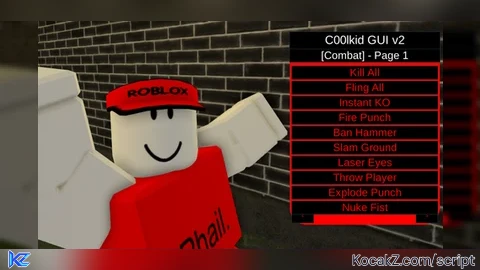
-- c00lgui, TEAM C00LKIDD!
local screenGui = Instance.new("ScreenGui")
screenGui.Name = "C00lgui"
screenGui.Parent = game.Players.LocalPlayer:WaitForChild("PlayerGui")

local icon = Instance.new("ImageLabel")
icon.Size = UDim2.new(0, 50, 0, 50)
icon.Position = UDim2.new(0, 5, 0, 5)
icon.BackgroundTransparency = 1
icon.Image = "rbxassetid://130381521049312"
icon.Parent = screenGui

local frame = Instance.new("Frame")
frame.Size = UDim2.new(0, 350, 0, 450)
frame.Position = UDim2.new(0.5, -175, 0.5, -225)
frame.BackgroundColor3 = Color3.fromRGB(255, 0, 0)
frame.Active = true
frame.Draggable = true
frame.Parent = screenGui

local uiCorner = Instance.new("UICorner")
uiCorner.CornerRadius = UDim.new(0, 40)
uiCorner.Parent = frame

local titleLabel = Instance.new("TextLabel")
titleLabel.Size = UDim2.new(1, 0, 0, 40)
titleLabel.BackgroundColor3 = Color3.fromRGB(0, 0, 0)
titleLabel.Text = "C00lkid GUI v2"
titleLabel.TextColor3 = Color3.fromRGB(255, 255, 255)
titleLabel.TextSize = 20
titleLabel.Parent = frame

local pages = {"Combat", "Movement", "Server Chaos", "Utility", "Secret"}
local currentPage = 1
local buttons = {}

local pageLabel = Instance.new("TextLabel")
pageLabel.Size = UDim2.new(1, 0, 0, 30)
pageLabel.Position = UDim2.new(0, 0, 0, 40)
pageLabel.BackgroundColor3 = Color3.fromRGB(0, 0, 0)
pageLabel.TextColor3 = Color3.fromRGB(255, 255, 255)
pageLabel.TextSize = 18
pageLabel.Parent = frame

local nextPageBtn = Instance.new("TextButton")
nextPageBtn.Size = UDim2.new(0, 50, 0, 30)
nextPageBtn.Position = UDim2.new(1, -55, 1, -35)
nextPageBtn.Text = ">"
nextPageBtn.TextColor3 = Color3.fromRGB(255, 0, 0)
nextPageBtn.BackgroundColor3 = Color3.fromRGB(0, 0, 0)
nextPageBtn.Parent = frame

local prevPageBtn = Instance.new("TextButton")
prevPageBtn.Size = UDim2.new(0, 50, 0, 30)
prevPageBtn.Position = UDim2.new(0, 5, 1, -35)
prevPageBtn.Text = "<"
prevPageBtn.TextColor3 = Color3.fromRGB(255, 0, 0)
prevPageBtn.BackgroundColor3 = Color3.fromRGB(0, 0, 0)
prevPageBtn.Parent = frame

-- Functions
local function clearButtons()
	for _, btn in pairs(buttons) do
		btn:Destroy()
	end
	table.clear(buttons)
end

local allScripts = {
	Combat = {
		{"Kill All", function()
			for _, player in pairs(game.Players:GetPlayers()) do
				if player.Character and player.Character:FindFirstChild("Humanoid") then
					player.Character.Humanoid.Health = 0
				end
			end
		end},
		{"Fling All", function()
			for _, p in pairs(game.Players:GetPlayers()) do
				if p.Character and p.Character:FindFirstChild("HumanoidRootPart") then
					p.Character.HumanoidRootPart.Velocity = Vector3.new(9999,9999,9999)
				end
			end
		end},
		{"Instant KO", function()
			local target = game.Players:GetPlayers()[2]
			if target and target.Character then
				target.Character:BreakJoints()
			end
		end},
		{"Fire Punch", function()
			-- Fun animation
		end},
		{"Ban Hammer", function()
			-- Imaginary hammer ban effect
		end},
		{"Slam Ground", function()
			-- AoE fake slam
		end},
		{"Laser Eyes", function()
			-- Eye lasers pew pew
		end},
		{"Throw Player", function()
			-- Fake throw animation
		end},
		{"Explode Punch", function()
			-- Boom punch
		end},
		{"Nuke Fist", function()
			-- Combo animation with fake effect
		end},
	},
	Movement = {
		{"Infinite Jump", function()
			game:GetService("UserInputService").JumpRequest:Connect(function()
				game.Players.LocalPlayer.Character:FindFirstChildOfClass("Humanoid"):ChangeState("Jumping")
			end)
		end},
		{"Freecam", function()
			-- Same freecam code here
		end},
		{"Fly Mode", function()
			-- Flying animation or BodyVelocity
		end},
		{"Speed Boost", function()
			game.Players.LocalPlayer.Character.Humanoid.WalkSpeed = 100
		end},
		{"Super Jump", function()
			game.Players.LocalPlayer.Character.Humanoid.JumpPower = 150
		end},
		{"Teleport Forward", function()
			local char = game.Players.LocalPlayer.Character
			char:SetPrimaryPartCFrame(char.PrimaryPart.CFrame * CFrame.new(0, 0, -50))
		end},
		{"Teleport to Lobby", function()
			game.Players.LocalPlayer.Character:MoveTo(Vector3.new(0, 50, 0))
		end},
		{"Invisible", function()
			for _, p in pairs(game.Players.LocalPlayer.Character:GetDescendants()) do
				if p:IsA("BasePart") and p.Name ~= "HumanoidRootPart" then p.Transparency = 1 end
			end
		end},
		{"Teleport to Player", function()
			-- Optional
		end},
		{"Slow-Mo", function()
			-- Slow walk effect
		end},
	},
	Server_Chaos = {
		{"Destroy Server", function()
			-- Kick all
		end},
		{"Lag Server", function()
			while true do game.Workspace:Clone() end
		end},
		{"Nuke Map", function()
			-- Boom effect
		end},
		{"Explode Everything", function()
			-- Explosions
		end},
		{"Anchor Chaos", function()
			-- Unanchor all
		end},
		{"Delete All Parts", function()
			for _, obj in pairs(workspace:GetChildren()) do if obj:IsA("BasePart") then obj:Destroy() end end
		end},
		{"Break Gravity", function()
			workspace.Gravity = 0
		end},
		{"Rain Parts", function()
			-- Loop part spawn
		end},
		{"Bounce Everything", function()
			-- Bouncy part loop
		end},
		{"Spin World", function()
			-- Rotate all parts
		end},
	},
	Utility = {
		{"God Mode", function()
			local h = game.Players.LocalPlayer.Character:FindFirstChild("Humanoid")
			h.MaxHealth = math.huge
			h.Health = math.huge
		end},
		{"ESP", function()
			-- Add ESP outlines
		end},
		{"TP Tool", function()
			-- Tool for clicking teleport
		end},
		{"Admin Chat", function()
			-- Global chat mimic
		end},
		{"Clone Player", function()
			-- Dummy clone
		end},
		{"View Others", function()
			-- Set camera to others
		end},
		{"Tool Giver", function()
			-- Give all tools
		end},
		{"Part Spawner", function()
			-- Spawns parts
		end},
		{"Click Destroy", function()
			-- Click to delete part
		end},
		{"Name Changer", function()
			-- Spoof name
		end},
	},
	Secret = {
		{"C00lkid Rises", function()
			-- Cool C00lkid spawn animation
		end},
		{"Glitch Mode", function()
			-- Crazy part effects
		end},
		{"Spawn Clone Army", function()
			-- Spawn multiple dummies
		end},
		{"Rainbow Chaos", function()
			-- Color loops
		end},
		{"Jumpscare LOL", function()
			-- Fake jumpscare
		end},
		{"Script Error Flood", function()
			-- GUI spam
		end},
		{"Weird Music", function()
			-- Start strange song
		end},
		{"Dizzy Effect", function()
			-- Rotate player camera
		end},
		{"World Flip", function()
			-- Invert everything
		end},
		{"Clone Yourself x100", function()
			-- Laggy fun
		end},
	}
}

local function createButton(name, position, action)
	local button = Instance.new("TextButton")
	button.Size = UDim2.new(1, -10, 0, 30)
	button.Position = position
	button.BackgroundColor3 = Color3.fromRGB(0, 0, 0)
	button.Text = name
	button.TextColor3 = Color3.fromRGB(255, 0, 0)
	button.TextSize = 18
	button.Parent = frame
	table.insert(buttons, button)
	button.MouseButton1Click:Connect(action)
end

local function updatePage()
	clearButtons()
	local name = pages[currentPage]
	local scriptList = allScripts[name:gsub(" ", "_")]
	pageLabel.Text = "[" .. name .. "] - Page " .. currentPage
	for i, v in ipairs(scriptList) do
		createButton(v[1], UDim2.new(0, 5, 0, 80 + (i-1) * 35), v[2])
	end
end

nextPageBtn.MouseButton1Click:Connect(function()
	if currentPage < #pages then
		currentPage += 1
		updatePage()
	end
end)

prevPageBtn.MouseButton1Click:Connect(function()
	if currentPage > 1 then
		currentPage -= 1
		updatePage()
	end
end)

updatePage()

-- team c00lkidd join today!


-- not the end of the script


-- Secret

local player = game.Players.LocalPlayer
local screenGui = Instance.new("ScreenGui")
screenGui.Name = "C00lguiV2"
screenGui.Parent = player:WaitForChild("PlayerGui")

-- Create the corner button
local box = Instance.new("TextButton")
box.Size = UDim2.new(0, 100, 0, 50)
box.Position = UDim2.new(1, -120, 0, 20)
box.BackgroundColor3 = Color3.fromRGB(0, 0, 0)
box.BorderColor3 = Color3.fromRGB(255, 0, 0)
box.BorderSizePixel = 3
box.Text = "Dont tap"
box.TextColor3 = Color3.fromRGB(255, 0, 0)
box.Parent = screenGui

-- Add corner to box
local boxCorner = Instance.new("UICorner")
boxCorner.CornerRadius = UDim.new(0, 12)
boxCorner.Parent = box

-- Main GUI
local c00lgui = Instance.new("Frame")
c00lgui.Size = UDim2.new(0, 400, 0, 600)
c00lgui.Position = UDim2.new(0.5, -200, 0.5, -300)
c00lgui.BackgroundColor3 = Color3.fromRGB(0, 0, 0)
c00lgui.BorderColor3 = Color3.fromRGB(255, 0, 0)
c00lgui.BorderSizePixel = 5
c00lgui.Visible = false
c00lgui.Parent = screenGui

-- Add corner to main GUI
local guiCorner = Instance.new("UICorner")
guiCorner.CornerRadius = UDim.new(0, 16)
guiCorner.Parent = c00lgui

-- Server Destruction Button
local destructionButton = Instance.new("TextButton")
destructionButton.Size = UDim2.new(0, 200, 0, 50)
destructionButton.Position = UDim2.new(0.5, -100, 0.8, -25)
destructionButton.BackgroundColor3 = Color3.fromRGB(0, 0, 0)
destructionButton.BorderColor3 = Color3.fromRGB(255, 0, 0)
destructionButton.BorderSizePixel = 3
destructionButton.Text = "Destroy Server"
destructionButton.TextColor3 = Color3.fromRGB(255, 0, 0)
destructionButton.Parent = c00lgui

-- Add corner to button
local destroyCorner = Instance.new("UICorner")
destroyCorner.CornerRadius = UDim.new(0, 10)
destroyCorner.Parent = destructionButton

-- Scrolling Message Area
local messageHolder = Instance.new("ScrollingFrame")
messageHolder.Size = UDim2.new(1, -20, 0.6, 0)
messageHolder.Position = UDim2.new(0, 10, 0, 10)
messageHolder.BackgroundTransparency = 1
messageHolder.CanvasSize = UDim2.new(0, 0, 5, 0)
messageHolder.BorderSizePixel = 0
messageHolder.ScrollBarImageColor3 = Color3.fromRGB(255, 0, 0)
messageHolder.Parent = c00lgui

-- Add corner to message area
local messageCorner = Instance.new("UICorner")
messageCorner.CornerRadius = UDim.new(0, 10)
messageCorner.Parent = messageHolder

-- Sound effect
local staplerSound = Instance.new("Sound")
staplerSound.Name = "StaplerGodSound"
staplerSound.SoundId = "rbxassetid://9118823106" -- You can change this
staplerSound.Volume = 1
staplerSound.Looped = true
staplerSound.Parent = screenGui

-- Function to create message labels
local function addMessage(text)
	local label = Instance.new("TextLabel")
	label.Size = UDim2.new(1, 0, 0, 30)
	label.BackgroundTransparency = 1
	label.Text = text
	label.TextColor3 = Color3.fromRGB(255, 0, 0)
	label.TextScaled = true
	label.Font = Enum.Font.GothamBlack
	label.Parent = messageHolder
	messageHolder.CanvasSize = UDim2.new(0, 0, 0, #messageHolder:GetChildren() * 30)
end

-- Show GUI, play sound, spam messages
box.MouseButton1Click:Connect(function()
	c00lgui.Visible = true
	staplerSound:Play()

	coroutine.wrap(function()
		while c00lgui.Visible do
			addMessage("GOD IS HERE")
			wait(0.5)
		end
	end)()
end)

-- Server destruction logic
destructionButton.MouseButton1Click:Connect(function()
	for _, part in pairs(workspace:GetDescendants()) do
		if part:IsA("BasePart") then
			part:Destroy()
		end
	end
end)


-- team c00lkidd join today!

-- (updating alot)


V2! Hope your happy...!
@c00lkidoffical yes
what games can i use this in?
@dominikpelsoczi i recommend obby creator and filtering disabled games, or mm2.
thanks
It works but half the commands don't work I used in mm2 if u have directions please help
@ababeti i'll update it soon for mm2, thank you for the bug report!
Ofc
Doesn’t work one mm2 for me pls fix!
Plz lmk when updated
How do I enter the script cmds? Do I say exact phrases in chat? Is there a gui thats supposed to pop up?
how do i use the hack i am new to scrip bloc
@ylashkabest You're going to have to download any executor that supports Lua Executor. Then, copy the script and enter it in the Lua Executor and send or whatever button you got.
It's only effecting me. No one else. @c00lkidoffical
how do i get it to work
it's not work?
this guy got viewed by like 11k people in a youtube video when all this is client sided i dont recommend i can recommend if you wanna have fun but for real no. MASTERMZ or sum carried you bro.. you just c00lkidd d rider again you still have allegation that you using chatgpt.
Allmoste evvery button Doesnt work , 2/10
when i got the script it worked now it doesn't work
got disconected when iused kill all
were i enter this script
how i enter
is it FE?
is it fe?
HOW DO I DOWNLOAD IT
most of the combat doesnt work
Does this work for mobile?
Can I get ip banned for this?
я скачал а что дальше делать
i have a question... how to turn on (im on windows)
hey i dont know how to set it up could someone please explain
Yo how to set it up??
i want to hack but i dont understand
How do I download into Roblox
bro anything isn't working
i cant activate it
How I Can Used this
is fe?
mam pytanie jak mam to zapisać na TXT
@c00kidoficjalna
ej jak to wgrać na roblox
~como eu uso esse script? onde eu coloco?
How do put the exec on Roblox like how does it go to Roblox?
Como lo utilizo
Esque no me sale el panel
No sé que hacer para que me salga el panel
Приветик я так понимаю он визуальный ? Если да то я напишу потом
how to use it?
pls help
What i need for use it ¿a executor?
dont works