

KeylessUniversal
local ScreenGui = Instance.new("ScreenGui")
local MainFrame = Instance.new("Frame")
local ScrollingFrame = Instance.new("ScrollingFrame")
local UIListLayout = Instance.new("UIListLayout")
local Title = Instance.new("TextLabel")

-- Setup UI
ScreenGui.Name = "UniversalButtonSpy"
ScreenGui.Parent = game:GetService("CoreGui")
ScreenGui.ResetOnSpawn = false

MainFrame.Name = "MainFrame"
MainFrame.Parent = ScreenGui
MainFrame.BackgroundColor3 = Color3.fromRGB(30, 30, 30)
MainFrame.BorderSizePixel = 0
MainFrame.Position = UDim2.new(0.3, 0, 0.3, 0)
MainFrame.Size = UDim2.new(0, 260, 0, 300)
MainFrame.Active = true
MainFrame.Draggable = true

Title.Parent = MainFrame
Title.Size = UDim2.new(1, 0, 0, 35)
Title.BackgroundColor3 = Color3.fromRGB(180, 50, 50) -- Red theme for mobile spy
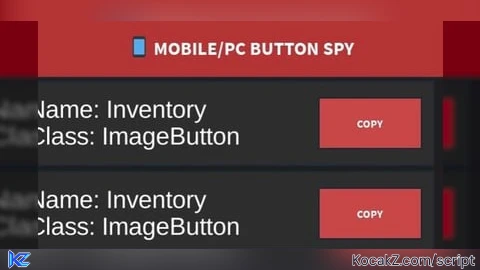
Title.Text = "📱 MOBILE/PC BUTTON SPY"
Title.TextColor3 = Color3.fromRGB(255, 255, 255)
Title.TextSize = 14
Title.Font = Enum.Font.SourceSansBold

ScrollingFrame.Parent = MainFrame
ScrollingFrame.Position = UDim2.new(0, 0, 0, 35)
ScrollingFrame.Size = UDim2.new(1, 0, 1, -35)
ScrollingFrame.BackgroundTransparency = 1
ScrollingFrame.CanvasSize = UDim2.new(0, 0, 0, 0)
ScrollingFrame.ScrollBarThickness = 5

UIListLayout.Parent = ScrollingFrame
UIListLayout.SortOrder = Enum.SortOrder.LayoutOrder
UIListLayout.Padding = UDim.new(0, 5)

local function AddButtonToList(obj)
    local ButtonFrame = Instance.new("Frame")
    local NameLabel = Instance.new("TextLabel")
    local CopyBtn = Instance.new("TextButton")

    ButtonFrame.Size = UDim2.new(0.95, 0, 0, 50)
    ButtonFrame.BackgroundColor3 = Color3.fromRGB(45, 45, 45)
    ButtonFrame.Parent = ScrollingFrame

    NameLabel.Parent = ButtonFrame
    NameLabel.Size = UDim2.new(0.7, 0, 1, 0)
    NameLabel.BackgroundTransparency = 1
    NameLabel.Text = "Name: " .. obj.Name .. "\nClass: " .. obj.ClassName
    NameLabel.TextColor3 = Color3.fromRGB(255, 255, 255)
    NameLabel.TextSize = 11
    NameLabel.TextXAlignment = Enum.TextXAlignment.Left
    NameLabel.TextWrapped = true

    CopyBtn.Parent = ButtonFrame
    CopyBtn.Position = UDim2.new(0.72, 0, 0.2, 0)
    CopyBtn.Size = UDim2.new(0.25, 0, 0.6, 0)
    CopyBtn.BackgroundColor3 = Color3.fromRGB(200, 70, 70)
    CopyBtn.Text = "COPY"
    CopyBtn.TextColor3 = Color3.fromRGB(255, 255, 255)
    CopyBtn.Font = Enum.Font.SourceSansBold

    CopyBtn.MouseButton1Click:Connect(function()
        setclipboard(obj:GetFullName())
        CopyBtn.Text = "OK!"
        task.wait(0.5)
        CopyBtn.Text = "COPY"
    end)

    ScrollingFrame.CanvasSize = UDim2.new(0, 0, 0, UIListLayout.AbsoluteContentSize.Y)
end

-- DETECTION LOGIC (MOBILE + PC)
local UserInputService = game:GetService("UserInputService")
local Player = game:GetService("Players").LocalPlayer

local function ProcessInput(input)
    -- This handles BOTH Mouse clicks and Mobile Taps
    if input.UserInputType == Enum.UserInputType.MouseButton1 or input.UserInputType == Enum.UserInputType.Touch then
        local pos = input.Position
        local guiObjects = Player.PlayerGui:GetGuiObjectsAtPosition(pos.X, pos.Y)

        for _, obj in pairs(guiObjects) do
            if obj:IsA("TextButton") or obj:IsA("ImageButton") then
                AddButtonToList(obj)
                break -- Only log the button you actually touched
            end
        end
    end
end

UserInputService.InputBegan:Connect(ProcessInput)

print("Mobile/PC Button Spy Loaded. Tap or Click buttons to log them.")![[KEYLESS] Moondiety Script | 17+ supported Games](https://scriptblox.com/images/sb/0-1753093706828.png)


Good