

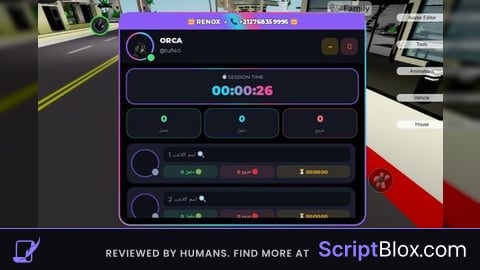
KeylessUniversal
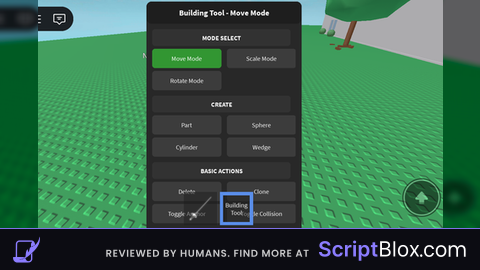
local player = game:GetService("Players").LocalPlayer
local mouse = player:GetMouse()
local userInputService = game:GetService("UserInputService")
local runService = game:GetService("RunService")

local tool = Instance.new("Tool")
tool.Name = "Building Tool"
tool.RequiresHandle = false
tool.Parent = player:WaitForChild("Backpack")

local selectedPart = nil
local mode = "move"
local gridSize = 1
local isDragging = false
local dragOffset = Vector3.new()
local equipped = false

local screenGui = Instance.new("ScreenGui")
screenGui.Name = "BuildingToolsGUI"
screenGui.ResetOnSpawn = false
screenGui.Parent = player:WaitForChild("PlayerGui")

local mainFrame = Instance.new("Frame")
mainFrame.Size = UDim2.new(0, 280, 0, 500)
mainFrame.Position = UDim2.new(0, 10, 0.5, -250)
mainFrame.BackgroundColor3 = Color3.fromRGB(40, 40, 40)
mainFrame.BorderSizePixel = 2
mainFrame.BorderColor3 = Color3.fromRGB(255, 255, 255)
mainFrame.Visible = false
mainFrame.Active = true
mainFrame.Draggable = true
mainFrame.Parent = screenGui

local mainCorner = Instance.new("UICorner")
mainCorner.CornerRadius = UDim.new(0, 10)
mainCorner.Parent = mainFrame

local titleLabel = Instance.new("TextLabel")
titleLabel.Size = UDim2.new(1, 0, 0, 40)
titleLabel.BackgroundColor3 = Color3.fromRGB(30, 30, 30)
titleLabel.BorderSizePixel = 0
titleLabel.Text = "Building Tool - Move Mode"
titleLabel.TextColor3 = Color3.fromRGB(255, 255, 255)
titleLabel.TextSize = 18
titleLabel.Font = Enum.Font.SourceSansBold
titleLabel.Parent = mainFrame

local titleCorner = Instance.new("UICorner")
titleCorner.CornerRadius = UDim.new(0, 10)
titleCorner.Parent = titleLabel

local scrollFrame = Instance.new("ScrollingFrame")
scrollFrame.Size = UDim2.new(1, -10, 1, -50)
scrollFrame.Position = UDim2.new(0, 5, 0, 45)
scrollFrame.BackgroundTransparency = 1
scrollFrame.BorderSizePixel = 0
scrollFrame.ScrollBarThickness = 6
scrollFrame.CanvasSize = UDim2.new(0, 0, 0, 1200)
scrollFrame.Parent = mainFrame

local function createButton(text, position, callback)
	local button = Instance.new("TextButton")
	button.Size = UDim2.new(0, 125, 0, 35)
	button.Position = position
	button.BackgroundColor3 = Color3.fromRGB(60, 60, 60)
	button.BorderSizePixel = 0
	button.Text = text
	button.TextColor3 = Color3.fromRGB(255, 255, 255)
	button.TextSize = 14
	button.Font = Enum.Font.SourceSans
	button.Parent = scrollFrame

	local corner = Instance.new("UICorner")
	corner.CornerRadius = UDim.new(0, 6)
	corner.Parent = button

	button.MouseButton1Click:Connect(callback)
	button.Activated:Connect(callback)

	return button
end

local function createLabel(text, position)
	local label = Instance.new("TextLabel")
	label.Size = UDim2.new(1, -20, 0, 30)
	label.Position = position
	label.BackgroundColor3 = Color3.fromRGB(50, 50, 50)
	label.BorderSizePixel = 0
	label.Text = text
	label.TextColor3 = Color3.fromRGB(255, 255, 255)
	label.TextSize = 14
	label.Font = Enum.Font.SourceSansBold
	label.Parent = scrollFrame

	local corner = Instance.new("UICorner")
	corner.CornerRadius = UDim.new(0, 6)
	corner.Parent = label

	return label
end

createLabel("MODE SELECT", UDim2.new(0, 5, 0, 5))

local moveButton = createButton("Move Mode", UDim2.new(0, 5, 0, 40), function()
	mode = "move"
	titleLabel.Text = "Building Tool - Move Mode"
	moveButton.BackgroundColor3 = Color3.fromRGB(50, 150, 50)
	scaleButton.BackgroundColor3 = Color3.fromRGB(60, 60, 60)
	rotateButton.BackgroundColor3 = Color3.fromRGB(60, 60, 60)
end)
moveButton.BackgroundColor3 = Color3.fromRGB(50, 150, 50)

local scaleButton = createButton("Scale Mode", UDim2.new(0, 140, 0, 40), function()
	mode = "scale"
	titleLabel.Text = "Scale Mode (Use Buttons)"
	moveButton.BackgroundColor3 = Color3.fromRGB(60, 60, 60)
	scaleButton.BackgroundColor3 = Color3.fromRGB(50, 150, 50)
	rotateButton.BackgroundColor3 = Color3.fromRGB(60, 60, 60)
end)

local rotateButton = createButton("Rotate Mode", UDim2.new(0, 5, 0, 80), function()
	mode = "rotate"
	titleLabel.Text = "Rotate Mode (Use Buttons)"
	moveButton.BackgroundColor3 = Color3.fromRGB(60, 60, 60)
	scaleButton.BackgroundColor3 = Color3.fromRGB(60, 60, 60)
	rotateButton.BackgroundColor3 = Color3.fromRGB(50, 150, 50)
end)

createLabel("CREATE", UDim2.new(0, 5, 0, 125))

local createPartButton = createButton("Part", UDim2.new(0, 5, 0, 160), function()
	local part = Instance.new("Part")
	part.Size = Vector3.new(4, 1, 2)
	part.Position = player.Character.HumanoidRootPart.Position + Vector3.new(0, 5, 0)
	part.Anchored = true
	part.Parent = workspace
	selectedPart = part
end)

local createSphereButton = createButton("Sphere", UDim2.new(0, 140, 0, 160), function()
	local part = Instance.new("Part")
	part.Shape = Enum.PartType.Ball
	part.Size = Vector3.new(4, 4, 4)
	part.Position = player.Character.HumanoidRootPart.Position + Vector3.new(0, 5, 0)
	part.Anchored = true
	part.Parent = workspace
	selectedPart = part
end)

local createCylinderButton = createButton("Cylinder", UDim2.new(0, 5, 0, 200), function()
	local part = Instance.new("Part")
	part.Shape = Enum.PartType.Cylinder
	part.Size = Vector3.new(4, 4, 4)
	part.Position = player.Character.HumanoidRootPart.Position + Vector3.new(0, 5, 0)
	part.Anchored = true
	part.Parent = workspace
	selectedPart = part
end)

local createWedgeButton = createButton("Wedge", UDim2.new(0, 140, 0, 200), function()
	local part = Instance.new("WedgePart")
	part.Size = Vector3.new(4, 2, 4)
	part.Position = player.Character.HumanoidRootPart.Position + Vector3.new(0, 5, 0)
	part.Anchored = true
	part.Parent = workspace
	selectedPart = part
end)

createLabel("BASIC ACTIONS", UDim2.new(0, 5, 0, 245))

local deleteButton = createButton("Delete", UDim2.new(0, 5, 0, 280), function()
	if selectedPart and selectedPart.Parent then
		selectedPart:Destroy()
		selectedPart = nil
	end
end)

local cloneButton = createButton("Clone", UDim2.new(0, 140, 0, 280), function()
	if selectedPart and selectedPart.Parent then
		local clone = selectedPart:Clone()
		clone.Position = selectedPart.Position + Vector3.new(0, 3, 0)
		clone.Parent = workspace
		selectedPart = clone
	end
end)

local anchorButton = createButton("Toggle Anchor", UDim2.new(0, 5, 0, 320), function()
	if selectedPart and selectedPart:IsA("BasePart") then
		selectedPart.Anchored = not selectedPart.Anchored
	end
end)

local collisionButton = createButton("Toggle Collision", UDim2.new(0, 140, 0, 320), function()
	if selectedPart and selectedPart:IsA("BasePart") then
		selectedPart.CanCollide = not selectedPart.CanCollide
	end
end)

createLabel("APPEARANCE", UDim2.new(0, 5, 0, 365))

local colorButton = createButton("Random Color", UDim2.new(0, 5, 0, 400), function()
	if selectedPart and selectedPart:IsA("BasePart") then
		selectedPart.Color = Color3.fromRGB(math.random(0, 255), math.random(0, 255), math.random(0, 255))
	end
end)

local materialButton = createButton("Material", UDim2.new(0, 140, 0, 400), function()
	if selectedPart and selectedPart:IsA("BasePart") then
		local materials = {Enum.Material.Plastic, Enum.Material.Wood, Enum.Material.Slate, Enum.Material.Concrete,
			Enum.Material.CorrodedMetal, Enum.Material.DiamondPlate, Enum.Material.Grass,
			Enum.Material.Ice, Enum.Material.Marble, Enum.Material.Granite, Enum.Material.Brick,
			Enum.Material.Sand, Enum.Material.Fabric, Enum.Material.SmoothPlastic, Enum.Material.Metal, Enum.Material.Neon}
		selectedPart.Material = materials[math.random(1, #materials)]
	end
end)

local transparentUpButton = createButton("Transparency +", UDim2.new(0, 5, 0, 440), function()
	if selectedPart and selectedPart:IsA("BasePart") then
		selectedPart.Transparency = math.min(selectedPart.Transparency + 0.1, 1)
	end
end)

local transparentDownButton = createButton("Transparency -", UDim2.new(0, 140, 0, 440), function()
	if selectedPart and selectedPart:IsA("BasePart") then
		selectedPart.Transparency = math.max(selectedPart.Transparency - 0.1, 0)
	end
end)

createLabel("SIZE", UDim2.new(0, 5, 0, 485))

local sizeUpButton = createButton("Size +", UDim2.new(0, 5, 0, 520), function()
	if selectedPart and selectedPart:IsA("BasePart") then
		selectedPart.Size = selectedPart.Size + Vector3.new(1, 1, 1)
	end
end)

local sizeDownButton = createButton("Size -", UDim2.new(0, 140, 0, 520), function()
	if selectedPart and selectedPart:IsA("BasePart") then
		selectedPart.Size = Vector3.new(
			math.max(0.5, selectedPart.Size.X - 1),
			math.max(0.5, selectedPart.Size.Y - 1),
			math.max(0.5, selectedPart.Size.Z - 1)
		)
	end
end)

local sizeXUpButton = createButton("X +", UDim2.new(0, 5, 0, 560), function()
	if selectedPart and selectedPart:IsA("BasePart") then
		selectedPart.Size = selectedPart.Size + Vector3.new(1, 0, 0)
	end
end)

local sizeXDownButton = createButton("X -", UDim2.new(0, 140, 0, 560), function()
	if selectedPart and selectedPart:IsA("BasePart") then
		selectedPart.Size = Vector3.new(math.max(0.5, selectedPart.Size.X - 1), selectedPart.Size.Y, selectedPart.Size.Z)
	end
end)

local sizeYUpButton = createButton("Y +", UDim2.new(0, 5, 0, 600), function()
	if selectedPart and selectedPart:IsA("BasePart") then
		selectedPart.Size = selectedPart.Size + Vector3.new(0, 1, 0)
	end
end)

local sizeYDownButton = createButton("Y -", UDim2.new(0, 140, 0, 600), function()
	if selectedPart and selectedPart:IsA("BasePart") then
		selectedPart.Size = Vector3.new(selectedPart.Size.X, math.max(0.5, selectedPart.Size.Y - 1), selectedPart.Size.Z)
	end
end)

local sizeZUpButton = createButton("Z +", UDim2.new(0, 5, 0, 640), function()
	if selectedPart and selectedPart:IsA("BasePart") then
		selectedPart.Size = selectedPart.Size + Vector3.new(0, 0, 1)
	end
end)

local sizeZDownButton = createButton("Z -", UDim2.new(0, 140, 0, 640), function()
	if selectedPart and selectedPart:IsA("BasePart") then
		selectedPart.Size = Vector3.new(selectedPart.Size.X, selectedPart.Size.Y, math.max(0.5, selectedPart.Size.Z - 1))
	end
end)

createLabel("ROTATION", UDim2.new(0, 5, 0, 685))

local rotateXButton = createButton("Rotate X", UDim2.new(0, 5, 0, 720), function()
	if selectedPart and selectedPart:IsA("BasePart") then
		selectedPart.CFrame = selectedPart.CFrame * CFrame.Angles(math.rad(45), 0, 0)
	end
end)

local rotateYButton = createButton("Rotate Y", UDim2.new(0, 140, 0, 720), function()
	if selectedPart and selectedPart:IsA("BasePart") then
		selectedPart.CFrame = selectedPart.CFrame * CFrame.Angles(0, math.rad(45), 0)
	end
end)

local rotateZButton = createButton("Rotate Z", UDim2.new(0, 5, 0, 760), function()
	if selectedPart and selectedPart:IsA("BasePart") then
		selectedPart.CFrame = selectedPart.CFrame * CFrame.Angles(0, 0, math.rad(45))
	end
end)

createLabel("GRID", UDim2.new(0, 5, 0, 805))

local gridButton = createButton("Grid: 1", UDim2.new(0, 5, 0, 840), function()
	if gridSize == 1 then
		gridSize = 2
		gridButton.Text = "Grid: 2"
	elseif gridSize == 2 then
		gridSize = 4
		gridButton.Text = "Grid: 4"
	elseif gridSize == 4 then
		gridSize = 0.5
		gridButton.Text = "Grid: 0.5"
	else
		gridSize = 1
		gridButton.Text = "Grid: 1"
	end
end)

local snapButton = createButton("Snap to Grid", UDim2.new(0, 140, 0, 840), function()
	if selectedPart and selectedPart:IsA("BasePart") then
		local pos = selectedPart.Position
		selectedPart.Position = Vector3.new(
			math.round(pos.X / gridSize) * gridSize,
			math.round(pos.Y / gridSize) * gridSize,
			math.round(pos.Z / gridSize) * gridSize
		)
	end
end)

createLabel("UTILITIES", UDim2.new(0, 5, 0, 885))

local clearButton = createButton("Clear All", UDim2.new(0, 5, 0, 920), function()
	for _, part in pairs(workspace:GetChildren()) do
		if part:IsA("BasePart") and (part.Name == "Part" or part.Name == "WedgePart") then
			part:Destroy()
		end
	end
	selectedPart = nil
end)

local bringButton = createButton("Bring to Me", UDim2.new(0, 140, 0, 920), function()
	if selectedPart and selectedPart:IsA("BasePart") then
		selectedPart.Position = player.Character.HumanoidRootPart.Position + Vector3.new(0, 5, 0)
	end
end)

local selectionBox = Instance.new("SelectionBox")
selectionBox.LineThickness = 0.05
selectionBox.Color3 = Color3.fromRGB(0, 150, 255)
selectionBox.Parent = player:WaitForChild("PlayerGui")

tool.Equipped:Connect(function()
	equipped = true
	mainFrame.Visible = true
end)

tool.Unequipped:Connect(function()
	equipped = false
	mainFrame.Visible = false
	isDragging = false
	selectedPart = nil
end)

mouse.Button1Down:Connect(function()
	if not equipped then return end

	if mouse.Target and mouse.Target:IsA("BasePart") and mouse.Target.Parent == workspace then
		selectedPart = mouse.Target

		if mode == "move" then
			isDragging = true
			local hitPos = mouse.Hit.Position
			dragOffset = selectedPart.Position - hitPos
		end
	end
end)

mouse.Button1Up:Connect(function()
	isDragging = false
end)

userInputService.InputBegan:Connect(function(input, gameProcessed)
	if not equipped or gameProcessed then return end

	if input.KeyCode == Enum.KeyCode.R then
		if selectedPart and selectedPart:IsA("BasePart") then
			selectedPart.CFrame = selectedPart.CFrame * CFrame.Angles(0, math.rad(45), 0)
		end
	elseif input.KeyCode == Enum.KeyCode.Delete then
		if selectedPart and selectedPart.Parent then
			selectedPart:Destroy()
			selectedPart = nil
		end
	end
end)

runService.RenderStepped:Connect(function()
	if equipped and selectedPart and selectedPart.Parent then
		selectionBox.Adornee = selectedPart

		if isDragging and mode == "move" then
			local targetPos = mouse.Hit.Position + dragOffset

			if gridSize > 0 then
				targetPos = Vector3.new(
					math.round(targetPos.X / gridSize) * gridSize,
					math.round(targetPos.Y / gridSize) * gridSize,
					math.round(targetPos.Z / gridSize) * gridSize
				)
			end

			selectedPart.Position = targetPos
		end
	else
		selectionBox.Adornee = nil
	end
end)
not fe