

KeylessUniversal
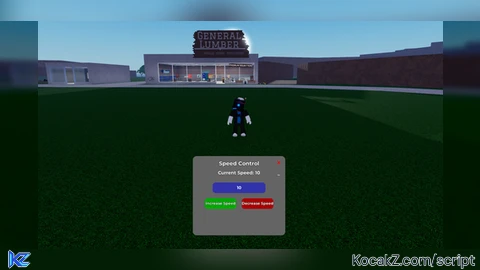
-- Variables to define the player and UI setup
local player = game.Players.LocalPlayer
local mouse = player:GetMouse()

-- Utility function for smooth tween animations
local function createTween(object, tweenInfo, goal)
    local tweenService = game:GetService("TweenService")
    local tween = tweenService:Create(object, tweenInfo, goal)
    tween:Play()
    return tween
end

-- Function to create the UI
local function createUI()
    -- Create the ScreenGui
    local screenGui = Instance.new("ScreenGui")
    screenGui.Parent = player:WaitForChild("PlayerGui")
    screenGui.ResetOnSpawn = false  -- Keep UI across respawns

    -- Create the main UI frame with a grey background
    local mainFrame = Instance.new("Frame")
    mainFrame.Size = UDim2.new(0, 350, 0, 300)  -- Reduced size for a more compact UI
    mainFrame.Position = UDim2.new(0.5, -175, 0.8, -150)
    mainFrame.BackgroundColor3 = Color3.fromRGB(100, 100, 100)  -- Grey background
    mainFrame.BorderSizePixel = 0
    mainFrame.Parent = screenGui

    -- Add rounded corners to the frame
    local UICorner = Instance.new("UICorner")
    UICorner.CornerRadius = UDim.new(0, 15)  -- Slightly smaller corner radius
    UICorner.Parent = mainFrame

    -- Fade-in effect for the entire frame
    mainFrame.BackgroundTransparency = 1
    createTween(mainFrame, TweenInfo.new(1, Enum.EasingStyle.Quart, Enum.EasingDirection.Out), {BackgroundTransparency = 0})

    -- Add a title label with a glowing effect
    local titleLabel = Instance.new("TextLabel")
    titleLabel.Size = UDim2.new(1, 0, 0, 35)
    titleLabel.Position = UDim2.new(0, 0, 0, 10)
    titleLabel.Text = "Speed Control"
    titleLabel.TextColor3 = Color3.fromRGB(255, 255, 255)
    titleLabel.TextSize = 24
    titleLabel.TextStrokeTransparency = 0.6
    titleLabel.TextXAlignment = Enum.TextXAlignment.Center
    titleLabel.BackgroundTransparency = 1
    titleLabel.Font = Enum.Font.GothamBold
    titleLabel.Parent = mainFrame

    -- Create the Speed Label
    local speedLabel = Instance.new("TextLabel")
    speedLabel.Size = UDim2.new(1, 0, 0, 25)
    speedLabel.Position = UDim2.new(0, 0, 0, 50)
    speedLabel.Text = "Current Speed: 16"
    speedLabel.TextColor3 = Color3.fromRGB(255, 255, 255)
    speedLabel.TextSize = 20
    speedLabel.TextStrokeTransparency = 0.8
    speedLabel.TextXAlignment = Enum.TextXAlignment.Center
    speedLabel.BackgroundTransparency = 1
    speedLabel.Font = Enum.Font.GothamBold
    speedLabel.Parent = mainFrame

    -- Create an input box for the player to type the desired speed
    local speedInput = Instance.new("TextBox")
    speedInput.Size = UDim2.new(0, 200, 0, 40)
    speedInput.Position = UDim2.new(0.5, -100, 0, 100)
    speedInput.PlaceholderText = "Enter Speed (10-3000)"
    speedInput.TextColor3 = Color3.fromRGB(255, 255, 255)
    speedInput.BackgroundColor3 = Color3.fromRGB(50, 50, 170)
    speedInput.TextSize = 18
    speedInput.Font = Enum.Font.GothamBold
    speedInput.Parent = mainFrame

    -- Add rounded corners to the TextBox
    local textBoxCorner = Instance.new("UICorner")
    textBoxCorner.CornerRadius = UDim.new(0, 12)
    textBoxCorner.Parent = speedInput

    -- Function to update the player's speed
    local function updateSpeed(newSpeed)
        local humanoid = player.Character and player.Character:FindFirstChild("Humanoid")
        if humanoid then
            newSpeed = math.clamp(newSpeed, 10, 3000)
            humanoid.WalkSpeed = newSpeed
            createTween(speedLabel, TweenInfo.new(0.5), {TextTransparency = 1})
            wait(0.5)
            speedLabel.Text = "Current Speed: " .. math.floor(newSpeed)
            createTween(speedLabel, TweenInfo.new(0.5), {TextTransparency = 0})
        end
    end

    -- When the player presses Enter on the speed input box
    speedInput.FocusLost:Connect(function(enterPressed)
        if enterPressed then
            local inputText = tonumber(speedInput.Text)
            if inputText and inputText >= 10 and inputText <= 3000 then
                updateSpeed(inputText)
            else
                speedInput.Text = ""
                speedLabel.Text = "Invalid Speed! (10-3000)"
            end
        end
    end)

    -- Function to create buttons with advanced interactivity
    local function createButton(position, text, bgColor, textColor, callback)
        local button = Instance.new("TextButton")
        button.Size = UDim2.new(0, 120, 0, 40)
        button.Position = position
        button.Text = text
        button.TextColor3 = textColor
        button.BackgroundColor3 = bgColor
        button.TextSize = 16
        button.TextStrokeTransparency = 0.6
        button.Font = Enum.Font.GothamBold
        button.Parent = mainFrame

        -- Add rounded corners to the button
        local buttonUICorner = Instance.new("UICorner")
        buttonUICorner.CornerRadius = UDim.new(0, 12)
        buttonUICorner.Parent = button

        -- Hover effects with animation
        button.MouseEnter:Connect(function()
            createTween(button, TweenInfo.new(0.2, Enum.EasingStyle.Back, Enum.EasingDirection.Out), {Size = UDim2.new(0, 140, 0, 45), BackgroundColor3 = button.BackgroundColor3:Lerp(Color3.fromRGB(255, 255, 255), 0.5)})
        end)

        button.MouseLeave:Connect(function()
            createTween(button, TweenInfo.new(0.2, Enum.EasingStyle.Back, Enum.EasingDirection.Out), {Size = UDim2.new(0, 120, 0, 40), BackgroundColor3 = bgColor})
        end)

        button.MouseButton1Click:Connect(callback)
        return button
    end

    -- Create buttons to increase and decrease speed
    local increaseButton = createButton(UDim2.new(0.5, -130, 0, 160), "Increase Speed", Color3.fromRGB(0, 170, 0), Color3.fromRGB(255, 255, 255), function() updateSpeedByAmount(10) end)
    local decreaseButton = createButton(UDim2.new(0.5, 10, 0, 160), "Decrease Speed", Color3.fromRGB(170, 0, 0), Color3.fromRGB(255, 255, 255), function() updateSpeedByAmount(-10) end)

    -- Minimize/Restore Button with smooth transition
    local minimizeButton = Instance.new("TextButton")
    minimizeButton.Size = UDim2.new(0, 30, 0, 30)
    minimizeButton.Position = UDim2.new(1, -40, 0, 50)
    minimizeButton.Text = "_"
    minimizeButton.TextColor3 = Color3.fromRGB(255, 255, 255)
    minimizeButton.BackgroundTransparency = 1
    minimizeButton.TextSize = 20
    minimizeButton.Font = Enum.Font.GothamBold
    minimizeButton.Parent = mainFrame

    local isMinimized = false
    minimizeButton.MouseButton1Click:Connect(function()
        isMinimized = not isMinimized
        if isMinimized then
            createTween(mainFrame, TweenInfo.new(0.3), {Size = UDim2.new(0, 350, 0, 40)})
            speedLabel.Visible = false
            speedInput.Visible = false
            increaseButton.Visible = false
            decreaseButton.Visible = false
        else
            createTween(mainFrame, TweenInfo.new(0.3), {Size = UDim2.new(0, 350, 0, 300)})
            speedLabel.Visible = true
            speedInput.Visible = true
            increaseButton.Visible = true
            decreaseButton.Visible = true
        end
    end)

    -- Close button (X button) to close the UI with animation
    local closeButton = Instance.new("TextButton")
    closeButton.Size = UDim2.new(0, 30, 0, 30)
    closeButton.Position = UDim2.new(1, -40, 0, 10)
    closeButton.Text = "X"
    closeButton.TextColor3 = Color3.fromRGB(255, 0, 0)
    closeButton.BackgroundTransparency = 1
    closeButton.TextSize = 20
    closeButton.Font = Enum.Font.GothamBold
    closeButton.Parent = mainFrame

    closeButton.MouseButton1Click:Connect(function()
        createTween(mainFrame, TweenInfo.new(0.2, Enum.EasingStyle.Back, Enum.EasingDirection.Out), {Size = UDim2.new(0, 350, 0, 0)})
        wait(0.2)
        screenGui:Destroy()  -- Close the UI with animation
    end)

    -- Add draggable functionality with smooth dragging
    local dragging = false
    local dragStart = nil
    local startPos = nil

    mainFrame.InputBegan:Connect(function(input)
        if input.UserInputType == Enum.UserInputType.MouseButton1 then
            dragging = true
            dragStart = input.Position
            startPos = mainFrame.Position
        end
    end)

    mainFrame.InputChanged:Connect(function(input)
        if dragging and input.UserInputType == Enum.UserInputType.MouseMovement then
            local delta = input.Position - dragStart
            mainFrame.Position = UDim2.new(startPos.X.Scale, startPos.X.Offset + delta.X, startPos.Y.Scale, startPos.Y.Offset + delta.Y)
        end
    end)

    mainFrame.InputEnded:Connect(function(input)
        if input.UserInputType == Enum.UserInputType.MouseButton1 then
            dragging = false
        end
    end)
end

-- Create the UI when the player joins
createUI()


yea just a speed script
chatgpt!
lil bro disliked my comment
Its a nice script