

KeylessUniversal
-- // Services
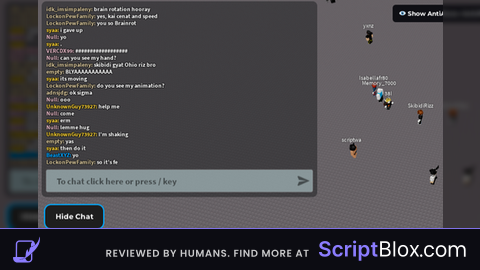
local CoreGui = game:GetService("CoreGui")
local TextChatService = game:GetService("TextChatService")
local UserInputService = game:GetService("UserInputService")
local TweenService = game:GetService("TweenService")

-- // Chat Configuration
local ChatConfig = TextChatService:FindFirstChild("ChatWindowConfiguration")

-- Modify your custom config here
if ChatConfig then
    ChatConfig.HeightScale = 2
    ChatConfig.WidthScale = 2
    ChatConfig.TextSize = 13
    ChatConfig.Enabled = true
else
    warn("ChatWindowConfiguration not found.")
    return
end

-- // GUI Elements
local ScreenGui = Instance.new("ScreenGui")
local HideButton = Instance.new("TextButton")
local UIStroke = Instance.new("UIStroke")
local UICorner = Instance.new("UICorner")

-- // GUI Setup
ScreenGui.Parent = CoreGui
ScreenGui.ZIndexBehavior = Enum.ZIndexBehavior.Sibling

HideButton.Parent = ScreenGui
HideButton.Position = UDim2.new(0.9, 0, 0.1, 0)
HideButton.Size = UDim2.new(0, 100, 0, 40)
HideButton.BackgroundColor3 = Color3.fromRGB(30, 30, 30)
HideButton.Text = "Hide Chat"
HideButton.TextColor3 = Color3.fromRGB(255, 255, 255)
HideButton.Font = Enum.Font.GothamBold
HideButton.TextSize = 14
HideButton.AutoButtonColor = true

UICorner.Parent = HideButton
UICorner.CornerRadius = UDim.new(0, 10)

UIStroke.Parent = HideButton
UIStroke.Thickness = 2
UIStroke.Color = Color3.fromRGB(0, 170, 255)
UIStroke.ApplyStrokeMode = Enum.ApplyStrokeMode.Border

-- // Draggable Button
local dragging, dragStart, startPos

HideButton.InputBegan:Connect(function(input)
    if input.UserInputType == Enum.UserInputType.MouseButton1 then
        dragging = true
        dragStart = input.Position
        startPos = HideButton.Position
        input.Changed:Connect(function()
            if input.UserInputState == Enum.UserInputState.End then
                dragging = false
            end
        end)
    end
end)

UserInputService.InputChanged:Connect(function(input)
    if dragging and input.UserInputType == Enum.UserInputType.MouseMovement then
        local delta = input.Position - dragStart
        HideButton.Position = UDim2.new(startPos.X.Scale, startPos.X.Offset + delta.X, startPos.Y.Scale, startPos.Y.Offset + delta.Y)
    end
end)

-- // Toggle Chat Visibility
local function toggleChat()
    ChatConfig.Enabled = not ChatConfig.Enabled
    HideButton.Text = ChatConfig.Enabled and "Hide Chat" or "Show Chat"
end

HideButton.MouseButton1Click:Connect(toggleChat)

chat you size 100?
@e85663866 no, you can't set it too 100 or more than 2, because roblox set the limit is 2 only.
Why
WHY ME 😭😭😭😭😭😭😭😭😭😭