

KeylessUniversal
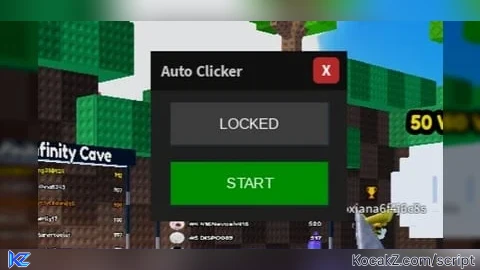
-- Delta Executor: Mobile-Safe Clicker (With Close Button)
local CoreGui = game:GetService("CoreGui")
local UIS = game:GetService("UserInputService")
local VIM = game:GetService("VirtualInputManager")

----------------------------------------------------
-- 1. NOTIFICATION SYSTEM
----------------------------------------------------
pcall(function()
    game:GetService("StarterGui"):SetCore("SendNotification", {
        Title = "Credits",
        Text = "Creator: gvghk_tt\nTester: gvghk_test2",
        Duration = 5
    })
end)

----------------------------------------------------
-- 2. MAIN CLICKER UI
----------------------------------------------------
local ScreenGui = Instance.new("ScreenGui")
local Main = Instance.new("Frame")
local TitleBar = Instance.new("Frame")
local TitleText = Instance.new("TextLabel")
local CloseBtn = Instance.new("TextButton")
local Toggle = Instance.new("TextButton")
local SetPos = Instance.new("TextButton")
local Marker = Instance.new("Frame")

ScreenGui.Name = "Delta_UltraTarget"
ScreenGui.Parent = CoreGui
ScreenGui.ZIndexBehavior = Enum.ZIndexBehavior.Sibling

Main.Name = "MainFrame"
Main.Parent = ScreenGui
Main.BackgroundColor3 = Color3.fromRGB(30, 30, 30)
Main.BorderSizePixel = 0
Main.Position = UDim2.new(0.5, -75, 0.4, 0)
Main.Size = UDim2.new(0, 150, 0, 130)
Main.Active = true

TitleBar.Name = "TitleBar"
TitleBar.Parent = Main
TitleBar.BackgroundColor3 = Color3.fromRGB(15, 15, 15)
TitleBar.BorderSizePixel = 0
TitleBar.Size = UDim2.new(1, 0, 0, 30)

TitleText.Name = "TitleText"
TitleText.Parent = TitleBar
TitleText.BackgroundTransparency = 1
TitleText.Position = UDim2.new(0, 8, 0, 0)
TitleText.Size = UDim2.new(1, -38, 1, 0)
TitleText.Font = Enum.Font.SourceSansBold
TitleText.Text = "Auto Clicker"
TitleText.TextColor3 = Color3.fromRGB(200, 200, 200)
TitleText.TextSize = 14
TitleText.TextXAlignment = Enum.TextXAlignment.Left

-- Close Button
CloseBtn.Name = "CloseBtn"
CloseBtn.Parent = TitleBar
CloseBtn.BackgroundColor3 = Color3.fromRGB(180, 40, 40)
CloseBtn.BorderSizePixel = 0
CloseBtn.Position = UDim2.new(1, -26, 0.15, 0)
CloseBtn.Size = UDim2.new(0, 20, 0, 20)
CloseBtn.Font = Enum.Font.SourceSansBold
CloseBtn.Text = "X"
CloseBtn.TextColor3 = Color3.new(1, 1, 1)
CloseBtn.TextSize = 14
Instance.new("UICorner", CloseBtn).CornerRadius = UDim.new(0, 4)

Marker.Name = "TargetMarker"
Marker.Parent = ScreenGui
Marker.BackgroundColor3 = Color3.fromRGB(255, 0, 0)
Marker.Size = UDim2.new(0, 10, 0, 10)
Marker.Visible = false
Instance.new("UICorner", Marker).CornerRadius = UDim.new(1, 0)

-- Mobile Dragging Logic
local dragging, dragStart, startPos
TitleBar.InputBegan:Connect(function(input)
    if input.UserInputType == Enum.UserInputType.Touch then
        dragging = true
        dragStart = input.Position
        startPos = Main.Position
    end
end)
UIS.InputChanged:Connect(function(input)
    if input.UserInputType == Enum.UserInputType.Touch and dragging then
        local delta = input.Position - dragStart
        Main.Position = UDim2.new(startPos.X.Scale, startPos.X.Offset + delta.X, startPos.Y.Scale, startPos.Y.Offset + delta.Y)
    end
end)
UIS.InputEnded:Connect(function(input)
    if input.UserInputType == Enum.UserInputType.Touch then
        dragging = false
    end
end)

SetPos.Name = "SetPos"
SetPos.Parent = Main
SetPos.BackgroundColor3 = Color3.fromRGB(60, 60, 60)
SetPos.Position = UDim2.new(0.1, 0, 0.3, 0)
SetPos.Size = UDim2.new(0.8, 0, 0.25, 0)
SetPos.Text = "SET TARGET"
SetPos.TextColor3 = Color3.new(1, 1, 1)

Toggle.Name = "Toggle"
Toggle.Parent = Main
Toggle.BackgroundColor3 = Color3.fromRGB(0, 140, 0)
Toggle.Position = UDim2.new(0.1, 0, 0.65, 0)
Toggle.Size = UDim2.new(0.8, 0, 0.25, 0)
Toggle.Text = "START"
Toggle.TextColor3 = Color3.new(1, 1, 1)

----------------------------------------------------
-- 3. CLICKING LOOP & CONTROLS
----------------------------------------------------
local clicking = false
local picking = false
local targetPos = Vector2.new(0, 0)

SetPos.MouseButton1Click:Connect(function()
    picking = true
    SetPos.Text = "TAP SCREEN..."
    SetPos.BackgroundColor3 = Color3.fromRGB(100, 100, 0)
end)

UIS.InputBegan:Connect(function(input)
    if picking and input.UserInputType == Enum.UserInputType.Touch then
        targetPos = Vector2.new(input.Position.X, input.Position.Y)
        Marker.Position = UDim2.new(0, targetPos.X - 5, 0, targetPos.Y - 5)
        Marker.Visible = true
        picking = false
        SetPos.Text = "LOCKED"
        SetPos.BackgroundColor3 = Color3.fromRGB(60, 60, 60)
    end
end)

Toggle.MouseButton1Click:Connect(function()
    clicking = not clicking
    Toggle.Text = clicking and "STOP" or "START"
    Toggle.BackgroundColor3 = clicking and Color3.fromRGB(140, 0, 0) or Color3.fromRGB(0, 140, 0)

    if clicking then
        task.spawn(function()
            local touchId = 9999
            while clicking do
                VIM:SendTouchEvent(touchId, 0, targetPos.X, targetPos.Y)
                VIM:SendTouchEvent(touchId, 2, targetPos.X, targetPos.Y)

                task.wait(0.000001)
            end
        end)
    end
end)

-- Close Button Cleanup Logic
CloseBtn.MouseButton1Click:Connect(function()
    clicking = false
    picking = false
    ScreenGui:Destroy()
end)


so good
@hygg520 thanks