
![Sir Meme Hub | [16 GAMES] [$14.99 LIFETIME] | FARM/AIM/ESP](https://scriptblox.com/images/script/-1-1791044877945.webp)
Key Required VerifiedUniversal
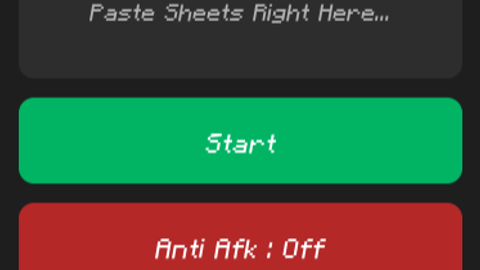
-- Velocity Piano Script V9 (Final Add : Ui Round Corner)
if game.CoreGui:FindFirstChild("EraVelocityV9") then game.CoreGui.EraVelocityV9:Destroy() end

local ScreenGui = Instance.new("ScreenGui", game.CoreGui)
ScreenGui.Name = "EraVelocityV9"

local Main = Instance.new("Frame", ScreenGui)
Main.Size = UDim2.new(0, 250, 0, 220)
Main.Position = UDim2.new(0.5, -125, 0.4, -110)
Main.BackgroundColor3 = Color3.fromRGB(30, 30, 30)
Main.BorderSizePixel = 0
Main.Active = true
Main.Draggable = true
Instance.new("UICorner", Main).CornerRadius = UDim.new(0, 10)

-- Input Sheet
local Input = Instance.new("TextBox", Main)
Input.Size = UDim2.new(0, 230, 0, 70)
Input.Position = UDim2.new(0, 10, 0, 10)
Input.PlaceholderText = "Paste Sheets Right Here..."
Input.Text = ""
Input.TextWrapped = true
Input.BackgroundColor3 = Color3.fromRGB(45, 45, 45)
Input.TextColor3 = Color3.fromRGB(255, 255, 255)
Input.Font = Enum.Font.Gotham
Input.TextSize = 14
Instance.new("UICorner", Input)

-- Start Button
local StartBtn = Instance.new("TextButton", Main)
StartBtn.Size = UDim2.new(0, 230, 0, 45)
StartBtn.Position = UDim2.new(0, 10, 0, 90)
StartBtn.Text = "Start"
StartBtn.BackgroundColor3 = Color3.fromRGB(0, 180, 100)
StartBtn.TextColor3 = Color3.fromRGB(255, 255, 255)
StartBtn.Font = Enum.Font.GothamBold
StartBtn.TextSize = 16
Instance.new("UICorner", StartBtn)

-- Anti Afk Button
local AntiAfkBtn = Instance.new("TextButton", Main)
AntiAfkBtn.Size = UDim2.new(0, 230, 0, 45)
AntiAfkBtn.Position = UDim2.new(0, 10, 0, 145)
AntiAfkBtn.Text = "Anti Afk : Off"
AntiAfkBtn.BackgroundColor3 = Color3.fromRGB(180, 40, 40)
AntiAfkBtn.TextColor3 = Color3.fromRGB(255, 255, 255)
AntiAfkBtn.Font = Enum.Font.GothamBold
AntiAfkBtn.TextSize = 16
Instance.new("UICorner", AntiAfkBtn)

-- Credit Make By Era
local Credit = Instance.new("TextLabel", Main)
Credit.Size = UDim2.new(0, 100, 0, 20)
Credit.Position = UDim2.new(0, 10, 0, 195)
Credit.Text = "Make By Era"
Credit.BackgroundTransparency = 1
Credit.TextColor3 = Color3.fromRGB(150, 150, 150)
Credit.Font = Enum.Font.Gotham
Credit.TextSize = 12
Credit.TextXAlignment = Enum.TextXAlignment.Left

-- Music And Anti Afk
local VIM = game:GetService("VirtualInputManager")
local isPlaying = false
local antiAfkEnabled = false

-- Anti Afk And Jump
AntiAfkBtn.MouseButton1Click:Connect(function()
    antiAfkEnabled = not antiAfkEnabled
    AntiAfkBtn.Text = antiAfkEnabled and "Anti Afk : On" or "Anti Afk : Off"
    AntiAfkBtn.BackgroundColor3 = antiAfkEnabled and Color3.fromRGB(0, 120, 255) or Color3.fromRGB(180, 40, 40)
end)

task.spawn(function()
    while true do
        if antiAfkEnabled then
            VIM:SendKeyEvent(true, Enum.KeyCode.Space, false, game)
            task.wait(0.05)
            VIM:SendKeyEvent(false, Enum.KeyCode.Space, false, game)
        end
        task.wait(math.random(1, 5))
    end
end)

-- Fix Piano Key Press
local symbolMap = {["!"]=49, ["@"]=50, ["#"]=51, ["$"]=52, ["%"]=53, ["^"]=54, ["&"]=55, ["*"]=56, ["("]=57, [")"]=48}

local function press(char)
    if char == " " or char == "\n" then return end
    local code; local shift = false
    if symbolMap[char] then code = symbolMap[char]; shift = true
    elseif char:match("%a") and char:upper() == char then code = Enum.KeyCode[char:upper()].Value; shift = true
    elseif tonumber(char) then code = 48 + tonumber(char)
    else local s, c = pcall(function() return Enum.KeyCode[char:upper()].Value end); code = s and c or nil end

    if code then
        if shift then VIM:SendKeyEvent(true, Enum.KeyCode.LeftShift, false, game) end
        VIM:SendKeyEvent(true, code, false, game)
        task.wait(0.02)
        VIM:SendKeyEvent(false, code, false, game)
        if shift then VIM:SendKeyEvent(false, Enum.KeyCode.LeftShift, false, game) end
    end
end

local function play()
    local text = Input.Text; local i = 1
    while i <= #text and isPlaying do
        local c = text:sub(i, i)
        if c == "[" then
            i = i + 1
            while i <= #text and text:sub(i, i) ~= "]" and isPlaying do
                task.spawn(function() press(text:sub(i, i)) end)
                i = i + 1
            end
        else press(c) end
        task.wait(0.15); i = i + 1
    end
    isPlaying = false; StartBtn.Text = "Start"
end

StartBtn.MouseButton1Click:Connect(function()
    if isPlaying then isPlaying = false return end
    if #Input.Text > 0 then
        isPlaying = true
        StartBtn.Text = "Playing..."
        play()
    end
end)

Scroll down to the bottom, you can see the words task.wait. You can change the number in that box to make it faster or slower
The Anti-AFK function, randomly generated from 1-5 seconds, makes you jump, preventing you from being kicked out if you AFK for 20 minutes
If you want Minecraft fonts like mine, download Fishtrap and search for "minecraft fonts," click on the first one, you'll find "minecraft fonts" there, download it and add it to Fishtrap