


Key RequiredUniversal
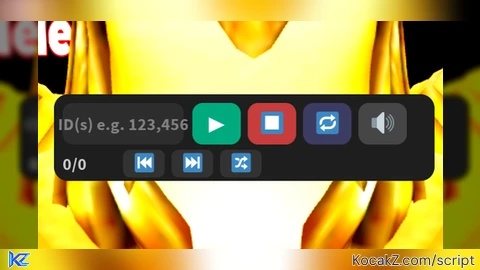
-- LightningHub Audio Player
-- prepared by halilibrahimseviml1

local Players = game:GetService("Players")
local UserInputService = game:GetService("UserInputService")
local player = Players.LocalPlayer
local playerGui = player:WaitForChild("PlayerGui")

-- remove old GUI if exists
if playerGui:FindFirstChild("LightningHubPlayer") then
    playerGui.LightningHubPlayer:Destroy()
end

-- main GUI
local screenGui = Instance.new("ScreenGui")
screenGui.Name = "LightningHubPlayer"
screenGui.ResetOnSpawn = false
screenGui.Parent = playerGui

-- main frame (size unchanged: 220x50)
local mainFrame = Instance.new("Frame")
mainFrame.Name = "MainFrame"
mainFrame.Size = UDim2.new(0, 220, 0, 50)
mainFrame.Position = UDim2.new(0.5, -110, 0.1, 0)
mainFrame.BackgroundColor3 = Color3.fromRGB(30, 30, 30)
mainFrame.BorderSizePixel = 0
mainFrame.Active = true
mainFrame.Draggable = true
mainFrame.Parent = screenGui

local corner = Instance.new("UICorner")
corner.CornerRadius = UDim.new(0, 8)
corner.Parent = mainFrame

-- === Sound object ===
local sound = Instance.new("Sound")
sound.Name = "PlayerSound"
sound.Volume = 0.7
sound.Parent = workspace

-- === Queue & state ===
local queue = {}          -- list of sound IDs (strings)
local currentIndex = 0
local isPlaying = false
local isLooping = false
local isShuffled = false

-- helper: update the track label
local function updateTrackLabel()
    local total = #queue
    if total > 0 then
        trackLabel.Text = currentIndex .. "/" .. total
    else
        trackLabel.Text = "0/0"
    end
end

-- play a track by index
local function playTrack(index)
    if index < 1 or index > #queue then
        sound:Stop()
        isPlaying = false
        playButton.Text = "▶"
        updateTrackLabel()
        return
    end
    currentIndex = index
    local id = queue[currentIndex]
    if not string.find(id, "rbxassetid://") then
        id = "rbxassetid://" .. id
    end
    sound.SoundId = id
    sound:Stop()
    sound:Play()
    isPlaying = true
    playButton.Text = "⏸"
    updateTrackLabel()
end

-- next track (with loop and shuffle awareness)
local function nextTrack()
    if #queue == 0 then return end
    if isShuffled then
        -- pick random remaining? simple: shuffle and go to next
        local newIdx = math.random(1, #queue)
        playTrack(newIdx)
    else
        local nextIdx = currentIndex + 1
        if nextIdx > #queue then
            if isLooping then
                nextIdx = 1
            else
                sound:Stop()
                isPlaying = false
                playButton.Text = "▶"
                updateTrackLabel()
                return
            end
        end
        playTrack(nextIdx)
    end
end

local function prevTrack()
    if #queue == 0 then return end
    local prevIdx = currentIndex - 1
    if prevIdx < 1 then
        if isLooping then
            prevIdx = #queue
        else
            return
        end
    end
    playTrack(prevIdx)
end

-- when track ends -> auto next
sound.Ended:Connect(function()
    if isPlaying then
        nextTrack()
    end
end)

-- === UI Elements ===

-- Row 1 (y=5)
-- TextBox for ID input (width 70)
local textBox = Instance.new("TextBox")
textBox.Size = UDim2.new(0, 70, 0, 24)
textBox.Position = UDim2.new(0, 5, 0, 5)
textBox.BackgroundColor3 = Color3.fromRGB(45, 45, 45)
textBox.TextColor3 = Color3.fromRGB(255, 255, 255)
textBox.PlaceholderText = "ID(s) e.g. 123,456"
textBox.Text = ""
textBox.TextSize = 12
textBox.Font = Enum.Font.SourceSansBold
textBox.Parent = mainFrame
local tbCorner = Instance.new("UICorner")
tbCorner.CornerRadius = UDim.new(0, 6)
tbCorner.Parent = textBox

-- Play / Pause button (width 28)
local playButton = Instance.new("TextButton")
playButton.Size = UDim2.new(0, 28, 0, 24)
playButton.Position = UDim2.new(0, 80, 0, 5)
playButton.BackgroundColor3 = Color3.fromRGB(0, 170, 127)
playButton.TextColor3 = Color3.fromRGB(255, 255, 255)
playButton.Text = "▶"
playButton.TextSize = 14
playButton.Font = Enum.Font.SourceSansBold
playButton.Parent = mainFrame
local pbCorner = Instance.new("UICorner")
pbCorner.CornerRadius = UDim.new(0, 6)
pbCorner.Parent = playButton

playButton.MouseButton1Click:Connect(function()
    if #queue == 0 then
        -- if nothing in queue, try to parse input
        local input = textBox.Text
        if input == "" then return end
        local ids = {}
        for token in string.gmatch(input, "[^,]+") do
            local id = string.gsub(token, "%s", "")
            if id ~= "" then
                table.insert(ids, id)
            end
        end
        if #ids == 0 then return end
        queue = ids
        currentIndex = 0
        isShuffled = false
        playTrack(1)
        return
    end
    if isPlaying then
        sound:Pause()
        isPlaying = false
        playButton.Text = "▶"
    else
        sound:Resume()
        isPlaying = true
        playButton.Text = "⏸"
        -- if sound was stopped and not playing, restart current track
        if sound.Playing == false and currentIndex > 0 then
            sound:Stop()
            sound:Play()
            isPlaying = true
            playButton.Text = "⏸"
        end
    end
end)

-- Stop button (width 28)
local stopButton = Instance.new("TextButton")
stopButton.Size = UDim2.new(0, 28, 0, 24)
stopButton.Position = UDim2.new(0, 112, 0, 5)
stopButton.BackgroundColor3 = Color3.fromRGB(200, 60, 60)
stopButton.TextColor3 = Color3.fromRGB(255, 255, 255)
stopButton.Text = "⏹"
stopButton.TextSize = 14
stopButton.Font = Enum.Font.SourceSansBold
stopButton.Parent = mainFrame
local stCorner = Instance.new("UICorner")
stCorner.CornerRadius = UDim.new(0, 6)
stCorner.Parent = stopButton

stopButton.MouseButton1Click:Connect(function()
    sound:Stop()
    isPlaying = false
    playButton.Text = "▶"
end)

-- Loop toggle (width 28)
local loopButton = Instance.new("TextButton")
loopButton.Size = UDim2.new(0, 28, 0, 24)
loopButton.Position = UDim2.new(0, 144, 0, 5)
loopButton.BackgroundColor3 = Color3.fromRGB(60, 60, 100)
loopButton.TextColor3 = Color3.fromRGB(255, 255, 255)
loopButton.Text = "🔁"
loopButton.TextSize = 14
loopButton.Font = Enum.Font.SourceSansBold
loopButton.Parent = mainFrame
local lpCorner = Instance.new("UICorner")
lpCorner.CornerRadius = UDim.new(0, 6)
lpCorner.Parent = loopButton

loopButton.MouseButton1Click:Connect(function()
    isLooping = not isLooping
    loopButton.BackgroundColor3 = isLooping and Color3.fromRGB(0, 120, 200) or Color3.fromRGB(60, 60, 100)
end)

-- Volume button (width 28) – click to show slider popup
local volButton = Instance.new("TextButton")
volButton.Size = UDim2.new(0, 28, 0, 24)
volButton.Position = UDim2.new(0, 176, 0, 5)
volButton.BackgroundColor3 = Color3.fromRGB(70, 70, 70)
volButton.TextColor3 = Color3.fromRGB(255, 255, 255)
volButton.Text = "🔊"
volButton.TextSize = 14
volButton.Font = Enum.Font.SourceSansBold
volButton.Parent = mainFrame
local vbCorner = Instance.new("UICorner")
vbCorner.CornerRadius = UDim.new(0, 6)
vbCorner.Parent = volButton

-- Volume popup (hidden initially) – appears above the main frame, does not resize main frame
local volPopup = Instance.new("Frame")
volPopup.Name = "VolPopup"
volPopup.Size = UDim2.new(0, 100, 0, 30)
volPopup.Position = UDim2.new(0, 60, 0, -35) -- above button
volPopup.BackgroundColor3 = Color3.fromRGB(40, 40, 40)
volPopup.BorderSizePixel = 0
volPopup.Visible = false
volPopup.Parent = mainFrame
local vpCorner = Instance.new("UICorner")
vpCorner.CornerRadius = UDim.new(0, 6)
vpCorner.Parent = volPopup

local volSlider = Instance.new("TextButton") -- using button as a slider track; we'll use mouse drag
volSlider.Size = UDim2.new(0, 80, 0, 16)
volSlider.Position = UDim2.new(0, 10, 0, 7)
volSlider.BackgroundColor3 = Color3.fromRGB(100, 100, 100)
volSlider.Text = ""
volSlider.Parent = volPopup
local vsCorner = Instance.new("UICorner")
vsCorner.CornerRadius = UDim.new(0, 8)
vsCorner.Parent = volSlider

-- Volume indicator
local volIndicator = Instance.new("Frame")
volIndicator.Size = UDim2.new(0, 40, 0, 16) -- will be updated
volIndicator.Position = UDim2.new(0, 0, 0, 0)
volIndicator.BackgroundColor3 = Color3.fromRGB(0, 170, 127)
volIndicator.BorderSizePixel = 0
volIndicator.Parent = volSlider
local viCorner = Instance.new("UICorner")
viCorner.CornerRadius = UDim.new(0, 8)
viCorner.Parent = volIndicator

-- update volume indicator
local function updateVolumeIndicator()
    local vol = sound.Volume
    local maxVol = 2 -- max volume
    local percent = math.clamp(vol / maxVol, 0, 1)
    volIndicator.Size = UDim2.new(percent, 0, 0, 16)
end
updateVolumeIndicator()

-- drag to change volume
local dragging = false
volSlider.InputBegan:Connect(function(input)
    if input.UserInputType == Enum.UserInputType.MouseButton1 then
        dragging = true
    end
end)
volSlider.InputEnded:Connect(function(input)
    if input.UserInputType == Enum.UserInputType.MouseButton1 then
        dragging = false
    end
end)
volSlider.InputChanged:Connect(function(input)
    if dragging and input.UserInputType == Enum.UserInputType.MousePosition then
        local relativeX = math.clamp((input.Position.X - volSlider.AbsolutePosition.X) / volSlider.AbsoluteSize.X, 0, 1)
        sound.Volume = relativeX * 2 -- max 2
        updateVolumeIndicator()
    end
end)

-- toggle popup on volume button click
volButton.MouseButton1Click:Connect(function()
    volPopup.Visible = not volPopup.Visible
end)

-- === Row 2 (y=32) ===
-- Track label (current/total)
local trackLabel = Instance.new("TextLabel")
trackLabel.Size = UDim2.new(0, 30, 0, 16)
trackLabel.Position = UDim2.new(0, 5, 0, 32)
trackLabel.BackgroundTransparency = 1
trackLabel.TextColor3 = Color3.fromRGB(200, 200, 200)
trackLabel.Text = "0/0"
trackLabel.TextSize = 12
trackLabel.Font = Enum.Font.SourceSansBold
trackLabel.TextXAlignment = Enum.TextXAlignment.Left
trackLabel.Parent = mainFrame

-- Previous button (width 24)
local prevBtn = Instance.new("TextButton")
prevBtn.Size = UDim2.new(0, 24, 0, 16)
prevBtn.Position = UDim2.new(0, 40, 0, 32)
prevBtn.BackgroundColor3 = Color3.fromRGB(50, 50, 50)
prevBtn.TextColor3 = Color3.fromRGB(255, 255, 255)
prevBtn.Text = "⏮"
prevBtn.TextSize = 12
prevBtn.Font = Enum.Font.SourceSansBold
prevBtn.Parent = mainFrame
local pvCorner = Instance.new("UICorner")
pvCorner.CornerRadius = UDim.new(0, 4)
pvCorner.Parent = prevBtn

prevBtn.MouseButton1Click:Connect(prevTrack)

-- Next button (width 24)
local nextBtn = Instance.new("TextButton")
nextBtn.Size = UDim2.new(0, 24, 0, 16)
nextBtn.Position = UDim2.new(0, 68, 0, 32)
nextBtn.BackgroundColor3 = Color3.fromRGB(50, 50, 50)
nextBtn.TextColor3 = Color3.fromRGB(255, 255, 255)
nextBtn.Text = "⏭"
nextBtn.TextSize = 12
nextBtn.Font = Enum.Font.SourceSansBold
nextBtn.Parent = mainFrame
local nxCorner = Instance.new("UICorner")
nxCorner.CornerRadius = UDim.new(0, 4)
nxCorner.Parent = nextBtn

nextBtn.MouseButton1Click:Connect(nextTrack)

-- Shuffle button (width 24)
local shuffleBtn = Instance.new("TextButton")
shuffleBtn.Size = UDim2.new(0, 24, 0, 16)
shuffleBtn.Position = UDim2.new(0, 96, 0, 32)
shuffleBtn.BackgroundColor3 = Color3.fromRGB(50, 50, 50)
shuffleBtn.TextColor3 = Color3.fromRGB(255, 255, 255)
shuffleBtn.Text = "🔀"
shuffleBtn.TextSize = 12
shuffleBtn.Font = Enum.Font.SourceSansBold
shuffleBtn.Parent = mainFrame
local shCorner = Instance.new("UICorner")
shCorner.CornerRadius = UDim.new(0, 4)
shCorner.Parent = shuffleBtn

shuffleBtn.MouseButton1Click:Connect(function()
    if #queue == 0 then return end
    -- simple shuffle: randomize queue order
    for i = #queue, 2, -1 do
        local j = math.random(1, i)
        queue[i], queue[j] = queue[j], queue[i]
    end
    isShuffled = true
    -- restart from first
    playTrack(1)
end)

-- === Keyboard shortcuts ===
UserInputService.InputBegan:Connect(function(input, gameProcessed)
    if gameProcessed then return end
    if not screenGui.Enabled then return end
    if input.KeyCode == Enum.KeyCode.Space then
        playButton.MouseButton1Click:Fire()
    elseif input.KeyCode == Enum.KeyCode.Right then
        nextTrack()
    elseif input.KeyCode == Enum.KeyCode.Left then
        prevTrack()
    end
end)

-- parse input on enter key in textBox
textBox.FocusLost:Connect(function(enterPressed)
    if enterPressed then
        local input = textBox.Text
        if input == "" then return end
        local ids = {}
        for token in string.gmatch(input, "[^,]+") do
            local id = string.gsub(token, "%s", "")
            if id ~= "" then
                table.insert(ids, id)
            end
        end
        if #ids == 0 then return end
        queue = ids
        currentIndex = 0
        isShuffled = false
        playTrack(1)
    end
end)

-- initial update
updateTrackLabel()


its a nice script but others cant hear
@Xicor Sorry buddy, I did a bit of clickbait.
⚡️