


KeylessUniversal
--[[
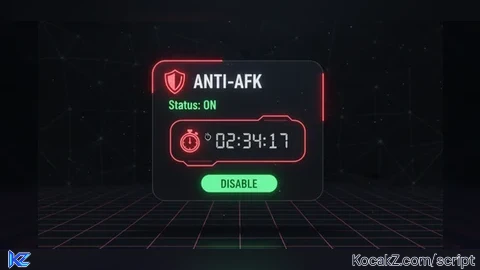
    ANTI-AFK BYPASS WITH GUI
    - Type "afk" in chat to show/hide GUI
    - Draggable window
    - Toggle on/off
    - Stopwatch showing AFK duration
]]

local Players = game:GetService("Players")
local VirtualUser = game:GetService("VirtualUser")
local RunService = game:GetService("RunService")
local LocalPlayer = Players.LocalPlayer

-- ── CLEANUP OLD INSTANCE ─────────────────────
if _G.AFK_GUI then pcall(function() _G.AFK_GUI:Destroy() end) end
if _G.AFK_CONN then pcall(function() _G.AFK_CONN:Disconnect() end) end
if _G.AFK_LOOP then pcall(function() _G.AFK_LOOP:Disconnect() end) end
if _G.AFK_CHAT then pcall(function() _G.AFK_CHAT:Disconnect() end) end

-- ── STATE ────────────────────────────────────
local afkEnabled = false
local afkStartTime = 0
local guiVisible = false

-- ── CREATE GUI ───────────────────────────────
local ScreenGui = Instance.new("ScreenGui")
ScreenGui.Name = "AntiAFKGui"
ScreenGui.ResetOnSpawn = false
ScreenGui.ZIndexBehavior = Enum.ZIndexBehavior.Sibling
ScreenGui.Parent = LocalPlayer:WaitForChild("PlayerGui")
_G.AFK_GUI = ScreenGui

-- Main frame
local MainFrame = Instance.new("Frame")
MainFrame.Name = "MainFrame"
MainFrame.Size = UDim2.new(0, 200, 0, 140)
MainFrame.Position = UDim2.new(0.5, -100, 0.4, 0)
MainFrame.BackgroundColor3 = Color3.fromRGB(30, 30, 35)
MainFrame.BorderSizePixel = 0
MainFrame.Visible = false
MainFrame.Parent = ScreenGui

local MainCorner = Instance.new("UICorner")
MainCorner.CornerRadius = UDim.new(0, 10)
MainCorner.Parent = MainFrame

local MainStroke = Instance.new("UIStroke")
MainStroke.Color = Color3.fromRGB(255, 50, 50)
MainStroke.Thickness = 2
MainStroke.Parent = MainFrame

-- Title bar
local TitleBar = Instance.new("Frame")
TitleBar.Name = "TitleBar"
TitleBar.Size = UDim2.new(1, 0, 0, 32)
TitleBar.BackgroundColor3 = Color3.fromRGB(40, 40, 45)
TitleBar.BorderSizePixel = 0
TitleBar.Parent = MainFrame

local TitleCorner = Instance.new("UICorner")
TitleCorner.CornerRadius = UDim.new(0, 10)
TitleCorner.Parent = TitleBar

-- Fix title bar bottom corners
local TitleFix = Instance.new("Frame")
TitleFix.Size = UDim2.new(1, 0, 0, 10)
TitleFix.Position = UDim2.new(0, 0, 1, -10)
TitleFix.BackgroundColor3 = Color3.fromRGB(40, 40, 45)
TitleFix.BorderSizePixel = 0
TitleFix.Parent = TitleBar

-- Title text
local TitleText = Instance.new("TextLabel")
TitleText.Name = "TitleText"
TitleText.Size = UDim2.new(1, -10, 1, 0)
TitleText.Position = UDim2.new(0, 10, 0, 0)
TitleText.BackgroundTransparency = 1
TitleText.Text = "🛡️ Anti-AFK"
TitleText.TextColor3 = Color3.fromRGB(255, 255, 255)
TitleText.TextSize = 16
TitleText.Font = Enum.Font.GothamBold
TitleText.TextXAlignment = Enum.TextXAlignment.Left
TitleText.Parent = TitleBar

-- Status label
local StatusLabel = Instance.new("TextLabel")
StatusLabel.Name = "StatusLabel"
StatusLabel.Size = UDim2.new(1, -20, 0, 20)
StatusLabel.Position = UDim2.new(0, 10, 0, 40)
StatusLabel.BackgroundTransparency = 1
StatusLabel.Text = "Status: OFF"
StatusLabel.TextColor3 = Color3.fromRGB(255, 80, 80)
StatusLabel.TextSize = 14
StatusLabel.Font = Enum.Font.GothamSemibold
StatusLabel.TextXAlignment = Enum.TextXAlignment.Left
StatusLabel.Parent = MainFrame

-- Stopwatch label
local StopwatchLabel = Instance.new("TextLabel")
StopwatchLabel.Name = "StopwatchLabel"
StopwatchLabel.Size = UDim2.new(1, -20, 0, 25)
StopwatchLabel.Position = UDim2.new(0, 10, 0, 62)
StopwatchLabel.BackgroundTransparency = 1
StopwatchLabel.Text = "⏱️ 00:00:00"
StopwatchLabel.TextColor3 = Color3.fromRGB(200, 200, 200)
StopwatchLabel.TextSize = 20
StopwatchLabel.Font = Enum.Font.Code
StopwatchLabel.TextXAlignment = Enum.TextXAlignment.Left
StopwatchLabel.Parent = MainFrame

-- Toggle button
local ToggleButton = Instance.new("TextButton")
ToggleButton.Name = "ToggleButton"
ToggleButton.Size = UDim2.new(1, -20, 0, 32)
ToggleButton.Position = UDim2.new(0, 10, 0, 95)
ToggleButton.BackgroundColor3 = Color3.fromRGB(255, 50, 50)
ToggleButton.BorderSizePixel = 0
ToggleButton.Text = "ENABLE"
ToggleButton.TextColor3 = Color3.fromRGB(255, 255, 255)
ToggleButton.TextSize = 14
ToggleButton.Font = Enum.Font.GothamBold
ToggleButton.Parent = MainFrame

local ButtonCorner = Instance.new("UICorner")
ButtonCorner.CornerRadius = UDim.new(0, 6)
ButtonCorner.Parent = ToggleButton

-- ── DRAGGING ─────────────────────────────────
local dragging = false
local dragStart = nil
local startPos = nil

TitleBar.InputBegan:Connect(function(input)
    if input.UserInputType == Enum.UserInputType.MouseButton1 or input.UserInputType == Enum.UserInputType.Touch then
        dragging = true
        dragStart = input.Position
        startPos = MainFrame.Position
    end
end)

TitleBar.InputEnded:Connect(function(input)
    if input.UserInputType == Enum.UserInputType.MouseButton1 or input.UserInputType == Enum.UserInputType.Touch then
        dragging = false
    end
end)

RunService.RenderStepped:Connect(function()
    if dragging and dragStart then
        local mouse = game:GetService("UserInputService"):GetMouseLocation()
        local delta = Vector2.new(mouse.X, mouse.Y) - Vector2.new(dragStart.X, dragStart.Y)
        MainFrame.Position = UDim2.new(
            startPos.X.Scale,
            startPos.X.Offset + delta.X,
            startPos.Y.Scale,
            startPos.Y.Offset + delta.Y
        )
    end
end)

-- ── FORMAT TIME ──────────────────────────────
local function formatTime(seconds)
    local hrs = math.floor(seconds / 3600)
    local mins = math.floor((seconds % 3600) / 60)
    local secs = math.floor(seconds % 60)
    return string.format("%02d:%02d:%02d", hrs, mins, secs)
end

-- ── TOGGLE FUNCTION ──────────────────────────
local function toggleAFK()
    afkEnabled = not afkEnabled

    if afkEnabled then
        afkStartTime = tick()
        StatusLabel.Text = "Status: ON"
        StatusLabel.TextColor3 = Color3.fromRGB(80, 255, 80)
        ToggleButton.Text = "DISABLE"
        ToggleButton.BackgroundColor3 = Color3.fromRGB(80, 200, 80)
    else
        StatusLabel.Text = "Status: OFF"
        StatusLabel.TextColor3 = Color3.fromRGB(255, 80, 80)
        ToggleButton.Text = "ENABLE"
        ToggleButton.BackgroundColor3 = Color3.fromRGB(255, 50, 50)
        StopwatchLabel.Text = "⏱️ 00:00:00"
    end
end

ToggleButton.MouseButton1Click:Connect(toggleAFK)

-- ── STOPWATCH UPDATE ─────────────────────────
_G.AFK_LOOP = RunService.Heartbeat:Connect(function()
    if afkEnabled then
        local elapsed = tick() - afkStartTime
        StopwatchLabel.Text = "⏱️ " .. formatTime(elapsed)
    end
end)

-- ── ANTI-AFK LOGIC ───────────────────────────
_G.AFK_CONN = LocalPlayer.Idled:Connect(function()
    if afkEnabled then
        VirtualUser:CaptureController()
        VirtualUser:ClickButton2(Vector2.new())
    end
end)

-- Backup anti-kick every 60 seconds
spawn(function()
    while ScreenGui and ScreenGui.Parent do
        wait(60)
        if afkEnabled then
            VirtualUser:CaptureController()
            VirtualUser:ClickButton2(Vector2.new())
        end
    end
end)

-- ── CHAT TOGGLE ──────────────────────────────
_G.AFK_CHAT = LocalPlayer.Chatted:Connect(function(message)
    if string.lower(message) == "afk" then
        guiVisible = not guiVisible
        MainFrame.Visible = guiVisible
    end
end)

-- ── DESTROY FUNCTION ─────────────────────────
_G.AFK_DESTROY = function()
    if _G.AFK_GUI then _G.AFK_GUI:Destroy() end
    if _G.AFK_CONN then _G.AFK_CONN:Disconnect() end
    if _G.AFK_LOOP then _G.AFK_LOOP:Disconnect() end
    if _G.AFK_CHAT then _G.AFK_CHAT:Disconnect() end
    print("[Anti-AFK] Removed")
end

print("[Anti-AFK] Loaded! Type 'afk' in chat to show/hide GUI")


Seems to work fine!
@Revontulet do u want ur own script if yes js comment what u want :)
@TheKnockoutScripter Don't really have any games I need new scripts for, but if you could make a version of this that doesn't need you to type "afk" that'd be awesome, as some games either restrict chat or simply don't have chat, or if you don't want to type into chat for whatever reason.