


KeylessUniversal
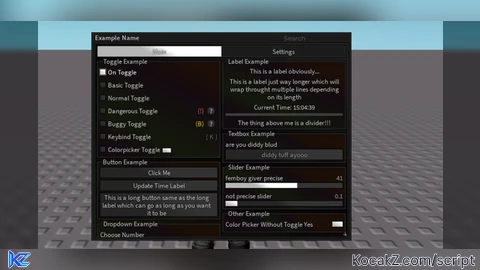
-- gui remake by @! nfpw on discord
-- custom gui settings you can also remove this if you dont want it
local stored_fonts = {}
gui_config = {
    Color = Color3.fromRGB(255, 255, 255),
    Keybind = Enum.KeyCode.Insert, -- for pc related only enum keys documentation: https://create.roblox.com/docs/reference/engine/enums/KeyCode
    Assets = false, -- set to true if you want custom background asset
    MinHeight = 100,
    MaxHeight = 600,
    InitialHeight = 400,
    MinWidth = 300,
    MaxWidth = 800,
    InitialWidth = 500
}

for _, v in Enum.Font:GetEnumItems() do
    table.insert(stored_fonts, v.Name)
end

local config = (getfenv().gui_config) or nil -- custom config or fully ignore this
local library = loadstring(game:HttpGet("https://raw.githubusercontent.com/nfpw/XXSCRIPT/refs/heads/main/Library/Module.lua"))()
local window = library:CreateWindow(config, gethui())
local window_name = library:SetWindowName("Example Name") -- title to use for gui

-- create/add tabs here
local tabs = {
    -- creates "main" tab
    main = window:CreateTab("Main"),
    settings = window:CreateTab("Settings")
}

-- create/add sections here if you dont put left or right as the 2nd argument it will auto generate based on size
local sections = {
    toggle_example_section = tabs.main:CreateSection("Toggle Example"),
    label_example_section = tabs.main:CreateSection("Label Example"),
    button_example_section = tabs.main:CreateSection("Button Example"),
    textbox_example_section = tabs.main:CreateSection("Textbox Example"),
    dropdown_example_section = tabs.main:CreateSection("Dropdown Example"),
    slider_example_section = tabs.main:CreateSection("Slider Example"),
    other_example_section = tabs.main:CreateSection("Other Example", "right")
}

-- toggle examples

sections.toggle_example_section:CreateToggle("On Toggle", true, function(value)
    print(value)
end)

sections.toggle_example_section:CreateToggle("Basic Toggle", false, function(value)
    print(value)
end)

sections.toggle_example_section:CreateToggle("Normal Toggle", false, function(value)
    print(value)
end)

sections.toggle_example_section:CreateToggle("Dangerous Toggle", false, function(value)
    print(value)
end, "dangerous", "scary toggle 🙀") -- you can also just do dangerous if you dont wanna include a text

sections.toggle_example_section:CreateToggle("Buggy Toggle", false, function(value)
    print(value)
end, "buggy", "barely functions awdawdhawdhauwdhu yk")

local bindable_toggle = sections.toggle_example_section:CreateToggle("Keybind Toggle", false, function(value)
    print(value)
end)

bindable_toggle:CreateKeybind("K", function(key)
    print("pressed keybind", key)
end) -- can also put , "Hold", or "Toggle" example: end, "Hold" or "Toggle")

local colorpicker_toggle = sections.toggle_example_section:CreateToggle("Colorpicker Toggle", false, function(value)
    print(value)
end)

sections.toggle_example_section:CreateColorpicker("Color Picker", function(color, transparency)
    print("Color: "..tostring(color).." Transparency: "..tostring(transparency))
end, false, false, colorpicker_toggle)

-- label examples

sections.label_example_section:CreateLabel("This is a label obviously...")
sections.label_example_section:CreateLabel("This is a label just way longer which will wrap throught multiple lines depending on its length", true)
local time_label = sections.label_example_section:CreateLabel("Current Time: "..os.date("%H:%M:%S"))
sections.label_example_section:CreateDivider()
sections.label_example_section:CreateLabel("The thing above me is a divider!!!")

-- button examples

sections.button_example_section:CreateButton("Click Me", function()
    print("clicked")
end)

sections.button_example_section:CreateButton("Update Time Label", function()
    time_label:UpdateText("Current Time: "..os.date("%H:%M:%S"))
end)

sections.button_example_section:CreateButton("This is a long button same as the long label which can go as long as you want it to be", function()
    print("blah")
end, true)

-- textbox examples

sections.textbox_example_section:CreateTextBox(
    "are you diddy blud",
    "diddy tuff ayooo",
    false, -- if you only wanna include numbers make it true
    function(value)
        print(value)
    end
)

-- slider examples

sections.slider_example_section:CreateSlider(
    "femboy giver precise",
    41, -- min
    67, -- max
    41, -- default
    true, -- Precise = true (integers only)
    function(value)
        print(value)
    end
)

sections.slider_example_section:CreateSlider(
    "not precise slider",
    0.1, -- min
    1, -- max
    0.1, -- default
    false, -- Precise = true (integers only)
    function(value)
        print(value)
    end
)

-- dropdown examples

sections.dropdown_example_section:CreateDropdown(
    "Choose Number",
    {"1", "2", "3", "4", "5"},
    function(value)
        print(value)
    end,
    "1",
    false -- set to true if you wanna choose multiple options
)

-- colorpicker examples

sections.other_example_section:CreateColorpicker("Color Picker Without Toggle Yes", function(color, transparency)
    print("Color: "..tostring(color).." Transparency: "..tostring(transparency))
end)

-- misc examples
--[[
window:Notify("title", "content", 5) -- 5 is how long the notification will last you can also remove it to keep all notifications at 15 seconds
local watermark = library:Hud()
game:GetService("RunService").RenderStepped:Connect(function()
    watermark:SetText("Example Name | "..os.date("%Y-%m-%d %H:%M:%S", os.time()))
end)
]]

sections.dropdown_example_section:CreateDropdown(
    "Change Font",
    stored_fonts,
    function(value)
        window:SetFont(value)
    end,
    "",
    false -- set to true if you wanna choose multiple options
)

local config_manager = loadstring(game:HttpGet("https://raw.githubusercontent.com/nfpw/XXSCRIPT/refs/heads/main/Library/ConfigManager.lua"))()
config_manager:SetLibrary(library)
config_manager:SetWindow(window)
config_manager:SetFolder("Example Name") -- name for folder where configs will be stored
config_manager:BuildConfigSection(tabs.settings)
config_manager:LoadAutoloadConfig()
window:SetBackground("123456789") -- if you turned on assets set the background id here
window:SetTileOffset(100)
window:SetTileScale(0.5) -- on how large background asset should be
window:SetBackgroundColor(Color3.fromRGB(40, 40, 40))
window:SetBackgroundTransparency(0.5) -- on how transparent background should be for asset![[KEYLESS] Moondiety Script | 17+ supported Games](https://scriptblox.com/images/sb/0-1753093706828.png)


Goated except for the fact that the colorpicker can't be hidden once opened lol