


Key RequiredUniversal
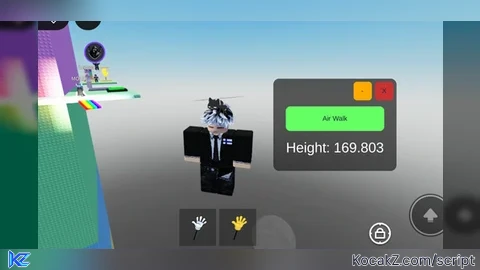
local player = game.Players.LocalPlayer
local character = player.Character or player.CharacterAdded:Wait()
local humanoidRootPart = character:WaitForChild("HumanoidRootPart")

-- Rounded corners
local function addRoundCorner(guiObject, radius)
	local corner = Instance.new("UICorner")
	corner.CornerRadius = UDim.new(0, radius)
	corner.Parent = guiObject
end

-- Create main GUI
local screenGui = Instance.new("ScreenGui", player:WaitForChild("PlayerGui"))
screenGui.Name = "AirWalkGUI"
screenGui.ResetOnSpawn = false

-- Main frame
local mainFrame = Instance.new("Frame", screenGui)
mainFrame.Size = UDim2.new(0, 200, 0, 150)
mainFrame.Position = UDim2.new(0.5, -100, 0.5, -75)
mainFrame.BackgroundColor3 = Color3.fromRGB(30, 30, 30)
mainFrame.BackgroundTransparency = 0.3
mainFrame.BorderColor3 = Color3.new(0, 0, 0)
mainFrame.BorderSizePixel = 2
mainFrame.Active = true
mainFrame.Draggable = true
addRoundCorner(mainFrame, 10)

-- Close button (X)
local closeButton = Instance.new("TextButton", mainFrame)
closeButton.Text = "X"
closeButton.Size = UDim2.new(0, 30, 0, 30)
closeButton.Position = UDim2.new(1, -35, 0, 5)
closeButton.BackgroundColor3 = Color3.fromRGB(200, 50, 50)
closeButton.BorderColor3 = Color3.new(0, 0, 0)
closeButton.BorderSizePixel = 1
addRoundCorner(closeButton, 6)

-- Minimize button (-)
local minimizeButton = Instance.new("TextButton", mainFrame)
minimizeButton.Text = "-"
minimizeButton.Size = UDim2.new(0, 30, 0, 30)
minimizeButton.Position = UDim2.new(1, -70, 0, 5)
minimizeButton.BackgroundColor3 = Color3.fromRGB(255, 170, 0)
minimizeButton.BorderColor3 = Color3.new(0, 0, 0)
minimizeButton.BorderSizePixel = 1
addRoundCorner(minimizeButton, 6)

-- Air Walk button
local airWalkButton = Instance.new("TextButton", mainFrame)
airWalkButton.Text = "Air Walk"
airWalkButton.Size = UDim2.new(0.8, 0, 0, 40)
airWalkButton.Position = UDim2.new(0.1, 0, 0.3, 0)
airWalkButton.BackgroundColor3 = Color3.fromRGB(100, 255, 100)
airWalkButton.BorderColor3 = Color3.new(0, 0, 0)
airWalkButton.BorderSizePixel = 1
addRoundCorner(airWalkButton, 8)

-- Height label
local heightLabel = Instance.new("TextLabel", mainFrame)
heightLabel.Size = UDim2.new(0.8, 0, 0, 30)
heightLabel.Position = UDim2.new(0.1, 0, 0.65, 0)
heightLabel.BackgroundTransparency = 1
heightLabel.TextColor3 = Color3.new(1, 1, 1)
heightLabel.TextScaled = true
heightLabel.Text = "Height: -"

-- AW ball GUI
local ballButton = Instance.new("TextButton", screenGui)
ballButton.Size = UDim2.new(0, 50, 0, 50)
ballButton.Position = UDim2.new(0, 20, 0.5, -25)
ballButton.Text = ""
ballButton.BackgroundColor3 = Color3.fromRGB(50, 50, 50)
ballButton.BackgroundTransparency = 0.3
ballButton.BorderColor3 = Color3.new(0, 0, 0)
ballButton.BorderSizePixel = 2
ballButton.Visible = false
ballButton.Active = true
ballButton.Draggable = true
addRoundCorner(ballButton, 25)

local awLabel = Instance.new("TextLabel", ballButton)
awLabel.Text = "AW"
awLabel.Size = UDim2.new(1, 0, 1, 0)
awLabel.BackgroundTransparency = 1
awLabel.TextColor3 = Color3.new(1, 1, 1)
awLabel.TextScaled = true
awLabel.Font = Enum.Font.GothamBold

-- Platform
local platform = Instance.new("Part")
platform.Anchored = true
platform.Size = Vector3.new(5, 1, 5)
platform.Transparency = 1
platform.CanCollide = false
platform.Parent = workspace

local airWalkOn = false
local platformY = 0

-- Update
game:GetService("RunService").RenderStepped:Connect(function()
	if airWalkOn then
		platform.Position = Vector3.new(
			humanoidRootPart.Position.X,
			platformY,
			humanoidRootPart.Position.Z
		)
		platform.CanCollide = true
	end
	heightLabel.Text = "Height: " .. string.format("%.3f", humanoidRootPart.Position.Y)
end)

-- Air Walk button click
airWalkButton.MouseButton1Click:Connect(function()
	platformY = humanoidRootPart.Position.Y - 3
	airWalkOn = not airWalkOn
	platform.CanCollide = airWalkOn
end)

-- Close all
closeButton.MouseButton1Click:Connect(function()
	screenGui:Destroy()
	platform:Destroy()
end)

-- Minimize
minimizeButton.MouseButton1Click:Connect(function()
	mainFrame.Visible = false
	ballButton.Visible = true
end)

-- Restore GUI
ballButton.MouseButton1Click:Connect(function()
	mainFrame.Visible = true
	ballButton.Visible = false
end)


chatgpt script
Skid. Also it would be better if the block under you moved vertically with you instead just staying there
where do i execute