KeylessUniversal
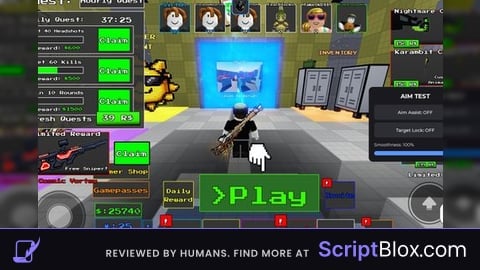
--// Private Test Aim Assist / Target Lock
--// Place this LocalScript in StarterPlayer > StarterPlayerScripts

local Players = game:GetService("Players")
local RunService = game:GetService("RunService")
local UserInputService = game:GetService("UserInputService")

local player = Players.LocalPlayer
local camera = workspace.CurrentCamera

--// SETTINGS
local aimEnabled = false
local targetLockEnabled = false
local smoothness = 0.18
local maxDistance = 500
local targetPartName = "Head"

--// GUI
local gui = Instance.new("ScreenGui")
gui.Name = "PrivateAimTestGUI"
gui.ResetOnSpawn = false
gui.Parent = player:WaitForChild("PlayerGui")

local main = Instance.new("Frame")
main.Size = UDim2.fromOffset(260, 210)
main.Position = UDim2.new(1, -280, 0.5, -105)
main.BackgroundColor3 = Color3.fromRGB(25, 25, 30)
main.BorderSizePixel = 0
main.Parent = gui

local corner = Instance.new("UICorner")
corner.CornerRadius = UDim.new(0, 12)
corner.Parent = main

--// Title
local title = Instance.new("TextLabel")
title.Size = UDim2.new(1, -20, 0, 35)
title.Position = UDim2.fromOffset(10, 8)
title.BackgroundTransparency = 1
title.Text = "AIM TEST"
title.TextColor3 = Color3.new(1, 1, 1)
title.TextSize = 20
title.Font = Enum.Font.GothamBold
title.Parent = main

--// Helper
local function makeButton(text, y)
	local button = Instance.new("TextButton")
	button.Size = UDim2.new(1, -30, 0, 42)
	button.Position = UDim2.fromOffset(15, y)
	button.BackgroundColor3 = Color3.fromRGB(45, 45, 52)
	button.TextColor3 = Color3.new(1, 1, 1)
	button.TextSize = 15
	button.Font = Enum.Font.GothamMedium
	button.Text = text
	button.AutoButtonColor = true
	button.Parent = main

	local c = Instance.new("UICorner")
	c.CornerRadius = UDim.new(0, 8)
	c.Parent = button

	return button
end

local aimButton = makeButton("Aim Assist: OFF", 50)
local lockButton = makeButton("Target Lock: OFF", 100)

--// Smoothness label
local smoothLabel = Instance.new("TextLabel")
smoothLabel.Size = UDim2.new(1, -30, 0, 25)
smoothLabel.Position = UDim2.fromOffset(15, 150)
smoothLabel.BackgroundTransparency = 1
smoothLabel.Text = "Smoothness: 18%"
smoothLabel.TextColor3 = Color3.new(1, 1, 1)
smoothLabel.TextSize = 14
smoothLabel.Font = Enum.Font.Gotham
smoothLabel.TextXAlignment = Enum.TextXAlignment.Left
smoothLabel.Parent = main

--// Slider
local slider = Instance.new("TextButton")
slider.Size = UDim2.new(1, -30, 0, 12)
slider.Position = UDim2.fromOffset(15, 180)
slider.BackgroundColor3 = Color3.fromRGB(55, 55, 62)
slider.Text = ""
slider.AutoButtonColor = false
slider.Parent = main

local sliderCorner = Instance.new("UICorner")
sliderCorner.CornerRadius = UDim.new(1, 0)
sliderCorner.Parent = slider

local fill = Instance.new("Frame")
fill.Size = UDim2.new(smoothness, 0, 1, 0)
fill.BackgroundColor3 = Color3.fromRGB(90, 150, 255)
fill.BorderSizePixel = 0
fill.Parent = slider

local fillCorner = Instance.new("UICorner")
fillCorner.CornerRadius = UDim.new(1, 0)
fillCorner.Parent = fill

--// Toggle buttons
aimButton.MouseButton1Click:Connect(function()
	aimEnabled = not aimEnabled

	if aimEnabled then
		aimButton.Text = "Aim Assist: ON"
		aimButton.BackgroundColor3 = Color3.fromRGB(45, 120, 70)
	else
		aimButton.Text = "Aim Assist: OFF"
		aimButton.BackgroundColor3 = Color3.fromRGB(45, 45, 52)
	end
end)

lockButton.MouseButton1Click:Connect(function()
	targetLockEnabled = not targetLockEnabled

	if targetLockEnabled then
		lockButton.Text = "Target Lock: ON"
		lockButton.BackgroundColor3 = Color3.fromRGB(45, 120, 70)
	else
		lockButton.Text = "Target Lock: OFF"
		lockButton.BackgroundColor3 = Color3.fromRGB(45, 45, 52)
	end
end)

--// Smoothness slider
local draggingSlider = false

local function updateSlider(x)
	local left = slider.AbsolutePosition.X
	local width = slider.AbsoluteSize.X

	local percent = math.clamp((x - left) / width, 0, 1)

	-- Prevent extremely weak camera movement
	smoothness = math.clamp(percent, 0.05, 1)

	fill.Size = UDim2.new(percent, 0, 1, 0)
	smoothLabel.Text = "Smoothness: " .. math.floor(smoothness * 100) .. "%"
end

slider.InputBegan:Connect(function(input)
	if input.UserInputType == Enum.UserInputType.MouseButton1
		or input.UserInputType == Enum.UserInputType.Touch then

		draggingSlider = true
		updateSlider(input.Position.X)
	end
end)

UserInputService.InputChanged:Connect(function(input)
	if draggingSlider then
		if input.UserInputType == Enum.UserInputType.MouseMovement
			or input.UserInputType == Enum.UserInputType.Touch then

			updateSlider(input.Position.X)
		end
	end
end)

UserInputService.InputEnded:Connect(function(input)
	if input.UserInputType == Enum.UserInputType.MouseButton1
		or input.UserInputType == Enum.UserInputType.Touch then

		draggingSlider = false
	end
end)

--// Find closest target to screen center
local function getClosestTarget()
	local closestCharacter = nil
	local closestDistance = math.huge

	local viewport = camera.ViewportSize
	local screenCenter = Vector2.new(viewport.X / 2, viewport.Y / 2)

	for _, otherPlayer in ipairs(Players:GetPlayers()) do
		if otherPlayer ~= player then
			local character = otherPlayer.Character

			if character then
				local humanoid = character:FindFirstChildOfClass("Humanoid")
				local targetPart = character:FindFirstChild(targetPartName)

				if humanoid and humanoid.Health > 0 and targetPart then
					local screenPosition, visible =
						camera:WorldToViewportPoint(targetPart.Position)

					if visible and screenPosition.Z > 0 then
						local distance = (
							Vector2.new(screenPosition.X, screenPosition.Y)
							- screenCenter
						).Magnitude

						local worldDistance =
							(camera.CFrame.Position - targetPart.Position).Magnitude

						if distance < closestDistance
							and worldDistance <= maxDistance then

							closestDistance = distance
							closestCharacter = character
						end
					end
				end
			end
		end
	end

	return closestCharacter
end

--// Camera targeting
RunService.RenderStepped:Connect(function()
	if not aimEnabled and not targetLockEnabled then
		return
	end

	local target = getClosestTarget()

	if not target then
		return
	end

	local targetPart = target:FindFirstChild(targetPartName)

	if not targetPart then
		return
	end

	local cameraPosition = camera.CFrame.Position
	local desiredCFrame = CFrame.lookAt(
		cameraPosition,
		targetPart.Position
	)

	-- Smooth camera movement
	camera.CFrame = camera.CFrame:Lerp(
		desiredCFrame,
		smoothness
	)
end)

--// Make GUI draggable on PC and mobile
local dragging = false
local dragStart
local startPosition

title.InputBegan:Connect(function(input)
	if input.UserInputType == Enum.UserInputType.MouseButton1
		or input.UserInputType == Enum.UserInputType.Touch then

		dragging = true
		dragStart = input.Position
		startPosition = main.Position
	end
end)

UserInputService.InputChanged:Connect(function(input)
	if not dragging then
		return
	end

	if input.UserInputType == Enum.UserInputType.MouseMovement
		or input.UserInputType == Enum.UserInputType.Touch then

		local delta = input.Position - dragStart

		main.Position = UDim2.new(
			startPosition.X.Scale,
			startPosition.X.Offset + delta.X,
			startPosition.Y.Scale,
			startPosition.Y.Offset + delta.Y
		)
	end
end)

UserInputService.InputEnded:Connect(function(input)
	if input.UserInputType == Enum.UserInputType.MouseButton1
		or input.UserInputType == Enum.UserInputType.Touch then

		dragging = false
	end
end)No comments yet for this script.