🌟 Overview
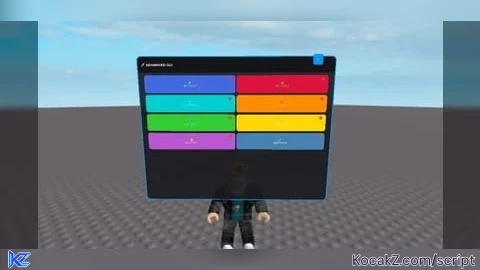
This is a unique GUI system for Roblox that uses BillboardGui technology instead of traditional ScreenGui. It provides a highly customizable, movable, and collapsible interface that always stays visible in the 3D world.
🛠️ Installation
1. Copy the entire script
2. Paste into a Script object in StarterPlayerScripts
3. The GUI will automatically appear when you spawn
⚙️ Customization Guide
🎨 Changing Colors
```lua
-- Main background color
mainFrame.BackgroundColor3 = Color3.fromRGB(25, 25, 30)
-- Header color
header.BackgroundColor3 = Color3.fromRGB(20, 20, 25)
-- Button colors (example)
createCustomButton("⭐", "MY BUTTON", Color3.fromRGB(255, 0, 0)) -- Red button
```
📏 Changing Size
```lua
-- GUI Part size (width, height, depth)
guiPart.Size = Vector3.new(10, 8, 0.1) -- Larger GUI
-- Button grid layout
gridLayout.CellSize = UDim2.new(0.45, 0, 0, 80) -- Larger buttons
```
🔧 Adding Custom Functions
```lua
-- Example: Add custom functionality to button 1
buttons[1].MouseButton1Click:Connect(function()
-- Your custom code here
print("Custom function executed!")
-- Example: Change player speed
game.Players.LocalPlayer.Character.Humanoid.WalkSpeed = 50
-- Example: Create a part
local part = Instance.new("Part")
part.Position = game.Players.LocalPlayer.Character.HumanoidRootPart.Position
part.Parent = workspace
end)
```
📱 Mobile Optimization
The GUI is automatically optimized for mobile devices with:
· Large touch targets
· Draggable interface
· Clear visual feedback
· Responsive design
🎯 Positioning Options
```lua
-- Change follow offset
local offset = CFrame.new(0, 5, -6) -- Higher and further back
-- Static position (disable follow system)
-- Remove the Heartbeat connection and set position manually
advancedGUI.Position = Vector3.new(0, 10, 0)
advancedGUI.Anchored = true
```
🔧 Advanced Features
Button States
Each button has a status indicator that toggles between red (off) and green (on). You can customize this behavior:
```lua
-- Custom status colors
statusLight.BackgroundColor3 = isActive and Color3.fromRGB(0, 255, 0) or Color3.fromRGB(255, 0, 0)
-- Add more states
statusLight.BackgroundColor3 = Color3.fromRGB(255, 165, 0) -- Orange for intermediate state
```
Dynamic Content
```lua
-- Add images to buttons
local buttonIcon = Instance.new("ImageLabel")
buttonIcon.Image = "rbxassetid://YOUR_IMAGE_ID"
buttonIcon.Parent = button
-- Create different button layouts
gridLayout.CellPadding = UDim2.new(0, 10, 0, 15) -- More spacing
```
🚀 Performance Tips
· The GUI uses minimal resources
· Only updates position when player moves
· Collapsible to reduce visual clutter
· Automatic cleanup when player respawns
🎨 Theme Customization
Create different themes by modifying these color values:
Dark Theme (Default):
```lua
mainFrame.BackgroundColor3 = Color3.fromRGB(25, 25, 30)
header.BackgroundColor3 = Color3.fromRGB(20, 20, 25)
```
Light Theme:
```lua
mainFrame.BackgroundColor3 = Color3.fromRGB(240, 240, 240)
header.BackgroundColor3 = Color3.fromRGB(220, 220, 220)
title.TextColor3 = Color3.fromRGB(0, 0, 0)
```
Blue Theme:
```lua
mainFrame.BackgroundColor3 = Color3.fromRGB(30, 40, 70)
header.BackgroundColor3 = Color3.fromRGB(20, 30, 60)
```
📝 Usage Examples
Game Controls:
```lua
-- Teleport button
buttons[1].MouseButton1Click:Connect(function()
game.Players.LocalPlayer.Character.HumanoidRootPart.Position = Vector3.new(0, 100, 0)
end)
```
Admin Command


![[KEYLESS] Moondiety Script | 17+ supported Games](https://scriptblox.com/images/sb/0-1753093706828.png)

