


KeylessUniversal
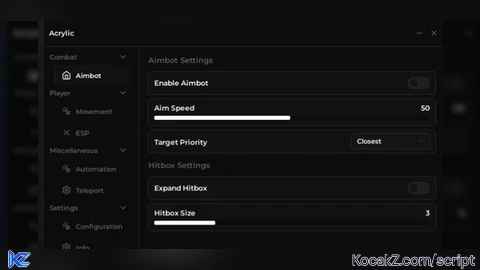
-- Load the library
local Library = loadstring(game:HttpGet("https://raw.githubusercontent.com/noowtf31-ui/Arcylic/refs/heads/main/src.lua.txt"))()

-- Create the main window
local window = Library.new("My Hub", "MyHubConfigs")

-- Set toggle key (optional, default is RightControl)
window:SetToggleKey(Enum.KeyCode.RightControl)

-- Show welcome notification
window:Notify({
    Title = "Welcome!",
    Description = "Hub loaded successfully",
    Duration = 3,
    Icon = "rbxassetid://10709775704"
})

-- Create sections
local CombatSection = window:CreateSection("Combat")
local PlayerSection = window:CreateSection("Player")

-- Create tabs within sections
local AimbotTab = CombatSection:CreateTab("Aimbot", "rbxassetid://10723407389")
local MovementTab = PlayerSection:CreateTab("Movement", "rbxassetid://10734898355")

-- Add section headers
AimbotTab:CreateSection("Aimbot Settings")

-- Add components with config flags
local aimbotEnabled = false
AimbotTab:CreateToggle({
    Name = "Enable Aimbot",
    Default = false,
    Flag = "AimbotEnabled", -- Used for config saving
    Callback = function(enabled)
        aimbotEnabled = enabled
        window:Notify({
            Title = enabled and "Aimbot Enabled" or "Aimbot Disabled",
            Description = enabled and "Auto-aim active" or "Auto-aim deactivated",
            Duration = 2
        })
    end
})

AimbotTab:CreateSlider({
    Name = "Aim Speed",
    Min = 1,
    Max = 100,
    Default = 50,
    Flag = "AimSpeed",
    Callback = function(value)
        print("Aim speed:", value)
    end
})

AimbotTab:CreateDropdown({
    Name = "Target Priority",
    Options = {"Closest", "Lowest HP", "Highest Threat", "Random"},
    Default = "Closest",
    Flag = "TargetPriority",
    Callback = function(selected)
        print("Target priority:", selected)
    end
})


My second upload for the year
Nice 👍