


KeylessUniversal
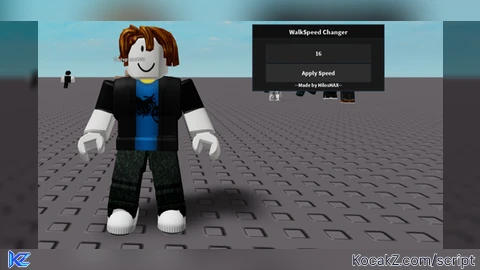
local Players = game:GetService("Players")
local UserInputService = game:GetService("UserInputService")

local player = Players.LocalPlayer
local character = player.Character or player.CharacterAdded:Wait()
local humanoid = character:WaitForChild("Humanoid")

local ScreenGui = Instance.new("ScreenGui")
ScreenGui.Parent = game.CoreGui

local MainFrame = Instance.new("Frame")
MainFrame.Size = UDim2.new(0, 300, 0, 150)
MainFrame.Position = UDim2.new(0.5, -150, 0.5, -75)
MainFrame.BackgroundColor3 = Color3.fromRGB(25, 25, 25)
MainFrame.BorderSizePixel = 2
MainFrame.Draggable = true
MainFrame.Active = true
MainFrame.Parent = ScreenGui

local Title = Instance.new("TextLabel")
Title.Size = UDim2.new(1, 0, 0, 30)
Title.BackgroundColor3 = Color3.fromRGB(15, 15, 15)
Title.Text = "WalkSpeed Changer"
Title.TextColor3 = Color3.fromRGB(255, 255, 255)
Title.Font = Enum.Font.SourceSansBold
Title.TextSize = 18
Title.Parent = MainFrame

local SpeedInput = Instance.new("TextBox")
SpeedInput.Size = UDim2.new(0.8, 0, 0, 40)
SpeedInput.Position = UDim2.new(0.1, 0, 0.3, 0)
SpeedInput.BackgroundColor3 = Color3.fromRGB(35, 35, 35)
SpeedInput.TextColor3 = Color3.fromRGB(255, 255, 255)
SpeedInput.PlaceholderText = "Enter WalkSpeed (Max: 1M)"
SpeedInput.Font = Enum.Font.SourceSansBold
SpeedInput.TextSize = 16
SpeedInput.Parent = MainFrame

local ApplyButton = Instance.new("TextButton")
ApplyButton.Size = UDim2.new(0.8, 0, 0, 40)
ApplyButton.Position = UDim2.new(0.1, 0, 0.6, 0)
ApplyButton.BackgroundColor3 = Color3.fromRGB(45, 45, 45)
ApplyButton.Text = "Apply Speed"
ApplyButton.TextColor3 = Color3.fromRGB(255, 255, 255)
ApplyButton.Font = Enum.Font.SourceSansBold
ApplyButton.TextSize = 16
ApplyButton.Parent = MainFrame

local Watermark = Instance.new("TextLabel")
Watermark.Size = UDim2.new(1, 0, 0, 20)
Watermark.Position = UDim2.new(0, 0, 0.85, 0)
Watermark.BackgroundTransparency = 1
Watermark.Text = "--Made by HilosHAX--"
Watermark.TextColor3 = Color3.fromRGB(255, 255, 255)
Watermark.Font = Enum.Font.SourceSansBold
Watermark.TextSize = 14
Watermark.Parent = MainFrame

local ToggleButton = Instance.new("TextButton")
ToggleButton.Size = UDim2.new(0, 120, 0, 40)
ToggleButton.Position = UDim2.new(0, 10, 0, 10)
ToggleButton.BackgroundColor3 = Color3.fromRGB(35, 35, 35)
ToggleButton.Text = "Toggle GUI"
ToggleButton.TextColor3 = Color3.fromRGB(255, 255, 255)
ToggleButton.Font = Enum.Font.SourceSansBold
ToggleButton.TextSize = 14
ToggleButton.Parent = ScreenGui
ToggleButton.Draggable = true
ToggleButton.Active = true

local guiVisible = true
ToggleButton.MouseButton1Click:Connect(function()
    guiVisible = not guiVisible
    MainFrame.Visible = guiVisible
end)

ApplyButton.MouseButton1Click:Connect(function()
    local speed = tonumber(SpeedInput.Text)
    if speed and speed > 0 and speed <= 1000000 then
        humanoid.WalkSpeed = speed
    end
end)

SpeedInput.FocusLost:Connect(function(enterPressed)
    if enterPressed then
        local speed = tonumber(SpeedInput.Text)
        if speed and speed > 0 and speed <= 1000000 then
            humanoid.WalkSpeed = speed
        end
    end
end)


@ignite human scripters use that too dip* i use it and i dont use chatgpt
it works but when you die it doesnt work you have to rejoin for it to work again
@PineCodeReborn Shut your flipping mouth You dont need to hate on bro Just cuz hes using Chatgpt He will get better soon