


KeylessUniversal
--[[
===========================================
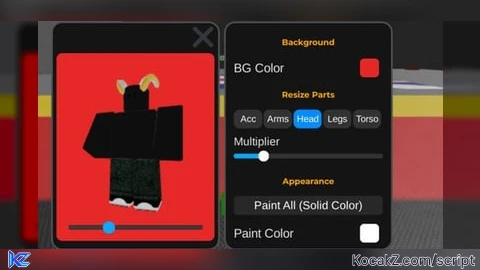
Roblox Heads and Accessories Management Script
===========================================

Current Issue:
- Heads do not hide properly when executing hide commands

Required Development:
1. Fix the hiding system
2. Add new features as needed
3. Handle any errors or exceptions

How to Contribute:
- You can modify any part of the code
- Improve the algorithms used
- Fix existing errors

Original Developer: AZ SCRIPT
Start Date: 2025/12/4

Note: This is an open-source project.
===========================================
]]
local Players = game:GetService("Players")
local UserInputService = game:GetService("UserInputService")
local RunService = game:GetService("RunService")
local Player = Players.LocalPlayer

if Player.PlayerGui:FindFirstChild("PerfectViewer") then
	Player.PlayerGui["PerfectViewer"]:Destroy()
end

local ScreenGui = Instance.new("ScreenGui")
ScreenGui.Name = "PerfectViewer"
ScreenGui.ResetOnSpawn = false
ScreenGui.Parent = Player:WaitForChild("PlayerGui")
ScreenGui.ZIndexBehavior = Enum.ZIndexBehavior.Sibling

local ActivePopups = {}

local Config = {
	AutoRotate = true,
	RotSpeed = 0.01,
	CamHeight = -0.5,

	Scales = {
		Head = 1, Torso = 1, Arms = 1, Legs = 1, Accessories = 1
	},
	CurrentSelectedPart = "Head",
	Hidden = {Head=false, Torso=false, Arms=false, Legs=false, Acc=false},

	Transparency = 0,
	IsForceField = false,
	EffectColor = Color3.fromRGB(100, 255, 100),

	SolidColorEnabled = false,
	SolidColor = Color3.fromRGB(255, 255, 255)
}

local MainFrame = Instance.new("ImageLabel")
MainFrame.Name = "MainFrame"
MainFrame.Size = UDim2.new(0, 220, 0, 300)
MainFrame.Position = UDim2.new(0, 20, 0.5, -150)
MainFrame.BackgroundColor3 = Color3.fromRGB(20, 20, 20)
MainFrame.BorderSizePixel = 0
MainFrame.Active = true
MainFrame.Parent = ScreenGui

local MainCorner = Instance.new("UICorner") MainCorner.CornerRadius = UDim.new(0, 12) MainCorner.Parent = MainFrame
local MainStroke = Instance.new("UIStroke") MainStroke.Color = Color3.fromRGB(80, 80, 80) MainStroke.Thickness = 2 MainStroke.Parent = MainFrame

local Viewport = Instance.new("ViewportFrame")
Viewport.Size = UDim2.new(1, -10, 1, -50)
Viewport.Position = UDim2.new(0, 5, 0, 40)
Viewport.BackgroundTransparency = 0
Viewport.BackgroundColor3 = Color3.fromRGB(35, 35, 35)
Viewport.Parent = MainFrame
Instance.new("UICorner", Viewport).CornerRadius = UDim.new(0, 8)

local WorldModel = Instance.new("WorldModel") WorldModel.Parent = Viewport
local Camera = Instance.new("Camera") Viewport.CurrentCamera = Camera Camera.Parent = Viewport

local ToggleBtn = Instance.new("TextButton")
ToggleBtn.Name = "ToggleBtn"
ToggleBtn.Size = UDim2.new(0, 30, 0, 30)
ToggleBtn.Position = UDim2.new(1, -35, 0, 5)
ToggleBtn.BackgroundTransparency = 1
ToggleBtn.Text = "⚙️"
ToggleBtn.TextSize = 24
ToggleBtn.TextColor3 = Color3.new(1,1,1)
ToggleBtn.Parent = MainFrame

local SettingsFrame = Instance.new("ScrollingFrame")
SettingsFrame.Name = "SettingsFrame"
SettingsFrame.Position = UDim2.new(0, 250, 0.5, -150)
SettingsFrame.Size = UDim2.new(0, 220, 0, 300)
SettingsFrame.BackgroundColor3 = Color3.fromRGB(20, 20, 20)
SettingsFrame.Visible = false
SettingsFrame.ScrollBarThickness = 3
SettingsFrame.ScrollBarImageColor3 = Color3.fromRGB(100, 100, 100)
SettingsFrame.BorderSizePixel = 0
SettingsFrame.AutomaticCanvasSize = Enum.AutomaticSize.Y
SettingsFrame.CanvasSize = UDim2.new(0,0,0,0)
SettingsFrame.Parent = ScreenGui

local SetCorner = Instance.new("UICorner") SetCorner.CornerRadius = UDim.new(0, 12) SetCorner.Parent = SettingsFrame
local SetStroke = Instance.new("UIStroke") SetStroke.Color = Color3.fromRGB(80, 80, 80) SetStroke.Thickness = 2 SetStroke.Parent = SettingsFrame

local ListLayout = Instance.new("UIListLayout")
ListLayout.Parent = SettingsFrame
ListLayout.SortOrder = Enum.SortOrder.LayoutOrder
ListLayout.Padding = UDim.new(0, 10)
ListLayout.HorizontalAlignment = Enum.HorizontalAlignment.Center

local Padding = Instance.new("UIPadding")
Padding.Parent = SettingsFrame
Padding.PaddingTop = UDim.new(0, 15)
Padding.PaddingBottom = UDim.new(0, 15)

ToggleBtn.MouseButton1Click:Connect(function()
	SettingsFrame.Visible = not SettingsFrame.Visible
	ToggleBtn.Text = SettingsFrame.Visible and "✖" or "⚙️"
	ToggleBtn.TextColor3 = SettingsFrame.Visible and Color3.fromRGB(255, 80, 80) or Color3.fromRGB(255, 255, 255)

	if not SettingsFrame.Visible then
		for _, data in pairs(ActivePopups) do
			data.Popup.Visible = false
		end
	end
end)

local function CreateColorPicker(name, defaultColor, callback, order)
	local Container = Instance.new("Frame")
	Container.Size = UDim2.new(0.9, 0, 0, 30)
	Container.BackgroundTransparency = 1
	Container.LayoutOrder = order or 0
	Container.Parent = SettingsFrame

	local Label = Instance.new("TextLabel")
	Label.Size = UDim2.new(0.7, 0, 1, 0)
	Label.BackgroundTransparency = 1
	Label.Text = name
	Label.TextColor3 = Color3.new(0.9, 0.9, 0.9)
	Label.TextXAlignment = Enum.TextXAlignment.Left
	Label.TextSize = 12
	Label.Parent = Container

	local ColorPreviewBtn = Instance.new("TextButton")
	ColorPreviewBtn.Size = UDim2.new(0, 25, 0, 25)
	ColorPreviewBtn.Position = UDim2.new(1, -30, 0, 2)
	ColorPreviewBtn.BackgroundColor3 = defaultColor
	ColorPreviewBtn.Text = ""
	ColorPreviewBtn.Parent = Container
	Instance.new("UICorner", ColorPreviewBtn).CornerRadius = UDim.new(0, 6)
	local PreviewStroke = Instance.new("UIStroke") PreviewStroke.Color = Color3.new(1,1,1) PreviewStroke.Thickness = 1 PreviewStroke.Parent = ColorPreviewBtn

	local PickerPopup = Instance.new("Frame")
	PickerPopup.Name = "ColorPopup"
	PickerPopup.Size = UDim2.new(0, 150, 0, 160)
	PickerPopup.BackgroundColor3 = Color3.fromRGB(30, 30, 30)
	PickerPopup.Visible = false
	PickerPopup.ZIndex = 100
	PickerPopup.Parent = ScreenGui

	Instance.new("UICorner", PickerPopup).CornerRadius = UDim.new(0, 8)
	local PopStroke = Instance.new("UIStroke") PopStroke.Color = Color3.fromRGB(80,80,80) PopStroke.Thickness = 1 PopStroke.Parent = PickerPopup

	table.insert(ActivePopups, {Popup = PickerPopup, Button = ColorPreviewBtn})

	local h, s, v = Color3.toHSV(defaultColor)

	local SVBox = Instance.new("ImageButton")
	SVBox.Size = UDim2.new(1, -20, 0, 100)
	SVBox.Position = UDim2.new(0, 10, 0, 10)
	SVBox.BackgroundColor3 = Color3.fromHSV(h, 1, 1)
	SVBox.AutoButtonColor = false
	SVBox.Image = ""
	SVBox.ZIndex = 101
	SVBox.Parent = PickerPopup

	local SatLayer = Instance.new("Frame")
	SatLayer.Size = UDim2.new(1,0,1,0)
	SatLayer.BackgroundColor3 = Color3.new(1,1,1)
	SatLayer.BorderSizePixel = 0
	SatLayer.ZIndex = 102
	SatLayer.Parent = SVBox
	local SatGrad = Instance.new("UIGradient")
	SatGrad.Transparency = NumberSequence.new{NumberSequenceKeypoint.new(0, 0), NumberSequenceKeypoint.new(1, 1)}
	SatGrad.Parent = SatLayer

	local ValLayer = Instance.new("Frame")
	ValLayer.Size = UDim2.new(1,0,1,0)
	ValLayer.BackgroundColor3 = Color3.new(0,0,0)
	ValLayer.BorderSizePixel = 0
	ValLayer.ZIndex = 103
	ValLayer.Parent = SVBox
	local ValGrad = Instance.new("UIGradient")
	ValGrad.Rotation = 90
	ValGrad.Transparency = NumberSequence.new{NumberSequenceKeypoint.new(0, 1), NumberSequenceKeypoint.new(1, 0)}
	ValGrad.Parent = ValLayer

	local SVCursor = Instance.new("Frame")
	SVCursor.Size = UDim2.new(0, 10, 0, 10)
	SVCursor.AnchorPoint = Vector2.new(0.5, 0.5)
	SVCursor.BackgroundColor3 = Color3.new(1,1,1)
	SVCursor.ZIndex = 104
	SVCursor.Parent = SVBox
	Instance.new("UICorner", SVCursor).CornerRadius = UDim.new(1,0)
	Instance.new("UIStroke", SVCursor).Thickness = 2

	local HueBar = Instance.new("ImageButton")
	HueBar.Size = UDim2.new(1, -20, 0, 20)
	HueBar.Position = UDim2.new(0, 10, 0, 120)
	HueBar.BackgroundColor3 = Color3.new(1,1,1)
	HueBar.AutoButtonColor = false
	HueBar.Image = ""
	HueBar.ZIndex = 101
	HueBar.Parent = PickerPopup
	Instance.new("UICorner", HueBar).CornerRadius = UDim.new(0, 4)

	local HueGrad = Instance.new("UIGradient")
	HueGrad.Color = ColorSequence.new{
		ColorSequenceKeypoint.new(0, Color3.new(1,0,0)), ColorSequenceKeypoint.new(0.167, Color3.new(1,1,0)),
		ColorSequenceKeypoint.new(0.333, Color3.new(0,1,0)), ColorSequenceKeypoint.new(0.5, Color3.new(0,1,1)),
		ColorSequenceKeypoint.new(0.667, Color3.new(0,0,1)), ColorSequenceKeypoint.new(0.833, Color3.new(1,0,1)),
		ColorSequenceKeypoint.new(1, Color3.new(1,0,0))
	}
	HueGrad.Parent = HueBar

	local HueCursor = Instance.new("Frame")
	HueCursor.Size = UDim2.new(0, 6, 1, 4)
	HueCursor.Position = UDim2.new(h, 0, 0.5, 0)
	HueCursor.AnchorPoint = Vector2.new(0.5, 0.5)
	HueCursor.BackgroundColor3 = Color3.new(1,1,1)
	HueCursor.BorderSizePixel = 0
	HueCursor.ZIndex = 105
	HueCursor.Parent = HueBar

	local function UpdateColor()
		local finalColor = Color3.fromHSV(h, s, v)
		ColorPreviewBtn.BackgroundColor3 = finalColor
		SVBox.BackgroundColor3 = Color3.fromHSV(h, 1, 1)
		SVCursor.BackgroundColor3 = finalColor
		HueCursor.Position = UDim2.new(h, 0, 0.5, 0)
		SVCursor.Position = UDim2.new(s, 0, 1 - v, 0)
		callback(finalColor)
	end

	local hueDragging = false
	HueBar.InputBegan:Connect(function(input)
		if input.UserInputType == Enum.UserInputType.MouseButton1 or input.UserInputType == Enum.UserInputType.Touch then hueDragging = true end
	end)

	local svDragging = false
	SVBox.InputBegan:Connect(function(input)
		if input.UserInputType == Enum.UserInputType.MouseButton1 or input.UserInputType == Enum.UserInputType.Touch then svDragging = true end
	end)

	UserInputService.InputEnded:Connect(function(input)
		if input.UserInputType == Enum.UserInputType.MouseButton1 or input.UserInputType == Enum.UserInputType.Touch then
			hueDragging = false
			svDragging = false
		end
	end)

	UserInputService.InputChanged:Connect(function(input)
		if input.UserInputType == Enum.UserInputType.MouseMovement or input.UserInputType == Enum.UserInputType.Touch then
			if hueDragging then
				local relX = math.clamp((input.Position.X - HueBar.AbsolutePosition.X) / HueBar.AbsoluteSize.X, 0, 1)
				h = relX
				UpdateColor()
			elseif svDragging then
				local relX = math.clamp((input.Position.X - SVBox.AbsolutePosition.X) / SVBox.AbsoluteSize.X, 0, 1)
				local relY = math.clamp((input.Position.Y - SVBox.AbsolutePosition.Y) / SVBox.AbsoluteSize.Y, 0, 1)
				s = relX
				v = 1 - relY
				UpdateColor()
			end
		end
	end)

	ColorPreviewBtn.MouseButton1Click:Connect(function()
		for _, data in pairs(ActivePopups) do
			if data.Popup ~= PickerPopup then
				data.Popup.Visible = false
			end
		end

		if not PickerPopup.Visible then
			local btnAbsPos = ColorPreviewBtn.AbsolutePosition
			PickerPopup.Position = UDim2.new(0, btnAbsPos.X + 35, 0, btnAbsPos.Y - 50)
		end

		PickerPopup.Visible = not PickerPopup.Visible
	end)

	UpdateColor()
end

UserInputService.InputBegan:Connect(function(input)
	if input.UserInputType == Enum.UserInputType.MouseButton1 or input.UserInputType == Enum.UserInputType.Touch then
		local clickPos = input.Position
		for _, data in pairs(ActivePopups) do
			if data.Popup.Visible then
				local function IsInFrame(frame)
					local absPos = frame.AbsolutePosition
					local absSize = frame.AbsoluteSize
					return clickPos.X >= absPos.X and clickPos.X <= absPos.X + absSize.X
						and clickPos.Y >= absPos.Y and clickPos.Y <= absPos.Y + absSize.Y
				end
				if not IsInFrame(data.Popup) and not IsInFrame(data.Button) then
					data.Popup.Visible = false
				end
			end
		end
	end
end)


local function CreateHeader(text, order)
	local L = Instance.new("TextLabel")
	L.Size = UDim2.new(0.9, 0, 0, 20)
	L.BackgroundTransparency = 1
	L.Text = text
	L.TextColor3 = Color3.fromRGB(255, 170, 0)
	L.Font = Enum.Font.GothamBold
	L.TextSize = 13
	L.LayoutOrder = order or 0
	L.Parent = SettingsFrame
end

local function CreateSlider(name, min, max, default, callback, updateRef, order)
	local F = Instance.new("Frame") F.Size = UDim2.new(0.9, 0, 0, 40) F.BackgroundTransparency = 1 F.LayoutOrder = order or 0 F.Parent = SettingsFrame
	local L = Instance.new("TextLabel") L.Size = UDim2.new(1, 0, 0, 15) L.BackgroundTransparency = 1 L.Text = name L.TextColor3 = Color3.new(0.9,0.9,0.9) L.TextXAlignment = Enum.TextXAlignment.Left L.TextSize = 11 L.Parent = F
	local Bar = Instance.new("Frame") Bar.Size = UDim2.new(1, 0, 0, 6) Bar.Position = UDim2.new(0, 0, 0.6, 0) Bar.BackgroundColor3 = Color3.fromRGB(50,50,50) Bar.BorderSizePixel = 0 Bar.Parent = F
	Instance.new("UICorner", Bar).CornerRadius = UDim.new(1,0)
	local Fill = Instance.new("Frame") Fill.Size = UDim2.new(0,0,1,0) Fill.BackgroundColor3 = Color3.fromRGB(0, 170, 255) Fill.BorderSizePixel = 0 Fill.Parent = Bar
	Instance.new("UICorner", Fill).CornerRadius = UDim.new(1,0)
	local Knob = Instance.new("TextButton") Knob.Size = UDim2.new(0,14,0,14) Knob.AnchorPoint = Vector2.new(0.5,0.5) Knob.BackgroundColor3 = Color3.new(1,1,1) Knob.Text="" Knob.Parent=Bar
	Instance.new("UICorner", Knob).CornerRadius = UDim.new(1,0)

	local function UpdateVisuals(ratio) Knob.Position = UDim2.new(math.clamp(ratio, 0, 1), 0, 0.5, 0) Fill.Size = UDim2.new(ratio, 0, 1, 0) end
	local function UpdateFromVal(val) local ratio = (val - min) / (max - min) UpdateVisuals(ratio) end
	UpdateFromVal(default)
	if updateRef then updateRef.Update = UpdateFromVal end

	local dragging = false
	Knob.InputBegan:Connect(function(i) if i.UserInputType == Enum.UserInputType.MouseButton1 or i.UserInputType == Enum.UserInputType.Touch then dragging = true end end)
	UserInputService.InputEnded:Connect(function(i) if i.UserInputType == Enum.UserInputType.MouseButton1 or i.UserInputType == Enum.UserInputType.Touch then dragging = false end end)
	UserInputService.InputChanged:Connect(function(i)
		if dragging and (i.UserInputType == Enum.UserInputType.MouseMovement or i.UserInputType == Enum.UserInputType.Touch) then
			local mX = i.Position.X
			local rel = math.clamp((mX - Bar.AbsolutePosition.X) / Bar.AbsoluteSize.X, 0, 1)
			UpdateVisuals(rel)
			callback(min + (rel * (max - min)))
		end
	end)
end

local function CreateToggle(text, default, callback, order)
	local B = Instance.new("TextButton") B.Size = UDim2.new(0.9, 0, 0, 25) B.BackgroundColor3 = default and Color3.fromRGB(0,180,0) or Color3.fromRGB(40,40,40) B.Text = text B.TextColor3 = Color3.new(1,1,1) B.TextSize = 11 B.LayoutOrder = order or 0 B.Parent = SettingsFrame
	Instance.new("UICorner", B).CornerRadius = UDim.new(0,6)
	B.MouseButton1Click:Connect(function() local newVal = callback() B.BackgroundColor3 = newVal and Color3.fromRGB(0,180,0) or Color3.fromRGB(40,40,40) end)
end


CreateHeader("Background", 1)
CreateColorPicker("BG Color", Color3.fromRGB(35, 35, 35), function(col) Viewport.BackgroundColor3 = col end, 2)

CreateHeader("Resize Parts", 5)
local PartSelectFrame = Instance.new("Frame")
PartSelectFrame.Size = UDim2.new(0.9, 0, 0, 25)
PartSelectFrame.BackgroundTransparency = 1
PartSelectFrame.LayoutOrder = 6
PartSelectFrame.Parent = SettingsFrame
local UIList = Instance.new("UIListLayout") UIList.Parent = PartSelectFrame UIList.FillDirection = Enum.FillDirection.Horizontal UIList.Padding = UDim.new(0,2)

local PartsBtns = {}
local PartRef = {}
local function SelectPart(pName)
	Config.CurrentSelectedPart = pName
	for name, btn in pairs(PartsBtns) do
		btn.BackgroundColor3 = (name == pName) and Color3.fromRGB(0, 140, 255) or Color3.fromRGB(50,50,50)
	end
	if PartRef.Update then PartRef.Update(Config.Scales[pName]) end
end

for _, pName in pairs({"Head", "Torso", "Arms", "Legs", "Accessories"}) do
	local b = Instance.new("TextButton")
	b.Name = pName
	b.Size = UDim2.new(0.19, 0, 1, 0)
	b.Text = (pName == "Accessories") and "Acc" or pName
	b.TextSize = 9
	b.TextColor3 = Color3.new(1,1,1)
	b.BackgroundColor3 = Color3.fromRGB(50,50,50)
	b.Parent = PartSelectFrame
	Instance.new("UICorner", b).Parent = b
	b.MouseButton1Click:Connect(function() SelectPart(pName) end)
	PartsBtns[pName] = b
end
SelectPart("Head")

CreateSlider("Multiplier", 0.5, 3, 1, function(v)
	Config.Scales[Config.CurrentSelectedPart] = v
end, PartRef, 7)

CreateHeader("Appearance", 8)
CreateToggle("Paint All (Solid Color)", false, function() Config.SolidColorEnabled = not Config.SolidColorEnabled return Config.SolidColorEnabled end, 9)
CreateColorPicker("Paint Color", Color3.fromRGB(255, 255, 255), function(col) Config.SolidColor = col end, 10)

CreateToggle("ForceField Effect", false, function() Config.IsForceField = not Config.IsForceField return Config.IsForceField end, 13)
CreateColorPicker("Effect Color", Color3.fromRGB(100, 255, 100), function(col) Config.EffectColor = col end, 14)

CreateSlider("Transparency", 0, 1, 0, function(v) Config.Transparency = v end, nil, 15)

CreateHeader("Hide Parts", 16)
local HideFrame = Instance.new("Frame")
HideFrame.Size = UDim2.new(0.9,0,0,85)
HideFrame.BackgroundTransparency=1
HideFrame.LayoutOrder = 17
HideFrame.Parent=SettingsFrame
local HGrid = Instance.new("UIGridLayout") HGrid.Parent=HideFrame HGrid.CellSize=UDim2.new(0.48,0,0,25) HGrid.CellPadding=UDim2.new(0,5,0,5)

local function MiniTog(txt, fn)
	local b=Instance.new("TextButton") b.Text=txt b.BackgroundColor3=Color3.fromRGB(40,40,40) b.TextColor3=Color3.new(1,1,1) b.TextSize=10 b.Parent=HideFrame
	Instance.new("UICorner",b).CornerRadius=UDim.new(0,4)
	b.MouseButton1Click:Connect(function() local s=fn() b.BackgroundColor3=s and Color3.fromRGB(150,0,0) or Color3.fromRGB(40,40,40) end)
end
MiniTog("Hide Head", function() Config.Hidden.Head = not Config.Hidden.Head return Config.Hidden.Head end)
MiniTog("Hide Body", function() Config.Hidden.Torso = not Config.Hidden.Torso return Config.Hidden.Torso end)
MiniTog("Hide Arms", function() Config.Hidden.Arms = not Config.Hidden.Arms return Config.Hidden.Arms end)
MiniTog("Hide Legs", function() Config.Hidden.Legs = not Config.Hidden.Legs return Config.Hidden.Legs end)
MiniTog("Hide Acc.", function() Config.Hidden.Acc = not Config.Hidden.Acc return Config.Hidden.Acc end)

CreateHeader("Camera & Rotate", 18)
CreateToggle("Auto Rotate", true, function() Config.AutoRotate = not Config.AutoRotate return Config.AutoRotate end, 19)
CreateSlider("Rot Speed", 0, 0.1, 0.01, function(v) Config.RotSpeed = v end, nil, 20)
CreateSlider("Cam Height", -3, 3, -0.5, function(v) Config.CamHeight = v end, nil, 21)


local CloneCharacter = nil
local RealCharacter = nil
local CurrentRotX, CurrentRotY = 0, 0
local ZoomDistance = 6

local function SetupCharacter()
	WorldModel:ClearAllChildren()
	RealCharacter = Player.Character or Player.CharacterAdded:Wait()
	if not RealCharacter:FindFirstChild("HumanoidRootPart") then
		task.wait(0.1)
		if not RealCharacter:FindFirstChild("HumanoidRootPart") then return end
	end

	RealCharacter.Archivable = true
	CloneCharacter = RealCharacter:Clone()

	for _, part in pairs(CloneCharacter:GetDescendants()) do
		if part:IsA("BasePart") then
			part.Anchored = true
			part.CanCollide = false
		end
		if part:IsA("Script") or part:IsA("LocalScript") or part:IsA("Sound") then part:Destroy() end
	end

	CloneCharacter:SetPrimaryPartCFrame(CFrame.new(0,0,0))
	local Light = Instance.new("PointLight")
	Light.Brightness = 2 Light.Range = 15
	if CloneCharacter:FindFirstChild("HumanoidRootPart") then Light.Parent = CloneCharacter.HumanoidRootPart end
	CloneCharacter.Parent = WorldModel
end

task.wait(0.5) SetupCharacter()
Player.CharacterAdded:Connect(function(newChar)
	RealCharacter = newChar
	task.wait(1)
	SetupCharacter()
end)

local isInteracting = false

RunService.RenderStepped:Connect(function()
	if not CloneCharacter or not CloneCharacter.Parent or not RealCharacter or not RealCharacter.Parent then return end
	local RealRoot = RealCharacter:FindFirstChild("HumanoidRootPart")
	local CloneRoot = CloneCharacter:FindFirstChild("HumanoidRootPart")
	if not RealRoot or not CloneRoot then return end

	CloneRoot.CFrame = CFrame.new(0, 0, 0)
	local activePaint = Config.SolidColorEnabled
	local activeEffect = Config.IsForceField

	for _, realPart in pairs(RealCharacter:GetDescendants()) do
if realPart:IsA("BasePart") anNo comments yet for this script.


