
Lua Script•146 lines (4096 chars)
local Players = game:GetService("Players")
local UserInputService = game:GetService("UserInputService")

local player = Players.LocalPlayer

-- GUI
local screenGui = Instance.new("ScreenGui")
screenGui.Name = "CODE_MOON_GUI"
screenGui.Parent = player:WaitForChild("PlayerGui")

-- Main Frame
local frame = Instance.new("Frame")
frame.Size = UDim2.new(0, 300, 0, 160)
frame.Position = UDim2.new(0.5, -150, 0.5, -80)
frame.BackgroundColor3 = Color3.fromRGB(10, 10, 25)
frame.BorderSizePixel = 0
frame.Parent = screenGui

local corner = Instance.new("UICorner")
corner.CornerRadius = UDim.new(0, 12)
corner.Parent = frame

-- Space Gradient
local gradient = Instance.new("UIGradient")
gradient.Color = ColorSequence.new{
    ColorSequenceKeypoint.new(0, Color3.fromRGB(15, 15, 40)),
    ColorSequenceKeypoint.new(1, Color3.fromRGB(5, 5, 15))
}
gradient.Rotation = 90
gradient.Parent = frame

-- Title
local title = Instance.new("TextLabel")
title.Size = UDim2.new(1, 0, 0, 40)
title.BackgroundTransparency = 1
title.Text = "CODE M.O.O.N."
title.TextColor3 = Color3.fromRGB(180, 200, 255)
title.TextScaled = true
title.Font = Enum.Font.GothamBold
title.Parent = frame

-- Teleport Button
local button = Instance.new("TextButton")
button.Size = UDim2.new(0.8, 0, 0, 50)
button.Position = UDim2.new(0.1, 0, 0.55, -10)
button.Text = "TELEPORT TO MOON"
button.Font = Enum.Font.GothamBold
button.TextScaled = true
button.BackgroundColor3 = Color3.fromRGB(60, 60, 90)
button.TextColor3 = Color3.fromRGB(220, 220, 255)
button.Parent = frame

local buttonCorner = Instance.new("UICorner")
buttonCorner.CornerRadius = UDim.new(0, 10)
buttonCorner.Parent = button

-- Glow
local stroke = Instance.new("UIStroke")
stroke.Color = Color3.fromRGB(120, 140, 255)
stroke.Thickness = 2
stroke.Parent = button

-- Starfield
for i = 1, 25 do
    local star = Instance.new("Frame")
    star.Size = UDim2.new(0, math.random(2,4), 0, math.random(2,4))
    star.Position = UDim2.new(math.random(), 0, math.random(), 0)
    star.BackgroundColor3 = Color3.new(1,1,1)
    star.BackgroundTransparency = math.random(3,7)/10
    star.BorderSizePixel = 0
    star.Parent = frame

    local starCorner = Instance.new("UICorner")
    starCorner.CornerRadius = UDim.new(1,0)
    starCorner.Parent = star
end

-- Teleport Logic (safe landing)
button.MouseButton1Click:Connect(function()
    local character = player.Character or player.CharacterAdded:Wait()
    local root = character:WaitForChild("HumanoidRootPart")

    local target = workspace:WaitForChild("Planets")
        :WaitForChild("Moon")
        :WaitForChild("Fog")

    if target:IsA("BasePart") then
        -- Safe teleport 50 studs above the target part
        local safeOffset = 50
        root.CFrame = CFrame.new(
            target.Position.X,
            target.Position.Y + safeOffset,
            target.Position.Z
        )
    end
end)

-- Button hover effect
button.MouseEnter:Connect(function()
    button.BackgroundColor3 = Color3.fromRGB(80, 80, 120)
end)
button.MouseLeave:Connect(function()
    button.BackgroundColor3 = Color3.fromRGB(60, 60, 90)
end)

-- Dragging
local dragging = false
local dragInput
local dragStart
local startPos

local function update(input)
    local delta = input.Position - dragStart
    frame.Position = UDim2.new(
        startPos.X.Scale,
        startPos.X.Offset + delta.X,
        startPos.Y.Scale,
        startPos.Y.Offset + delta.Y
    )
end

title.InputBegan:Connect(function(input)
    if input.UserInputType == Enum.UserInputType.MouseButton1 then
        dragging = true
        dragStart = input.Position
        startPos = frame.Position

        input.Changed:Connect(function()
            if input.UserInputState == Enum.UserInputState.End then
                dragging = false
            end
        end)
    end
end)

title.InputChanged:Connect(function(input)
    if input.UserInputType == Enum.UserInputType.MouseMovement then
        dragInput = input
    end
end)

UserInputService.InputChanged:Connect(function(input)
    if input == dragInput and dragging then
        update(input)
    end
end)
Features & Information
1. Draggable Space-Themed GUI
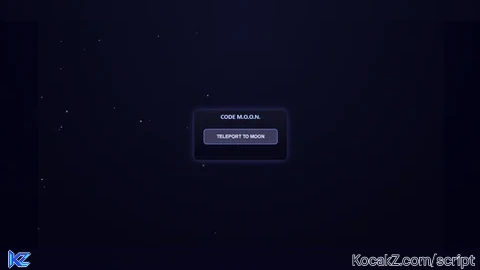
The main panel is called “CODE M.O.O.N.”.
Dark space-colored gradient background with rounded corners for a futuristic feel.
Can be dragged around the screen by clicking and holding the title bar.
Safe to place anywhere — won’t break the layout when moving.
2. Interactive Teleport Button
Button labeled “TELEPORT TO MOON”.
Hover effect: color brightens slightly when the mouse moves over it.
Teleports the player to workspace → Planets → Moon → Fog safely:
Instead of using CFrame directly (which caused Far Lands), it teleports to 50 studs above the target part to ensure a safe landing.
Works only if the target exists and is a BasePart.
3. Starfield Decoration
25 tiny “stars” randomly placed inside the GUI to give a space theme.
Stars have random sizes and transparency for a subtle sparkling effect.
Rounded corners on all stars for realism.
4. Glow & Style Enhancements
The teleport button has a UIStroke glow for a neon/tech look.
Rounded corners on both the main frame and button.
Text uses GothamBold font for a modern sci-fi aesthetic.
Gradient background gives depth, simulating a “space window.”
5. Drag Logic
Only the title bar is draggable, preventing accidental button presses while moving.
Smooth mouse tracking with proper start/end detection.
Handles mouse movement and keeps position consistent with the drag.
6. Safety & Usability Features
Safe teleport offset to avoid falling into the Roblox Far Lands.
Teleport button only acts if the target part exists.
Hover effects provide visual feedback for interactivity.
Entire GUI is self-contained and won’t interfere with other scripts.
Community Comments (0)
No comments yet for this script.