
Lua Script•363 lines (12482 chars)
local player = game.Players.LocalPlayer
local screenGui = Instance.new('ScreenGui', player:WaitForChild('PlayerGui'))
local ReplicatedStorage = game:GetService('ReplicatedStorage')
local UserInputService = game:GetService('UserInputService')
local EventsFolder = ReplicatedStorage:WaitForChild('Events')

-- ---------- Utilities ----------
local function addGradient(inst, c1, c2)
    local g = Instance.new('UIGradient', inst)
    g.Color = ColorSequence.new({
        ColorSequenceKeypoint.new(0, c1),
        ColorSequenceKeypoint.new(1, c2),
    })
    g.Rotation = 90
end

local function makeButton(
    parent,
    text,
    pos,
    color,
    textColor,
    width,
    height,
    size
)
    local btn = Instance.new('TextButton')
    btn.Size = UDim2.new(0, width or 110, 0, height or 50)
    btn.Position = pos
    btn.Text = text
    btn.Font = Enum.Font.Cartoon
    btn.TextSize = size or 22
    btn.TextScaled = false
    btn.TextColor3 = textColor
    btn.BackgroundColor3 = color
    btn.Parent = parent
    local grad = Instance.new('UIGradient', btn)
    local lighter = Color3.new(
        math.clamp(color.R + 0.15, 0, 1),
        math.clamp(color.G + 0.15, 0, 1),
        math.clamp(color.B + 0.15, 0, 1)
    )
    grad.Color = ColorSequence.new({
        ColorSequenceKeypoint.new(0, color),
        ColorSequenceKeypoint.new(1, lighter),
    })
    grad.Rotation = 90
    return btn
end

-- ---------- Main Menu Frame ----------
local mainFrame = Instance.new('Frame', screenGui)
mainFrame.Size = UDim2.new(0, 350, 0, 370)
mainFrame.Position = UDim2.new(0.5, -175, 0.3, 0)
mainFrame.BackgroundColor3 = Color3.fromRGB(40, 40, 40)
mainFrame.BorderSizePixel = 0
mainFrame.Active = true
mainFrame.Draggable = true
mainFrame.Visible = false
addGradient(mainFrame, Color3.fromRGB(60, 60, 80), Color3.fromRGB(40, 40, 60))
Instance.new('UICorner', mainFrame).CornerRadius = UDim.new(0, 12)

local title = Instance.new('TextLabel', mainFrame)
title.Size = UDim2.new(1, 0, 0, 35)
title.Position = UDim2.new(0, 0, 0, 0)
title.Text = 'Luck Incremental Menu'
title.Font = Enum.Font.Cartoon
title.TextSize = 24
title.TextColor3 = Color3.fromRGB(255, 255, 255)
title.BackgroundTransparency = 1

local closeBtn = makeButton(
    mainFrame,
    'X',
    UDim2.new(1, -30, 0, 5),
    Color3.fromRGB(150, 0, 0),
    Color3.fromRGB(255, 255, 255),
    25,
    25,
    18
)

-- ---------- Open Button ----------
local openBtn = Instance.new('TextButton')
openBtn.Size = UDim2.new(0, 180, 0, 50)
openBtn.Position = UDim2.new(0.5, -90, 0.05, 0)
openBtn.Text = 'Open Menu'
openBtn.Font = Enum.Font.Cartoon
openBtn.TextSize = 24
openBtn.TextColor3 = Color3.fromRGB(255, 255, 255)
openBtn.BackgroundColor3 = Color3.fromRGB(60, 60, 80)
openBtn.Active = true
openBtn.Draggable = true
openBtn.Parent = screenGui
addGradient(openBtn, Color3.fromRGB(80, 80, 120), Color3.fromRGB(60, 60, 100))
Instance.new('UICorner', openBtn).CornerRadius = UDim.new(0, 10)

-- Prevent opening while dragging
local dragging, mouseDown = false, nil

openBtn.InputBegan:Connect(function(input)
    if input.UserInputType == Enum.UserInputType.MouseButton1 then
        mouseDown = input.Position
        dragging = false
    end
end)

openBtn.InputChanged:Connect(function(input)
    if input.UserInputType == Enum.UserInputType.MouseMovement and mouseDown then
        if (input.Position - mouseDown).Magnitude > 3 then
            dragging = true
        end
    end
end)

openBtn.InputEnded:Connect(function(input)
    if input.UserInputType == Enum.UserInputType.MouseButton1 then
        mouseDown = nil
    end
end)

openBtn.MouseButton1Click:Connect(function()
    if not dragging then
        mainFrame.Visible = true
        openBtn.Visible = false
    end
end)

closeBtn.MouseButton1Click:Connect(function()
    mainFrame.Visible = false
    openBtn.Visible = true
end)

-- ---------- Auto-Farm Controls ----------
local windows = {
    {
        name = 'Tokenize',
        event = EventsFolder:WaitForChild('tokenizeReq'),
        color = Color3.fromRGB(255, 170, 0),
        args = nil,
    },
    {
        name = 'Energize',
        event = EventsFolder:WaitForChild('energyRequest'),
        color = Color3.fromRGB(0, 120, 255),
        args = { 'ReportClicks', 50 },
    },
    {
        name = 'Marketize',
        event = EventsFolder:WaitForChild('marketReq'),
        color = Color3.fromRGB(140, 255, 140),
        args = nil,
    },
    {
        name = 'Temperaturize',
        event = EventsFolder:WaitForChild('temperatureReq'),
        color = Color3.fromRGB(255, 100, 100),
        args = nil,
        isTemperaturize = true,
    },
}

local yPos = 0.15
local runningStates = {}

for i, win in ipairs(windows) do
    -- Label
    local label = Instance.new('TextLabel', mainFrame)
    label.Size = UDim2.new(0, 100, 0, 30)
    label.Position = UDim2.new(0.05, 0, yPos, 0)
    label.Text = win.name
    label.Font = Enum.Font.Cartoon
    label.TextSize = 20
    label.TextColor3 = Color3.fromRGB(255, 255, 255)
    label.BackgroundTransparency = 1
    label.TextXAlignment = Enum.TextXAlignment.Left

    -- Status
    local status = Instance.new('TextLabel', mainFrame)
    status.Size = UDim2.new(0, 80, 0, 30)
    status.Position = UDim2.new(0.35, 0, yPos, 0)
    status.Text = 'Stopped'
    status.Font = Enum.Font.Cartoon
    status.TextSize = 18
    status.TextColor3 = Color3.fromRGB(255, 100, 100)
    status.BackgroundTransparency = 1

    -- Start Button
    local startBtn = makeButton(
        mainFrame,
        'Start',
        UDim2.new(0.58, 0, yPos, 0),
        Color3.fromRGB(0, 150, 0),
        Color3.fromRGB(255, 255, 255),
        60,
        30,
        18
    )

    -- Stop Button
    local stopBtn = makeButton(
        mainFrame,
        'Stop',
        UDim2.new(0.79, 0, yPos, 0),
        Color3.fromRGB(180, 0, 0),
        Color3.fromRGB(255, 255, 255),
        60,
        30,
        18
    )

    runningStates[i] = false

    local function loop()
        if win.isTemperaturize then
            -- Temperaturize special loop
            while runningStates[i] do
                local character = player.Character
                if not character or not character:FindFirstChild('HumanoidRootPart') then
                    task.wait(1)
                    continue
                end

                local resources = {
                    {name = 'Ash', part = workspace:FindFirstChild('Ash'), stat = player:WaitForChild('Stats'):FindFirstChild('Ash')},
                    {name = 'Igneous', part = workspace:FindFirstChild('Igneous'), stat = player:WaitForChild('Stats'):FindFirstChild('Igneous')},
                    {name = 'Lava', part = workspace:FindFirstChild('Lava'), stat = player:WaitForChild('Stats'):FindFirstChild('Lava')},
                    {name = 'Magma', part = workspace:FindFirstChild('Magma'), stat = player:WaitForChild('Stats'):FindFirstChild('Magma')},
                }

                local success = true
                for _, resource in ipairs(resources) do
                    if not runningStates[i] then
                        break
                    end

                    if not resource.part then
                        print('[Temperaturize] ERROR: Could not find ' .. resource.name .. ' in workspace')
                        ReplicatedStorage:WaitForChild('Events'):WaitForChild('teleportEvent'):FireServer('World7Arrival')
                        runningStates[i] = false
                        status.Text = 'Stopped'
                        status.TextColor3 = Color3.fromRGB(255, 100, 100)
                        success = false
                        break
                    end

                    if not resource.part:FindFirstChild('Touch') then
                        print('[Temperaturize] ERROR: ' .. resource.name .. ' has no Touch part')
                        ReplicatedStorage:WaitForChild('Events'):WaitForChild('teleportEvent'):FireServer('World7Arrival')
                        runningStates[i] = false
                        status.Text = 'Stopped'
                        status.TextColor3 = Color3.fromRGB(255, 100, 100)
                        success = false
                        break
                    end

                    if not resource.stat then
                        print('[Temperaturize] ERROR: Could not find ' .. resource.name .. ' stat')
                        ReplicatedStorage:WaitForChild('Events'):WaitForChild('teleportEvent'):FireServer('World7Arrival')
                        runningStates[i] = false
                        status.Text = 'Stopped'
                        status.TextColor3 = Color3.fromRGB(255, 100, 100)
                        success = false
                        break
                    end

                    local initialValue = resource.stat.Value
                    character.HumanoidRootPart.CFrame = resource.part.Touch.CFrame

                    local waited = 0
                    local collected = false
                    while waited < 2 and not collected do
                        task.wait(0.1)
                        waited = waited + 0.1
                        if resource.stat.Value > initialValue then
                            collected = true
                            break
                        end
                    end

                    if not collected then
                        initialValue = resource.stat.Value
                        character.HumanoidRootPart.CFrame = resource.part.Touch.CFrame

                        waited = 0
                        while waited < 2 and not collected do
                            task.wait(0.1)
                            waited = waited + 0.1
                            if resource.stat.Value > initialValue then
                                collected = true
                                break
                            end
                        end

                        if not collected then
                            print('[Temperaturize] ERROR: Failed to collect ' .. resource.name .. ' after retry - Teleporting to World 7')
                            ReplicatedStorage:WaitForChild('Events'):WaitForChild('teleportEvent'):FireServer('World7Arrival')
                            runningStates[i] = false
                            status.Text = 'Stopped'
                            status.TextColor3 = Color3.fromRGB(255, 100, 100)
                            success = false
                            break
                        end
                    end
                end

                if success and runningStates[i] then
                    win.event:FireServer()
                    task.wait(0.5)
                end
            end
        else
            -- Normal loop for other buttons
            while runningStates[i] do
                if win.args then
                    win.event:FireServer(unpack(win.args))
                else
                    win.event:FireServer()
                end
                task.wait(0.1)
            end
        end
    end

    startBtn.MouseButton1Click:Connect(function()
        if not runningStates[i] then
            runningStates[i] = true
            status.Text = 'Running'
            status.TextColor3 = Color3.fromRGB(100, 255, 100)
            task.spawn(loop)
        end
    end)

    stopBtn.MouseButton1Click:Connect(function()
        runningStates[i] = false
        status.Text = 'Stopped'
        status.TextColor3 = Color3.fromRGB(255, 100, 100)
    end)

    yPos = yPos + 0.22
end

-- ---------- LR Pity Display in Main Menu ----------
local pityLabel = Instance.new('TextLabel', mainFrame)
pityLabel.Size = UDim2.new(1, 0, 0, 35)
pityLabel.Position = UDim2.new(0, 0, 0.88, 0)
pityLabel.Text = 'LR Pity: 0/2000'
pityLabel.Font = Enum.Font.Cartoon
pityLabel.TextSize = 22
pityLabel.TextColor3 = Color3.fromRGB(255, 255, 100)
pityLabel.BackgroundTransparency = 1

-- Update pity display
task.spawn(function()
    local miscStats = player:WaitForChild('MiscStats')
    local lrPity = miscStats:WaitForChild('LRPity')

    pityLabel.Text = 'LR Pity: ' .. tostring(lrPity.Value) .. '/2000'

    lrPity:GetPropertyChangedSignal('Value'):Connect(function()
        pityLabel.Text = 'LR Pity: ' .. tostring(lrPity.Value) .. '/2000'
    end)
end)
Features & Information
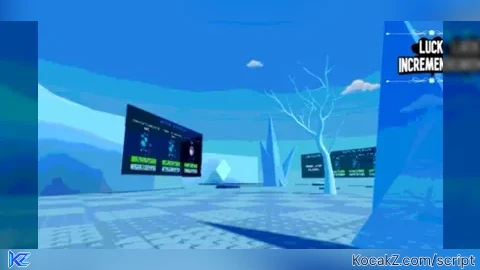
Allows you to get ahead of the competition in Luck Incremental! Adds a couple features to automate some things, so you don't have to do them yourselves.
**IMPORTANT**
DO NOT SKIP THE ASSET LOADING, SOME SCRIPTS MAY NOT WORK IF YOU DO!!
*Auto Energy clicking(500 clicks per second!) [W4]
*Auto sell fish! [W6]
*Auto Tokenize! [Does it for you automatically when hits threshold]
-There is an auto-tokenize ingame already, however mine is more effective and available sooner.
*Auto Fahrenheit [MUST BE IN W7 FOR IT TO WORK]
̶*̶A̶l̶l̶o̶w̶s̶ ̶y̶o̶u̶ ̶t̶o̶ ̶g̶e̶t̶ ̶i̶n̶s̶t̶a̶ ̶L̶R̶ ̶r̶e̶l̶i̶c̶s̶ ̶f̶r̶o̶m̶ ̶t̶h̶e̶ ̶L̶u̶c̶k̶ ̶a̶n̶d̶ ̶R̶u̶n̶e̶ ̶b̶a̶n̶n̶e̶r̶s̶,̶ ̶f̶o̶r̶ ̶5̶0̶ ̶g̶e̶m̶s̶ ̶e̶a̶c̶h̶!̶ ̶Y̶o̶u̶ ̶s̶t̶i̶l̶l̶ ̶h̶a̶v̶e̶ ̶t̶o̶ ̶h̶a̶v̶e̶ ̶t̶h̶e̶ ̶r̶e̶l̶i̶c̶ ̶t̶a̶l̶e̶n̶t̶ ̶u̶n̶l̶o̶c̶k̶e̶d̶ ̶t̶o̶ ̶u̶s̶e̶ ̶t̶h̶e̶m̶,̶ ̶t̶h̶o̶u̶g̶h̶.̶
-This has been patched, but I am looking for ways around it. In the mean time, there's a feature to view how close you are to pity for LR
First time scripting, so be gentle please, and any advice would be welcome!
:)
@vaziqa19 what are you talking about bro. this is for Luck Incremental. wtf is burping reborn 2 😭
can you show Allows you to get insta LR relics from the Luck and Rune banners, for 50 gems each! You still have to have the relic talent unlocked to use them, though.?
can you add so we can choose which relic we like to get?
@gachasingapore no. it is a server controlled event, you only control the category
@Administrators I see. Can you make one for the UR in exchanging numbers?
@gachasingapore I tried, it's possible to control the pity for that one but it's not as easy to manipulate, given URs roll more frequently and spoil the pity chance. LRs are designed to completely NOT drop outside of pity, so if anybody has them it's because they earned them via pity. Give me some time this weekend, I'll figure it out.
maybe you can add some stuff like auto/insta fahrenheit and auto w6 upgrades, auto open multiple runes at once, and even insta divine trait. ur going great keep improving urself! idk if u can but if u can u should try to do inf tickets or ticket duping
@cutepuppie29 Tried an auto fahrenheit feature, didn't work with my macro but I'll give it another crack this weekend. Not sure what the problem was. Great idea with auto W6 upgrades though. Opening runes isn't something possible via scripting, at least not intuitively at my level so not yet. Can't guarantee divine traits, the script that runs client to server only tells the server you want to roll a trait, the server accepts the response (if you have the tokenize to roll) and sends you one after rolling it, completely serverside(thus, outside of the client, YOUR OWN) control. Same with tickets, already tried. that is handled 100% serverside, there is no way within my ability to manipulate it. Appreciate the support!
@Administrators do you have a discord so we can add each other and chat there ?
@cutepuppie29 Sure, what's your discord?
@Administrators cutepuppie29
@Administrators How to make token x99 , more ?
rune luck, bulk and more
i dont really mind the floating gui type boxes but if u add another feature can u please like put it top of another im on mobile and i see that the banner almost got out of my screen and please dont like open it if we executed it idk if u can get this because im bad at english but thank you for this script ^^
Will this be update to add more features? I’m mainly looking for a auto trait roller, and a auto Fahrenheit/celcius
@Baxts auto Celsius doesn't work, not sure why, and fahrenheit requires you to get the resources to reset still, which requires a macro on its own. more updates are unlikely, game is finished with updates and game is quite locked down security wise
sike. updates coming soon, including auto fahrenheit and a complete rewrite of the gui, including being all in one and not opening when being ran(@boundlessvoidness suggestion), looking at finding ways around the bannerize exploit right now, but it's been patched thus removed for now
what pc executor works with this does xeno or swift work?
@sigma69 not sure. i developed using zenith, but i cannot imagine it's incompatible with any executors. if you find any that are, let me know
hai idk if u r still updating this script and if u ever found a loophole on the pity but if u can update this script please try to add a trait booster smth so i could get blessed trait and other traits or u can add a auto trait smth and u can select which trait we want to get ^^ thats all if i ever have some sugg for the script i would tell u ik u might not read this lol and it was a great script
@visitorofworlds i don't work on scripting anymore, as i haven't found or been looking for another executor since zenith shut down. taking recommendations, though. to answer your question, traits are rolled entirely on the server side, so it's out of the client's control. it rolls on the server and gives the output to the client, so it cannot be modified. though, if i find an executor, i could make it so it auto rolls until it gets values you pick. granted, you'd still have to have the tokenize to roll it anyhow. appreciate you using it though! i made it when this game was in its peak and being updated regularly
@Administrators hi for me i use Delta, its an mobile executor and i pla* it on emulator mumu, better than all, i know its a mobile executor but now its hard to find computer executor without virus
Hi will you make some update for this game ?