

Key Required
--[[
	WARNING: Heads up! This script has not been verified by ScriptBlox. Use at your own risk!
]]

local teamCheck = false
local fov = 500
local smoothing = 1

-- Переменные для обучения
local totalShots = 0
local totalHits = 0
local accuracy = 0.0

-- Переменная для Триггер-бота
local TriggerBotEnabled = false

local RunService       = game:GetService("RunService")
local UserInputService = game:GetService("UserInputService")
local Players          = game:GetService("Players")
local LocalPlayer      = Players.LocalPlayer
local Camera           = workspace.CurrentCamera

-- =============================================================================
-- FOV КРУГ
-- =============================================================================
local FOVring = Drawing.new("Circle")
FOVring.Visible       = true
FOVring.Thickness     = 1.5
FOVring.Radius        = fov
FOVring.Transparency  = 1
FOVring.Color         = Color3.fromRGB(255, 128, 128)
FOVring.Position      = Camera.ViewportSize / 2
FOVring.Filled        = false

-- =============================================================================
-- ESP НАСТРОЙКИ + радуга
-- =============================================================================
local ESPSettings = {
    Enabled       = true,
    ShowBox       = true,
    ShowName      = true,
    ShowHP        = true,
    ShowFOVCircle = true,
    RainbowESP    = false,
}

-- Тема меню
local CurrentTheme = "Dark"

local Theme = {
    Dark = {
        Background     = Color3.fromRGB(20,  20,  26),
        Accent         = Color3.fromRGB(0,   170, 100),
        Text           = Color3.fromRGB(220, 220, 235),
        SecondaryText  = Color3.fromRGB(200, 200, 220),
        Divider        = Color3.fromRGB(55,  55,  70),
        ToggleOff      = Color3.fromRGB(70,  70,  85),
    },
    Light = {
        Background     = Color3.fromRGB(245, 245, 250),
        Accent         = Color3.fromRGB(0,   140, 220),
        Text           = Color3.fromRGB(30,  30,  40),
        SecondaryText  = Color3.fromRGB(70,  70,  90),
        Divider        = Color3.fromRGB(210, 210, 220),
        ToggleOff      = Color3.fromRGB(180, 180, 190),
    }
}

-- =============================================================================
-- Водяной знак "lin4ik"
-- =============================================================================
local watermarkBg = Drawing.new("Square")
watermarkBg.Visible       = true
watermarkBg.Position      = Vector2.new(Camera.ViewportSize.X - 170, 5)
watermarkBg.Size          = Vector2.new(120, 35)
watermarkBg.Thickness     = 1
watermarkBg.Filled        = true
watermarkBg.Color         = Color3.fromRGB(0, 0, 0)
watermarkBg.Transparency  = 0.70
watermarkBg.Radius        = 8

local watermark = Drawing.new("Text")
watermark.Visible       = true
watermark.Position      = Vector2.new(Camera.ViewportSize.X - 140, 12)
watermark.Size          = 22
watermark.Center        = false
watermark.Outline       = true
watermark.OutlineColor  = Color3.fromRGB(0,0,0)
watermark.Color         = Color3.fromRGB(180, 180, 180)
watermark.Text          = "lin4ik"
watermark.Font          = Drawing.Fonts.Monospace

-- Анимация радуги
local rainbowTime = 0
RunService.RenderStepped:Connect(function(delta)
    rainbowTime = rainbowTime + delta * 1.2
    local hue = rainbowTime % 1
    local color = Color3.fromHSV(hue, 1, 1)

    if ESPSettings.RainbowESP then
        watermark.Color = color
        for _, data in pairs(espElements) do
            data.nameTag.Color = color
            data.healthText.Color = color
            for _, line in ipairs(data.lines) do
                line.Color = color
            end
        end
    end
end)

-- =============================================================================
-- Текст вверху экрана
-- =============================================================================
local hintText = Drawing.new("Text")
hintText.Visible       = true
hintText.Position      = Vector2.new(Camera.ViewportSize.X / 2, 60)
hintText.Size          = 40
hintText.Center        = true
hintText.Outline       = true
hintText.OutlineColor  = Color3.fromRGB(0,0,0)
hintText.Color         = Color3.fromRGB(40, 40, 40)
hintText.Text          = "ОТКРЫТЬ МЕНЮ НА M\nАИМБОТ НА E"
hintText.Font          = Drawing.Fonts.Monospace

task.delay(10, function()
    hintText.Visible = false
end)

-- =============================================================================
-- Свой HP % над головой
-- =============================================================================
local selfHPText = Drawing.new("Text")
selfHPText.Visible       = true
selfHPText.Center        = true
selfHPText.Outline       = true
selfHPText.OutlineColor  = Color3.fromRGB(0,0,0)
selfHPText.Color         = Color3.fromRGB(220, 220, 220)
selfHPText.Size          = 26
selfHPText.Font          = Drawing.Fonts.Monospace

RunService.RenderStepped:Connect(function()
    if LocalPlayer.Character and LocalPlayer.Character:FindFirstChild("Humanoid") and LocalPlayer.Character:FindFirstChild("Head") then
        local humanoid = LocalPlayer.Character.Humanoid
        local headPos = LocalPlayer.Character.Head.Position + Vector3.new(0, 2.8, 0)
        local screenPos, onScreen = Camera:WorldToViewportPoint(headPos)

        if onScreen then
            local hpPerc = math.clamp(math.floor(humanoid.Health / humanoid.MaxHealth * 100 + 0.5), 0, 100)
            selfHPText.Text = tostring(hpPerc) .. "%"
            selfHPText.Position = Vector2.new(screenPos.X, screenPos.Y - 30)
            selfHPText.Visible = true

            if hpPerc > 70 then
                selfHPText.Color = Color3.fromRGB(100, 220, 140)
            elseif hpPerc > 30 then
                selfHPText.Color = Color3.fromRGB(220, 180, 60)
            else
                selfHPText.Color = Color3.fromRGB(220, 60, 60)
            end
        else
            selfHPText.Visible = false
        end
    else
        selfHPText.Visible = false
    end
end)

-- =============================================================================
-- TRIGGER BOT LOGIC (Новая функция)
-- =============================================================================
task.spawn(function()
    while true do
        task.wait(0.01) -- Быстрая проверка
        if TriggerBotEnabled then
            -- Параметры луча: игнорируем себя и камеру
            local rayParams = RaycastParams.new()
            rayParams.FilterDescendantsInstances = {LocalPlayer.Character, Camera}
            rayParams.FilterType = Enum.RaycastFilterType.Exclude

            -- Пускаем луч из центра камеры
            local rayOrigin = Camera.CFrame.Position
            local rayDirection = Camera.CFrame.LookVector * 1000

            local rayResult = workspace:Raycast(rayOrigin, rayDirection, rayParams)

            if rayResult and rayResult.Instance then
                local hitPart = rayResult.Instance

                -- Пытаемся найти модель игрока, в которого попали
                local model = hitPart:FindFirstAncestorOfClass("Model")
                if model then
                    local player = Players:GetPlayerFromCharacter(model)

                    -- Проверяем, что это игрок, не мы, и он жив
                    if player and player ~= LocalPlayer then
                        local hum = model:FindFirstChild("Humanoid")
                        if hum and hum.Health > 0 then
                            -- Проверка команды (используем ту же переменную teamCheck, что и для аима)
                            if (not teamCheck) or (player.Team ~= LocalPlayer.Team) then
                                -- ВЫСТРЕЛ
                                mouse1press()
                                task.wait(0.05) -- Удерживаем кнопку
                                mouse1release()
                                task.wait(0.1)  -- Небольшая задержка перед следующим выстрелом
                            end
                        end
                    end
                end
            end
        end
    end
end)

-- =============================================================================
-- getClosest
-- =============================================================================
local function getClosest(cframe)
    local ray = Ray.new(cframe.Position, cframe.LookVector).Unit
    local target = nil
    local mag = math.huge

    for _, v in pairs(Players:GetPlayers()) do
        if v.Character and v.Character:FindFirstChild("Head")
           and v.Character:FindFirstChild("Humanoid")
           and v.Character:FindFirstChild("HumanoidRootPart")
           and v ~= LocalPlayer
           and (v.Team ~= LocalPlayer.Team or not teamCheck) then

            local headPos = v.Character.Head.Position
            local closestPoint = ray:ClosestPoint(headPos)
            local magBuf = (headPos - closestPoint).Magnitude

            if magBuf < mag then
                mag = magBuf
                target = v
            end
        end
    end
    return target
end

-- =============================================================================
-- updateLearning
-- =============================================================================
local function updateLearning(success)
    totalShots = totalShots + 1
    if success then totalHits = totalHits + 1 end
    accuracy = totalShots > 0 and (totalHits / totalShots) or 0

    if accuracy < 0.3 then
        fov = fov + 10
        smoothing = math.max(0.05, smoothing - 0.01)
    elseif accuracy > 0.7 then
        smoothing = math.min(1, smoothing + 0.01)
    end
    FOVring.Radius = fov
end

-- =============================================================================
-- Аимбот
-- =============================================================================
RunService.RenderStepped:Connect(function()
    if not (UserInputService:IsMouseButtonPressed(Enum.UserInputType.MouseButton3) or
            UserInputService:IsKeyDown(Enum.KeyCode.E)) then return end

    local cam = Camera
    local screenCenter = cam.ViewportSize / 2

    local closestTarget = getClosest(cam.CFrame)
    if closestTarget and closestTarget.Character and closestTarget.Character:FindFirstChild("Head") then
        local headPos = closestTarget.Character.Head.Position
        local ssHeadPoint, onScreen = cam:WorldToScreenPoint(headPos)
        local screenHead = Vector2.new(ssHeadPoint.X, ssHeadPoint.Y)

        if onScreen and (screenHead - screenCenter).Magnitude < fov then
            local targetCFrame = CFrame.new(cam.CFrame.Position, headPos)
            cam.CFrame = cam.CFrame:Lerp(targetCFrame, smoothing)

            local hitChance = math.random() < 0.9
            updateLearning(hitChance)
        end
    end
end)

-- =============================================================================
-- ESP
-- =============================================================================
local espElements = {}

local function createESP(player)
    if player == LocalPlayer then return end

    local esp = {}

    esp.nameTag = Drawing.new("Text")
    esp.nameTag.Visible    = false
    esp.nameTag.Center     = true
    esp.nameTag.Outline    = true
    esp.nameTag.Size       = 16
    esp.nameTag.Color      = Color3.fromRGB(200, 200, 200)
    esp.nameTag.Text       = player.Name

    esp.healthText = Drawing.new("Text")
    esp.healthText.Visible    = false
    esp.healthText.Outline    = true
    esp.healthText.Size       = 15
    esp.healthText.Color      = Color3.fromRGB(180, 180, 180)

    esp.lines = {}
    for i = 1, 4 do
        local line = Drawing.new("Line")
        line.Visible      = false
        line.Thickness    = 2
        line.Transparency = 1
        line.Color        = Color3.fromRGB(200, 200, 200)
        table.insert(esp.lines, line)
    end

    espElements[player] = esp
end

local function updateESP()
    if not ESPSettings.Enabled then
        for _, data in pairs(espElements) do
            data.nameTag.Visible = false
            data.healthText.Visible = false
            for _, ln in ipairs(data.lines) do ln.Visible = false end
        end
        return
    end

    for _, player in pairs(Players:GetPlayers()) do
        local data = espElements[player]
        if not data then continue end

        if player.Character then
            local hrp  = player.Character:FindFirstChild("HumanoidRootPart")
            local head = player.Character:FindFirstChild("Head")
            local hum  = player.Character:FindFirstChild("Humanoid")

            if hrp and head and hum then
                local rootPos, onScreen = Camera:WorldToViewportPoint(hrp.Position)

                if onScreen then
                    local top    = Camera:WorldToViewportPoint(head.Position + Vector3.new(0, 0.6, 0))
                    local bottom = Camera:WorldToViewportPoint(hrp.Position - Vector3.new(0, 3.0, 0))

                    local height = math.abs(top.Y - bottom.Y)
                    local width  = height * 0.55

                    local left   = Vector2.new(rootPos.X - width/2, top.Y)
                    local right  = Vector2.new(rootPos.X + width/2, top.Y)
                    local bl     = Vector2.new(left.X, bottom.Y)
                    local br     = Vector2.new(right.X, bottom.Y)

                    if ESPSettings.ShowBox then
                        local boxColor = ESPSettings.RainbowESP and Color3.fromHSV((tick() * 0.8) % 1, 1, 1) or Color3.fromRGB(200, 200, 200)
                        for _, ln in ipairs(data.lines) do
                            ln.Color = boxColor
                        end
                        data.lines[1].From = left;    data.lines[1].To = right;  data.lines[1].Visible = true
                        data.lines[2].From = right;   data.lines[2].To = br;      data.lines[2].Visible = true
                        data.lines[3].From = br;      data.lines[3].To = bl;      data.lines[3].Visible = true
                        data.lines[4].From = bl;      data.lines[4].To = left;    data.lines[4].Visible = true
                    else
                        for _, ln in ipairs(data.lines) do ln.Visible = false end
                    end

                    data.nameTag.Visible = ESPSettings.ShowName
                    if ESPSettings.ShowName then
                        data.nameTag.Position = Vector2.new(rootPos.X, top.Y - 24)
                        if ESPSettings.RainbowESP then
                            data.nameTag.Color = Color3.fromHSV((tick() * 0.8 + 0.1) % 1, 1, 1)
                        end
                    end

                    if ESPSettings.ShowHP then
                        local hpPerc = math.clamp(math.floor(hum.Health / hum.MaxHealth * 100), 0, 100)
                        data.healthText.Text = hpPerc .. "%"

                        if ESPSettings.RainbowESP then
                            data.healthText.Color = Color3.fromHSV((tick() * 0.8 + 0.2) % 1, 1, 1)
                        else
                            data.healthText.Color = hpPerc > 70 and Color3.fromRGB(100,220,140)
                                or hpPerc > 30 and Color3.fromRGB(220,180,60)
                                or Color3.fromRGB(220,60,60)
                        end

                        data.healthText.Position = Vector2.new(right.X + 6, rootPos.Y - 10)
                        data.healthText.Visible = true
                    else
                        data.healthText.Visible = false
                    end
                else
                    data.nameTag.Visible = false
                    data.healthText.Visible = false
                    for _, ln in ipairs(data.lines) do ln.Visible = false end
                end
            else
                data.nameTag.Visible = false
                data.healthText.Visible = false
                for _, ln in ipairs(data.lines) do ln.Visible = false end
            end
        else
            data.nameTag.Visible = false
            data.healthText.Visible = false
            for _, ln in ipairs(data.lines) do ln.Visible = false end
        end
    end

    -- Управление видимостью FOV круга через меню
    FOVring.Visible = ESPSettings.ShowFOVCircle
end

for _, plr in pairs(Players:GetPlayers()) do createESP(plr) end
Players.PlayerAdded:Connect(createESP)
Players.PlayerRemoving:Connect(function(plr)
    local d = espElements[plr]
    if d then
        d.nameTag:Remove()
        d.healthText:Remove()
        for _, ln in ipairs(d.lines) do ln:Remove() end
        espElements[plr] = nil
    end
end)

RunService.RenderStepped:Connect(updateESP)

-- =============================================================================
-- МЕНЮ
-- =============================================================================
local screenGui = Instance.new("ScreenGui")
screenGui.Name = "CustomESPMenu"
screenGui.ResetOnSpawn = false
screenGui.Parent = LocalPlayer:WaitForChild("PlayerGui")
screenGui.Enabled = false

local mainFrame = Instance.new("Frame")
mainFrame.Size = UDim2.new(0, 300, 0, 600) -- Увеличил высоту, чтобы влезла новая кнопка
mainFrame.Position = UDim2.new(0.5, -150, 0.5, -250)
mainFrame.BackgroundColor3 = Theme[CurrentTheme].Background
mainFrame.BorderSizePixel = 0
mainFrame.Parent = screenGui

local uiCorner = Instance.new("UICorner")
uiCorner.CornerRadius = UDim.new(0, 18)
uiCorner.Parent = mainFrame

local titleBar = Instance.new("Frame")
titleBar.Size = UDim2.new(1, 0, 0, 54)
titleBar.BackgroundColor3 = Theme[CurrentTheme].Background
titleBar.BorderSizePixel = 0
titleBar.Parent = mainFrame

local titleLabel = Instance.new("TextLabel")
titleLabel.Size = UDim2.new(1, -80, 1, 0)
titleLabel.Position = UDim2.new(0, 20, 0, 0)
titleLabel.BackgroundTransparency = 1
titleLabel.Text = "Settings" -- Поменял название, так как теперь тут не только ESP
titleLabel.TextColor3 = Theme[CurrentTheme].Text
titleLabel.TextSize = 22
titleLabel.Font = Enum.Font.GothamBold
titleLabel.TextXAlignment = Enum.TextXAlignment.Left
titleLabel.Parent = titleBar

-- Перетаскивание
local dragging, dragInput, dragStart, startPos
titleBar.InputBegan:Connect(function(input)
    if input.UserInputType == Enum.UserInputType.MouseButton1 or input.UserInputType == Enum.UserInputType.Touch then
        dragging = true
        dragStart = input.Position
        startPos = mainFrame.Position

        input.Changed:Connect(function()
            if input.UserInputState == Enum.UserInputState.End then
                dragging = false
            end
        end)
    end
end)

titleBar.InputChanged:Connect(function(input)
    if input.UserInputType == Enum.UserInputType.MouseMovement or input.UserInputType == Enum.UserInputType.Touch then
        dragInput = input
    end
end)

RunService.RenderStepped:Connect(function()
    if dragging and dragInput then
        local delta = dragInput.Position - dragStart
        mainFrame.Position = UDim2.new(startPos.X.Scale, startPos.X.Offset + delta.X, startPos.Y.Scale, startPos.Y.Offset + delta.Y)
    end
end)

local divider = Instance.new("Frame")
divider.Size = UDim2.new(0.92, 0, 0, 1)
divider.Position = UDim2.new(0.04, 0, 0, 54)
divider.BackgroundColor3 = Theme[CurrentTheme].Divider
divider.BorderSizePixel = 0
divider.Parent = mainFrame

local function createToggle(name, initial, callback, yPos)
    local cont = Instance.new("Frame")
    cont.Size = UDim2.new(0.92, 0, 0, 50)
    cont.Position = UDim2.new(0.04, 0, 0, yPos)
    cont.BackgroundTransparency = 1
    cont.Parent = mainFrame

    local lbl = Instance.new("TextLabel")
    lbl.Size = UDim2.new(0.68, 0, 1, 0)
    lbl.BackgroundTransparency = 1
    lbl.Text = name
    lbl.TextColor3 = Theme[CurrentTheme].SecondaryText
    lbl.TextSize = 18
    lbl.Font = Enum.Font.GothamSemibold
    lbl.TextXAlignment = Enum.TextXAlignment.Left
    lbl.Parent = cont

    local bg = Instance.new("Frame")
    bg.Size = UDim2.new(0, 58, 0, 30)
    bg.Position = UDim2.new(1, -78, 0.5, -15)
    bg.BackgroundColor3 = initial and Theme[CurrentTheme].Accent or Theme[CurrentTheme].ToggleOff
    bg.BorderSizePixel = 0
    bg.Parent = cont

    Instance.new("UICorner", bg).CornerRadius = UDim.new(1)

    local knob = Instance.new("Frame")
    knob.Size = UDim2.new(0, 24, 0, 24)
    knob.Position = initial and UDim2.new(0, 30, 0.5, -12) or UDim2.new(0, 4, 0.5, -12)
    knob.BackgroundColor3 = Color3.fromRGB(255,255,255)
    knob.BorderSizePixel = 0
    knob.Parent = bg

    Instance.new("UICorner", knob).CornerRadius = UDim.new(1)

    local btn = Instance.new("TextButton")
    btn.Size = UDim2.new(1,0,1,0)
    btn.BackgroundTransparency = 1
    btn.Text = ""
    btn.Parent = cont

    local state = initial

    btn.MouseButton1Click:Connect(function()
        state = not state
        bg.BackgroundColor3 = state and Theme[CurrentTheme].Accent or Theme[CurrentTheme].ToggleOff
        knob:TweenPosition(state and UDim2.new(0,30,0.5,-12) or UDim2.new(0,4,0.5,-12), "Out", "Quad", 0.18, true)
        callback(state)
    end)
end

local y = 80
createToggle("ESP Enabled",      ESPSettings.Enabled,       function(v) ESPSettings.Enabled = v       end, y) y += 58
createToggle("Show Box",         ESPSettings.ShowBox,       function(v) ESPSettings.ShowBox = v       end, y) y += 58
createToggle("Show Name",        ESPSettings.ShowName,      function(v) ESPSettings.ShowName = v      end, y) y += 58
createToggle("Show HP %",        ESPSettings.ShowHP,        function(v) ESPSettings.ShowHP = v        end, y) y += 58
createToggle("Show FOV Circle", ESPSettings.ShowFOVCircle,function(v)
    ESPSettings.ShowFOVCircle = v
    FOVring.Visible = v
end, y) y += 58
createToggle("Rainbow ESP",      ESPSettings.RainbowESP,    function(v) ESPSettings.RainbowESP = v    end, y) y += 58
createToggle("Trigger Bot",      TriggerBotEnabled,         function(v) TriggerBotEnabled = v         end, y) y += 58 -- КНОПКА ДОБАВЛЕНА

-- Переключатель темы
local themeCont = Instance.new("Frame")
themeCont.Size = UDim2.new(0.92, 0, 0, 50)
themeCont.Position = UDim2.new(0.04, 0, 0, y)
themeCont.BackgroundTransparency = 1
themeCont.Parent = mainFrame

local themeLbl = Instance.new("TextLabel")
themeLbl.Size = UDim2.new(0.5, 0, 1, 0)
themeLbl.BackgroundTransparency = 1
themeLbl.Text = "Theme"
themeLbl.TextColor3 = Theme[CurrentTheme].SecondaryText
themeLbl.TextSize = 18
themeLbl.Font = Enum.Font.GothamSemibold
themeLbl.TextXAlignment = Enum.TextXAlignment.Left
themeLbl.Parent = themeCont

local themeBtn = Instance.new("TextButton")
themeBtn.Size = UDim2.new(0, 60, 0, 60)
themeBtn.Position = UDim2.new(1, -80, 0.5, -30)
themeBtn.BackgroundTransparency = 1
themeBtn.Text = ""
themeBtn.Parent = themeCont

local themeIcon = Instance.new("TextLabel")
themeIcon.Size = UDim2.new(1, 0, 1, 0)
themeIcon.BackgroundTransparency = 1
themeIcon.TextSize = 48
themeIcon.Font = Enum.Font.SourceSansBold
themeIcon.Parent = themeBtn

local function updateThemeIcon()
    if CurrentTheme == "Dark" then
        themeIcon.Text = "🌙"
        themeIcon.TextColor3 = Color3.fromRGB(200, 220, 255)
    else
        themeIcon.Text = "☀️"
        themeIcon.TextColor3 = Color3.fromRGB(255, 220, 80)
    end
end

updateThemeIcon()

themeBtn.MouseButton1Click:Connect(function()
    CurrentTheme = CurrentTheme == "Dark" and "Light" or "Dark"

    mainFrame.BackgroundColor3 = Theme[CurrentTheme].Background
    titleBar.BackgroundColor3 = Theme[CurrentTheme].Background
    titleLabel.TextColor3 = Theme[CurrentTheme].Text
    divider.BackgroundColor3 = Theme[CurrentTheme].Divider

    for _, child in ipairs(mainFrame:GetDescendants()) do
        if child:IsA("TextLabel") and child ~= titleLabel and child ~= themeIcon then
            child.TextColor3 = Theme[CurrentTheme].SecondaryText
        end
    end

    updateThemeIcon()
end)

-- Открытие меню
UserInputService.InputBegan:Connect(function(input, gp)
    if gp then return end
    if input.KeyCode == Enum.KeyCode.M then
        screenGui.Enabled = not screenGui.Enabled
    end
end)

print("Trigger Bot добавлен в меню. Нажми M, включи 'Trigger Bot' и наведи прицел на врага.")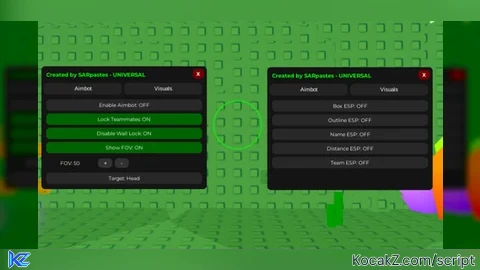
Стилерр стилит куки
опен сурс кому ты врешь