
--// ============================================================
--// MERGE A MINI ARMY — WindUI (Автор: armenchik)
--// ============================================================

local WindUI = loadstring(game:HttpGet("https://github.com/Footagesus/WindUI/releases/latest/download/main.lua"))()
local Players = game:GetService("Players")
local RS = game:GetService("ReplicatedStorage")
local LP = Players.LocalPlayer

-- Поиск базы (Plot)
local plot = nil
for _, v in pairs(workspace.Plots:GetDescendants()) do
    if v.Name == "Owner" and v:IsA("ObjectValue") and v.Value == LP then
        plot = v.Parent
        break
    end
end

if not plot then
    warn("База не найдена. Убедись, что ты в игре.")
    return
end

-- Окно WindUI (Автор: armenchik)
local Window = WindUI:CreateWindow({
    Title = "Merge a Mini Army",
    Icon = "gamepad-2",
    Author = "armenchik",
    Folder = "MergeArmy",
    Theme = "Dark"
})

-- Вкладка
local Tab = Window:Tab({ Title = "Auto Farm", Icon = "zap" })

-- ================= Auto Merge =================
Tab:Toggle({
    Title = "Auto Merge",
    Desc = "Автоматическое слияние одинаковых юнитов",
    Value = false,
    Callback = function(state)
        _G.Merge = state
        if not state then return end

        task.spawn(function()
            while _G.Merge do
                pcall(function()
                    local units = plot:FindFirstChild("Units")
                    if not units then return end

                    local RF = RS.Framework.Features.BrainrotSystem.BrainrotUtil.RemoteFunction
                    local groups = {}

                    for _, u in pairs(units:GetChildren()) do
                        if u:IsA("CFrameValue") then
                            local id = u:GetAttribute("BrainrotId")
                            if id then
                                groups[id] = groups[id] or {}
                                table.insert(groups[id], u)
                            end
                        end
                    end

                    for _, list in pairs(groups) do
                        if #list >= 2 then
                            RF:InvokeServer("PickUpPlot", list[1].Name)
                            task.wait(0.2)
                            RF:InvokeServer("MergePlot", list[1].Name, list[2].Name)
                            break
                        end
                    end
                end)
                task.wait(0.2)
            end
        end)
    end
})

-- ================= Auto Deploy =================
Tab:Toggle({
    Title = "Auto Deploy",
    Desc = "Развертывание юнитов, если есть место",
    Value = false,
    Callback = function(state)
        _G.Deploy = state
        if not state then return end

        task.spawn(function()
            while _G.Deploy do
                pcall(function()
                    local hud = LP.PlayerGui:FindFirstChild("HUD")
                    if hud and hud.TopButtons and hud.TopButtons.Deploy then
                        local text = hud.TopButtons.Deploy.UnitsCurrentlyDeployed.Frame.AmountDeployed.Text
                        local cur, max = text:match("(%d+)%s*/%s*(%d+)")
                        cur = tonumber(cur)
                        max = tonumber(max)

                        if cur and max and cur < max then
                            RS.Framework.Features.CampSystem.CampUtil.RemoteEvent:FireServer("Deploy")
                        end
                    end
                end)
                task.wait(0.2)
            end
        end)
    end
})

-- ================= Buy SpawnLevel =================
Tab:Toggle({
    Title = "Buy SpawnLevel",
    Desc = "Автопокупка улучшения SpawnLevel",
    Value = false,
    Callback = function(state)
        _G.up1 = state
        if not state then return end

        task.spawn(function()
            while _G.up1 do
                pcall(function()
                    local hud = LP.PlayerGui:FindFirstChild("HUD")
                    if hud and hud.TopButtons.UpgradesWindow.Notification.Visible then
                        RS.Framework.Features.BrainrotSystem.BrainrotUtil.RemoteEvent:FireServer("UpgradeSpawnLevel")
                    end
                end)
                task.wait(0.2)
            end
        end)
    end
})

-- ================= Buy MaxOutside =================
Tab:Toggle({
    Title = "Buy MaxOutside",
    Desc = "Автопокупка улучшения MaxOutside",
    Value = false,
    Callback = function(state)
        _G.up2 = state
        if not state then return end

        task.spawn(function()
            while _G.up2 do
                pcall(function()
                    local hud = LP.PlayerGui:FindFirstChild("HUD")
                    if hud and hud.TopButtons.UpgradesWindow.Notification.Visible then
                        RS.Framework.Features.BrainrotSystem.BrainrotUtil.RemoteEvent:FireServer("UpgradeMaxOutside")
                    end
                end)
                task.wait(0.2)
            end
        end)
    end
})

-- ================= Buy MaxSpawned =================
Tab:Toggle({
    Title = "Buy MaxSpawned",
    Desc = "Автопокупка улучшения MaxSpawned",
    Value = false,
    Callback = function(state)
        _G.up3 = state
        if not state then return end

        task.spawn(function()
            while _G.up3 do
                pcall(function()
                    local hud = LP.PlayerGui:FindFirstChild("HUD")
                    if hud and hud.TopButtons.UpgradesWindow.Notification.Visible then
                        RS.Framework.Features.BrainrotSystem.BrainrotUtil.RemoteEvent:FireServer("UpgradeMaxSpawned")
                    end
                end)
                task.wait(0.2)
            end
        end)
    end
})

WindUI:Notify({
    Title = "Готово",
    Content = "Скрипт от armenchik загружен",
    Duration = 4,
    Icon = "check"
})
How to Execute Merge a Mini Army Script – for a game (Keyless)
Step 1: Copy Code: Click the Copy Code button in the viewer above to grab the clean Lua loadstring.
Step 2: Launch Executor: Open a compatible, unpatched executor. If you need one, check our Roblox Executors Directory.
Step 3: Join Experience: Launch Roblox and join Merge a Mini Army.
Step 4: Attach & Run: Attach/inject your executor into the Roblox process, paste the code into the script tab, and press Execute.
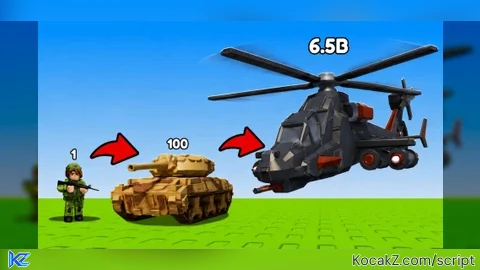
![[UPD🎃] Merge a Mini Army](https://media.kocakz.me/c727c4b3401a6681bba6bbe8621e53d1be8e71303331635c2e6f8c14c2844ade.webp)
Features & Information
Script Changelog (1)
Community Comments (0)
No comments yet for this script.
Frequently Asked Questions
How do I execute Merge a Mini Army Script – for a game (Keyless) in Roblox?
To run Merge a Mini Army Script – for a game (Keyless), copy the Lua loadstring from the code viewer above, launch Roblox and join Merge a Mini Army, attach a working executor (such as Potassium, Solara, or Delta from our Executors directory), paste the code into your executor console, and click Execute.
Is Merge a Mini Army Script – for a game (Keyless) keyless or does it require an access key?
Merge a Mini Army Script – for a game (Keyless) requires an access key. You can retrieve the official key directly using the Get Script Key link provided above.
Is Merge a Mini Army Script – for a game (Keyless) currently safe and working?
This script is active and operational. Always test scripts using a secondary (alt) Roblox account to safeguard your main profile against anti-cheat bans.