Key Required VerifiedUniversal
local Player = game.Players.LocalPlayer
local CoreGui = game:GetService("CoreGui")
local TweenService = game:GetService("TweenService")
local UserInputService = game:GetService("UserInputService")

if CoreGui:FindFirstChild("SpeedHub") then CoreGui.SpeedHub:Destroy() end

local ScreenGui = Instance.new("ScreenGui", CoreGui)
ScreenGui.Name = "SpeedHub"

local Main = Instance.new("Frame", ScreenGui)
Main.Size = UDim2.new(0, 220, 0, 130)
Main.Position = UDim2.new(0.5, -110, 0.4, 0)
Main.BackgroundColor3 = Color3.fromRGB(20, 20, 25)
Main.BorderSizePixel = 0
Main.Active = true
Main.ClipsDescendants = true

local UICorner = Instance.new("UICorner", Main)
UICorner.CornerRadius = UDim.new(0, 12)

local dragStart, startPos
Main.InputBegan:Connect(function(input)
    if input.UserInputType == Enum.UserInputType.MouseButton1 or input.UserInputType == Enum.UserInputType.Touch then
        dragStart = input.Position
        startPos = Main.Position
        input.Changed:Connect(function()
            if input.UserInputState == Enum.UserInputState.End then dragStart = nil end
        end)
    end
end)
UserInputService.InputChanged:Connect(function(input)
    if (input.UserInputType == Enum.UserInputType.MouseMovement or input.UserInputType == Enum.UserInputType.Touch) and dragStart then
        local delta = input.Position - dragStart
        Main.Position = UDim2.new(startPos.X.Scale, startPos.X.Offset + delta.X, startPos.Y.Scale, startPos.Y.Offset + delta.Y)
    end
end)

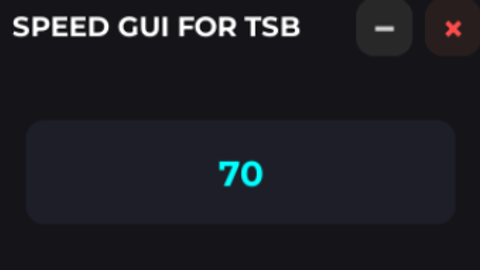
local Title = Instance.new("TextLabel", Main)
Title.Size = UDim2.new(1, -60, 0, 35)
Title.Position = UDim2.new(0, 10, 0, 0)
Title.Text = "SPEED GUI FOR TSB"
Title.TextColor3 = Color3.new(1, 1, 1)
Title.Font = Enum.Font.GothamBold
Title.TextSize = 14
Title.TextXAlignment = Enum.TextXAlignment.Left
Title.BackgroundTransparency = 1

local CloseBtn = Instance.new("TextButton", Main)
CloseBtn.Size = UDim2.new(0, 25, 0, 25)
CloseBtn.Position = UDim2.new(1, -30, 0, 5)
CloseBtn.Text = "×"
CloseBtn.TextColor3 = Color3.new(1, 0.3, 0.3)
CloseBtn.BackgroundColor3 = Color3.fromRGB(40, 30, 30)
CloseBtn.Font = Enum.Font.GothamBold
CloseBtn.TextSize = 20
Instance.new("UICorner", CloseBtn)

CloseBtn.MouseButton1Click:Connect(function()
    ScreenGui:Destroy()
end)

local MiniBtn = Instance.new("TextButton", Main)
MiniBtn.Size = UDim2.new(0, 25, 0, 25)
MiniBtn.Position = UDim2.new(1, -60, 0, 5)
MiniBtn.Text = "−"
MiniBtn.TextColor3 = Color3.new(0.8, 0.8, 0.8)
MiniBtn.BackgroundColor3 = Color3.fromRGB(40, 40, 40)
MiniBtn.Font = Enum.Font.GothamBold
MiniBtn.TextSize = 20
Instance.new("UICorner", MiniBtn)

local minimized = false
MiniBtn.MouseButton1Click:Connect(function()
    minimized = not minimized
    local targetSize = minimized and UDim2.new(0, 220, 0, 35) or UDim2.new(0, 220, 0, 130)
    TweenService:Create(Main, TweenInfo.new(0.3), {Size = targetSize}):Play()
end)

local Box = Instance.new("TextBox", Main)
Box.Size = UDim2.new(0.85, 0, 0, 45)
Box.Position = UDim2.new(0.075, 0, 0.45, 0)
Box.BackgroundColor3 = Color3.fromRGB(30, 30, 40)
Box.PlaceholderText = "Set Speed..."
Box.Text = "16"
Box.TextColor3 = Color3.new(0, 1, 1)
Box.Font = Enum.Font.GothamBold
Box.TextSize = 18
Instance.new("UICorner", Box)

local targetSpeed = 16
Box.FocusLost:Connect(function()
    targetSpeed = tonumber(Box.Text) or 16
end)

task.spawn(function()
    while true do
        pcall(function()
            local char = Player.Character
            if char and char:FindFirstChild("Humanoid") then
                char.Humanoid.WalkSpeed = targetSpeed
            end
        end)
        task.wait(0)
    end
end)No comments yet for this script.