

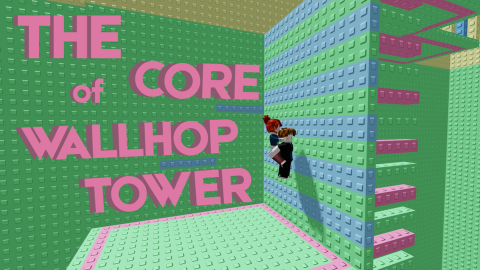
Key Required
if game:GetService("CoreGui"):FindFirstChild("WallHopGui") then
    game:GetService("CoreGui")["WallHopGui"]:Destroy()
end

local Players = game:GetService("Players")
local TweenService = game:GetService("TweenService")
local UserInputService = game:GetService("UserInputService")
local CoreGui = game:GetService("CoreGui")

local player = Players.LocalPlayer
local targetPosition = Vector3.new(-307.53, 835.00, 496.78)
local autoTpEnabled = false

local screenGui = Instance.new("ScreenGui")
screenGui.Name = "WallHopGui"
screenGui.ResetOnSpawn = false
screenGui.Parent = CoreGui

local mainFrame = Instance.new("Frame")
mainFrame.Name = "MainFrame"
mainFrame.Size = UDim2.new(0, 260, 0, 110)
mainFrame.Position = UDim2.new(0.5, -130, 0.4, -55)
mainFrame.BackgroundColor3 = Color3.fromRGB(15, 15, 20)
mainFrame.BorderSizePixel = 0
mainFrame.Active = true
mainFrame.Parent = screenGui

local corner = Instance.new("UICorner")
corner.CornerRadius = UDim.new(0, 10)
corner.Parent = mainFrame

local stroke = Instance.new("UIStroke")
stroke.Color = Color3.fromRGB(230, 50, 50)
stroke.Thickness = 1.5
stroke.Parent = mainFrame

local topBar = Instance.new("Frame")
topBar.Name = "TopBar"
topBar.Size = UDim2.new(1, 0, 0, 30)
topBar.BackgroundTransparency = 1
topBar.Parent = mainFrame

local titleLabel = Instance.new("TextLabel")
titleLabel.Name = "Title"
titleLabel.Size = UDim2.new(1, -35, 1, 0)
titleLabel.Position = UDim2.new(0, 12, 0, 0)
titleLabel.BackgroundTransparency = 1
titleLabel.Text = "WALL HOP"
titleLabel.TextColor3 = Color3.fromRGB(240, 240, 245)
titleLabel.TextSize = 13
titleLabel.Font = Enum.Font.GothamBold
titleLabel.TextXAlignment = Enum.TextXAlignment.Left
titleLabel.Parent = topBar

local closeButton = Instance.new("TextButton")
closeButton.Name = "CloseButton"
closeButton.Size = UDim2.new(0, 25, 0, 25)
closeButton.Position = UDim2.new(1, -30, 0, 3)
closeButton.BackgroundTransparency = 1
closeButton.Text = "✕"
closeButton.TextColor3 = Color3.fromRGB(150, 150, 160)
closeButton.TextSize = 13
closeButton.Font = Enum.Font.GothamBold
closeButton.Parent = topBar

local toggleButton = Instance.new("TextButton")
toggleButton.Name = "ToggleButton"
toggleButton.Size = UDim2.new(1, -24, 0, 45)
toggleButton.Position = UDim2.new(0, 12, 0, 45)
toggleButton.BackgroundColor3 = Color3.fromRGB(40, 40, 45)
toggleButton.BorderSizePixel = 0
toggleButton.Text = "Auto Win: OFF"
toggleButton.TextColor3 = Color3.fromRGB(180, 180, 190)
toggleButton.TextSize = 14
toggleButton.Font = Enum.Font.GothamBold
toggleButton.AutoButtonColor = false
toggleButton.Parent = mainFrame

local btnCorner = Instance.new("UICorner")
btnCorner.CornerRadius = UDim.new(0, 6)
btnCorner.Parent = toggleButton

local dragging, dragInput, dragStart, startPos
local function update(input)
    local delta = input.Position - dragStart
    mainFrame.Position = UDim2.new(startPos.X.Scale, startPos.X.Offset + delta.X, startPos.Y.Scale, startPos.Y.Offset + delta.Y)
end

topBar.InputBegan:Connect(function(input)
    if input.UserInputType == Enum.UserInputType.MouseButton1 or input.UserInputType == Enum.UserInputType.Touch then
        dragging = true
        dragStart = input.Position
        startPos = mainFrame.Position
        input.Changed:Connect(function()
            if input.UserInputState == Enum.UserInputState.End then dragging = false end
        end)
    end
end)

topBar.InputChanged:Connect(function(input)
    if input.UserInputType == Enum.UserInputType.MouseMovement or input.UserInputType == Enum.UserInputType.Touch then dragInput = input end
end)

UserInputService.InputChanged:Connect(function(input)
    if input == dragInput and dragging then update(input) end
end)

closeButton.MouseButton1Click:Connect(function()
    autoTpEnabled = false
    screenGui:Destroy()
end)

toggleButton.MouseButton1Click:Connect(function()
    autoTpEnabled = not autoTpEnabled
    if autoTpEnabled then
        TweenService:Create(toggleButton, TweenInfo.new(0.2), {BackgroundColor3 = Color3.fromRGB(230, 50, 50)}):Play()
        toggleButton.Text = "Auto Win: ON"
        toggleButton.TextColor3 = Color3.fromRGB(255, 255, 255)
        task.spawn(function()
            while autoTpEnabled do
                local character = player.Character
                local rootPart = character and character:FindFirstChild("HumanoidRootPart")
                if rootPart then
                    rootPart.CFrame = CFrame.new(targetPosition)
                end
                task.wait(0.8)
            end
        end)
    else
        TweenService:Create(toggleButton, TweenInfo.new(0.2), {BackgroundColor3 = Color3.fromRGB(40, 40, 45)}):Play()
        toggleButton.Text = "Auto Win: OFF"
        toggleButton.TextColor3 = Color3.fromRGB(180, 180, 190)
    end
end)No comments yet for this script.