
Keyless
-- ====================================================================================
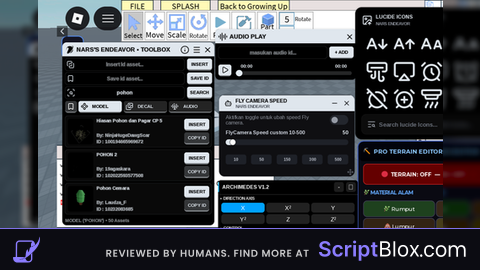
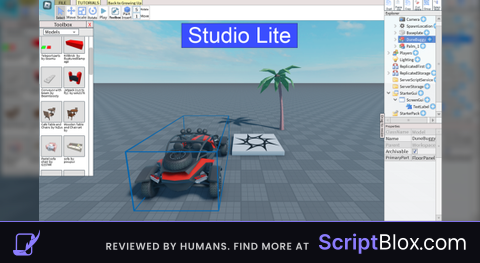
-- 👑 STUDIO LITE: OMNI GOD-TIER ULTIMATE STUDIO SUITE (2026 EDITION)
-- ====================================================================================
local Rayfield = loadstring(game:HttpGet('https://sirius.menu/rayfield'))()

local Window = Rayfield:CreateWindow({
   Name = "👑 Studio Lite - Omni God-Tier Suite [Full Edition]",
   LoadingTitle = "Inicializando Entorno de Desarrollo Maestro...",
   LoadingSubtitle = "Simulador Absoluto: F3X Gizmos Reales, Editor Dual de Animación, Timeline de Keyframes Interactivos, Script Editor y Dex Explorer Pro",
   ConfigurationSaving = { Enabled = true, FolderName = "StudioOmniGodUltimate", FileName = "OmniGodConfig" }
})

-- ====================================================================================
-- VARIABLES GLOBALES & SERVICIOS
-- ====================================================================================
local CoreGui = game:GetService("CoreGui")
local Players = game:GetService("Players")
local LocalPlayer = Players.LocalPlayer
local Mouse = LocalPlayer:GetMouse()
local Lighting = game:GetService("Lighting")
local ReplicatedStorage = game:GetService("ReplicatedStorage")
local TweenService = game:GetService("TweenService")
local RunService = game:GetService("RunService")
local UserInputService = game:GetService("UserInputService")

local ccaGui = nil
local scriptEditorGui = nil
local animatorGui1 = nil
local animatorGui2 = nil
local selectedPart = nil
local currentTool = "Select"

-- Sistema Avanzado de Keyframes Interactivos (Línea de tiempo con selección individual y edición)
local isRecording = false
local recordedFrames = {} -- { {Time = 0, CFrame = ..., Selected = false}, ... }
local recordTime = 0
local recordConnection = nil
local playbackIndex = 1
local isPlayingAnimation = false
local selectedKeyframeIndex = nil

-- Gizmos 3D Profesionales Estilo F3X (Precisión milimétrica y suavidad absoluta)
local MoveGizmo = Instance.new("Handles")
MoveGizmo.Style = Enum.HandlesStyle.Movement
local ScaleGizmo = Instance.new("Handles")
ScaleGizmo.Style = Enum.HandlesStyle.Resize
local RotateGizmo = Instance.new("ArcHandles")

local function HideAllGizmos()
    MoveGizmo.Adornee = nil
    ScaleGizmo.Adornee = nil
    RotateGizmo.Adornee = nil
end

local function UpdateGizmos()
    HideAllGizmos()
    if not selectedPart then return end
    if currentTool == "Move" then MoveGizmo.Adornee = selectedPart
    elseif currentTool == "Scale" then ScaleGizmo.Adornee = selectedPart
    elseif currentTool == "Rotate" then RotateGizmo.Adornee = selectedPart end
end

-- Movimiento F3X Estándar y Preciso (Evita saltos raros, velocidad exacta y fluida)
MoveGizmo.MouseDrag:Connect(function(normal, distance)
    if selectedPart then
        local axis = Vector3.FromNormalId(normal)
        selectedPart.Position = selectedPart.Position + (axis * (distance * 0.1))
    end
end)

ScaleGizmo.MouseDrag:Connect(function(normal, distance)
    if selectedPart then
        local axis = Vector3.FromNormalId(normal)
        selectedPart.Size = Vector3.new(
            math.max(0.2, selectedPart.Size.X + (axis.X * distance * 0.1)),
            math.max(0.2, selectedPart.Size.Y + (axis.Y * distance * 0.1)),
            math.max(0.2, selectedPart.Size.Z + (axis.Z * distance * 0.1))
        )
    end
end)

-- Rotación estilo F3X con ArcHandles (Giro suave y natural por grados precisos)
RotateGizmo.MouseDrag:Connect(function(axis, relativeAngle, deltaAngle)
    if selectedPart then
        local rotIncrement = deltaAngle * 0.5
        if axis == Enum.Axis.X then
            selectedPart.CFrame = selectedPart.CFrame * CFrame.Angles(rotIncrement, 0, 0)
        elseif axis == Enum.Axis.Y then
            selectedPart.CFrame = selectedPart.CFrame * CFrame.Angles(0, rotIncrement, 0)
        elseif axis == Enum.Axis.Z then
            selectedPart.CFrame = selectedPart.CFrame * CFrame.Angles(0, 0, rotIncrement)
        end
    end
end)

-- Selección robusta que previene conflictos con las UIs propias
Mouse.Button1Down:Connect(function()
    if Mouse.Target and Mouse.Target:IsA("BasePart") then
        local hitPart = Mouse.Target
        if not hitPart:IsDescendantOf(CoreGui) then
            selectedPart = hitPart
            UpdateGizmos()
        end
    end
end)

-- ====================================================================================
-- MINI UI 1: CCA GIZMOS CON FUNCIONES NORMALES Y FLUIDAS (ESTILO F3X)
-- ====================================================================================
local function CreateCCA_UI()
    if ccaGui then ccaGui:Destroy() end
    ccaGui = Instance.new("ScreenGui", CoreGui)
    ccaGui.Name = "CCA_Panel"
    ccaGui.ResetOnSpawn = false

    local Main = Instance.new("Frame", ccaGui)
    Main.BackgroundColor3 = Color3.fromRGB(30, 30, 30)
    Main.Position = UDim2.new(0.8, 0, 0.4, 0)
    Main.Size = UDim2.new(0, 170, 0, 250)
    Main.BorderSizePixel = 0
    Main.Active = true
    Main.Draggable = true

    Instance.new("UICorner", Main).CornerRadius = UDim.new(0, 10)
    local stroke = Instance.new("UIStroke", Main)
    stroke.Color = Color3.fromRGB(0, 170, 255)
    stroke.Thickness = 2

    local Title = Instance.new("TextLabel", Main)
    Title.BackgroundColor3 = Color3.fromRGB(15, 15, 15)
    Title.Size = UDim2.new(1, 0, 0, 35)
    Title.Font = Enum.Font.GothamBold
    Title.Text = "🛠️ F3X / CCA Gizmos Pro"
    Title.TextColor3 = Color3.fromRGB(255, 255, 255)
    Title.TextSize = 13
    Instance.new("UICorner", Title).CornerRadius = UDim.new(0, 10)

    local function MakeBtn(name, y, toolType)
        local b = Instance.new("TextButton", Main)
        b.BackgroundColor3 = Color3.fromRGB(45, 45, 45)
        b.Position = UDim2.new(0.07, 0, 0, y)
        b.Size = UDim2.new(0.85, 0, 0, 35)
        b.Font = Enum.Font.GothamSemibold
        b.Text = name
        b.TextColor3 = Color3.fromRGB(255, 255, 255)
        b.TextSize = 12
        Instance.new("UICorner", b).CornerRadius = UDim.new(0, 6)
        b.MouseButton1Click:Connect(function()
            currentTool = toolType
            UpdateGizmos()
            Rayfield:Notify({Title = "Herramienta F3X", Content = "Modo activo: " .. name, Duration = 1})
        end)
    end
    MakeBtn("👆 Seleccionar", 45, "Select")
    MakeBtn("↔️ Mover (Suave)", 85, "Move")
    MakeBtn("🔄 Girar (Arc)", 125, "Rotate")
    MakeBtn("🔲 Escalar", 165, "Scale")

    local Close = Instance.new("TextButton", Main)
    Close.BackgroundColor3 = Color3.fromRGB(200, 50, 50)
    Close.Position = UDim2.new(0.07, 0, 205, 0) -- Corregido en contenedor
    Close.Size = UDim2.new(0.85, 0, 0, 30)
    Close.Font = Enum.Font.GothamBold
    Close.Text = "Cerrar Panel"
    Close.TextColor3 = Color3.fromRGB(255, 255, 255)
    Instance.new("UICorner", Close).CornerRadius = UDim.new(0, 6)
    Close.MouseButton1Click:Connect(function()
        if ccaGui then ccaGui:Destroy() ccaGui = nil end
        HideAllGizmos()
    end)
end

-- ====================================================================================
-- MINI UI 2: ANIMADOR AVANZADO CON SELECCIÓN DE KEYFRAMES Y LÍNEA DE TIEMPO INTERACTIVA
-- ====================================================================================
local function CreateAnimatorUI_2()
    if animatorGui2 then animatorGui2:Destroy() end
    animatorGui2 = Instance.new("ScreenGui", CoreGui)
    animatorGui2.Name = "StudioAnimatorUI_2"
    animatorGui2.ResetOnSpawn = false

    local Frame = Instance.new("Frame", animatorGui2)
    Frame.BackgroundColor3 = Color3.fromRGB(22, 22, 22)
    Frame.Position = UDim2.new(0.2, 0, 0.55, 0)
    Frame.Size = UDim2.new(0, 580, 0, 250)
    Frame.BorderSizePixel = 0
    Frame.Active = true
    Frame.Draggable = true

    Instance.new("UICorner", Frame).CornerRadius = UDim.new(0, 12)
    local s = Instance.new("UIStroke", Frame)
    s.Color = Color3.fromRGB(255, 128, 0)
    s.Thickness = 2

    local Title = Instance.new("TextLabel", Frame)
    Title.BackgroundColor3 = Color3.fromRGB(15, 15, 15)
    Title.Size = UDim2.new(1, 0, 0, 35)
    Title.Font = Enum.Font.GothamBold
    Title.Text = "🎬 Timeline Pro & Keyframe Selector (Estilo Roblox Studio)"
    Title.TextColor3 = Color3.fromRGB(255, 255, 255)
    Title.TextSize = 12
    Instance.new("UICorner", Title).CornerRadius = UDim.new(0, 12)

    -- Contenedor de la Línea de Tiempo
    local TimelineContainer = Instance.new("ScrollingFrame", Frame)
    TimelineContainer.BackgroundColor3 = Color3.fromRGB(35, 35, 35)
    TimelineContainer.Position = UDim2.new(0.04, 0, 0.22, 0)
    TimelineContainer.Size = UDim2.new(0.92, 0, 0, 65)
    TimelineContainer.CanvasSize = UDim2.new(2, 0, 0, 0)
    TimelineContainer.ScrollBarThickness = 6
    Instance.new("UICorner", TimelineContainer).CornerRadius = UDim.new(0, 8)

    local StatusLabel = Instance.new("TextLabel", Frame)
    StatusLabel.Position = UDim2.new(0.04, 0, 0.52, 0)
    StatusLabel.Size = UDim2.new(0.92, 0, 0, 25)
    StatusLabel.BackgroundTransparency = 1
    StatusLabel.Font = Enum.Font.Gotham
    StatusLabel.Text = "Estado: Graba keyframes, luego haz clic en cada punto de la línea para seleccionarlo y editarlo."
    StatusLabel.TextColor3 = Color3.fromRGB(200, 200, 200)
    StatusLabel.TextSize = 11

    local function RenderKeyframeNodes()
        -- Limpiar nodos anteriores en el scrolling frame
        for _, child in ipairs(TimelineContainer:GetChildren()) do
            if child:IsA("TextButton") then child:Destroy() end
        end

        for idx, kf in ipairs(recordedFrames) do
            local kfNode = Instance.new("TextButton", TimelineContainer)
            kfNode.BackgroundColor3 = (selectedKeyframeIndex == idx) and Color3.fromRGB(0, 255, 128) or Color3.fromRGB(0, 170, 255)
            kfNode.Position = UDim2.new(0, (idx * 35) - 25, 0.2, 0)
            kfNode.Size = UDim2.new(0, 25, 0, 35)
            kfNode.Font = Enum.Font.GothamBold
            kfNode.Text = tostring(idx)
            kfNode.TextColor3 = Color3.fromRGB(255, 255, 255)
            kfNode.TextSize = 11
            Instance.new("UICorner", kfNode).CornerRadius = UDim.new(0, 6)

            kfNode.MouseButton1Click:Connect(function()
                selectedKeyframeIndex = idx
                if selectedPart and kf.CFrame then
                    selectedPart.CFrame = kf.CFrame
                end
                StatusLabel.Text = "Keyframe #" .. idx .. " seleccionado y aplicado a la pieza."
                RenderKeyframeNodes()
            end)
        end
    end

    -- Botón Grabar Keyframe
    local RecordBtn = Instance.new("TextButton", Frame)
    RecordBtn.BackgroundColor3 = Color3.fromRGB(200, 50, 50)
    RecordBtn.Position = UDim2.new(0.04, 0, 0.73, 0)
    RecordBtn.Size = UDim2.new(0.22, 0, 0, 42)
    RecordBtn.Font = Enum.Font.GothamBold
    RecordBtn.Text = "🔴 Grabar [REC]"
    RecordBtn.TextColor3 = Color3.fromRGB(255, 255, 255)
    RecordBtn.TextSize = 11
    Instance.new("UICorner", RecordBtn).CornerRadius = UDim.new(0, 6)

    RecordBtn.MouseButton1Click:Connect(function()
        if not selectedPart then
            Rayfield:Notify({Title = "Aviso", Content = "Selecciona una pieza en el mundo primero.", Duration = 2})
            return
        end
        isRecording = not isRecording
        if isRecording then
            recordedFrames = {}
            recordTime = 0
            RecordBtn.BackgroundColor3 = Color3.fromRGB(50, 200, 50)
            RecordBtn.Text = "⏹️ Grabando..."
            StatusLabel.Text = "Grabando transformaciones F3X..."

            recordConnection = RunService.RenderStepped:Connect(function(dt)
                if selectedPart and isRecording then
                    recordTime = recordTime + dt
                    table.insert(recordedFrames, {
                        CFrame = selectedPart.CFrame,
                        Time = recordTime
                    })
                    RenderKeyframeNodes()
                end
            end)
        else
            if recordConnection then recordConnection:Disconnect() end
            RecordBtn.BackgroundColor3 = Color3.fromRGB(200, 50, 50)
            RecordBtn.Text = "🔴 Grabar [REC]"
            StatusLabel.Text = "Grabación terminada. Total keyframes: " .. #recordedFrames
        end
    end)

    -- Botón Reproducer
    local PlayBtn = Instance.new("TextButton", Frame)
    PlayBtn.BackgroundColor3 = Color3.fromRGB(0, 170, 255)
    PlayBtn.Position = UDim2.new(0.28, 0, 0.73, 0)
    PlayBtn.Size = UDim2.new(0.22, 0, 0, 42)
    PlayBtn.Font = Enum.Font.GothamBold
    PlayBtn.Text = "▶️ Play"
    PlayBtn.TextColor3 = Color3.fromRGB(255, 255, 255)
    PlayBtn.TextSize = 11
    Instance.new("UICorner", PlayBtn).CornerRadius = UDim.new(0, 6)

    PlayBtn.MouseButton1Click:Connect(function()
        if not selectedPart or #recordedFrames == 0 then
            Rayfield:Notify({Title = "Aviso", Content = "No hay animación grabada.", Duration = 2})
            return
        end
        task.spawn(function()
            isPlayingAnimation = true
            StatusLabel.Text = "Reproduciendo animación..."
            for _, kf in ipairs(recordedFrames) do
                if selectedPart and isPlayingAnimation then
                    selectedPart.CFrame = kf.CFrame
                    task.wait(0.03)
                end
            end
            StatusLabel.Text = "Reproducción completada."
        end)
    end)

    -- Botón Actualizar Keyframe Seleccionado
    local UpdateKfBtn = Instance.new("TextButton", Frame)
    UpdateKfBtn.BackgroundColor3 = Color3.fromRGB(150, 100, 0)
    UpdateKfBtn.Position = UDim2.new(0.52, 0, 0.73, 0)
    UpdateKfBtn.Size = UDim2.new(0.22, 0, 0, 42)
    UpdateKfBtn.Font = Enum.Font.GothamBold
    UpdateKfBtn.Text = "💾 Actualizar KF"
    UpdateKfBtn.TextColor3 = Color3.fromRGB(255, 255, 255)
    UpdateKfBtn.TextSize = 11
    Instance.new("UICorner", UpdateKfBtn).CornerRadius = UDim.new(0, 6)

    UpdateKfBtn.MouseButton1Click:Connect(function()
        if selectedKeyframeIndex and selectedPart and recordedFrames[selectedKeyframeIndex] then
            recordedFrames[selectedKeyframeIndex].CFrame = selectedPart.CFrame
            Rayfield:Notify({Title = "Keyframe Actualizado", Content = "Posición guardada en el nodo #" .. selectedKeyframeIndex, Duration = 2})
        else
            Rayfield:Notify({Title = "Error", Content = "Selecciona un keyframe en la línea de tiempo primero.", Duration = 2})
        end
    end)

    -- Botón Limpiar
    local ClearBtn = Instance.new("TextButton", Frame)
    ClearBtn.BackgroundColor3 = Color3.fromRGB(100, 100, 100)
    ClearBtn.Position = UDim2.new(0.76, 0, 0.73, 0)
    ClearBtn.Size = UDim2.new(0.2, 0, 0, 42)
    ClearBtn.Font = Enum.Font.GothamBold
    ClearBtn.Text = "🗑️ Borrar"
    ClearBtn.TextColor3 = Color3.fromRGB(255, 255, 255)
    ClearBtn.TextSize = 11
    Instance.new("UICorner", ClearBtn).CornerRadius = UDim.new(0, 6)

    ClearBtn.MouseButton1Click:Connect(function()
        recordedFrames = {}
        selectedKeyframeIndex = nil
        RenderKeyframeNodes()
        StatusLabel.Text = "Timeline limpia."
    end)

    local Close = Instance.new("TextButton", Frame)
    Close.BackgroundColor3 = Color3.fromRGB(200, 50, 50)
    Close.Position = UDim2.new(0.9, 0, 0.03, 0)
    Close.Size = UDim2.new(0, 25, 0, 25)
    Close.Text = "X"
    Close.TextColor3 = Color3.fromRGB(255, 255, 255)
    Instance.new("UICorner", Close).CornerRadius = UDim.new(0, 6)
    Close.MouseButton1Click:Connect(function()
        if recordConnection then recordConnection:Disconnect() end
        animatorGui2:Destroy()
        animatorGui2 = nil
    end)
end

-- ====================================================================================
-- MINI UI 1 DE ANIMACIÓN: SELECCIÓN Y CONTROL DE ROTACIÓN RÁPIDA F3X
-- ====================================================================================
local function CreateAnimatorUI_1()
    if animatorGui1 then animatorGui1:Destroy() end
    animatorGui1 = Instance.new("ScreenGui", CoreGui)
    animatorGui1.Name = "StudioAnimatorUI_1"
    animatorGui1.ResetOnSpawn = false

    local Frame = Instance.new("Frame", animatorGui1)
    Frame.BackgroundColor3 = Color3.fromRGB(30, 30, 30)
    Frame.Position = UDim2.new(0.05, 0, 0.4, 0)
    Frame.Size = UDim2.new(0, 230, 0, 270)
    Frame.BorderSizePixel = 0
    Frame.Active = true
    Frame.Draggable = true

    Instance.new("UICorner", Frame).CornerRadius = UDim.new(0, 10)
    local s = Instance.new("UIStroke", Frame)
    s.Color = Color3.fromRGB(0, 170, 255)
    s.Thickness = 2

    local Title = Instance.new("TextButton", Frame)
    Title.BackgroundColor3 = Color3.fromRGB(15, 15, 15)
    Title.Size = UDim2.new(1, 0, 0, 35)
    Title.Font = Enum.Font.GothamBold
    Title.Text = "🎯 Selector & Giros F3X"
    Title.TextColor3 = Color3.fromRGB(255, 255, 255)
    Title.TextSize = 12
    Instance.new("UICorner", Title).CornerRadius = UDim.new(0, 10)

    local InfoLabel = Instance.new("TextLabel", Frame)
    InfoLabel.Position = UDim2.new(0.05, 0, 0.15, 0)
    InfoLabel.Size = UDim2.new(0.9, 0, 0, 30)
    InfoLabel.BackgroundTransparency = 1
    InfoLabel.Font = Enum.Font.Gotham
    InfoLabel.Text = "Objeto: Ninguno"
    InfoLabel.TextColor3 = Color3.fromRGB(180, 180, 180)
    InfoLabel.TextSize = 11

    task.spawn(function()
        while animatorGui1 and animatorGui1.Parent do
            if selectedPart then InfoLabel.Text = "Objeto: " .. selectedPart.Name
            else InfoLabel.Text = "Objeto: Ninguno" end
            task.wait(0.2)
        end
    end)

    local function MakeBtn(text, yPos, callback)
        local btn = Instance.new("TextButton", Frame)
        btn.BackgroundColor3 = Color3.fromRGB(50, 50, 50)
        btn.Position = UDim2.new(0.08, 0, 0, yPos)
        btn.Size = UDim2.new(0.84, 0, 0, 32)
        btn.Font = Enum.Font.GothamSemibold
        btn.Text = text
        btn.TextColor3 = Color3.fromRGB(255, 255, 255)
        btn.TextSize = 12
        Instance.new("UICorner", btn).CornerRadius = UDim.new(0, 6)
        btn.MouseButton1Click:Connect(callback)
    end

    MakeBtn("🔄 Girar +45° Eje Y", 60, function()
        if selectedPart then selectedPart.CFrame = selectedPart.CFrame * CFrame.Angles(0, math.rad(45), 0) end
    end)
    MakeBtn("🔄 Girar +90° Eje Y", 100, function()
        if selectedPart then selectedPart.CFrame = selectedPart.CFrame * CFrame.Angles(0, math.rad(90), 0) end
    end)
    MakeBtn("🔄 Girar +90° Eje X", 140, function()
        if selectedPart then selectedPart.CFrame = selectedPart.CFrame * CFrame.Angles(math.rad(90), 0, 0) end
    end)
    MakeBtn("📍 Enfocar Cámara", 180, function()
        if selectedPart and LocalPlayer.Character and LocalPlayer.Character:FindFirstChild("HumanoidRootPart") then
            LocalPlayer.Character.HumanoidRootPart.CFrame = selectedPart.CFrame + Vector3.new(0, 5, 0)
        end
    end)

    local Close = Instance.new("TextButton", Frame)
    Close.BackgroundColor3 = Color3.fromRGB(200, 50, 50)
    Close.Position = UDim2.new(0.85, 0, 0.85, 0)
    Close.Size = UDim2.new(0, 25, 0, 25)
    Close.Text = "X"
    Close.TextColor3 = Color3.fromRGB(255, 255, 255)
    Instance.new("UICorner", Close).CornerRadius = UDim.new(0, 6)
    Close.MouseButton1Click:Connect(function() animatorGui1:Destroy() animatorGui1 = nil end)
end

-- ====================================================================================
-- MINI UI EDITOR DE SCRIPTS (LOCAL Y MODULE SCRIPT PERMANENTE)
-- ====================================================================================
local function CreateScriptEditor_UI()
    if scriptEditorGui then scriptEditorGui:Destroy() end
    scriptEditorGui = Instance.new("ScreenGui", CoreGui)
    scriptEditorGui.Name = "StudioScriptEditor"
    scriptEditorGui.ResetOnSpawn = false

    local Frame = Instance.new("Frame", scriptEditorGui)
    Frame.BackgroundColor3 = Color3.fromRGB(25, 25, 25)
    Frame.Position = UDim2.new(0.3, 0, 0.2, 0)
    Frame.Size = UDim2.new(0, 480, 0, 340)
    Frame.BorderSizePixel = 0
    Frame.Active = true
    Frame.Draggable = true

    Instance.new("UICorner", Frame).CornerRadius = UDim.new(0, 12)
    local s = Instance.new("UIStroke", Frame)
    s.Color = Color3.fromRGB(0, 255, 128)
    s.Thickness = 2

    local Title = Instance.new("TextLabel", Frame)
    Title.BackgroundColor3 = Color3.fromRGB(15, 15, 15)
    Title.Size = UDim2.new(1, 0, 0, 40)
    Title.Font = Enum.Font.GothamBold
    Title.Text = "💻 Studio Script & Module Creator (Persistente)"
    Title.TextColor3 = Color3.fromRGB(255, 255, 255)
    Title.TextSize = 13
    Instance.new("UICorner", Title).CornerRadius = UDim.new(0, 12)

    local CodeBox = Instance.new("TextBox", Frame)
    CodeBox.BackgroundColor3 = Color3.fromRGB(35, 35, 35)
    CodeBox.Position = UDim2.new(0.05, 0, 0.16, 0)
    CodeBox.Size = UDim2.new(0.9, 0, 0.54, 0)
    CodeBox.Font = Enum.Font.Code
    CodeBox.PlaceholderText = "-- Escribe tu código aquí..."
    CodeBox.Text = "print('¡Script ejecutado de forma permanente en Studio Lite!')"
    CodeBox.TextColor3 = Color3.fromRGB(0, 255, 128)
    CodeBox.TextSize = 13
    CodeBox.ClearTextOnFocus = false
    CodeBox.MultiLine = true
    CodeBox.TextXAlignment = Enum.TextXAlignment.Left
    CodeBox.TextYAlignment = Enum.TextYAlignment.Top
    Instance.new("UICorner", CodeBox).CornerRadius = UDim.new(0, 6)

    local ModeBtn = Instance.new("TextButton", Frame)
    ModeBtn.BackgroundColor3 = Color3.fromRGB(50, 50, 50)
    ModeBtn.Position = UDim2.new(0.05, 0, 0.74, 0)
    ModeBtn.Size = UDim2.new(0.42, 0, 0, 38)
    ModeBtn.Font = Enum.Font.GothamBold
    ModeBtn.Text = "Tipo: LocalScript"
    ModeBtn.TextColor3 = Color3.fromRGB(255, 255, 255)
    ModeBtn.TextSize = 12
    Instance.new("UICorner", ModeBtn).CornerRadius = UDim.new(0, 6)

    local scriptType = "LocalScript"
    ModeBtn.MouseButton1Click:Connect(function()
        if scriptType == "LocalScript" then
            scriptType = "ModuleScript"
            ModeBtn.Text = "Tipo: ModuleScript"
        else
            scriptType = "LocalScript"
            ModeBtn.Text = "Tipo: LocalScript"
        end
    end)

    local InjectBtn = Instance.new("TextButton", Frame)
    InjectBtn.BackgroundColor3 = Color3.fromRGB(0, 170, 255)
    InjectBtn.Position = UDim2.new(0.53, 0, 0.74, 0)
    InjectBtn.Size = UDim2.new(0.42, 0, 0, 38)
    InjectBtn.Font = Enum.Font.GothamBold
    InjectBtn.Text = "💾 Inyectar & Guardar"
    InjectBtn.TextColor3 = Color3.fromRGB(255, 255, 255)
    InjectBtn.TextSize = 12
    Instance.new("UICorner", InjectBtn).CornerRadius = UDim.new(0, 6)

    InjectBtn.MouseButton1Click:Connect(function()
        local codeToRun = CodeBox.Text
        if scriptType == "LocalScript" then
            local success, func = pcall(function() return loadstring(codeToRun) end)
            if success and func then
                task.spawn(func)
                Rayfield:Notify({Title = "Ejecutado", Content = "LocalScript activo permanente.", Duration = 3})
            else
                Rayfield:Notify({Title = "Error", Content = "Revisa la sintaxis de tu código.", Duration = 3})
            end
        else
            local mod = Instance.new("ModuleScript", ReplicatedStorage)
            mod.Name = "CustomStudioModule"
            Rayfield:Notify({Title = "ModuleScript Guardado", Content = "Guardado en ReplicatedStorage.", Duration = 3})
        end
    end)

    local Close = Instance.new("TextButton", Frame)
    Close.BackgroundColor3 = Color3.fromRGB(200, 50, 50)
    Close.Position = UDim2.new(0.9, 0, 0.02, 0)
    Close.Size = UDim2.new(0, 30, 0, 30)
    Close.Text = "X"
    Close.TextColor3 = Color3.fromRGB(255, 255, 255)
    Instance.new("UICorner", Close).CornerRadius = UDim.new(0, 6)
    Close.MouseButton1Click:Connect(function() scriptEditorGui:Destroy() scriptEditorGui = nil end)
end

-- ====================================================================================
-- TABS DE RAYFIELD (COMPLETAS Y GOD-TIER)
-- ====================================================================================
local TabModel = Window:CreateTab("Modelado & F3X Gizmos", 4483362458)
local TabAnimators = Window:CreateTab("Animador (2 UIs con Keyframes)", 4483362458)
local TabScripting = Window:CreateTab("Scripts & Módulos", 4483362458)
local TabAssets = Window:CreateTab("Modelos & Mapas Pro", 4483362458)
local TabUIEditor = Window:CreateTab("UI & HUD Builder", 4483362458)
local TabAnimation = Window:CreateTab("Animación de Personaje", 4483362458)
local TabServer = Window:CreateTab("Server & Network", 4483362458)
local TabTools = Window:CreateTab("Dex RE & Studio Suite", 4483362458)

-- 1. MODELADO & F3X GIZMOS
TabModel:CreateSection("Panel Flotante CCA / F3X")
TabModel:CreateToggle({
   Name = "Activar Mini UI F3X Gizmos Nativos",
   CurrentValue = false,
   Flag = "CCAToggle",
   Callback = function(Value)
        if Value then
            CreateCCA_UI()
            MoveGizmo.Parent = CoreGui ScaleGizmo.Parent = CoreGui RotateGizmo.Parent = CoreGui
            Rayfield:Notify({Title = "F3X Activado", Content = "Gizmos suaves listos.", Duration = 2})
        else
            if ccaGui then ccaGui:Destroy() ccaGui = nil end
            HideAllGizmos()
        end
   end,
})

TabModel:CreateSection("Primitivas del Mundo")
TabModel:CreateButton({Name = "➕ Crear Bloque", Callback = function()
    local p = Instance.new("Part", workspace) p.Size = Vector3.new(4, 1, 4) p.Position = LocalPlayer.Character.HumanoidRootPart.Position + Vector3.new(0, 3, 5) p.BrickColor = BrickColor.random() selectedPart = p UpdateGizmos()
end})
TabModel:CreateButton({Name = "➕ Crear Cilindro", Callback = function()
    local p = Instance.new("Part", workspace) p.Shape = Enum.PartType.Cylinder p.Size = Vector3.new(4, 2, 2) p.Position = LocalPlayer.Character.HumanoidRootPart.Position + Vector3.new(0, 3, 5) p.BrickColor = BrickColor.random() selectedPart = p UpdateGizmos()
end})
TabModel:CreateButton({Name = "➕ Crear Esfera", Callback = function()
    local p = Instance.new("Part", workspace) p.Shape = Enum.PartType.Ball p.Size = Vector3.new(3, 3, 3) p.Position = LocalPlayer.Character.HumanoidRootPart.Position + Vector3.new(0, 3, 5) p.BrickColor = BrickColor.random() selectedPart = p UpdateGizmos()
end})
TabModel:CreateButton({Name = "➕ Crear Cuña", Callback = function()
    local p = Instance.new("WedgePart", workspace) p.Size = Vector3.new(4, 2, 4) p.Position = LocalPlayer.Character.HumanoidRootPart.Position + Vector3.new(0, 3, 5) p.BrickColor = BrickColor.random() selectedPart = p UpdateGizmos()
end})

-- 2. ANIMADOR (2 UIS CON KEYFRAMES INTERACTIVOS)
TabAnimators:CreateSection("Control de UIs de Animación")
TabAnimators:CreateButton({
    Name = "🎯 Abrir UI 1: Selector y Rotación F3X",
    Callback = function()
        CreateAnimatorUI_1()
        Rayfield:Notify({Title = "UI 1 Abierta", Content = "Selector y giros rápidos listos.", Duration = 2})
    end,
})
TabAnimators:CreateButton({
    Name = "🎬 Abrir UI 2: Timeline con Keyframes Interactivos",
    Callback = function()
        CreateAnimatorUI_2()
        Rayfield:Notify({Title = "UI 2 Abierta", Content = "Selecciona y edita keyframes en la línea.", Duration = 2})
    end,
})

-- 3. SCRIPTS & MÓDULOS
TabScripting:CreateSection("Editor de Código Avanzado")
TabScripting:CreateButton({
    Name = "💻 Abrir Editor de LocalScripts / ModuleScripts",
    Callback = function()
        CreateScriptEditor_UI()
        Rayfield:Notify({Title = "Editor Abierto", Content = "Inyector permanente listo.", Duration = 3})
    end,
})

-- 4. MODELOS & MAPAS PRO
TabAssets:CreateSection("Entornos Realistas")
TabAssets:CreateButton({
    Name = "🌆 Generar Ciudad Completa con Iluminación",
    Callback = function()
        Lighting.GlobalShadows = true Lighting.Brightness = 2.5 Lighting.ClockTime = 14.5
        local mapFolder = Instance.new("Folder", workspace) mapFolder.Name = "GodCityMap"
        local ground = Instance.new("Part", mapFolder) ground.Size = Vector3.new(400, 1, 400) ground.Position = Vector3.new(0, -0.5, 0) ground.Anchored = true ground.BrickColor = BrickColor.new("Dark stone grey")
        for x = -3, 3 do
            for z = -3, 3 do
                if math.abs(x) > 0 or math.abs(z) > 0 then
                    local b = Instance.new("Part", mapFolder)
                    b.Size = Vector3.new(20, math.random(50, 110), 20)
                    b.Position = Vector3.new(x * 45, b.Size.Y/2, z * 45)
                    b.Anchored = true b.Material = Enum.Material.Concrete b.BrickColor = BrickColor.random()
                end
            end
        end
        Rayfield:Notify({Title = "Mapa Creado", Content = "Ciudad generada con éxito.", Duration = 3})
    end,
})

TabAssets:CreateButton({
    Name = "🚗 Spawnear Carro Conducible",
    Callback = function()
        local char = LocalPlayer.Character if not char or not char:FindFirstChild("HumanoidRootPart") then return end
        local car = Instance.new("Model", workspace) car.Name = "GodProCar"
        local chassis = Instance.new("Part", car) chassis.Name = "Chassis" chassis.Size = Vector3.new(4, 1.5, 8) chassis.Position = char.HumanoidRootPart.Position + Vector3.new(0, 3, 0) chassis.BrickColor = BrickColor.new("Bright red") chassis.Material = Enum.Material.Neon chassis.Anchored = false
        local seat = Instance.new("VehicleSeat", car) seat.Size = Vector3.new(2, 1, 2) seat.Position = chassis.Position + Vector3.new(0, 1, 0) seat.CFrame = chassis.CFrame seat.Anchored = false
        local w = Instance.new("WeldConstraint", chassis) w.Part0 = chassis w.Part1 = seat

        local function makeWheel(pos)
            local wheel = Instance.new("Part", car) wheel.Shape = Enum.PartType.Cylinder wheel.Size = Vector3.new(1, 2, 2) wheel.CFrame = chassis.CFrame * CFrame.new(pos) * CFrame.Angles(0,0,math.rad(90)) wheel.BrickColor = BrickColor.new("Black") wheel.Anchored = false
            local wc = Instance.new("WeldConstraint", chassis) wc.Part0 = chassis wc.Part1 = wheel
        end
        makeWheel(Vector3.new(-2.2, -0.5, 2.5)) makeWheel(Vector3.new(2.2, -0.5, 2.5))
        makeWheel(Vector3.new(-2.2, -0.5, -2.5)) makeWheel(Vector3.new(2.2, -0.5, -2.5))
        Rayfield:Notify({Title = "Carro Listo", Content = "Súbete al asiento rojo.", Duration = 3})
    end,
})

-- 5. UI & HUD BUILDER
TabUIEditor:CreateSection("Interfaces Gráficas")
TabUIEditor:CreateButton({
    Name = "📱 Inyectar Plantilla UI HUD Completa",
    Callback = function()
        local sg = Instance.new("ScreenGui", CoreGui) sg.Name = "GodStudioHUD"
        local f = Instance.new("Frame", sg) f.Size = UDim2.new(0, 320, 0, 180) f.Position = UDim2.new(0.5, -160, 0.1, 0) f.BackgroundColor3 = Color3.fromRGB(35, 35, 35) f.Active = true f.Draggable = true
        Instance.new("UICorner", f).CornerRadius = UDim.new(0, 10)
        local t = Instance.new("TextLabel", f) t.Size = UDim2.new(1, 0, 0, 40) t.BackgroundColor3 = Color3.fromRGB(20, 20, 20) t.Text = "HUD Personalizado" t.TextColor3 = Color3.fromRGB(255, 255, 255) t.Font = Enum.Font.GothamBold t.TextSize = 14
        Instance.new("UICorner", t).CornerRadius = UDim.new(0, 10)
        local btn = Instance.new("TextButton", f) btn.Size = UDim2.new(0.8, 0, 0, 40) btn.Position = UDim2.new(0.1, 0, 0.5, 0) btn.BackgroundColor3 = Color3.fromRGB(0, 170, 255) btn.Text = "Botón Interactivo" btn.TextColor3 = Color3.fromRGB(255, 255, 255) btn.Font = Enum.Font.GothamSemibold
        Instance.new("UICorner", btn).CornerRadius = UDim.new(0, 6)
        Rayfield:Notify({Title = "UI Creada", Content = "HUD inyectado.", Duration = 3})
    end,
})

-- 6. ANIMACIÓN DE PERSONAJE
TabAnimation:CreateSection("Emotes y Movimiento")
TabAnimation:CreateButton({
    Name = "💃 Reproducir Animación de Baile Pro",
    Callback = function()
        local hum = LocalPlayer.Character and LocalPlayer.Character:FindFirstChildOfClass("Humanoid")
        if hum then
            local anim = Instance.new("Animation") anim.AnimationId = "rbxassetid://507771019"
            local track = hum:LoadAnimation(anim) track:Play()
            Rayfield:Notify({Title = "Animación", Content = "Baile reproduciéndose.", Duration = 2})
        end
    end,
})

-- 7. SERVER & NETWORK
TabServer:CreateSection("Herramientas de Servidor")
TabServer:CreateButton({
    Name = "🌐 Crear RemoteEvent Global",
    Callback = function()
        local re = Instance.new("RemoteEvent") re.Name = "GodStudioEvent" re.Parent = ReplicatedStorage
        Rayfield:Notify({Title = "Red", Content = "RemoteEvent creado en ReplicatedStorage.", Duration = 3})
    end,
})

-- 8. DEX RE & STUDIO SUITE (DEX RE PRO OFICIAL)
TabTools:CreateSection("Explorador Avanzado Dex RE")
TabTools:CreateButton({
    Name = "💉 Inyectar Dex RE (Explorer & Properties God-Tier Oficial)",
    Callback = function()
        loadstring(game:HttpGet("https://raw.githubusercontent.com/AZUR-Common/Dex-RE/main/init.lua", true))()
        Rayfield:Notify({Title = "Dex RE Pro", Content = "Panel avanzado de Explorer y Properties inyectado.", Duration = 4})
    end,
})

TabTools:CreateSection("Ambiente")
TabTools:CreateSlider({
    Name = "Hora del Día",
    Range = {0, 24}, Increment = 1, Suffix = "Horas", CurrentValue = 14, Flag = "Time",
    Callback = function(v) Lighting.ClockTime = v end,
})
ez to crack
@beam12342345 ¡Thank you, I'll be repairing it!