Keyless
local existingUI = game:GetService("CoreGui"):FindFirstChild("Moonlit") or game:GetService("Players").LocalPlayer:FindFirstChildOfClass("PlayerGui"):FindFirstChild("Moonlit")
if existingUI then existingUI:Destroy() end

local ScreenGui = Instance.new("ScreenGui")
ScreenGui.Name = "Moonlit"

local success, err = pcall(function()
    ScreenGui.Parent = game:GetService("CoreGui")
end)
if not success then
    ScreenGui.Parent = game:GetService("Players").LocalPlayer:WaitForChild("PlayerGui")
end

local WindowFrame = Instance.new("Frame")
WindowFrame.Name = "MainWindow"
WindowFrame.Size = UDim2.new(0, 420, 0, 320)
WindowFrame.Position = UDim2.new(0.5, -210, 0.5, -160)
WindowFrame.BackgroundColor3 = Color3.fromRGB(240, 240, 240)
WindowFrame.BorderColor3 = Color3.fromRGB(130, 135, 144)
WindowFrame.BorderSizePixel = 1
WindowFrame.Active = true
WindowFrame.Draggable = true
WindowFrame.Parent = ScreenGui

local TopBar = Instance.new("Frame")
TopBar.Name = "TopBar"
TopBar.Size = UDim2.new(1, 0, 0, 24)
TopBar.BackgroundColor3 = Color3.fromRGB(185, 209, 234)
TopBar.BorderColor3 = Color3.fromRGB(150, 175, 200)
TopBar.Parent = WindowFrame

local WindowTitle = Instance.new("TextLabel")
WindowTitle.Name = "Title"
WindowTitle.Size = UDim2.new(1, -40, 1, 0)
WindowTitle.Position = UDim2.new(0, 6, 0, 0)
WindowTitle.BackgroundTransparency = 1
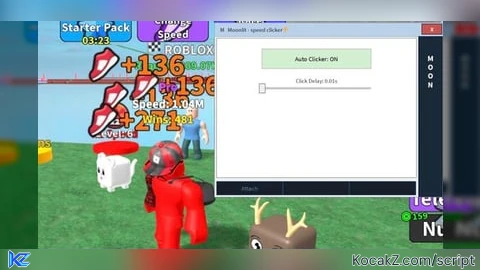
WindowTitle.Text = "  M   Moonlit - speed clicker⚡️"
WindowTitle.TextColor3 = Color3.fromRGB(30, 30, 30)
WindowTitle.TextXAlignment = Enum.TextXAlignment.Left
WindowTitle.Font = Enum.Font.SourceSans
WindowTitle.TextSize = 13
WindowTitle.Parent = TopBar

-- Close Button (X)
local CloseButton = Instance.new("TextButton")
CloseButton.Name = "CloseButton"
CloseButton.Size = UDim2.new(0, 36, 0, 18)
CloseButton.Position = UDim2.new(1, -38, 0, 2)
CloseButton.BackgroundColor3 = Color3.fromRGB(200, 80, 80)
CloseButton.Text = "X"
CloseButton.TextColor3 = Color3.fromRGB(255, 255, 255)
CloseButton.Font = Enum.Font.SourceSansBold
CloseButton.TextSize = 12
CloseButton.Parent = TopBar
CloseButton.MouseButton1Click:Connect(function() ScreenGui:Destroy() end)


    local SidePanel = Instance.new("Frame")
    SidePanel.Name = "SidePanel"
    SidePanel.Size = UDim2.new(0, 45, 1, -24)
    SidePanel.Position = UDim2.new(1, -45, 0, 24)
    SidePanel.BackgroundColor3 = Color3.fromRGB(27, 41, 56)
    SidePanel.BorderSizePixel = 0
    SidePanel.Parent = WindowFrame

    local SideLogo = Instance.new("TextLabel")
    SideLogo.Name = "SideLogo"
    SideLogo.Size = UDim2.new(1, 0, 0, 120)
    SideLogo.Position = UDim2.new(0, 0, 0, 5)
    SideLogo.BackgroundTransparency = 1
    SideLogo.Text = "M\nO\nO\nN" -- Adjusted side text to fit the Moonlit theme
    SideLogo.TextColor3 = Color3.fromRGB(255, 255, 255)
    SideLogo.Font = Enum.Font.SourceSansBold
    SideLogo.TextSize = 18
    SideLogo.LineHeight = 0.9
    SideLogo.Parent = SidePanel

    local MainCanvas = Instance.new("Frame")
    MainCanvas.Name = "MainCanvas"
    MainCanvas.Size = UDim2.new(1, -53, 1, -64)
    MainCanvas.Position = UDim2.new(0, 4, 0, 28)
    MainCanvas.BackgroundColor3 = Color3.fromRGB(255, 255, 255)
    MainCanvas.BorderColor3 = Color3.fromRGB(150, 150, 150)
    MainCanvas.Parent = WindowFrame

    local autoClickEnabled = false
    local clickDelay = 0.1
    local Event = game:GetService("ReplicatedStorage"):WaitForChild("IncreaseSpeed", 5)

    local ToggleButton = Instance.new("TextButton")
    ToggleButton.Name = "ToggleAutoClick"
    ToggleButton.Size = UDim2.new(0, 200, 0, 35)
    ToggleButton.Position = UDim2.new(0.5, -100, 0, 20)
    ToggleButton.BackgroundColor3 = Color3.fromRGB(235, 235, 235)
    ToggleButton.BorderColor3 = Color3.fromRGB(180, 180, 180)
    ToggleButton.Text = "Auto Clicker: OFF"
    ToggleButton.TextColor3 = Color3.fromRGB(0, 0, 0)
    ToggleButton.Font = Enum.Font.SourceSans
    ToggleButton.TextSize = 14
    ToggleButton.Parent = MainCanvas

    local SliderTrack = Instance.new("Frame")
    SliderTrack.Name = "SliderTrack"
    SliderTrack.Size = UDim2.new(0, 200, 0, 4)
    SliderTrack.Position = UDim2.new(0.5, -100, 0, 90)
    SliderTrack.BackgroundColor3 = Color3.fromRGB(200, 200, 200)
    SliderTrack.BorderSizePixel = 0
    SliderTrack.Parent = MainCanvas

    local SliderLabel = Instance.new("TextLabel")
    SliderLabel.Name = "SliderLabel"
    SliderLabel.Size = UDim2.new(0, 200, 0, 20)
    SliderLabel.Position = UDim2.new(0.5, -100, 0, 68)
    SliderLabel.BackgroundTransparency = 1
    SliderLabel.Text = "Click Delay: 0.10s"
    SliderLabel.TextColor3 = Color3.fromRGB(50, 50, 50)
    SliderLabel.Font = Enum.Font.SourceSans
    SliderLabel.TextSize = 13
    SliderLabel.Parent = MainCanvas

    local SliderThumb = Instance.new("TextButton")
    SliderThumb.Name = "SliderThumb"
    SliderThumb.Size = UDim2.new(0, 10, 0, 16)
    SliderThumb.Position = UDim2.new(0.1, -5, 0.5, -8)
    SliderThumb.BackgroundColor3 = Color3.fromRGB(240, 240, 240)
    SliderThumb.BorderColor3 = Color3.fromRGB(120, 120, 120)
    SliderThumb.Text = ""
    SliderThumb.Parent = SliderTrack

    local ButtonBar = Instance.new("Frame")
    ButtonBar.Name = "ButtonBar"
    ButtonBar.Size = UDim2.new(1, -53, 0, 24)
    ButtonBar.Position = UDim2.new(0, 4, 1, -28)
    ButtonBar.BackgroundColor3 = Color3.fromRGB(22, 31, 41)
    ButtonBar.BorderSizePixel = 0
    ButtonBar.Parent = WindowFrame

    local function createMoonlitBottomButton(name, text, xAlignmentIndex)
        local btn = Instance.new("TextButton")
        btn.Name = name
        btn.Size = UDim2.new(0.333, -1, 1, 0)
        btn.Position = UDim2.new(0.333 * xAlignmentIndex, 0, 0, 0)
        btn.BackgroundColor3 = Color3.fromRGB(22, 31, 41)
        btn.BorderColor3 = Color3.fromRGB(45, 90, 135)
        btn.Text = text
        btn.TextColor3 = Color3.fromRGB(86, 126, 155)
        btn.Font = Enum.Font.SourceSans
        btn.TextSize = 14
        btn.Parent = ButtonBar
        return btn
    end

    local AttachButton = createMoonlitBottomButton("AttachBtn", "Attach", 0)
    local ExecuteButton = createMoonlitBottomButton("ExecuteBtn", "", 1)
    local ClearButton = createMoonlitBottomButton("ClearBtn", "", 2)

    ToggleButton.MouseButton1Click:Connect(function()
        autoClickEnabled = not autoClickEnabled
        if autoClickEnabled then
            ToggleButton.Text = "Auto Clicker: ON"
            ToggleButton.BackgroundColor3 = Color3.fromRGB(210, 240, 210)
            ExecuteButton.TextColor3 = Color3.fromRGB(120, 220, 120)

            task.spawn(function()
                while autoClickEnabled and Event do
                    Event:FireServer()
                    task.wait(clickDelay)
                end
            end)
        else
            ToggleButton.Text = "Auto Clicker: OFF"
            ToggleButton.BackgroundColor3 = Color3.fromRGB(235, 235, 235)
            ExecuteButton.TextColor3 = Color3.fromRGB(86, 126, 155)
        end
    end)

    local UserInputService = game:GetService("UserInputService")
    local dragging = false

    SliderThumb.InputBegan:Connect(function(input)
        if input.UserInputType == Enum.UserInputType.MouseButton1 or input.UserInputType == Enum.UserInputType.Touch then dragging = true end
    end)
    UserInputService.InputEnded:Connect(function(input)
        if input.UserInputType == Enum.UserInputType.MouseButton1 or input.UserInputType == Enum.UserInputType.Touch then dragging = false end
    end)
    UserInputService.InputChanged:Connect(function(input)
        if dragging and (input.UserInputType == Enum.UserInputType.MouseMovement or input.UserInputType == Enum.UserInputType.Touch) then
            local percentage = math.clamp((input.Position.X - SliderTrack.AbsolutePosition.X) / SliderTrack.AbsoluteSize.X, 0, 1)
            SliderThumb.Position = UDim2.new(percentage, -5, 0.5, -8)
            clickDelay = 0.01 + (percentage * (1.0 - 0.01))
            SliderLabel.Text = string.format("Click Delay: %.2fs", clickDelay)
        end
end)No comments yet for this script.