KeylessUniversal
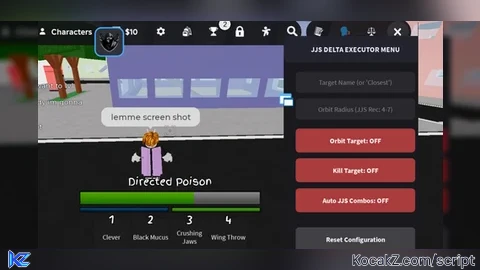
-- Create Main GUI
local ScreenGui = Instance.new("ScreenGui")
local Frame = Instance.new("Frame")
local Title = Instance.new("TextLabel")
local AutoKillBtn = Instance.new("TextButton")
local AutoAbilitiesBtn = Instance.new("TextButton")
local AutoUltimateBtn = Instance.new("TextButton")
local AutoAIBtn = Instance.new("TextButton")
local OrbitBtn = Instance.new("TextButton")
local DistanceInput = Instance.new("TextBox")
local HeightInput = Instance.new("TextBox")
local SpeedInput = Instance.new("TextBox")
local TargetInput = Instance.new("TextBox")

-- Properties
ScreenGui.Parent = game:GetService("CoreGui") or game:GetService("Players").LocalPlayer:WaitForChild("PlayerGui")

Frame.Name = "DeltaJJSAIPanel"
Frame.Parent = ScreenGui
Frame.BackgroundColor3 = Color3.fromRGB(20, 20, 25)
Frame.Position = UDim2.new(0.3, 0, 0.2, 0)
Frame.Size = UDim2.new(0, 270, 0, 500)
Frame.Active = true
Frame.Draggable = true

Title.Parent = Frame
Title.Size = UDim2.new(1, 0, 0, 40)
Title.BackgroundColor3 = Color3.fromRGB(30, 30, 40)
Title.Text = "JJS Delta AI & Orbit Panel"
Title.TextColor3 = Color3.fromRGB(255, 255, 255)
Title.TextSize = 16
Title.Font = Enum.Font.SourceSansBold

-- Input Boxes Customization Helper
local function styleInput(input, placeholder, yPos)
    input.Parent = Frame
    input.Position = UDim2.new(0.05, 0, 0, yPos)
    input.Size = UDim2.new(0.9, 0, 0, 32)
    input.BackgroundColor3 = Color3.fromRGB(40, 40, 45)
    input.PlaceholderText = placeholder
    input.Text = ""
    input.TextColor3 = Color3.fromRGB(255, 255, 255)
    input.TextSize = 13
end

styleInput(TargetInput, "Target Player Name (AI Focus/Orbit)", 50)
styleInput(DistanceInput, "Orbit Distance (Default: 4)", 90)
styleInput(HeightInput, "Orbit Height (Default: 0)", 130)
styleInput(SpeedInput, "Orbit Speed Multiplier (Default: 4.5)", 170)

-- Buttons Customization Helper
local function styleButton(btn, text, yPos, color)
    btn.Parent = Frame
    btn.Position = UDim2.new(0.05, 0, 0, yPos)
    btn.Size = UDim2.new(0.9, 0, 0, 35)
    btn.BackgroundColor3 = color
    btn.Text = text
    btn.TextColor3 = Color3.fromRGB(255, 255, 255)
    btn.TextSize = 14
    btn.Font = Enum.Font.SourceSansBold
end

styleButton(OrbitBtn, "Toggle Orbit: OFF", 215, Color3.fromRGB(55, 55, 60))
styleButton(AutoKillBtn, "Auto M1 Attacks: OFF", 255, Color3.fromRGB(55, 55, 60))
styleButton(AutoAbilitiesBtn, "Auto Use Abilities: OFF", 295, Color3.fromRGB(55, 55, 60))
styleButton(AutoUltimateBtn, "Auto Awakening (G): OFF", 335, Color3.fromRGB(55, 55, 60))
styleButton(AutoAIBtn, "Auto Play AI Mode: OFF", 385, Color3.fromRGB(75, 40, 110))

-- Variables & Services
local Players = game:GetService("Players")
local RunService = game:GetService("RunService")
local VIM = game:GetService("VirtualInputManager")
local LocalPlayer = Players.LocalPlayer

local orbiting = false
local autoKilling = false
local autoAbilities = false
local autoUltimate = false
local autoAI = false
local angle = 0
local aiTarget = nil

-- Smart Target Finder Function
local function getTarget()
    -- If AI mode is on and we don't have a valid manually typed target, find the closest active player
    if autoAI and (not TargetInput.Text or TargetInput.Text == "") then
        if aiTarget and aiTarget.Parent and aiTarget:FindFirstChild("HumanoidRootPart") and aiTarget:FindFirstChild("Humanoid") and aiTarget.Humanoid.Health > 0 then
            return Players:GetPlayerFromCharacter(aiTarget)
        end

        local closestPlayer = nil
        local shortestDistance = math.huge

        for _, p in pairs(Players:GetPlayers()) do
            if p ~= LocalPlayer and p.Character and p.Character:FindFirstChild("HumanoidRootPart") and p.Character:FindFirstChild("Humanoid") and p.Character.Humanoid.Health > 0 then
                local dist = (LocalPlayer.Character.HumanoidRootPart.Position - p.Character.HumanoidRootPart.Position).Magnitude
                if dist < shortestDistance then
                    shortestDistance = dist
                    closestPlayer = p
                end
            end
        end
        if closestPlayer then aiTarget = closestPlayer.Character end
        return closestPlayer
    end

    -- Standard manual target parsing
    local text = TargetInput.Text:lower()
    if text == "" then return nil end
    for _, p in pairs(Players:GetPlayers()) do
        if p ~= LocalPlayer and (p.Name:lower():sub(1, #text) == text or (p.DisplayName and p.DisplayName:lower():sub(1, #text) == text)) then
            return p
        end
    end
    return nil
end

-- Fast Key-Press Emulator
local function pressKey(key)
    VIM:SendKeyEvent(true, key, false, game)
    task.wait(0.02)
    VIM:SendKeyEvent(false, key, false, game)
end

-- Orbit & Movement Logic Loop
RunService.RenderStepped:Connect(function(dt)
    if not orbiting and not autoAI then return end

    local target = getTarget()
    if not target or not target.Character or not target.Character:FindFirstChild("HumanoidRootPart") then return end
    if not LocalPlayer.Character or not LocalPlayer.Character:FindFirstChild("HumanoidRootPart") then return end

    local dist = tonumber(DistanceInput.Text) or 4
    local height = tonumber(HeightInput.Text) or 0
    local speedMult = tonumber(SpeedInput.Text) or 4.5

    angle = angle + dt * speedMult

    local targetPos = target.Character.HumanoidRootPart.Position
    local offsetX = math.cos(angle) * dist
    local offsetZ = math.sin(angle) * dist

    LocalPlayer.Character.HumanoidRootPart.CFrame = CFrame.new(targetPos + Vector3.new(offsetX, height, offsetZ), targetPos)
end)

-- Combat Loops (M1 Auto Clicker)
task.spawn(function()
    while task.wait(0.08) do
        if autoKilling or autoAI then
            local target = getTarget()
            if target and target.Character and target.Character:FindFirstChild("HumanoidRootPart") then
                VIM:SendMouseButtonEvent(0, 0, 0, true, game, 1)
                task.wait(0.03)
                VIM:SendMouseButtonEvent(0, 0, 0, false, game, 1)
            end
        end
    end
end)

-- Abilities Cycle Loop (1 -> 2 -> 3 -> 4)
task.spawn(function()
    local moveKeys = {Enum.KeyCode.One, Enum.KeyCode.Two, Enum.KeyCode.Three, Enum.KeyCode.Four}
    local currentMove = 1

    while task.wait(0.35) do
        if (autoAbilities or autoAI) then
            local target = getTarget()
            if target and target.Character and target.Character:FindFirstChild("HumanoidRootPart") then
                pressKey(moveKeys[currentMove])
                currentMove = currentMove + 1
                if currentMove > 4 then currentMove = 1 end
            end
        end
    end
end)

-- Ultimate Auto-Trigger
task.spawn(function()
    while task.wait(0.5) do
        if autoUltimate or autoAI then
            local playerGui = LocalPlayer:FindFirstChild("PlayerGui")
            if playerGui then
                local screenGui = playerGui:FindFirstChild("ScreenGui")
                local magicFrame = screenGui and screenGui:FindFirstChild("MagicFrame")

                if magicFrame and magicFrame.Visible == true then
                    pressKey(Enum.KeyCode.G)
                end
            end
        end
    end
end)

-- Button Functionality
OrbitBtn.MouseButton1Click:Connect(function()
    orbiting = not orbiting
    OrbitBtn.Text = orbiting and "Toggle Orbit: ON" or "Toggle Orbit: OFF"
    OrbitBtn.BackgroundColor3 = orbiting and Color3.fromRGB(0, 140, 60) or Color3.fromRGB(55, 55, 60)
end)

AutoKillBtn.MouseButton1Click:Connect(function()
    autoKilling = not autoKilling
    AutoKillBtn.Text = autoKilling and "Auto M1 Attacks: ON" or "Auto M1 Attacks: OFF"
    AutoKillBtn.BackgroundColor3 = autoKilling and Color3.fromRGB(0, 140, 60) or Color3.fromRGB(55, 55, 60)
end)

AutoAbilitiesBtn.MouseButton1Click:Connect(function()
    autoAbilities = not autoAbilities
    AutoAbilitiesBtn.Text = autoAbilities and "Auto Use Abilities: ON" or "Auto Use Abilities: OFF"
    AutoAbilitiesBtn.BackgroundColor3 = autoAbilities and Color3.fromRGB(0, 140, 60) or Color3.fromRGB(55, 55, 60)
end)

AutoUltimateBtn.MouseButton1Click:Connect(function()
    autoUltimate = not autoUltimate
    AutoUltimateBtn.Text = autoUltimate and "Auto Awakening (G): ON" or "Auto Awakening (G): OFF"
    AutoUltimateBtn.BackgroundColor3 = autoUltimate and Color3.fromRGB(160, 30, 30) or Color3.fromRGB(55, 55, 60)
end)

AutoAIBtn.MouseButton1Click:Connect(function()
    autoAI = not autoAI
    if autoAI then
        AutoAIBtn.Text = "Auto Play AI Mode: ACTIVE"
        AutoAIBtn.BackgroundColor3 = Color3.fromRGB(130, 40, 200)
        aiTarget = nil -- Reset AI focus memory
    else
        AutoAIBtn.Text = "Auto Play AI Mode: OFF"
        AutoAIBtn.BackgroundColor3 = Color3.fromRGB(75, 40, 110)
    end
end)No comments yet for this script.