
Keyless
-- free to use :D
-- enjoy! ;)

local Players = game:GetService("Players")
local player = Players.LocalPlayer
local runService = game:GetService("RunService")

local gui = Instance.new("ScreenGui")
gui.Name = "L0LeR_s_Things"
gui.ResetOnSpawn = false
gui.Parent = player:WaitForChild("PlayerGui")

local mainFrame = Instance.new("Frame")
mainFrame.Name = "MainFrame"
mainFrame.Size = UDim2.new(0, 340, 0, 360)
mainFrame.Position = UDim2.new(1, -10, 0, 10)
mainFrame.AnchorPoint = Vector2.new(1, 0)
mainFrame.BackgroundColor3 = Color3.fromRGB(25, 25, 30)
mainFrame.BackgroundTransparency = 0.85
mainFrame.BorderSizePixel = 0
mainFrame.Draggable = true
mainFrame.Active = true
mainFrame.Parent = gui

local title = Instance.new("TextLabel")
title.Size = UDim2.new(1, 0, 0, 34)
title.BackgroundTransparency = 1
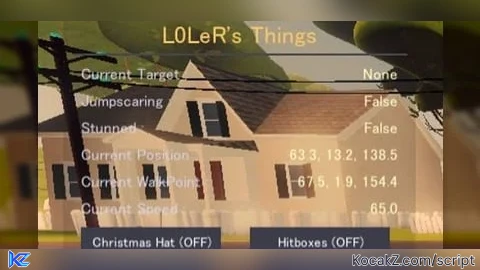
title.Text = "L0LeR's Things"
title.TextColor3 = Color3.fromRGB(255, 200, 100)
title.Font = Enum.Font.SourceSansBold
title.TextSize = 22
title.TextXAlignment = Enum.TextXAlignment.Center
title.Parent = mainFrame

local line = Instance.new("Frame")
line.Size = UDim2.new(0.95, 0, 0, 2)
line.Position = UDim2.new(0.025, 0, 0, 36)
line.BackgroundColor3 = Color3.fromRGB(70, 70, 80)
line.BorderSizePixel = 0
line.Parent = mainFrame

local function addInfoRow(parent, y, labelText)
    local label = Instance.new("TextLabel")
    label.Size = UDim2.new(0.55, 0, 0, 26)
    label.Position = UDim2.new(0.05, 0, 0, y)
    label.BackgroundTransparency = 1
    label.Text = labelText
    label.TextColor3 = Color3.fromRGB(210, 210, 230)
    label.TextSize = 14
    label.Font = Enum.Font.SourceSansBold
    label.TextXAlignment = Enum.TextXAlignment.Left
    label.Parent = parent

    local valueLabel = Instance.new("TextLabel")
    valueLabel.Size = UDim2.new(0.35, 0, 0, 26)
    valueLabel.Position = UDim2.new(0.6, 0, 0, y)
    valueLabel.BackgroundTransparency = 1
    valueLabel.Text = "..."
    valueLabel.TextColor3 = Color3.fromRGB(255, 255, 200)
    valueLabel.TextSize = 14
    valueLabel.Font = Enum.Font.SourceSansBold
    valueLabel.TextXAlignment = Enum.TextXAlignment.Right
    valueLabel.Parent = parent
    return valueLabel
end

local y = 42
local targetVal = addInfoRow(mainFrame, y, "Current Target : ")
y = y + 26
local jumpscareVal = addInfoRow(mainFrame, y, "Jumpscaring : ")
y = y + 26
local stunnedVal = addInfoRow(mainFrame, y, "Stunned : ")
y = y + 26
local positionVal = addInfoRow(mainFrame, y, "Current Position : ")
y = y + 26
local walkPointVal = addInfoRow(mainFrame, y, "Current WalkPoint : ")
y = y + 26
local speedVal = addInfoRow(mainFrame, y, "Current Speed : ")
y = y + 32

local hatBtn = Instance.new("TextButton")
hatBtn.Size = UDim2.new(0, 135, 0, 28)
hatBtn.Position = UDim2.new(0.05, 0, 0, y)
hatBtn.Text = "Christmas Hat (OFF)"
hatBtn.BackgroundColor3 = Color3.fromRGB(60, 60, 75)
hatBtn.TextColor3 = Color3.fromRGB(255, 255, 255)
hatBtn.Font = Enum.Font.SourceSansBold
hatBtn.TextSize = 12
hatBtn.BorderSizePixel = 0
hatBtn.Parent = mainFrame

local hitboxBtn = Instance.new("TextButton")
hitboxBtn.Size = UDim2.new(0, 135, 0, 28)
hitboxBtn.Position = UDim2.new(0.53, 0, 0, y)
hitboxBtn.Text = "Hitboxes (OFF)"
hitboxBtn.BackgroundColor3 = Color3.fromRGB(60, 60, 75)
hitboxBtn.TextColor3 = Color3.fromRGB(255, 255, 255)
hitboxBtn.Font = Enum.Font.SourceSansBold
hitboxBtn.TextSize = 12
hitboxBtn.BorderSizePixel = 0
hitboxBtn.Parent = mainFrame

local function getFredbear()
    local enemies = workspace:FindFirstChild("Enemies")
    return enemies and enemies:FindFirstChild("Fredbear")
end

local function updateStats()
    local fred = getFredbear()

    if fred then
        local targetObj = fred:FindFirstChild("Target")
        if targetObj then
            if targetObj:IsA("BoolValue") then
                if targetObj.Value == true then
                    local nameTarget = fred:FindFirstChild("CurrentTargetName")
                    if nameTarget and nameTarget:IsA("StringValue") then
                        targetVal.Text = nameTarget.Value
                    else
                        targetVal.Text = "True (no name)"
                    end
                else
                    targetVal.Text = "None"
                end
            elseif targetObj:IsA("ObjectValue") then
                targetVal.Text = targetObj.Value and targetObj.Value.Name or "None"
            else
                targetVal.Text = "?"
            end
        else
            targetVal.Text = "None"
        end

        local js = fred:FindFirstChild("IsJumpscaring")
        jumpscareVal.Text = (js and js:IsA("BoolValue") and js.Value) and "True" or "False"

        local hit = fred:FindFirstChild("Hit")
        stunnedVal.Text = (hit and hit:IsA("BoolValue") and hit.Value) and "True" or "False"

        local rootPart = fred:FindFirstChild("HumanoidRootPart")
        if rootPart and rootPart:IsA("BasePart") then
            local cframe = rootPart.CFrame
            positionVal.Text = string.format("%.1f, %.1f, %.1f", cframe.X, cframe.Y, cframe.Z)
        else
            positionVal.Text = "No RootPart"
        end

        local hum = fred:FindFirstChild("Humanoid")
        if hum and hum:IsA("Humanoid") then
            local wp = hum.WalkToPoint
            walkPointVal.Text = string.format("%.1f, %.1f, %.1f", wp.X, wp.Y, wp.Z)
            speedVal.Text = string.format("%.1f", hum.WalkSpeed)
        else
            walkPointVal.Text = "No Humanoid"
            speedVal.Text = "0"
        end

        local hat = fred:FindFirstChild("ChristmasHat")
        if hat and hat:IsA("BasePart") then
            hatBtn.Text = (hat.Transparency < 0.5) and "Christmas Hat (ON)" or "Christmas Hat (OFF)"
        else
            hatBtn.Text = "Christmas Hat (?)"
        end

        local hb = fred:FindFirstChild("Hitbox")
        if hb and hb:IsA("BasePart") then
            hitboxBtn.Text = (hb.Transparency < 0.5) and "Hitboxes (ON)" or "Hitboxes (OFF)"
        else
            hitboxBtn.Text = "Hitboxes (?)"
        end
    else
        targetVal.Text = "No Fredbear"
        jumpscareVal.Text = "False"
        stunnedVal.Text = "False"
        positionVal.Text = "0, 0, 0"
        walkPointVal.Text = "0, 0, 0"
        speedVal.Text = "0"
        hatBtn.Text = "Christmas Hat (no Fred)"
        hitboxBtn.Text = "Hitboxes (no Fred)"
    end
end

local function toggleHat()
    local fred = getFredbear()
    if fred then
        local hat = fred:FindFirstChild("ChristmasHat")
        if hat and hat:IsA("BasePart") then
            hat.Transparency = (hat.Transparency >= 0.5) and 0 or 1
            updateStats()
        end
    end
end

local function toggleHitbox()
    local fred = getFredbear()
    if fred then
        local hb = fred:FindFirstChild("Hitbox")
        if hb and hb:IsA("BasePart") then
            hb.Transparency = (hb.Transparency >= 0.5) and 0 or 1
            updateStats()
        end
    end
end

hatBtn.MouseButton1Click:Connect(toggleHat)
hitboxBtn.MouseButton1Click:Connect(toggleHitbox)

runService.Heartbeat:Connect(updateStats)
updateStats()
Okay?