Keyless
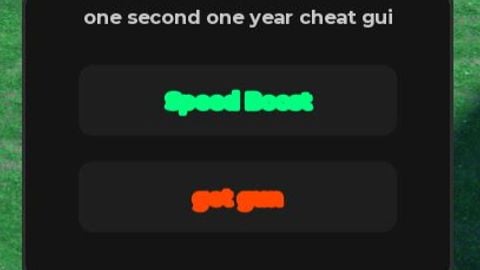
-- Universal Draggable Executor GUI (Speed Boost & Get Gun)
local Players = game:GetService("Players")
local UserInputService = game:GetService("UserInputService")
local RunService = game:GetService("RunService")

local localPlayer = Players.LocalPlayer
local PlayerGui = localPlayer:WaitForChild("PlayerGui")

-- Destroy existing GUI if it's already running to avoid duplication
if PlayerGui:FindFirstChild("DraggableExecutorGui") then
    PlayerGui.DraggableExecutorGui:Destroy()
end

-- 1. Create Core ScreenGUI
local screenGui = Instance.new("ScreenGui")
screenGui.Name = "DraggableExecutorGui"
screenGui.ResetOnSpawn = false
screenGui.Parent = PlayerGui

-- 2. Create the Main Draggable Frame (Height increased to 170 to fit both buttons)
local mainFrame = Instance.new("Frame")
mainFrame.Name = "MainFrame"
mainFrame.Size = UDim2.new(0, 240, 0, 170)
mainFrame.Position = UDim2.new(0.05, 0, 0.4, 0)
mainFrame.BackgroundColor3 = Color3.fromRGB(20, 20, 20)
mainFrame.BorderSizePixel = 0
mainFrame.Parent = screenGui

local frameCorner = Instance.new("UICorner")
frameCorner.CornerRadius = UDim.new(0, 12)
frameCorner.Parent = mainFrame

local frameStroke = Instance.new("UIStroke")
frameStroke.Color = Color3.fromRGB(45, 45, 45)
frameStroke.Thickness = 2
frameStroke.Parent = mainFrame

-- 3. Create Title Bar Text
local titleLabel = Instance.new("TextLabel")
titleLabel.Name = "TitleLabel"
titleLabel.Size = UDim2.new(1, 0, 0, 35)
titleLabel.BackgroundTransparency = 1
titleLabel.Text = "one second one year cheat gui"
titleLabel.TextColor3 = Color3.fromRGB(200, 200, 200)
titleLabel.Font = Enum.Font.GothamBold
titleLabel.TextSize = 13
titleLabel.Parent = mainFrame

-- 4. Create the Speed Button inside the Frame
local speedButton = Instance.new("TextButton")
speedButton.Name = "SpeedButton"
speedButton.Size = UDim2.new(0, 180, 0, 40)
speedButton.Position = UDim2.new(0.5, -90, 0, 45) -- Positioned near the top
speedButton.BackgroundColor3 = Color3.fromRGB(30, 30, 30)
speedButton.TextColor3 = Color3.fromRGB(0, 255, 127) -- Neon green text
speedButton.Font = Enum.Font.GothamBold
speedButton.TextSize = 15
speedButton.Text = "Speed Boost"
speedButton.Parent = mainFrame

local buttonCorner = Instance.new("UICorner")
buttonCorner.CornerRadius = UDim.new(0, 8)
buttonCorner.Parent = speedButton

local buttonStroke = Instance.new("UIStroke")
buttonStroke.Color = Color3.fromRGB(0, 255, 127)
buttonStroke.Thickness = 1.5
buttonStroke.Parent = speedButton

-- 5. Create the "get gun" Button inside the Frame
local gunButton = Instance.new("TextButton")
gunButton.Name = "GetGunButton"
gunButton.Size = UDim2.new(0, 180, 0, 40)
gunButton.Position = UDim2.new(0.5, -90, 0, 100) -- Positioned below the speed button
gunButton.BackgroundColor3 = Color3.fromRGB(30, 30, 30)
gunButton.TextColor3 = Color3.fromRGB(255, 69, 0) -- Neon Red/Orange text to stand out
gunButton.Font = Enum.Font.GothamBold
gunButton.TextSize = 15
gunButton.Text = "get gun"
gunButton.Parent = mainFrame

local gunButtonCorner = Instance.new("UICorner")
gunButtonCorner.CornerRadius = UDim.new(0, 8)
gunButtonCorner.Parent = gunButton

local gunButtonStroke = Instance.new("UIStroke")
gunButtonStroke.Color = Color3.fromRGB(255, 69, 0)
gunButtonStroke.Thickness = 1.5
gunButtonStroke.Parent = gunButton

-- 6. Dragging Functionality
local dragging, dragInput, dragStart, startPos

local function update(input)
    local delta = input.Position - dragStart
    mainFrame.Position = UDim2.new(startPos.X.Scale, startPos.X.Offset + delta.X, startPos.Y.Scale, startPos.Y.Offset + delta.Y)
end

mainFrame.InputBegan:Connect(function(input)
    if input.UserInputType == Enum.UserInputType.MouseButton1 or input.UserInputType == Enum.UserInputType.Touch then
        dragging = true
        dragStart = input.Position
        startPos = mainFrame.Position

        input.Changed:Connect(function()
            if input.UserInputState == Enum.UserInputState.End then
                dragging = false
            end
        end)
    end
end)

mainFrame.InputChanged:Connect(function(input)
    if input.UserInputType == Enum.UserInputType.MouseMovement or input.UserInputType == Enum.UserInputType.Touch then
        dragInput = input
    end
end)

UserInputService.InputChanged:Connect(function(input)
    if input == dragInput and dragging then
        update(input)
    end
end)

-- 7. Speed Loop (Maintains speed at 50)
local speedActive = false

local function setWalkSpeed()
    if speedActive then
        local character = localPlayer.Character
        if character then
            local humanoid = character:FindFirstChildOfClass("Humanoid")
            if humanoid then
                humanoid.WalkSpeed = 50
            end
        end
    end
end

task.spawn(function()
    while screenGui and screenGui.Parent do
        setWalkSpeed()
        task.wait(0.1)
    end
end)

-- Speed Button click toggles the speed script on/off
speedButton.MouseButton1Click:Connect(function()
    speedActive = not speedActive
    if speedActive then
        speedButton.Text = "Active!"
        speedButton.BackgroundColor3 = Color3.fromRGB(0, 50, 25)
        speedButton.TextColor3 = Color3.fromRGB(255, 255, 255)
    else
        speedButton.Text = "Speed Boost"
        speedButton.BackgroundColor3 = Color3.fromRGB(30, 30, 30)
        speedButton.TextColor3 = Color3.fromRGB(0, 255, 127)

        local character = localPlayer.Character
        if character then
            local humanoid = character:FindFirstChildOfClass("Humanoid")
            if humanoid then humanoid.WalkSpeed = 16 end
        end
    end
end)

-- 8. Get Gun Button Click Logic
gunButton.MouseButton1Click:Connect(function()
    -- Check if ReplicatedStorage has the RemoteEvent before firing to prevent errors
    if game:GetService("ReplicatedStorage"):FindFirstChild("GrabScrapGun") then
        game:GetService("ReplicatedStorage").GrabScrapGun:FireServer()

        -- Brief visual success flashing effect
        gunButton.Text = "Fired Remote!"
        task.wait(0.5)
        gunButton.Text = "get gun"
    else
        gunButton.Text = "Remote Not Found!"
        task.wait(1)
        gunButton.Text = "get gun"
    end
end)No comments yet for this script.