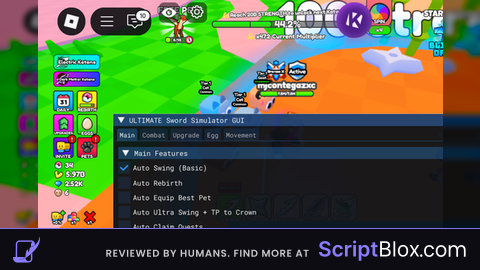
Keyless

local Players = game:GetService("Players")
local ReplicatedStorage = game:GetService("ReplicatedStorage")
local UserInputService = game:GetService("UserInputService")
local TweenService = game:GetService("TweenService")

local player = Players.LocalPlayer
local playerGui = player:WaitForChild("PlayerGui")

local Remotes = ReplicatedStorage:WaitForChild("Remotes")
local SwingRemote = Remotes:WaitForChild("Swing")
local RebirthRemote = Remotes:WaitForChild("Rebirth")

local autoSwing = false
local autoRebirth = false
local uiOpen = true
local minimized = false

local cf1 = CFrame.new(567.9150390625, 60.879043579102, -30.142890930176, 1, 0, 0, 0, 1, 0, 0, 0, 1)
local cf2 = CFrame.new(560.94482421875, 57.879047393799, -22.832832336426, -0.99036508798599, -0.08235877007246, 0.11132861673832, 7.4505797087454e-09, 0.80392622947693, 0.59472918510437, -0.13848114013672, 0.58899903297424, -0.79618042707443)

local screenGui = Instance.new("ScreenGui")
screenGui.Name = "SimpleHub"
screenGui.ResetOnSpawn = false
screenGui.Parent = playerGui

local mainFrame = Instance.new("Frame")
mainFrame.Size = UDim2.new(0, 320, 0, 220)
mainFrame.Position = UDim2.new(0.02, 0, 0.3, 0)
mainFrame.BackgroundColor3 = Color3.fromRGB(18, 18, 22)
mainFrame.BorderSizePixel = 0
mainFrame.Visible = uiOpen
mainFrame.Parent = screenGui

local mainCorner = Instance.new("UICorner")
mainCorner.CornerRadius = UDim.new(0, 14)
mainCorner.Parent = mainFrame

local mainStroke = Instance.new("UIStroke")
mainStroke.Color = Color3.fromRGB(80, 140, 255)
mainStroke.Thickness = 2
mainStroke.Parent = mainFrame

local titleBar = Instance.new("Frame")
titleBar.Size = UDim2.new(1, 0, 0, 40)
titleBar.BackgroundColor3 = Color3.fromRGB(25, 25, 40)
titleBar.BorderSizePixel = 0
titleBar.Parent = mainFrame

local titleCorner = Instance.new("UICorner")
titleCorner.CornerRadius = UDim.new(0, 14)
titleCorner.Parent = titleBar

local titleLabel = Instance.new("TextLabel")
titleLabel.Size = UDim2.new(1, -90, 1, 0)
titleLabel.Position = UDim2.new(0, 20, 0, 0)
titleLabel.BackgroundTransparency = 1
titleLabel.Text = "DINAS HUB"
titleLabel.TextColor3 = Color3.fromRGB(120, 200, 255)
titleLabel.Font = Enum.Font.GothamBold
titleLabel.TextSize = 18
titleLabel.TextXAlignment = Enum.TextXAlignment.Left
titleLabel.Parent = titleBar

local minBtn = Instance.new("TextButton")
minBtn.Size = UDim2.new(0, 35, 0, 35)
minBtn.Position = UDim2.new(1, -70, 0, 2.5)
minBtn.BackgroundTransparency = 1
minBtn.Text = "−"
minBtn.TextColor3 = Color3.fromRGB(220, 220, 220)
minBtn.Font = Enum.Font.Code
minBtn.TextSize = 22
minBtn.Parent = titleBar

local closeBtn = Instance.new("TextButton")
closeBtn.Size = UDim2.new(0, 35, 0, 35)
closeBtn.Position = UDim2.new(1, -35, 0, 2.5)
closeBtn.BackgroundTransparency = 1
closeBtn.Text = "×"
closeBtn.TextColor3 = Color3.fromRGB(255, 120, 120)
closeBtn.Font = Enum.Font.Code
closeBtn.TextSize = 20
closeBtn.Parent = titleBar

local content = Instance.new("Frame")
content.Size = UDim2.new(1, -20, 1, -50)
content.Position = UDim2.new(0, 10, 0, 45)
content.BackgroundTransparency = 1
content.Parent = mainFrame

local contentLayout = Instance.new("UIListLayout")
contentLayout.SortOrder = Enum.SortOrder.LayoutOrder
contentLayout.Padding = UDim.new(0, 12)
contentLayout.Parent = content

local swingBtn = Instance.new("TextButton")
swingBtn.Size = UDim2.new(1, 0, 0, 50)
swingBtn.BackgroundColor3 = Color3.fromRGB(35, 35, 45)
swingBtn.Text = "  [OFF] Auto Swing"
swingBtn.TextColor3 = Color3.fromRGB(200, 200, 200)
swingBtn.Font = Enum.Font.Gotham
swingBtn.TextSize = 16
swingBtn.TextXAlignment = Enum.TextXAlignment.Left
swingBtn.LayoutOrder = 1
swingBtn.Parent = content

local swingCorner = Instance.new("UICorner")
swingCorner.CornerRadius = UDim.new(0, 10)
swingCorner.Parent = swingBtn

local swingStroke = Instance.new("UIStroke")
swingStroke.Color = Color3.fromRGB(60, 60, 80)
swingStroke.Thickness = 1.5
swingStroke.Parent = swingBtn

local rebirthBtn = Instance.new("TextButton")
rebirthBtn.Size = UDim2.new(1, 0, 0, 50)
rebirthBtn.BackgroundColor3 = Color3.fromRGB(35, 35, 45)
rebirthBtn.Text = "  [OFF] Auto Rebirth"
rebirthBtn.TextColor3 = Color3.fromRGB(200, 200, 200)
rebirthBtn.Font = Enum.Font.Gotham
rebirthBtn.TextSize = 16
rebirthBtn.TextXAlignment = Enum.TextXAlignment.Left
rebirthBtn.LayoutOrder = 2
rebirthBtn.Parent = content

local rebirthCorner = Instance.new("UICorner")
rebirthCorner.CornerRadius = UDim.new(0, 10)
rebirthCorner.Parent = rebirthBtn

local rebirthStroke = Instance.new("UIStroke")
rebirthStroke.Color = Color3.fromRGB(60, 60, 80)
rebirthStroke.Thickness = 1.5
rebirthStroke.Parent = rebirthBtn

local cmdFrame = Instance.new("Frame")
cmdFrame.Size = UDim2.new(1, 0, 0, 70)
cmdFrame.BackgroundColor3 = Color3.fromRGB(28, 28, 38)
cmdFrame.LayoutOrder = 3
cmdFrame.Parent = content

local cmdCorner = Instance.new("UICorner")
cmdCorner.CornerRadius = UDim.new(0, 10)
cmdCorner.Parent = cmdFrame

local cmdTitle = Instance.new("TextLabel")
cmdTitle.Size = UDim2.new(1, 0, 0, 20)
cmdTitle.BackgroundTransparency = 1
cmdTitle.Text = "Chat Commands:"
cmdTitle.TextColor3 = Color3.fromRGB(150, 180, 255)
cmdTitle.Font = Enum.Font.GothamBold
cmdTitle.TextSize = 13
cmdTitle.TextXAlignment = Enum.TextXAlignment.Left
cmdTitle.Parent = cmdFrame

local cmdLabel = Instance.new("TextLabel")
cmdLabel.Size = UDim2.new(1, 0, 1, -20)
cmdLabel.Position = UDim2.new(0, 0, 0, 20)
cmdLabel.BackgroundTransparency = 1
cmdLabel.Text = ":autoswing  :offswing\n:autorebirth :offrebirth\n:offall     :ui"
cmdLabel.TextColor3 = Color3.fromRGB(160, 160, 180)
cmdLabel.Font = Enum.Font.Code
cmdLabel.TextSize = 13
cmdLabel.TextXAlignment = Enum.TextXAlignment.Left
cmdLabel.TextYAlignment = Enum.TextYAlignment.Top
cmdLabel.Parent = cmdFrame

local function updateToggle(btn, stroke, state, name)
    btn.Text = "  [ " .. (state and "ON" or "OFF") .. " ] " .. name
    btn.BackgroundColor3 = state and Color3.fromRGB(55, 120, 55) or Color3.fromRGB(35, 35, 45)
    btn.TextColor3 = state and Color3.fromRGB(180, 255, 180) or Color3.fromRGB(200, 200, 200)
    stroke.Color = state and Color3.fromRGB(100, 255, 100) or Color3.fromRGB(60, 60, 80)
end

local function fireSwing()
    pcall(function()
        SwingRemote:FireServer(cf1, cf2)
    end)
end

local function doRebirth()
    pcall(function()
        RebirthRemote:FireServer()
    end)
end

spawn(function()
    while wait(0.00001) do
        if autoSwing then fireSwing() end
    end
end)

spawn(function()
    while wait(1) do
        if autoRebirth then doRebirth() end
    end
end)

swingBtn.MouseButton1Click:Connect(function()
    autoSwing = not autoSwing
    updateToggle(swingBtn, swingStroke, autoSwing, "Auto Swing")
end)

rebirthBtn.MouseButton1Click:Connect(function()
    autoRebirth = not autoRebirth
    updateToggle(rebirthBtn, rebirthStroke, autoRebirth, "Auto Rebirth")
end)

minBtn.MouseButton1Click:Connect(function()
    minimized = not minimized
    local targetSize = minimized and UDim2.new(0, 320, 0, 40) or UDim2.new(0, 320, 0, 220)
    TweenService:Create(mainFrame, TweenInfo.new(0.3, Enum.EasingStyle.Back), {Size = targetSize}):Play()
    content.Visible = not minimized
end)

closeBtn.MouseButton1Click:Connect(function()
    mainFrame.Visible = false
end)

local dragging = false
local dragStart = nil
local startPos = nil

local function startDrag(input)
    if input.UserInputType == Enum.UserInputType.MouseButton1 or input.UserInputType == Enum.UserInputType.Touch then
        dragging = true
        dragStart = input.Position
        startPos = mainFrame.Position
        input.Changed:Connect(function()
            if input.UserInputState == Enum.UserInputState.End then
                dragging = false
            end
        end)
    end
end

local function onInputChanged(input)
    if dragging and (input.UserInputType == Enum.UserInputType.MouseMovement or input.UserInputType == Enum.UserInputType.Touch) then
        local delta = input.Position - dragStart
        mainFrame.Position = UDim2.new(
            startPos.X.Scale, startPos.X.Offset + delta.X,
            startPos.Y.Scale, startPos.Y.Offset + delta.Y
        )
    end
end

titleBar.InputBegan:Connect(startDrag)
titleBar.InputChanged:Connect(onInputChanged)

titleBar.TouchTap:Connect(function() end)
titleBar.TouchLongPress:Connect(function() end)

player.Chatted:Connect(function(msg)
    local cmd = string.lower(msg)

    if cmd == ":autoswing" then
        autoSwing = not autoSwing
        updateToggle(swingBtn, swingStroke, autoSwing, "Auto Swing")
    elseif cmd == ":autorebirth" then
        autoRebirth = not autoRebirth
        updateToggle(rebirthBtn, rebirthStroke, autoRebirth, "Auto Rebirth")
    elseif cmd == ":offswing" then
        autoSwing = false
        updateToggle(swingBtn, swingStroke, false, "Auto Swing")
    elseif cmd == ":offrebirth" then
        autoRebirth = false
        updateToggle(rebirthBtn, rebirthStroke, false, "Auto Rebirth")
    elseif cmd == ":offall" then
        autoSwing = false
        autoRebirth = false
        updateToggle(swingBtn, swingStroke, false, "Auto Swing")
        updateToggle(rebirthBtn, rebirthStroke, false, "Auto Rebirth")
    elseif cmd == ":ui" then
        uiOpen = not uiOpen
        mainFrame.Visible = uiOpen
    end
end)

updateToggle(swingBtn, swingStroke, false, "Auto Swing")
updateToggle(rebirthBtn, rebirthStroke, false, "Auto Rebirth")No comments yet for this script.