
Key Required VerifiedUniversal
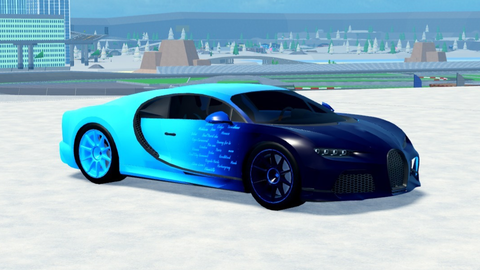
-- Script Lua para Roblox - Customizador de Decals no Carro (Atualizado - Menu Arrastável)
-- Novo recurso:
-- • O menu agora é totalmente arrastável (igual ao botão 🖌)
-- • Funciona em PC e Mobile (continua arrastando mesmo se o dedo/mouse sair do menu)
-- • Destaque com aura branca mantido

local player = game.Players.LocalPlayer
local workspace = game.Workspace
local UserInputService = game:GetService("UserInputService")

-- Detecção de mobile
local isMobile = UserInputService.TouchEnabled and not UserInputService.KeyboardEnabled

local car = nil
local currentHighlight = nil

local categoryInfo = {
    {display = "Body",          key = "Body"},
    {display = "Roda FL",       key = "FL"},
    {display = "Roda FR",       key = "FR"},
    {display = "Roda RL",       key = "RL"},
    {display = "Roda RR",       key = "RR"},
}

-- Função para remover o highlight atual
local function deselectPart()
    if currentHighlight then
        currentHighlight:Destroy()
        currentHighlight = nil
    end
    selectedPart = nil
end

-- Criar GUI
local screenGui = Instance.new("ScreenGui")
screenGui.Name = "DecalCustomizer"
screenGui.ResetOnSpawn = false
screenGui.Parent = player:WaitForChild("PlayerGui")

-- Botão flutuante com emoji 🖌 e cor cinza
local dragButton = Instance.new("TextButton")
dragButton.Size = UDim2.new(0, 40, 0, 40)
dragButton.Position = UDim2.new(0, 20, 0.5, -20)
dragButton.Text = "🖌"
dragButton.BackgroundColor3 = Color3.fromRGB(85, 85, 85)
dragButton.TextColor3 = Color3.new(1,1,1)
dragButton.Font = Enum.Font.GothamBold
dragButton.TextScaled = true
dragButton.Parent = screenGui

local corner = Instance.new("UICorner", dragButton)
corner.CornerRadius = UDim.new(0, 10)

-- Arraste do botão (já corrigido)
local buttonDragging = false
local buttonDragStart = nil
local buttonStartPos = nil

local function updateButtonInput(input)
    if buttonDragging then
        local delta = input.Position - buttonDragStart
        dragButton.Position = UDim2.new(buttonStartPos.X.Scale, buttonStartPos.X.Offset + delta.X, buttonStartPos.Y.Scale, buttonStartPos.Y.Offset + delta.Y)
    end
end

dragButton.InputBegan:Connect(function(input)
    if input.UserInputType == Enum.UserInputType.MouseButton1 or input.UserInputType == Enum.UserInputType.Touch then
        buttonDragging = true
        buttonDragStart = input.Position
        buttonStartPos = dragButton.Position

        local connection
        connection = input.Changed:Connect(function()
            if input.UserInputState == Enum.UserInputState.End then
                buttonDragging = false
                connection:Disconnect()
            end
        end)
    end
end)

-- Menu com tamanho condicional
local menuWidth = isMobile and 380 or 800
local menuHeight = isMobile and 300 or 550

local menu = Instance.new("Frame")
menu.Size = UDim2.new(0, menuWidth, 0, menuHeight)
menu.Position = UDim2.new(0.5, -menuWidth/2, 0.5, -menuHeight/2)
menu.BackgroundColor3 = Color3.fromRGB(30, 30, 30)
menu.BackgroundTransparency = 0.1
menu.Visible = false
menu.Parent = screenGui

local menuCorner = Instance.new("UICorner", menu)
menuCorner.CornerRadius = UDim.new(0, 12)

-- Arraste do MENU (novo - igual ao botão)
local menuDragging = false
local menuDragStart = nil
local menuStartPos = nil

local function updateMenuInput(input)
    if menuDragging then
        local delta = input.Position - menuDragStart
        menu.Position = UDim2.new(menuStartPos.X.Scale, menuStartPos.X.Offset + delta.X, menuStartPos.Y.Scale, menuStartPos.Y.Offset + delta.Y)
    end
end

menu.InputBegan:Connect(function(input)
    if input.UserInputType == Enum.UserInputType.MouseButton1 or input.UserInputType == Enum.UserInputType.Touch then
        menuDragging = true
        menuDragStart = input.Position
        menuStartPos = menu.Position

        local connection
        connection = input.Changed:Connect(function()
            if input.UserInputState == Enum.UserInputState.End then
                menuDragging = false
                connection:Disconnect()
            end
        end)
    end
end)

-- Handlers globais compartilhados (para botão e menu)
UserInputService.InputChanged:Connect(function(input)
    if (buttonDragging or menuDragging) and (input.UserInputType == Enum.UserInputType.MouseMovement or input.UserInputType == Enum.UserInputType.Touch) then
        if buttonDragging then
            updateButtonInput(input)
        end
        if menuDragging then
            updateMenuInput(input)
        end
    end
end)

UserInputService.InputEnded:Connect(function(input)
    if input.UserInputType == Enum.UserInputType.MouseButton1 or input.UserInputType == Enum.UserInputType.Touch then
        buttonDragging = false
        menuDragging = false
    end
end)

-- Parte esquerda
local leftWidth = isMobile and 0.35 or 0.4
local leftScrolling = Instance.new("ScrollingFrame")
leftScrolling.Size = UDim2.new(leftWidth, -10, 1, -20)
leftScrolling.Position = UDim2.new(0, 10, 0, 10)
leftScrolling.BackgroundTransparency = 1
leftScrolling.ScrollBarThickness = isMobile and 6 or 12
leftScrolling.AutomaticCanvasSize = Enum.AutomaticSize.Y
leftScrolling.Parent = menu

local listLayout = Instance.new("UIListLayout", leftScrolling)
listLayout.Padding = UDim.new(0, isMobile and 4 or 10)

-- Parte direita
local rightFrame = Instance.new("Frame")
rightFrame.Size = UDim2.new(1 - leftWidth, -10, 1, -20)
rightFrame.Position = UDim2.new(leftWidth, 10, 0, 10)
rightFrame.BackgroundTransparency = 1
rightFrame.Parent = menu

-- Botão Voltar
local backButton = Instance.new("TextButton")
backButton.Size = UDim2.new(0, isMobile and 80 or 140, 0, isMobile and 30 or 45)
backButton.Position = UDim2.new(0, 10, 0, -(isMobile and 38 or 55))
backButton.Text = "← Voltar"
backButton.BackgroundColor3 = Color3.fromRGB(200, 50, 50)
backButton.TextColor3 = Color3.new(1,1,1)
backButton.TextScaled = true
backButton.Visible = false
backButton.Parent = menu

local backCorner = Instance.new("UICorner", backButton)

local selectedPart = nil

-- Função para atualizar carro
local function updateCar()
    local newCar = nil
    for _, obj in pairs(workspace.Cars:GetChildren()) do
        local stats = obj:FindFirstChild("Stats")
        if stats and stats:FindFirstChild("Owner") and stats.Owner.Value == player.Name then
            newCar = obj
            break
        end
    end

    if newCar ~= car then
        car = newCar
        if menu.Visible then
            populateMain()
        end
    end
end

-- Funções auxiliares (mantidas iguais)
local function clearLeft()
    for _, child in pairs(leftScrolling:GetChildren()) do
        if child:IsA("GuiButton") or child:IsA("TextLabel") then
            child:Destroy()
        end
    end
end

local function clearRight()
    for _, child in pairs(rightFrame:GetChildren()) do
        if child:IsA("GuiObject") then
            child:Destroy()
        end
    end
    deselectPart()
end

local function getMeshParts(container)
    local parts = {}
    if container:IsA("BasePart") and container:IsA("MeshPart") then
        table.insert(parts, container)
    else
        for _, obj in pairs(container:GetDescendants()) do
            if obj:IsA("MeshPart") then
                table.insert(parts, obj)
            end
        end
    end
    return parts
end

local function populateParts(container)
    clearLeft()
    local parts = getMeshParts(container)

    local btnHeight = isMobile and 35 or 60

    if #parts == 0 then
        local lbl = Instance.new("TextLabel")
        lbl.Text = "Nenhuma peça encontrada"
        lbl.TextColor3 = Color3.new(1,1,1)
        lbl.BackgroundTransparency = 1
        lbl.TextScaled = true
        lbl.Size = UDim2.new(1, 0, 0, btnHeight)
        lbl.Parent = leftScrolling
        return
    end

    for _, part in ipairs(parts) do
        local btn = Instance.new("TextButton")
        btn.Size = UDim2.new(1, -15, 0, btnHeight)
        btn.Text = part.Name
        btn.BackgroundColor3 = Color3.fromRGB(50, 50, 50)
        btn.TextColor3 = Color3.new(1,1,1)
        btn.TextScaled = true
        btn.Parent = leftScrolling

        local btnCorner = Instance.new("UICorner", btn)
        btnCorner.CornerRadius = UDim.new(0, 6)

        btn.MouseButton1Click:Connect(function()
            deselectPart()

            selectedPart = part
            clearRight()

            local highlight = Instance.new("Highlight")
            highlight.Adornee = part
            highlight.OutlineColor = Color3.new(26, 255, 0)
            highlight.OutlineTransparency = 0
            highlight.FillTransparency = 0.5
            highlight.DepthMode = Enum.HighlightDepthMode.AlwaysOnTop
            highlight.Parent = part
            currentHighlight = highlight

            spawn(function()
                wait(3)
                if currentHighlight and currentHighlight == highlight then
                    currentHighlight:Destroy()
                    currentHighlight = nil
                end
            end)

            -- UI da direita (mantida igual)
            local title = Instance.new("TextLabel")
            title.Text = "Decals: " .. part.Name
            title.TextColor3 = Color3.new(1,1,1)
            title.BackgroundTransparency = 1
            title.Font = Enum.Font.GothamBold
            title.TextScaled = true
            title.Size = UDim2.new(1, 0, 0, isMobile and 30 or 60)
            title.Parent = rightFrame

            local yOffset = isMobile and 35 or 70
            local boxHeight = isMobile and 28 or 45
            local spacing = isMobile and 35 or 60
            local faceBoxes = {}
            local faces = {"Top", "Bottom", "Left", "Right", "Front", "Back"}

            local existing = {}
            for _, decal in pairs(part:GetChildren()) do
                if decal:IsA("Decal") then
                    local faceName = decal.Face.Name
                    existing[faceName] = decal.Texture:gsub("rbxassetid://", "")
                end
            end

            for _, face in ipairs(faces) do
                local lbl = Instance.new("TextLabel")
                lbl.Text = face .. ":"
                lbl.TextColor3 = Color3.new(1,1,1)
                lbl.BackgroundTransparency = 1
                lbl.TextScaled = true
                lbl.Size = UDim2.new(0, isMobile and 70 or 120, 0, boxHeight)
                lbl.Position = UDim2.new(0, isMobile and -13 or 30, 0, yOffset)
                lbl.Parent = rightFrame

                local box = Instance.new("TextBox")
                box.PlaceholderText = "ID"
                box.Text = existing[face] or ""
                box.Size = UDim2.new(0, isMobile and 170 or 300, 0, boxHeight)
                box.Position = UDim2.new(0, isMobile and 57 or 160, 0, yOffset)
                box.BackgroundColor3 = Color3.fromRGB(60, 60, 60)
                box.TextColor3 = Color3.new(1,1,1)
                box.TextScaled = true
                box.Parent = rightFrame

                local boxCorner = Instance.new("UICorner", box)
                boxCorner.CornerRadius = UDim.new(0, 6)

                faceBoxes[face] = box
                yOffset = yOffset + spacing
            end

            local applyBtn = Instance.new("TextButton")
            applyBtn.Text = "APLICAR"
            applyBtn.Size = UDim2.new(0, isMobile and 140 or 250, 0, isMobile and 38 or 60)
            applyBtn.Position = UDim2.new(0.5, -(isMobile and 70 or 125), 1, -(isMobile and 30 or 80))
            applyBtn.BackgroundColor3 = Color3.fromRGB(0, 170, 0)
            applyBtn.TextColor3 = Color3.new(1,1,1)
            applyBtn.TextScaled = true
            applyBtn.Parent = rightFrame

            local applyCorner = Instance.new("UICorner", applyBtn)
            applyCorner.CornerRadius = UDim.new(0, 8)

            applyBtn.MouseButton1Click:Connect(function()
                for _, child in pairs(part:GetChildren()) do
                    if child:IsA("Decal") then
                        child:Destroy()
                    end
                end

                for face, box in pairs(faceBoxes) do
                    local id = box.Text:match("^%s*(%d+)%s*$")
                    if id and id ~= "" then
                        local decal = Instance.new("Decal")
                        decal.Texture = "rbxassetid://" .. id
                        decal.Face = Enum.NormalId[face]
                        decal.Transparency = 0
                        decal.Parent = part
                    end
                end

                deselectPart()
            end)
        end)
    end
end

local function populateMain()
    clearLeft()
    clearRight()
    deselectPart()
    backButton.Visible = false

    if not car then
        local warnLbl = Instance.new("TextLabel")
        warnLbl.Text = "Nenhum carro detectado.\nEspere spawnar/trocar."
        warnLbl.TextColor3 = Color3.fromRGB(255, 150, 150)
        warnLbl.BackgroundTransparency = 1
        warnLbl.TextScaled = true
        warnLbl.Font = Enum.Font.GothamBold
        warnLbl.Size = UDim2.new(1, 0, 1, 0)
        warnLbl.TextYAlignment = Enum.TextYAlignment.Center
        warnLbl.Parent = leftScrolling
        return
    end

    local btnHeight = isMobile and 40 or 70

    for _, info in ipairs(categoryInfo) do
        local container = car:FindFirstChild(info.key)
        if container then
            local btn = Instance.new("TextButton")
            btn.Size = UDim2.new(1, -15, 0, btnHeight)
            btn.Text = info.display
            btn.BackgroundColor3 = Color3.fromRGB(40, 40, 40)
            btn.TextColor3 = Color3.new(1,1,1)
            btn.TextScaled = true
            btn.Font = Enum.Font.GothamBold
            btn.Parent = leftScrolling

            local btnCorner = Instance.new("UICorner", btn)
            btnCorner.CornerRadius = UDim.new(0, 8)

            btn.MouseButton1Click:Connect(function()
                populateParts(container)
                backButton.Visible = true
            end)
        end
    end
end

backButton.MouseButton1Click:Connect(function()
    deselectPart()
    populateMain()
end)

dragButton.MouseButton1Click:Connect(function()
    menu.Visible = not menu.Visible
    if menu.Visible then
        updateCar()
        populateMain()
    else
        deselectPart()
    end
end)

-- Monitoramento contínuo
spawn(function()
    while true do
        wait(1)
        updateCar()
    end
end)

updateCar()
Pls make scripts on english
how do i put on a rim on the car or is it just color and sh?