
Keyless
-- Criar GUI
local gui = Instance.new("ScreenGui", game.CoreGui)
gui.Name = "PremiumCalc"

local frame = Instance.new("Frame", gui)
frame.Size = UDim2.new(0, 320, 0, 500)
frame.Position = UDim2.new(0.5, -160, 0.5, -250)
frame.BackgroundColor3 = Color3.fromRGB(18,18,18)
frame.Active = true
frame.Draggable = true
frame.ClipsDescendants = true

-- Borda arredondada da calculadora
local frameCorner = Instance.new("UICorner", frame)
frameCorner.CornerRadius = UDim.new(0, 35)

-- Contorno leve (opcional premium)
local frameStroke = Instance.new("UIStroke", frame)
frameStroke.Thickness = 1
frameStroke.Color = Color3.fromRGB(60,60,60)

-- Display
local display = Instance.new("TextLabel", frame)
display.Size = UDim2.new(1, -20, 0, 80)
display.Position = UDim2.new(0, 10, 0, 10)
display.BackgroundColor3 = Color3.fromRGB(28,28,28)
display.TextColor3 = Color3.fromRGB(255,255,255)
display.TextScaled = true
display.TextXAlignment = Enum.TextXAlignment.Right
display.Text = "0"

local cornerDisplay = Instance.new("UICorner", display)
cornerDisplay.CornerRadius = UDim.new(0, 20)

-- Variáveis
local current = "0"

local function atualizar(valor)
	display.Text = valor
end

local function adicionar(valor)
	if current == "0" then
		current = valor
	else
		current = current .. valor
	end
	atualizar(current)
end

local function calcular()
	local expr = current
	expr = expr:gsub("×","*"):gsub("÷","/")

	local success, result = pcall(function()
		return loadstring("return " .. expr)()
	end)

	if success then
		current = tostring(result)
	else
		current = "Erro"
	end

	atualizar(current)
end

-- Criar botão
local function criarBotao(texto, x, y, cor)
	local btn = Instance.new("TextButton", frame)
	btn.Size = UDim2.new(0, 65, 0, 65)
	btn.Position = UDim2.new(0, 10 + (x * 75), 0, 110 + (y * 75))
	btn.Text = texto
	btn.TextScaled = true
	btn.BackgroundColor3 = cor or Color3.fromRGB(230,230,230)
	btn.TextColor3 = Color3.fromRGB(0,0,0)

	-- Botão redondo
	local corner = Instance.new("UICorner", btn)
	corner.CornerRadius = UDim.new(1,0)

	-- Contorno leve
	local stroke = Instance.new("UIStroke", btn)
	stroke.Thickness = 1
	stroke.Color = Color3.fromRGB(180,180,180)

	btn.MouseButton1Click:Connect(function()
		if texto == "AC" then
			current = "0"
			atualizar(current)

		elseif texto == "=" then
			calcular()

		elseif texto == "%" then
			current = tostring(tonumber(current) / 100)
			atualizar(current)

		elseif texto == "+" or texto == "-" or texto == "×" or texto == "÷" then
			current = current .. texto
			atualizar(current)

		elseif texto == "." then
			current = current .. "."
			atualizar(current)

		else
			adicionar(texto)
		end
	end)
end

-- Layout
local layout = {
	{"AC","(",")","÷"},
	{"7","8","9","×"},
	{"4","5","6","-"},
	{"1","2","3","+"},
	{"0",".","%","="}
}

for y, linha in ipairs(layout) do
	for x, texto in ipairs(linha) do
		local cor = Color3.fromRGB(230,230,230)

		if texto == "AC" then
			cor = Color3.fromRGB(80,80,80)
		elseif texto == "=" then
			cor = Color3.fromRGB(255,200,0)
		elseif texto == "+" or texto == "-" or texto == "×" or texto == "÷" then
			cor = Color3.fromRGB(200,200,200)
		end

		criarBotao(texto, x-1, y-1, cor)
	end
end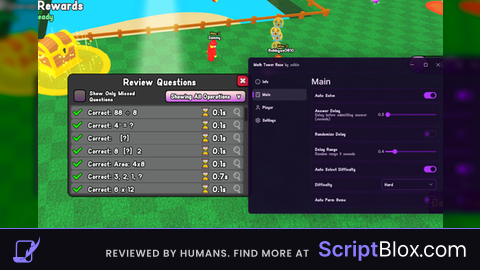
guys this is the best script in roblox TRY IT FAST!!!
this is verynevim