Keyless
--Join dc for more scripts
--https://discord.gg/Pu3RVpdYgd
local Rayfield = loadstring(game:HttpGet('https://sirius.menu/rayfield'))()

local Window = Rayfield:CreateWindow({
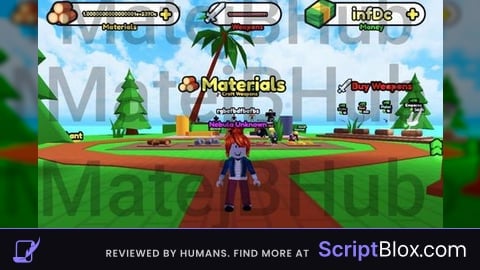
   Name = "Make and Sell Weapons",
   Icon = 0, -- Icon in Topbar. Can use Lucide Icons (string) or Roblox Image (number). 0 to use no icon (default).
   LoadingTitle = "loading the script",
   LoadingSubtitle = "by d a r k n e s s",
   Theme = "Default", -- Check https://docs.sirius.menu/rayfield/configuration/themes

   DisableRayfieldPrompts = false,
   DisableBuildWarnings = false, -- Prevents Rayfield from warning when the script has a version mismatch with the interface

   ConfigurationSaving = {
      Enabled = true,
      FolderName = nil, -- Create a custom folder for your hub/game
      FileName = "Big Hub"
   },

   Discord = {
      Enabled = false, -- Prompt the user to join your Discord server if their executor supports it
      Invite = "noinvitelink", -- The Discord invite code, do not include discord.gg/. E.g. discord.gg/ ABCD would be ABCD
      RememberJoins = true -- Set this to false to make them join the discord every time they load it up
   },

   KeySystem = false, -- Set this to true to use our key system
   KeySettings = {
      Title = "Untitled",
      Subtitle = "Key System",
      Note = "No method of obtaining the key is provided", -- Use this to tell the user how to get a key
      FileName = "Key", -- It is recommended to use something unique as other scripts using Rayfield may overwrite your key file
      SaveKey = true, -- The user's key will be saved, but if you change the key, they will be unable to use your script
      GrabKeyFromSite = false, -- If this is true, set Key below to the RAW site you would like Rayfield to get the key from
      Key = {"Hello"} -- List of keys that will be accepted by the system, can be RAW file links (pastebin, github etc) or simple strings ("hello","key22")
   }
})
local MainTab = Window:CreateTab("Infinite stuff", nil) -- Title, Image

local Button = MainTab:CreateButton({
   Name = "Inf Materials",
   Callback = function()
   local args = {
    [1] = 99999999999999999999999999999999999999
}

game:GetService("ReplicatedStorage"):WaitForChild("Event"):WaitForChild("Train"):FireServer(unpack(args))

   end,
})

local Button = MainTab:CreateButton({
   Name = "Inf Weapons",
   Callback = function()
   local args = {
    [1] = "Stick",
    [2] = 99999999999999999999999999999999999999
}

game:GetService("ReplicatedStorage"):WaitForChild("Event"):WaitForChild("CraftWeapon"):FireServer(unpack(args))

   end,
})

local Button = MainTab:CreateButton({
   Name = "Inf Money",
   Callback = function()
local args = {
    [1] = 99999999999999999999999999999999999999,
    [2] = 1
}

game:GetService("ReplicatedStorage"):WaitForChild("Event"):WaitForChild("SellWeapon"):FireServer(unpack(args))

   end,
})

local CoolTab = Window:CreateTab("Swords n stuff", nil) -- Title, Image

local Button = CoolTab:CreateButton({
   Name = "Best Sword",
   Callback = function()
local args = {
    [1] = "Nebula",
    [2] = 0
}

game:GetService("ReplicatedStorage"):WaitForChild("Event"):WaitForChild("BuyPower"):FireServer(unpack(args))

   end,
})

local MiscTab = Window:CreateTab("Misc", nil) -- Title, Image

local Button = MiscTab:CreateButton({
   Name = "MADE BY D A R K N E S S (SOOOOO SIGMA)",
   Callback = function()
   -- The function that takes place when the button is pressed
   end,
})No comments yet for this script.