❓ LUCKY BLOCKS Battlegrounds Script – lucky block giver ye
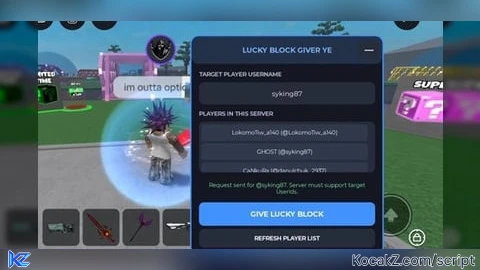
--// LUCKY BLOCK GIVER YE
--// Single LocalScript | Mobile-friendly UI
--// Place in StarterPlayer > StarterPlayerScripts
--// NOTE: Server must support target UserIds.

local Players = game:GetService("Players")
local UserInputService = game:GetService("UserInputService")
local ReplicatedStorage = game:GetService("ReplicatedStorage")

local player = Players.LocalPlayer
if not player then return end

local playerGui = player:WaitForChild("PlayerGui")

local old = playerGui:FindFirstChild("LuckyBlockGiverYE")
if old then old:Destroy() end

local BLUE = Color3.fromRGB(65, 145, 255)
local BG = Color3.fromRGB(20, 23, 34)
local PANEL = Color3.fromRGB(39, 44, 59)
local WHITE = Color3.fromRGB(245, 247, 255)
local MUTED = Color3.fromRGB(170, 180, 200)

local function create(className, props, parent)
    local obj = Instance.new(className)
    for k, v in pairs(props) do
        obj[k] = v
    end
    obj.Parent = parent
    return obj
end

local gui = create("ScreenGui", {
    Name = "LuckyBlockGiverYE",
    ResetOnSpawn = false,
    IgnoreGuiInset = true,
    DisplayOrder = 999
}, playerGui)

local main = create("Frame", {
    Name = "Main",
    Size = UDim2.fromOffset(310, 355),
    Position = UDim2.new(0.5, -155, 0.5, -177),
    BackgroundColor3 = BG,
    BorderSizePixel = 0,
    Active = true
}, gui)

create("UICorner", {CornerRadius = UDim.new(0, 12)}, main)
create("UIStroke", {Color = BLUE, Thickness = 2}, main)

local header = create("TextButton", {
    Name = "Header",
    Size = UDim2.new(1, 0, 0, 45),
    BackgroundColor3 = Color3.fromRGB(34, 48, 72),
    BorderSizePixel = 0,
    Text = "LUCKY BLOCK GIVER YE",
    TextColor3 = Color3.fromRGB(120, 180, 255),
    TextSize = 14,
    Font = Enum.Font.GothamBold,
    AutoButtonColor = false
}, main)

create("UICorner", {CornerRadius = UDim.new(0, 12)}, header)

local minimize = create("TextButton", {
    Size = UDim2.fromOffset(32, 30),
    Position = UDim2.new(1, -38, 0, 7),
    BackgroundColor3 = PANEL,
    BorderSizePixel = 0,
    Text = "—",
    TextColor3 = WHITE,
    TextSize = 17,
    Font = Enum.Font.GothamBold
}, header)

create("UICorner", {CornerRadius = UDim.new(0, 7)}, minimize)

local function makeLabel(text, y)
    return create("TextLabel", {
        Size = UDim2.new(1, -24, 0, 20),
        Position = UDim2.fromOffset(12, y),
        BackgroundTransparency = 1,
        Text = text,
        TextColor3 = MUTED,
        TextSize = 11,
        Font = Enum.Font.GothamBold,
        TextXAlignment = Enum.TextXAlignment.Left
    }, main)
end

makeLabel("TARGET PLAYER USERNAME", 52)

local nameBox = create("TextBox", {
    Name = "UsernameInput",
    Size = UDim2.new(1, -24, 0, 36),
    Position = UDim2.fromOffset(12, 75),
    BackgroundColor3 = PANEL,
    BorderSizePixel = 0,
    PlaceholderText = "Enter exact username...",
    PlaceholderColor3 = MUTED,
    Text = "",
    TextColor3 = WHITE,
    TextSize = 13,
    Font = Enum.Font.Gotham,
    ClearTextOnFocus = false
}, main)

create("UICorner", {CornerRadius = UDim.new(0, 8)}, nameBox)

makeLabel("PLAYERS IN THIS SERVER", 116)

local playerList = create("ScrollingFrame", {
    Name = "PlayerList",
    Size = UDim2.new(1, -24, 0, 82),
    Position = UDim2.fromOffset(12, 139),
    BackgroundColor3 = PANEL,
    BorderSizePixel = 0,
    ScrollBarThickness = 4,
    ScrollBarImageColor3 = BLUE,
    CanvasSize = UDim2.new(0, 0, 0, 0)
}, main)

create("UICorner", {CornerRadius = UDim.new(0, 8)}, playerList)

local listLayout = create("UIListLayout", {
    Padding = UDim.new(0, 4),
    SortOrder = Enum.SortOrder.LayoutOrder
}, playerList)

create("UIPadding", {
    PaddingTop = UDim.new(0, 4),
    PaddingLeft = UDim.new(0, 4),
    PaddingRight = UDim.new(0, 4)
}, playerList)

local function refreshPlayers()
    for _, child in ipairs(playerList:GetChildren()) do
        if child:IsA("TextButton") then
            child:Destroy()
        end
    end

    for _, target in ipairs(Players:GetPlayers()) do
        if target ~= player then
            local button = create("TextButton", {
                Name = "Select_" .. target.Name,
                Size = UDim2.new(1, -8, 0, 27),
                BackgroundColor3 = Color3.fromRGB(48, 57, 76),
                BorderSizePixel = 0,
                Text = target.DisplayName .. " (@" .. target.Name .. ")",
                TextColor3 = WHITE,
                TextSize = 11,
                Font = Enum.Font.Gotham,
                TextTruncate = Enum.TextTruncate.AtEnd
            }, playerList)

            create("UICorner", {
                CornerRadius = UDim.new(0, 5)
            }, button)

            button.Activated:Connect(function()
                nameBox.Text = target.Name
            end)
        end
    end

    task.defer(function()
        playerList.CanvasSize = UDim2.new(
            0, 0, 0, listLayout.AbsoluteContentSize.Y + 8
        )
    end)
end

refreshPlayers()
Players.PlayerAdded:Connect(refreshPlayers)
Players.PlayerRemoving:Connect(refreshPlayers)

local status = create("TextLabel", {
    Name = "Status",
    Size = UDim2.new(1, -24, 0, 38),
    Position = UDim2.fromOffset(12, 228),
    BackgroundTransparency = 1,
    Text = "Select a player to receive the block.",
    TextColor3 = MUTED,
    TextSize = 11,
    Font = Enum.Font.Gotham,
    TextWrapped = true
}, main)

local giveButton = create("TextButton", {
    Name = "SpawnBlock",
    Size = UDim2.new(1, -24, 0, 38),
    Position = UDim2.fromOffset(12, 270),
    BackgroundColor3 = BLUE,
    BorderSizePixel = 0,
    Text = "GIVE LUCKY BLOCK",
    TextColor3 = Color3.new(1, 1, 1),
    TextSize = 14,
    Font = Enum.Font.GothamBold
}, main)

create("UICorner", {CornerRadius = UDim.new(0, 8)}, giveButton)

local refreshButton = create("TextButton", {
    Name = "RefreshPlayers",
    Size = UDim2.new(1, -24, 0, 30),
    Position = UDim2.fromOffset(12, 313),
    BackgroundColor3 = PANEL,
    BorderSizePixel = 0,
    Text = "REFRESH PLAYER LIST",
    TextColor3 = WHITE,
    TextSize = 11,
    Font = Enum.Font.GothamBold
}, main)

create("UICorner", {CornerRadius = UDim.new(0, 8)}, refreshButton)
refreshButton.Activated:Connect(refreshPlayers)

giveButton.Activated:Connect(function()
    local targetName = nameBox.Text:match("^%s*(.-)%s*$")

    if targetName == "" then
        status.Text = "Enter or select a player first."
        status.TextColor3 = Color3.fromRGB(255, 180, 90)
        return
    end

    local target
    for _, candidate in ipairs(Players:GetPlayers()) do
        if candidate.Name:lower() == targetName:lower() then
            target = candidate
            break
        end
    end

    if not target then
        status.Text = "Player not found in this server."
        status.TextColor3 = Color3.fromRGB(255, 120, 120)
        return
    end

    if target == player then
        status.Text = "Choose another player."
        status.TextColor3 = Color3.fromRGB(255, 180, 90)
        return
    end

    local remote = ReplicatedStorage:FindFirstChild("SpawnGalaxyBlock")

    if not remote or not remote:IsA("RemoteEvent") then
        status.Text = "SpawnGalaxyBlock RemoteEvent not found."
        status.TextColor3 = Color3.fromRGB(255, 120, 120)
        return
    end

    local success, err = pcall(function()
        remote:FireServer(target.UserId)
    end)

    if success then
        status.Text = "Request sent for @" .. target.Name ..
            ". Server must support target UserIds."
        status.TextColor3 = Color3.fromRGB(130, 235, 160)
    else
        status.Text = "Request failed: " .. tostring(err)
        status.TextColor3 = Color3.fromRGB(255, 120, 120)
        warn(err)
    end
end)

local minimized = false

minimize.Activated:Connect(function()
    minimized = not minimized

    for _, child in ipairs(main:GetChildren()) do
        if child ~= header and child:IsA("GuiObject") then
            child.Visible = not minimized
        end
    end

    main.Size = minimized
        and UDim2.fromOffset(230, 45)
        or UDim2.fromOffset(310, 355)

    minimize.Text = minimized and "+" or "—"
end)

local dragging = false
local dragStart
local startPosition
local activeInput

header.InputBegan:Connect(function(input)
    if input.UserInputType == Enum.UserInputType.MouseButton1
        or input.UserInputType == Enum.UserInputType.Touch then

        dragging = true
        dragStart = input.Position
        startPosition = main.Position

        input.Changed:Connect(function()
            if input.UserInputState == Enum.UserInputState.End then
                dragging = false
            end
        end)
    end
end)

header.InputChanged:Connect(function(input)
    if input.UserInputType == Enum.UserInputType.MouseMovement
        or input.UserInputType == Enum.UserInputType.Touch then
        activeInput = input
    end
end)

UserInputService.InputChanged:Connect(function(input)
    if dragging and input == activeInput then
        local delta = input.Position - dragStart

        main.Position = UDim2.new(
            startPosition.X.Scale,
            startPosition.X.Offset + delta.X,
            startPosition.Y.Scale,
            startPosition.Y.Offset + delta.Y
        )
    end
end)

print("[Lucky Block Giver YE] Loaded successfully!")
How to Execute ❓ LUCKY BLOCKS Battlegrounds Script – lucky block giver ye
Step 1: Copy Code: Click the Copy Code button in the viewer above to grab the clean Lua loadstring.
Step 2: Launch Executor: Open a compatible, unpatched executor. If you need one, check our Roblox Executors Directory.
Step 3: Join Experience: Launch Roblox and join ❓ LUCKY BLOCKS Battlegrounds.
Step 4: Attach & Run: Attach/inject your executor into the Roblox process, paste the code into the script tab, and press Execute.
Features & Information
Script Changelog (1)
Community Comments (0)
No comments yet for this script.
Frequently Asked Questions
How do I execute ❓ LUCKY BLOCKS Battlegrounds Script – lucky block giver ye in Roblox?
To run ❓ LUCKY BLOCKS Battlegrounds Script – lucky block giver ye, copy the Lua loadstring from the code viewer above, launch Roblox and join ❓ LUCKY BLOCKS Battlegrounds, attach a working executor (such as Potassium, Solara, or Delta from our Executors directory), paste the code into your executor console, and click Execute.
Is ❓ LUCKY BLOCKS Battlegrounds Script – lucky block giver ye keyless or does it require an access key?
❓ LUCKY BLOCKS Battlegrounds Script – lucky block giver ye requires an access key. You can retrieve the official key directly using the Get Script Key link provided above.
Is ❓ LUCKY BLOCKS Battlegrounds Script – lucky block giver ye currently safe and working?
This script is active and operational. Always test scripts using a secondary (alt) Roblox account to safeguard your main profile against anti-cheat bans.