
Keyless
local Players = game:GetService("Players")
local UIS = game:GetService("UserInputService")
local LocalPlayer = Players.LocalPlayer

-- Game check (only run on this game)
local SUPPORTED_GAME_ID = 15919221063
if game.PlaceId ~= SUPPORTED_GAME_ID then
    local ScreenGui = Instance.new("ScreenGui", game.CoreGui)
    ScreenGui.Name = "UnsupportedGameGui"

    local Message = Instance.new("TextLabel", ScreenGui)
    Message.Size = UDim2.new(0, 300, 0, 100)
    Message.Position = UDim2.new(0.5, -150, 0.5, -50)
    Message.BackgroundColor3 = Color3.fromRGB(255, 0, 0)
    Message.TextColor3 = Color3.fromRGB(255, 255, 255)
    Message.Text = "GAME NOT SUPPORTED!"
    Message.Font = Enum.Font.GothamBold
    Message.TextSize = 24
    Message.TextWrapped = true
    Message.ZIndex = 5

    return
end

-- Create main GUI
local SuperHub = Instance.new("ScreenGui")
SuperHub.Name = "SuperHub"
SuperHub.ResetOnSpawn = false
SuperHub.Parent = game.CoreGui

-- Hello message (inline text only)
local greeting = Instance.new("TextLabel")
greeting.Size = UDim2.new(0, 350, 0, 40)
greeting.Position = UDim2.new(0.5, -175, 0.4, -220)
greeting.BackgroundTransparency = 1
greeting.TextColor3 = Color3.fromRGB(255, 255, 0)
greeting.Text = "Hello! Press Right Ctrl to open/close Super Hub."
greeting.Font = Enum.Font.GothamBold
greeting.TextSize = 18
greeting.Parent = SuperHub
greeting.TextStrokeTransparency = 1

-- Main Frame
local Frame = Instance.new("Frame")
Frame.Name = "MainFrame"
Frame.Size = UDim2.new(0, 350, 0, 420)
Frame.Position = UDim2.new(0.5, -175, 0.5, -210)
Frame.BackgroundColor3 = Color3.fromRGB(25, 25, 25)
Frame.BorderSizePixel = 0
Frame.Visible = true
Frame.Parent = SuperHub
Frame.ZIndex = 1

local UICorner = Instance.new("UICorner")
UICorner.CornerRadius = UDim.new(0, 10)
UICorner.Parent = Frame

local UIStroke = Instance.new("UIStroke")
UIStroke.Thickness = 2
UIStroke.Color = Color3.fromRGB(255, 255, 0)
UIStroke.Parent = Frame

local backgroundImage = Instance.new("ImageLabel")
backgroundImage.Parent = Frame
backgroundImage.Size = UDim2.new(1, 0, 1, 0)
backgroundImage.Position = UDim2.new(0, 0, 0, 0)
backgroundImage.Image = "rbxassetid://13733330224" -- Your troll neon blue face image
backgroundImage.BackgroundTransparency = 1
backgroundImage.ZIndex = 0

-- Helper function to create buttons
local function createButton(name, position, callback)
    local button = Instance.new("TextButton")
    button.Size = UDim2.new(0, 300, 0, 40)
    button.Position = position
    button.BackgroundColor3 = Color3.fromRGB(0, 100, 255)
    button.TextColor3 = Color3.fromRGB(255, 255, 255)
    button.Font = Enum.Font.GothamBold
    button.TextSize = 16
    button.Text = name
    button.Parent = Frame
    button.ZIndex = 2
    button.MouseButton1Click:Connect(callback)
end

-- Buttons
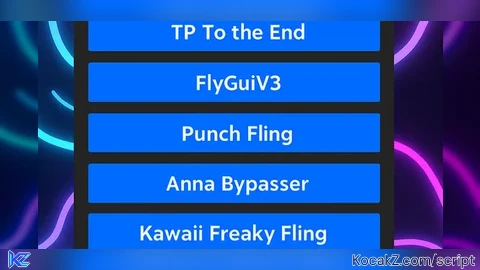
createButton("TP To the End", UDim2.new(0, 25, 0, 40), function()
    local char = LocalPlayer.Character or LocalPlayer.CharacterAdded:Wait()
    local hrp = char:WaitForChild("HumanoidRootPart")
    local targetPos = Vector3.new(1218.02, 3582.10 + 20, -125.53)
    hrp.CFrame = CFrame.new(targetPos)
end)

createButton("FlyGuiV3", UDim2.new(0, 25, 0, 90), function()
    loadstring(game:HttpGet("https://raw.githubusercontent.com/XNEOFF/FlyGuiV3/main/FlyGuiV3.txt"))()
end)

createButton("Punch Fling", UDim2.new(0, 25, 0, 140), function()
    loadstring(game:HttpGet("https://scriptblox.com/raw/Universal-Script-punch-fling-actually-works-unlike-others-25569"))()
end)

createButton("Anna Bypasser", UDim2.new(0, 25, 0, 190), function()
    loadstring(game:HttpGet("https://raw.githubusercontent.com/AnnaRoblox/AnnaBypasser/refs/heads/main/AnnaBypasser.lua", true))()
end)

createButton("Kawaii Freaky Fling", UDim2.new(0, 25, 0, 240), function()
    pcall(function()
        loadstring(game:HttpGet("https://raw.githubusercontent.com/hellohellohell012321/KAWAII-FREAKY-FLING/main/kawaii_freaky_fling.lua", true))()
    end)
end)

-- TP to player by display name UI
local TPGui = Instance.new("Frame")
TPGui.Size = UDim2.new(0, 300, 0, 120)
TPGui.Position = UDim2.new(0, 25, 0, 290)
TPGui.BackgroundColor3 = Color3.fromRGB(40, 40, 40)
TPGui.Parent = Frame
TPGui.ZIndex = 2

local TPCorner = Instance.new("UICorner")
TPCorner.CornerRadius = UDim.new(0, 6)
TPCorner.Parent = TPGui

local TextBox = Instance.new("TextBox")
TextBox.Size = UDim2.new(1, -20, 0, 40)
TextBox.Position = UDim2.new(0, 10, 0, 10)
TextBox.PlaceholderText = "Enter display name"
TextBox.Text = ""
TextBox.BackgroundColor3 = Color3.fromRGB(70, 70, 70)
TextBox.TextColor3 = Color3.fromRGB(255, 255, 255)
TextBox.Font = Enum.Font.Gotham
TextBox.TextSize = 14
TextBox.Parent = TPGui
TextBox.ZIndex = 3

local TPButton = Instance.new("TextButton")
TPButton.Size = UDim2.new(1, -20, 0, 40)
TPButton.Position = UDim2.new(0, 10, 0, 65)
TPButton.Text = "Teleport"
TPButton.BackgroundColor3 = Color3.fromRGB(0, 170, 255)
TPButton.TextColor3 = Color3.fromRGB(255, 255, 255)
TPButton.Font = Enum.Font.SourceSansBold
TPButton.TextSize = 20
TPButton.Parent = TPGui
TPButton.ZIndex = 3

TPButton.MouseButton1Click:Connect(function()
    local displayNameInput = TextBox.Text:lower()
    local targetPlayer = nil

    for _, player in ipairs(Players:GetPlayers()) do
        if player.DisplayName:lower() == displayNameInput then
            targetPlayer = player
            break
        end
    end

    if targetPlayer and targetPlayer.Character and targetPlayer.Character:FindFirstChild("HumanoidRootPart") then
        local targetPos = targetPlayer.Character.HumanoidRootPart.Position
        local hrp = LocalPlayer.Character and LocalPlayer.Character:FindFirstChild("HumanoidRootPart")
        if hrp then
            hrp.CFrame = CFrame.new(targetPos + Vector3.new(0, 5, 0))
        end
    else
        warn("Display name not found or player not loaded.")
    end
end)

-- Mobile drag support
local function makeDraggable(guiFrame)
    local dragging, dragInput, dragStart, startPos

    local function update(input)
        local delta = input.Position - dragStart
        guiFrame.Position = UDim2.new(
            startPos.X.Scale,
            startPos.X.Offset + delta.X,
            startPos.Y.Scale,
            startPos.Y.Offset + delta.Y
        )
    end

    guiFrame.InputBegan:Connect(function(input)
        if input.UserInputType == Enum.UserInputType.Touch then
            dragging = true
            dragStart = input.Position
            startPos = guiFrame.Position

            input.Changed:Connect(function()
                if input.UserInputState == Enum.UserInputState.End then
                    dragging = false
                end
            end)
        end
    end)

    guiFrame.InputChanged:Connect(function(input)
        if input.UserInputType == Enum.UserInputType.Touch then
            dragInput = input
        end
    end)

    UIS.InputChanged:Connect(function(input)
        if input == dragInput and dragging then
            update(input)
        end
    end)
end

makeDraggable(Frame)

-- Toggle GUI visibility with Right Ctrl key
UIS.InputBegan:Connect(function(input, processed)
    if not processed and input.KeyCode == Enum.KeyCode.RightControl then
        Frame.Visible = not Frame.Visible
    end
end)

-- Auto-hide greeting after 5 seconds
task.delay(5, function()
    greeting:Destroy()
end)
The features kinda messy
Working on a updated hub with a team.
Ai or smth.?
Your Are To Late To Use Anna Byp*er It Got Patched Like 1 Months Ago