
Lua Script•515 lines (16312 chars)
--[[
    Orb Collector v2.1
    Автор: любитель больших
    Дата: 0000
    Описание: Авто-сбор орбов и телепорт к игрокам
--]]

local player = game.Players.LocalPlayer
local character = player.Character or player.CharacterAdded:Wait()
local rootPart = character:WaitForChild("HumanoidRootPart")
local TweenService = game:GetService("TweenService")
local UserInputService = game:GetService("UserInputService")
local RunService = game:GetService("RunService")

-- Цветовая схема (тёмно-фиолетовая тема)
local colors = {
    background = Color3.fromRGB(20, 15, 25),
    button = Color3.fromRGB(45, 25, 65),
    buttonHover = Color3.fromRGB(65, 35, 95),
    buttonActive = Color3.fromRGB(85, 45, 125),
    text = Color3.fromRGB(210, 190, 245),
    input = Color3.fromRGB(35, 20, 45),
    shadow = Color3.fromRGB(10, 5, 15),
    accent = Color3.fromRGB(140, 80, 200),
    success = Color3.fromRGB(100, 200, 100),
    warning = Color3.fromRGB(200, 150, 50)
}

-- Поиск папки с орбами
local OrbsFolder = workspace:FindFirstChild("Orbs")
if not OrbsFolder then
    warn("⚠️ Не найдена папка с орбами! Проверьте название папки.")
end

-- Создание интерфейса
local screenGui = Instance.new("ScreenGui")
screenGui.Name = "DarkOrbCollector"
screenGui.ResetOnSpawn = false
screenGui.IgnoreGuiInset = true
screenGui.ZIndexBehavior = Enum.ZIndexBehavior.Sibling
screenGui.Parent = player:WaitForChild("PlayerGui")

-- Главная кнопка открытия меню
local mainButton = Instance.new("TextButton")
mainButton.Name = "MainBtn"
mainButton.Size = UDim2.new(0, 110, 0, 36)
mainButton.Position = UDim2.new(0.02, 0, 0.9, 0)
mainButton.Text = "🌌 Orb Menu"
mainButton.TextColor3 = colors.text
mainButton.TextSize = 13
mainButton.Font = Enum.Font.GothamMedium
mainButton.BackgroundColor3 = colors.button
mainButton.BorderSizePixel = 0
mainButton.AutoButtonColor = false
mainButton.ZIndex = 10
mainButton.Parent = screenGui

-- Скругление кнопки
local mainCorner = Instance.new("UICorner")
mainCorner.CornerRadius = UDim.new(0, 8)
mainCorner.Parent = mainButton

-- Лёгкая тень для кнопки
local mainShadow = Instance.new("UIStroke")
mainShadow.Color = colors.shadow
mainShadow.Thickness = 2
mainShadow.Parent = mainButton

-- Анимации наведения на кнопку
mainButton.MouseEnter:Connect(function()
    TweenService:Create(mainButton, TweenInfo.new(0.15), {BackgroundColor3 = colors.buttonHover}):Play()
    TweenService:Create(mainShadow, TweenInfo.new(0.15), {Thickness = 3}):Play()
end)

mainButton.MouseLeave:Connect(function()
    TweenService:Create(mainButton, TweenInfo.new(0.15), {BackgroundColor3 = colors.button}):Play()
    TweenService:Create(mainShadow, TweenInfo.new(0.15), {Thickness = 2}):Play()
end)

-- Основное окно меню
local mainFrame = Instance.new("Frame")
mainFrame.Name = "MainWindow"
mainFrame.Size = UDim2.new(0, 280, 0, 320)
mainFrame.Position = UDim2.new(0.02, 0, 0.5, -160)
mainFrame.BackgroundColor3 = colors.background
mainFrame.BackgroundTransparency = 0.1
mainFrame.BorderSizePixel = 0
mainFrame.Visible = false
mainFrame.ClipsDescendants = true
mainFrame.ZIndex = 5
mainFrame.Parent = screenGui

-- Скругление окна
local frameCorner = Instance.new("UICorner")
frameCorner.CornerRadius = UDim.new(0, 12)
frameCorner.Parent = mainFrame

-- Тень окна
local frameShadow = Instance.new("UIStroke")
frameShadow.Color = colors.shadow
frameShadow.Thickness = 3
frameShadow.Parent = mainFrame

-- Заголовок окна
local titleBar = Instance.new("Frame")
titleBar.Name = "TitleBar"
titleBar.Size = UDim2.new(1, 0, 0, 35)
titleBar.Position = UDim2.new(0, 0, 0, 0)
titleBar.BackgroundColor3 = Color3.fromRGB(25, 15, 35)
titleBar.BorderSizePixel = 0
titleBar.ZIndex = 6
titleBar.Parent = mainFrame

local titleCorner = Instance.new("UICorner")
titleCorner.CornerRadius = UDim.new(0, 12)
titleCorner.Parent = titleBar

local titleText = Instance.new("TextLabel")
titleText.Name = "Title"
titleText.Size = UDim2.new(1, -10, 1, 0)
titleText.Position = UDim2.new(0, 10, 0, 0)
titleText.Text = "🌀 Orb Collector v2.1"
titleText.TextColor3 = colors.text
titleText.TextSize = 16
titleText.Font = Enum.Font.GothamBold
titleText.BackgroundTransparency = 1
titleText.TextXAlignment = Enum.TextXAlignment.Left
titleText.ZIndex = 7
titleText.Parent = titleBar

-- Кнопка закрытия
local closeButton = Instance.new("TextButton")
closeButton.Name = "CloseBtn"
closeButton.Size = UDim2.new(0, 25, 0, 25)
closeButton.Position = UDim2.new(1, -30, 0, 5)
closeButton.Text = "×"
closeButton.TextColor3 = colors.text
closeButton.TextSize = 18
closeButton.Font = Enum.Font.GothamBold
closeButton.BackgroundColor3 = Color3.fromRGB(200, 60, 60)
closeButton.BorderSizePixel = 0
closeButton.ZIndex = 7
closeButton.Parent = titleBar

local closeCorner = Instance.new("UICorner")
closeCorner.CornerRadius = UDim.new(0, 6)
closeCorner.Parent = closeButton

-- Контейнер для элементов
local contentFrame = Instance.new("Frame")
contentFrame.Name = "Content"
contentFrame.Size = UDim2.new(1, -20, 1, -50)
contentFrame.Position = UDim2.new(0, 10, 0, 40)
contentFrame.BackgroundTransparency = 1
contentFrame.ZIndex = 6
contentFrame.Parent = mainFrame

-- Поле ввода имени игрока
local nameLabel = Instance.new("TextLabel")
nameLabel.Name = "NameLabel"
nameLabel.Size = UDim2.new(1, 0, 0, 20)
nameLabel.Position = UDim2.new(0, 0, 0, 0)
nameLabel.Text = "Имя игрока:"
nameLabel.TextColor3 = colors.text
nameLabel.TextSize = 12
nameLabel.Font = Enum.Font.Gotham
nameLabel.BackgroundTransparency = 1
nameLabel.TextXAlignment = Enum.TextXAlignment.Left
nameLabel.ZIndex = 6
nameLabel.Parent = contentFrame

local nameBox = Instance.new("TextBox")
nameBox.Name = "NameInput"
nameBox.Size = UDim2.new(1, 0, 0, 32)
nameBox.Position = UDim2.new(0, 0, 0, 22)
nameBox.Text = ""
nameBox.PlaceholderText = "Введите имя игрока..."
nameBox.TextColor3 = colors.text
nameBox.TextSize = 13
nameBox.Font = Enum.Font.Gotham
nameBox.BackgroundColor3 = colors.input
nameBox.BorderSizePixel = 0
nameBox.ZIndex = 6
nameBox.Parent = contentFrame

local nameBoxCorner = Instance.new("UICorner")
nameBoxCorner.CornerRadius = UDim.new(0, 6)
nameBoxCorner.Parent = nameBox

local nameBoxStroke = Instance.new("UIStroke")
nameBoxStroke.Color = colors.accent
nameBoxStroke.Thickness = 1
nameBoxStroke.Parent = nameBox

-- Кнопка телепорта к игроку
local teleportButton = Instance.new("TextButton")
teleportButton.Name = "TeleportBtn"
teleportButton.Size = UDim2.new(1, 0, 0, 36)
teleportButton.Position = UDim2.new(0, 0, 0, 64)
teleportButton.Text = "📡 Телепорт к игроку"
teleportButton.TextColor3 = colors.text
teleportButton.TextSize = 13
teleportButton.Font = Enum.Font.GothamMedium
teleportButton.BackgroundColor3 = colors.button
teleportButton.BorderSizePixel = 0
teleportButton.ZIndex = 6
teleportButton.Parent = contentFrame

local teleportCorner = Instance.new("UICorner")
teleportCorner.CornerRadius = UDim.new(0, 8)
teleportCorner.Parent = teleportButton

-- Разделитель
local separator = Instance.new("Frame")
separator.Name = "Separator"
separator.Size = UDim2.new(1, 0, 0, 1)
separator.Position = UDim2.new(0, 0, 0, 115)
separator.BackgroundColor3 = colors.accent
separator.BackgroundTransparency = 0.7
separator.BorderSizePixel = 0
separator.ZIndex = 6
separator.Parent = contentFrame

-- Заголовок секции орбов
local orbLabel = Instance.new("TextLabel")
orbLabel.Name = "OrbLabel"
orbLabel.Size = UDim2.new(1, 0, 0, 20)
orbLabel.Position = UDim2.new(0, 0, 0, 125)
orbLabel.Text = "Авто-сбор орбов:"
orbLabel.TextColor3 = colors.text
orbLabel.TextSize = 12
orbLabel.Font = Enum.Font.Gotham
orbLabel.BackgroundTransparency = 1
orbLabel.TextXAlignment = Enum.TextXAlignment.Left
orbLabel.ZIndex = 6
orbLabel.Parent = contentFrame

-- Кнопка включения/выключения сбора орбов
local orbButton = Instance.new("TextButton")
orbButton.Name = "OrbToggle"
orbButton.Size = UDim2.new(1, 0, 0, 36)
orbButton.Position = UDim2.new(0, 0, 0, 147)
orbButton.Text = "🔴 ВЫКЛ"
orbButton.TextColor3 = colors.text
orbButton.TextSize = 13
orbButton.Font = Enum.Font.GothamMedium
orbButton.BackgroundColor3 = colors.button
orbButton.BorderSizePixel = 0
orbButton.ZIndex = 6
orbButton.Parent = contentFrame

local orbCorner = Instance.new("UICorner")
orbCorner.CornerRadius = UDim.new(0, 8)
orbCorner.Parent = orbButton

-- Счётчик орбов
local counterText = Instance.new("TextLabel")
counterText.Name = "Counter"
counterText.Size = UDim2.new(1, 0, 0, 20)
counterText.Position = UDim2.new(0, 0, 0, 195)
counterText.Text = "📊 Орбов собрано: 0"
counterText.TextColor3 = colors.text
counterText.TextSize = 12
counterText.Font = Enum.Font.Gotham
counterText.BackgroundTransparency = 1
counterText.TextXAlignment = Enum.TextXAlignment.Left
counterText.ZIndex = 6
counterText.Parent = contentFrame

-- Статус работы
local statusText = Instance.new("TextLabel")
statusText.Name = "Status"
statusText.Size = UDim2.new(1, 0, 0, 16)
statusText.Position = UDim2.new(0, 0, 0, 220)
statusText.Text = "⚡ Готов к работе"
statusText.TextColor3 = colors.success
statusText.TextSize = 11
statusText.Font = Enum.Font.Gotham
statusText.BackgroundTransparency = 1
statusText.TextXAlignment = Enum.TextXAlignment.Left
statusText.ZIndex = 6
statusText.Parent = contentFrame

-- Футер с информацией
local footerText = Instance.new("TextLabel")
footerText.Name = "Footer"
footerText.Size = UDim2.new(1, 0, 0, 15)
footerText.Position = UDim2.new(0, 0, 1, -20)
footerText.Text = "DarkScript © 2024 | v2.1"
footerText.TextColor3 = Color3.fromRGB(100, 100, 120)
footerText.TextSize = 10
footerText.Font = Enum.Font.Gotham
footerText.BackgroundTransparency = 1
footerText.TextXAlignment = Enum.TextXAlignment.Center
footerText.ZIndex = 6
footerText.Parent = contentFrame

-- Переменные состояния
local isCollectingOrbs = false
local teleportConnection = nil
local isMenuOpen = false
local collectedOrbs = 0
local totalOrbs = 0

-- Функция обновления счётчика орбов
local function updateOrbCount()
    if OrbsFolder then
        totalOrbs = #OrbsFolder:GetChildren()
        counterText.Text = "📊 Орбов в мире: " .. totalOrbs
    else
        counterText.Text = "📊 Орбов в мире: 0"
    end
end

-- Функция сбора орбов
local function startOrbCollection()
    if teleportConnection then
        teleportConnection:Disconnect()
    end

    teleportConnection = RunService.Heartbeat:Connect(function()
        if not isCollectingOrbs or not rootPart or not OrbsFolder then
            return
        end

        local orbs = OrbsFolder:GetChildren()
        local collectedThisFrame = 0

        for _, orb in ipairs(orbs) do
            if orb:IsA("BasePart") and collectedThisFrame < 3 then -- Ограничение 3 орба за кадр
                -- Плавная телепортация орба
                local tweenInfo = TweenInfo.new(0.1, Enum.EasingStyle.Linear)
                local tween = TweenService:Create(orb, tweenInfo, {CFrame = rootPart.CFrame})
                tween:Play()

                -- Симуляция касания
                firetouchinterest(orb, rootPart, 0)
                firetouchinterest(orb, rootPart, 1)

                collectedThisFrame = collectedThisFrame + 1
                collectedOrbs = collectedOrbs + 1
            end
        end

        updateOrbCount()
    end)
end

-- Функция остановки сбора
local function stopOrbCollection()
    isCollectingOrbs = false
    orbButton.Text = "🔴 ВЫКЛ"
    orbButton.BackgroundColor3 = colors.button

    if teleportConnection then
        teleportConnection:Disconnect()
        teleportConnection = nil
    end

    statusText.Text = "⏹️ Сбор остановлен"
    statusText.TextColor3 = colors.warning
end

-- Анимации кнопок
local function setupButtonAnimations(button)
    button.MouseEnter:Connect(function()
        if button ~= orbButton or not isCollectingOrbs then
            TweenService:Create(button, TweenInfo.new(0.15), {BackgroundColor3 = colors.buttonHover}):Play()
        end
    end)

    button.MouseLeave:Connect(function()
        if button ~= orbButton or not isCollectingOrbs then
            TweenService:Create(button, TweenInfo.new(0.15), {BackgroundColor3 = colors.button}):Play()
        end
    end)

    button.MouseButton1Down:Connect(function()
        TweenService:Create(button, TweenInfo.new(0.1), {BackgroundColor3 = colors.buttonActive}):Play()
    end)

    button.MouseButton1Up:Connect(function()
        if button ~= orbButton or not isCollectingOrbs then
            TweenService:Create(button, TweenInfo.new(0.1), {BackgroundColor3 = colors.buttonHover}):Play()
        end
    end)
end

-- Применяем анимации к кнопкам
setupButtonAnimations(teleportButton)
setupButtonAnimations(orbButton)

-- Открытие/закрытие меню
mainButton.MouseButton1Click:Connect(function()
    isMenuOpen = not isMenuOpen
    if isMenuOpen then
        mainFrame.Visible = true
        TweenService:Create(mainFrame, TweenInfo.new(0.3), {BackgroundTransparency = 0.1}):Play()
        updateOrbCount()
    else
        TweenService:Create(mainFrame, TweenInfo.new(0.3), {BackgroundTransparency = 1}):Play()
        wait(0.3)
        mainFrame.Visible = false
    end
end)

closeButton.MouseButton1Click:Connect(function()
    isMenuOpen = false
    TweenService:Create(mainFrame, TweenInfo.new(0.3), {BackgroundTransparency = 1}):Play()
    wait(0.3)
    mainFrame.Visible = false
end)

-- Включение/выключение сбора орбов
orbButton.MouseButton1Click:Connect(function()
    isCollectingOrbs = not isCollectingOrbs

    if isCollectingOrbs then
        orbButton.Text = "🟢 ВКЛ"
        orbButton.BackgroundColor3 = colors.success
        statusText.Text = "🔄 Собираю орбы..."
        statusText.TextColor3 = colors.success
        startOrbCollection()
    else
        stopOrbCollection()
    end
end)

-- Телепорт к игроку
teleportButton.MouseButton1Click:Connect(function()
    local targetName = nameBox.Text:gsub("%s+", ""):lower()
    if targetName == "" then
        statusText.Text = "⚠️ Введите имя игрока"
        statusText.TextColor3 = colors.warning
        return
    end

    local foundPlayer = nil
    for _, plr in ipairs(game.Players:GetPlayers()) do
        if plr ~= player and plr.Name:lower():find(targetName, 1, true) then
            foundPlayer = plr
            break
        end
    end

    if foundPlayer and foundPlayer.Character then
        local targetRoot = foundPlayer.Character:FindFirstChild("HumanoidRootPart")
        if targetRoot then
            local originalPos = rootPart.CFrame
            rootPart.CFrame = targetRoot.CFrame
            statusText.Text = "📡 Телепорт к " .. foundPlayer.Name
            statusText.TextColor3 = colors.success

            -- Возврат через 50 мс
            wait(0.05)
            rootPart.CFrame = originalPos
        else
            statusText.Text = "⚠️ Игрок не найден"
            statusText.TextColor3 = colors.warning
        end
    else
        statusText.Text = "⚠️ Игрок не найден"
        statusText.TextColor3 = colors.warning
    end
end)

-- Перетаскивание окна
local dragging, dragInput, dragStart, startPos

titleBar.InputBegan:Connect(function(input)
    if input.UserInputType == Enum.UserInputType.MouseButton1 then
        dragging = true
        dragStart = input.Position
        startPos = mainFrame.Position
        input.Changed:Connect(function()
            if input.UserInputState == Enum.UserInputState.End then
                dragging = false
            end
        end)
    end
end)

titleBar.InputChanged:Connect(function(input)
    if input.UserInputType == Enum.UserInputType.MouseMovement then
        dragInput = input
    end
end)

UserInputService.InputChanged:Connect(function(input)
    if input == dragInput and dragging then
        local delta = input.Position - dragStart
        mainFrame.Position = UDim2.new(
            startPos.X.Scale,
            startPos.X.Offset + delta.X,
            startPos.Y.Scale,
            startPos.Y.Offset + delta.Y
        )
    end
end)

-- Обновление rootPart при респавне
player.CharacterAdded:Connect(function(newCharacter)
    character = newCharacter
    rootPart = newCharacter:WaitForChild("HumanoidRootPart")
    statusText.Text = "♻️ Персонаж обновлён"
    wait(2)
    statusText.Text = "⚡ Готов к работе"
end)

-- Периодическое обновление счётчика
while true do
    updateOrbCount()
    wait(5)

end
Features & Information
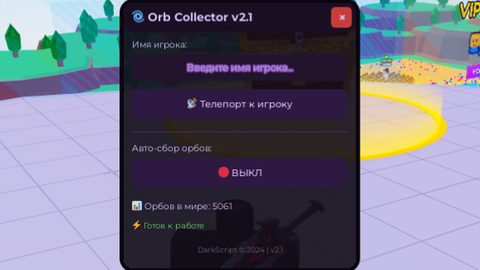
Orb Collector v2.1 - Описание скрипта
🎯 Основное назначение
Скрипт для автоматического сбора орбов (сфер) в играх Roblox с дополнительными функциями телепортации к другим игрокам.
✨ Основные возможности
🔮 Авто-сбор орбов
Автоматический поиск орбов в рабочем пространстве игры
Плавная анимация перемещения орбов к персонажу
Ограничение скорости - не более 3 орбов за кадр для стабильности
Автоматическое обновление при респавне персонажа
📡 Телепортация к игрокам
Поиск по имени (регистронезависимый, частичное совпадение)
Быстрый телепорт к целевому игроку и мгновенное возвращение
Валидация цели - проверка наличия игрока и его персонажа
🎨 Продвинутый интерфейс
Тёмная фиолетовая тема с профессиональным дизайном
Анимированные кнопки с эффектами наведения и нажатия
Перетаскиваемое окно с удобным управлением
Информационные панели со статусом работы
Авто-скрытие и плавные анимации
🛠 Технические особенности
🔧 Используемые сервисы
TweenService - плавные анимации
UserInputService - обработка ввода и перетаскивания
RunService - основной цикл сбора орбов
⚡ Оптимизация
Эффективный сбор с ограничением скорости
Автоматическое отключение при отсутствии персонажа
Корректное освобождение ресурсов
🎮 Управление и интерфейс
📋 Элементы управления
Главная кнопка "🌌 Orb Menu" - открытие/закрытие меню
Поле ввода - имя целевого игрока для телепорта
Кнопка телепорта "📡 Телепорт к игроку"
Переключатель сбора "🔴 ВЫКЛ/🟢 ВКЛ"
Информационные счетчики - количество орбов
📊 Отображаемая информация
Статус работы системы
Количество доступных орбов в мире
Состояние авто-сбора
Результаты телепортации
🛡 Безопасность и стабильность
✅ Проверки и валидация
Проверка наличия папки с орбами
Валидация существования целевого игрока
Проверка наличия корневой части персонажа
Обработка респавна персонажа
🔄 Обработка ошибок
Предупреждения при отсутствии необходимых объектов
Корректное восстановление после ошибок
Стабильная работа при изменении игровой среды
🚀 Использование
Активация: Нажмите кнопку "🌌 Orb Menu" в правом нижнем углу
Телепортация: Введите имя игрока и нажмите "📡 Телепорт к игроку"
Сбор орбов: Нажмите переключатель для активации авто-сбора
Мониторинг: Следите за статусом в информационных панелях
💡 Особенности реализации
Модульная структура кода для легкой поддержки
Гибкая цветовая схема для простой кастомизации
Расширяемая архитектура для добавления новых функций
Профессиональный UI/UX дизайн
Скрипт обеспечивает эффективный и стабильный сбор орбов с минимальным воздействием на производительность игры.
Community Comments (0)
No comments yet for this script.