
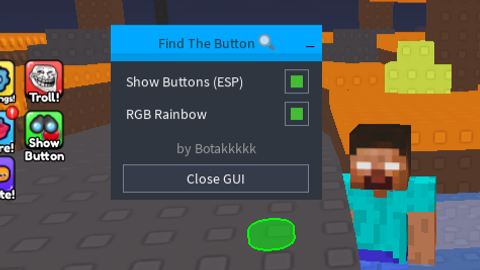

Lua Script•181 lines (5121 chars)
local Players = game:GetService("Players")
local Workspace = game:GetService("Workspace")
local RunService = game:GetService("RunService")
local CoreGui = game:GetService("CoreGui")
local HttpService = game:GetService("HttpService")

local CONFIG = {
    FolderName = "GameButtons",
    TargetPartName = "Press",
    DefaultColor = Color3.fromRGB(255, 0, 0),
    EspFillTransparency = 0.5,
    EspOutlineTransparency = 0,
    SaveFileName = "savedbuttons.json"
}

local State = {
    EspEnabled = false,
    RainbowEnabled = false,
    ActiveHighlights = {},
    Connections = {},
    RenderConnection = nil,
    SavedData = {}
}

local function LoadData()
    if isfile and isfile(CONFIG.SaveFileName) then
        local success, result = pcall(function()
            return HttpService:JSONDecode(readfile(CONFIG.SaveFileName))
        end)
        if success and type(result) == "table" then
            State.SavedData = result
        end
    end
end

local function SaveData()
    if writefile then
        local success, err = pcall(function()
            writefile(CONFIG.SaveFileName, HttpService:JSONEncode(State.SavedData))
        end)
        if not success then warn("Failed to save data:", err) end
    end
end

local function ValidateModel(model)
    local pressPart = model:FindFirstChild(CONFIG.TargetPartName)
    if not pressPart then return false end

    local hasSound = pressPart:FindFirstChild("Click") and pressPart.Click:IsA("Sound")
    local hasDetector = pressPart:FindFirstChild("ClickDetector") and pressPart.ClickDetector:IsA("ClickDetector")
    local hasMesh = pressPart:FindFirstChild("Mesh")

    if hasSound and hasDetector and hasMesh then
        return pressPart
    end
    return false
end

local function ClearSingleESP(model)
    if State.ActiveHighlights[model] then
        State.ActiveHighlights[model]:Destroy()
        State.ActiveHighlights[model] = nil
    end
    if State.Connections[model] then
        State.Connections[model]:Disconnect()
        State.Connections[model] = nil
    end
end

local function ClearAllESP()
    for model, _ in pairs(State.ActiveHighlights) do
        ClearSingleESP(model)
    end
    if State.RenderConnection then
        State.RenderConnection:Disconnect()
        State.RenderConnection = nil
    end
end

local function StartRenderLoop()
    if State.RenderConnection then return end

    State.RenderConnection = RunService.RenderStepped:Connect(function()
        local currentColor
        if State.RainbowEnabled then
            local hue = tick() % 5 / 5
            currentColor = Color3.fromHSV(hue, 1, 1)
        else
            currentColor = CONFIG.DefaultColor
        end

        for _, highlight in pairs(State.ActiveHighlights) do
            if highlight and highlight.Parent then
                highlight.FillColor = currentColor
                highlight.OutlineColor = currentColor
            end
        end
    end)
end

local function CreateESP(model)
    if State.SavedData[model.Name] == true then
        return
    end

    local pressPart = ValidateModel(model)
    if not pressPart then return end

    if State.ActiveHighlights[model] then return end

    local highlight = Instance.new("Highlight")
    highlight.Name = "ESPHighlight"
    highlight.Adornee = pressPart
    highlight.FillColor = CONFIG.DefaultColor
    highlight.OutlineColor = CONFIG.DefaultColor
    highlight.FillTransparency = CONFIG.EspFillTransparency
    highlight.OutlineTransparency = CONFIG.EspOutlineTransparency
    highlight.Parent = CoreGui:FindFirstChild("RobloxGui") or game.CoreGui

    State.ActiveHighlights[model] = highlight

    local cd = pressPart:FindFirstChild("ClickDetector")
    if cd then
        State.Connections[model] = cd.MouseClick:Connect(function()
            State.SavedData[model.Name] = true
            SaveData()
            ClearSingleESP(model)
        end)
    end
end

local function EnableESP()
    local folder = Workspace:FindFirstChild(CONFIG.FolderName)
    if not folder then
        warn("ESP Error: Folder " .. CONFIG.FolderName .. " not found.")
        return
    end

    for _, model in ipairs(folder:GetChildren()) do
        if model:IsA("Model") then
            CreateESP(model)
        end
    end

    StartRenderLoop()
end

LoadData()

local LibraryURL = "https://raw.githubusercontent.com/miroeramaa/TurtleLib/main/TurtleUiLib.lua"
local success, library = pcall(function()
    return loadstring(game:HttpGet(LibraryURL))()
end)

if not success then
    warn("Failed to load TurtleUiLib.")
    return
end

local gameName = game:GetService("MarketplaceService"):GetProductInfo(game.PlaceId).Name or "Game"
local window = library:Window(gameName)

window:Toggle("Show Buttons (ESP)", false, function(bool)
    State.EspEnabled = bool
    if bool then
        EnableESP()
    else
        ClearAllESP()
    end
end)

window:Toggle("RGB Rainbow", false, function(bool)
    State.RainbowEnabled = bool
end)

window:Label("by Botakkkkk", Color3.fromRGB(150, 150, 150))

window:Button("Close GUI", function()
    ClearAllESP()
    library:Destroy()
end)
Features & Information
Turtle UI Library: https://raw.githubusercontent.com/miroeramaa/TurtleLib/main/TurtleUiLib.lua
Features:
- ESP Toggle
- Animated RGB Toggle
- Close Button
- Auto Save Clicked Buttons & Auto Load Once Executed
OPEN SOURCE
Don't work with xeno
@maddj205 bruh, i used xeno & it working fine, i made this script & text it with xeno ._.