
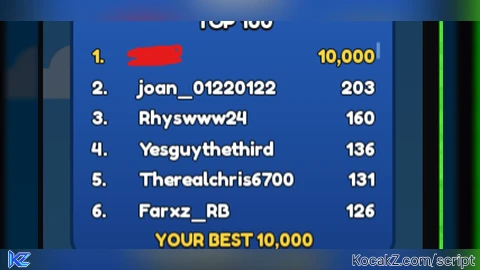

local ReplicatedStorage = game:GetService("ReplicatedStorage")
local Players = game:GetService("Players")
local CoreGui = game:GetService("CoreGui")

local LocalPlayer = Players.LocalPlayer

local MinigameRemotes = ReplicatedStorage:WaitForChild("Minigames", 10)
local ScoreRemote = MinigameRemotes and MinigameRemotes:WaitForChild("Score", 5)
local BoxRemote = MinigameRemotes and MinigameRemotes:WaitForChild("Box", 5)
local TopFunction = MinigameRemotes and MinigameRemotes:WaitForChild("Top", 5)

local FarmingFlappy = false
local AutoFarmThread = nil
local TargetScore = 100
local MAX_LIMIT = 10000

local ScreenGui = nil
local MainFrame = nil

local function DestroyUI()
    FarmingFlappy = false

    if AutoFarmThread then
        task.cancel(AutoFarmThread)
        AutoFarmThread = nil
    end

    if ScreenGui then
        ScreenGui:Destroy()
        ScreenGui = nil
    end

    for _, gui in pairs(CoreGui:GetChildren()) do
        if gui.Name == "ZedMinigameFarmUI" then
            gui:Destroy()
        end
    end
end

DestroyUI()

local function SendTargetScore(score)
    local validatedScore = math.clamp(math.floor(tonumber(score) or 0), 0, MAX_LIMIT)

    if ScoreRemote then
        ScoreRemote:FireServer("Flappy", validatedScore)
    end
    if BoxRemote then
        BoxRemote:FireServer("Flappy", "Claim")
    end
end

local function StartFlappyFarm()
    if FarmingFlappy then return end
    FarmingFlappy = true

    AutoFarmThread = task.spawn(function()
        local currentScore = 0
        local increment = math.max(1, math.floor(TargetScore / 10))

        while FarmingFlappy do
            currentScore = currentScore + increment

            if currentScore >= TargetScore then
                currentScore = TargetScore
                SendTargetScore(currentScore)
                FarmingFlappy = false
                break
            end

            SendTargetScore(currentScore)
            task.wait(0.25)
        end
    end)
end

local function StopFlappyFarm()
    FarmingFlappy = false
    if AutoFarmThread then
        task.cancel(AutoFarmThread)
        AutoFarmThread = nil
    end
end

ScreenGui = Instance.new("ScreenGui")
ScreenGui.Name = "ZedMinigameFarmUI"
ScreenGui.ResetOnSpawn = false

if gethui then
    ScreenGui.Parent = gethui()
elseif syn and syn.protect_gui then
    syn.protect_gui(ScreenGui)
    ScreenGui.Parent = CoreGui
else
    ScreenGui.Parent = CoreGui
end

MainFrame = Instance.new("Frame")
MainFrame.Name = "MainFrame"
MainFrame.Size = UDim2.new(0, 360, 0, 340)
MainFrame.Position = UDim2.new(0.5, -180, 0.4, -170)
MainFrame.BackgroundColor3 = Color3.fromRGB(24, 24, 28)
MainFrame.BorderSizePixel = 0
MainFrame.Active = true
MainFrame.Draggable = true
MainFrame.Parent = ScreenGui

local UICorner = Instance.new("UICorner")
UICorner.CornerRadius = UDim.new(0, 8)
UICorner.Parent = MainFrame

local TitleBar = Instance.new("Frame")
TitleBar.Name = "TitleBar"
TitleBar.Size = UDim2.new(1, 0, 0, 40)
TitleBar.BackgroundColor3 = Color3.fromRGB(32, 32, 38)
TitleBar.BorderSizePixel = 0
TitleBar.Parent = MainFrame

local TitleBarCorner = Instance.new("UICorner")
TitleBarCorner.CornerRadius = UDim.new(0, 8)
TitleBarCorner.Parent = TitleBar

local TitleText = Instance.new("TextLabel")
TitleText.Size = UDim2.new(1, -50, 1, 0)
TitleText.Position = UDim2.new(0, 12, 0, 0)
TitleText.BackgroundTransparency = 1
TitleText.Text = "Flappy Score Controller"
TitleText.TextColor3 = Color3.fromRGB(255, 255, 255)
TitleText.TextSize = 14
TitleText.Font = Enum.Font.SourceSansBold
TitleText.TextXAlignment = Enum.TextXAlignment.Left
TitleText.Parent = TitleBar

local CloseButton = Instance.new("TextButton")
CloseButton.Name = "CloseButton"
CloseButton.Size = UDim2.new(0, 30, 0, 30)
CloseButton.Position = UDim2.new(1, -35, 0, 5)
CloseButton.BackgroundColor3 = Color3.fromRGB(220, 53, 69)
CloseButton.Text = "X"
CloseButton.TextColor3 = Color3.fromRGB(255, 255, 255)
CloseButton.Font = Enum.Font.SourceSansBold
CloseButton.TextSize = 16
CloseButton.Parent = TitleBar

local CloseCorner = Instance.new("UICorner")
CloseCorner.CornerRadius = UDim.new(0, 6)
CloseCorner.Parent = CloseButton

CloseButton.MouseButton1Click:Connect(function()
    DestroyUI()
end)

local InputLabel = Instance.new("TextLabel")
InputLabel.Size = UDim2.new(0.9, 0, 0, 20)
InputLabel.Position = UDim2.new(0.05, 0, 0.15, 0)
InputLabel.BackgroundTransparency = 1
InputLabel.Text = "Pontuacao (0 - 10000):"
InputLabel.TextColor3 = Color3.fromRGB(200, 200, 200)
InputLabel.Font = Enum.Font.SourceSans
InputLabel.TextSize = 14
InputLabel.TextXAlignment = Enum.TextXAlignment.Left
InputLabel.Parent = MainFrame

local ScoreInput = Instance.new("TextBox")
ScoreInput.Name = "ScoreInput"
ScoreInput.Size = UDim2.new(0.9, 0, 0, 38)
ScoreInput.Position = UDim2.new(0.05, 0, 0.22, 0)
ScoreInput.BackgroundColor3 = Color3.fromRGB(40, 40, 48)
ScoreInput.Text = tostring(TargetScore)
ScoreInput.TextColor3 = Color3.fromRGB(255, 255, 0)
ScoreInput.Font = Enum.Font.SourceSansBold
ScoreInput.TextSize = 18
ScoreInput.Parent = MainFrame

local InputCorner = Instance.new("UICorner")
InputCorner.CornerRadius = UDim.new(0, 6)
InputCorner.Parent = ScoreInput

ScoreInput.FocusLost:Connect(function()
    local val = tonumber(ScoreInput.Text)
    if val then
        TargetScore = math.clamp(math.floor(val), 0, MAX_LIMIT)
        ScoreInput.Text = tostring(TargetScore)
    else
        ScoreInput.Text = tostring(TargetScore)
    end
end)

local PresetsFrame = Instance.new("Frame")
PresetsFrame.Name = "PresetsFrame"
PresetsFrame.Size = UDim2.new(0.9, 0, 0, 30)
PresetsFrame.Position = UDim2.new(0.05, 0, 0.36, 0)
PresetsFrame.BackgroundTransparency = 1
PresetsFrame.Parent = MainFrame

local presetValues = {50, 150, 300, 500}
for i, val in ipairs(presetValues) do
    local btn = Instance.new("TextButton")
    btn.Size = UDim2.new(0.22, 0, 1, 0)
    btn.Position = UDim2.new((i - 1) * 0.26, 0, 0, 0)
    btn.BackgroundColor3 = Color3.fromRGB(50, 50, 60)
    btn.Text = tostring(val)
    btn.TextColor3 = Color3.fromRGB(255, 255, 255)
    btn.Font = Enum.Font.SourceSansBold
    btn.TextSize = 13
    btn.Parent = PresetsFrame

    local btnCorner = Instance.new("UICorner")
    btnCorner.CornerRadius = UDim.new(0, 4)
    btnCorner.Parent = btn

    btn.MouseButton1Click:Connect(function()
        TargetScore = val
        ScoreInput.Text = tostring(val)
    end)
end

local InstantBtn = Instance.new("TextButton")
InstantBtn.Name = "InstantBtn"
InstantBtn.Size = UDim2.new(0.9, 0, 0, 40)
InstantBtn.Position = UDim2.new(0.05, 0, 0.48, 0)
InstantBtn.BackgroundColor3 = Color3.fromRGB(0, 123, 255)
InstantBtn.Text = "Enviar Instantaneo"
InstantBtn.TextColor3 = Color3.fromRGB(255, 255, 255)
InstantBtn.Font = Enum.Font.SourceSansBold
InstantBtn.TextSize = 15
InstantBtn.Parent = MainFrame

local InstantCorner = Instance.new("UICorner")
InstantCorner.CornerRadius = UDim.new(0, 6)
InstantCorner.Parent = InstantBtn

InstantBtn.MouseButton1Click:Connect(function()
    SendTargetScore(TargetScore)
end)

local ToggleFlappyBtn = Instance.new("TextButton")
ToggleFlappyBtn.Name = "ToggleFlappyBtn"
ToggleFlappyBtn.Size = UDim2.new(0.9, 0, 0, 40)
ToggleFlappyBtn.Position = UDim2.new(0.05, 0, 0.63, 0)
ToggleFlappyBtn.BackgroundColor3 = Color3.fromRGB(40, 167, 69)
ToggleFlappyBtn.Text = "Iniciar Gradual"
ToggleFlappyBtn.TextColor3 = Color3.fromRGB(255, 255, 255)
ToggleFlappyBtn.Font = Enum.Font.SourceSansBold
ToggleFlappyBtn.TextSize = 15
ToggleFlappyBtn.Parent = MainFrame

local ToggleFlappyCorner = Instance.new("UICorner")
ToggleFlappyCorner.CornerRadius = UDim.new(0, 6)
ToggleFlappyCorner.Parent = ToggleFlappyBtn

ToggleFlappyBtn.MouseButton1Click:Connect(function()
    if not FarmingFlappy then
        StartFlappyFarm()
        ToggleFlappyBtn.Text = "Parar"
        ToggleFlappyBtn.BackgroundColor3 = Color3.fromRGB(200, 35, 51)
    else
        StopFlappyFarm()
        ToggleFlappyBtn.Text = "Iniciar Gradual"
        ToggleFlappyBtn.BackgroundColor3 = Color3.fromRGB(40, 167, 69)
    end
end)

local DestroyBtn = Instance.new("TextButton")
DestroyBtn.Name = "DestroyBtn"
DestroyBtn.Size = UDim2.new(0.9, 0, 0, 35)
DestroyBtn.Position = UDim2.new(0.05, 0, 0.85, 0)
DestroyBtn.BackgroundColor3 = Color3.fromRGB(60, 60, 65)
DestroyBtn.Text = "Fechar / Unload 100%"
DestroyBtn.TextColor3 = Color3.fromRGB(200, 200, 200)
DestroyBtn.Font = Enum.Font.SourceSans
DestroyBtn.TextSize = 14
DestroyBtn.Parent = MainFrame

local DestroyCorner = Instance.new("UICorner")
DestroyCorner.CornerRadius = UDim.new(0, 6)
DestroyCorner.Parent = DestroyBtn

DestroyBtn.MouseButton1Click:Connect(function()
    DestroyUI()
end)
How to Execute Egg Skipping Script – Auto score flappy parrot 0-10K
Step 1: Copy Code: Click the Copy Code button in the viewer above to grab the clean Lua loadstring.
Step 2: Launch Executor: Open a compatible, unpatched executor. If you need one, check our Roblox Executors Directory.
Step 3: Join Experience: Launch Roblox and join Egg Skipping.
Step 4: Attach & Run: Attach/inject your executor into the Roblox process, paste the code into the script tab, and press Execute.
Features & Information
Script Changelog (1)
Community Comments (0)
No comments yet for this script.
Frequently Asked Questions
How do I execute Egg Skipping Script – Auto score flappy parrot 0-10K in Roblox?
To run Egg Skipping Script – Auto score flappy parrot 0-10K, copy the Lua loadstring from the code viewer above, launch Roblox and join Egg Skipping, attach a working executor (such as Potassium, Solara, or Delta from our Executors directory), paste the code into your executor console, and click Execute.
Is Egg Skipping Script – Auto score flappy parrot 0-10K keyless or does it require an access key?
Egg Skipping Script – Auto score flappy parrot 0-10K requires an access key. You can retrieve the official key directly using the Get Script Key link provided above.
Is Egg Skipping Script – Auto score flappy parrot 0-10K currently safe and working?
This script is active and operational. Always test scripts using a secondary (alt) Roblox account to safeguard your main profile against anti-cheat bans.